Hello! I'm Hong Minhee (洪 民憙), an open source software engineer in my late 30s, living in Seoul, Korea. I'm bisexual and non-binary (they/them), and an enthusiastic advocate of free/open source software and the fediverse.
I work full-time on @fedify, an ActivityPub server framework in TypeScript, funded by @sovtechfund. I'm also the creator of @hollo, a single-user ActivityPub microblog; @botkit, an ActivityPub bot framework; Hackers' Pub, a fediverse platform for software developers; and LogTape, a logging library for JavaScript and TypeScript.
I have a long interest in East Asian languages (CJK) and Unicode. I post mostly in English here, though occasionally in Japanese or in mixed-script Korean (國漢文混用體), a traditional writing style that interleaves Chinese characters with the native Korean alphabet. Wanting to write in that style was actually one of the reasons I joined the fediverse. Feel free to talk to me in English, Korean, Japanese, or even Literary Chinese!
安寧하세요! 저는 서울에 살고 있는 30代 後半의 오픈 소스 소프트웨어 엔지니어 洪民憙입니다. 兩性愛者(bisexual)이자 논바이너리(non-binary)이며, 自由·오픈 소스 소프트웨어(F/OSS)와 聯合宇宙(fediverse)의 熱烈한 支持者이기도 합니다.
STF(@sovtechfund)의 支援을 받아 TypeScript用 ActivityPub 서버 프레임워크 @fedify 開發에 專業으로 任하고 있습니다. 그 外에도 싱글 유저用 ActivityPub 마이크로블로그 @hollo, ActivityPub 봇 프레임워크 @botkit, 소프트웨어 開發者를 위한 聯合宇宙 플랫폼 Hackers' Pub, JavaScript·TypeScript用 로깅 라이브러리 LogTape 等의 製作者이기도 합니다.
東아시아 言語(이른바 CJK)와 Unicode에도 關心이 많습니다. 이 計定에서는 主로 英語로 포스팅하지만, 때때로 日本語나 國漢文混用體 韓國語로도 씁니다. 聯合宇宙에 오게 된 動機 中 하나가 바로 國漢文混用體로 글을 쓰고 싶었기 때문이기도 하고요. 韓國語, 英語, 日本語, 아니면 漢文으로도 말을 걸어주세요!
If you use BotKit, update to a patched release now. This update addresses two vulnerabilities: GHSA-4qhx-hhwf-8685, an inbox origin validation flaw that could let an attacker supply forged objects or suppress genuine activities, and GHSA-8863-8468-7hq7, a key ownership validation flaw that could authenticate activities as the wrong actor under specific actor-document configurations. Both flaws originate in Fedify, which BotKit uses for federation.
GHSA-4qhx-hhwf-8685 affects incoming activities. Fedify authenticated the activity's actor but did not require the activity's id to share that actor's origin. An attacker needed only an actor and its signing key on a server they controlled, with no account on the receiving server or interaction from the victim.
By choosing an activity ID on another server's origin, the attacker could make Create.getObject() and other accessors return embedded objects claiming to live on that server without fetching them from it. BotKit checks that a message's attribution matches the activity's actor, but that does not stop an attacker from attributing an object to themselves while giving it an ID on another server. Its handlers could therefore receive forged objects under that server's object IDs. The same flaw also let an attacker who knew or could predict a genuine activity's ID reserve its idempotency cache entry by sending a forged activity with that ID first. The genuine delivery then received 202 Accepted but did not reach the inbox listeners for one day. With a message queue, this suppression applied across all inboxes on the receiving server.
The fix rejects non-portable activities whose IDs have a different origin from their actors before they reach inbox listeners, the queue, or the idempotency cache. The same origin check runs when processing activities from the queue or routing them manually.
GHSA-8863-8468-7hq7 affects Fedify's checks that a signing key belongs to an actor. Fedify fetched the actor's document and checked that it listed the key, but did not require the document's id to match the actor ID it requested. An attacker could have activities authenticated as a victim if dereferencing the victim's exact actor ID led to an actor document whose key the attacker controlled. This could happen through a redirect or alternate-document link, including to another origin, or when the victim's server directly served another same-origin actor's document.
The attacker cannot normally arrange this condition: it depends on the server hosting the victim's actor ID. A redirect from some other URL on that server is not enough. HTTP Signatures, Linked Data Signatures, and Object Integrity Proofs use the affected ownership checks.
The fix requires the fetched actor document's id to exactly match the requested actor ID. Fedify also retains its check that the document's id shares the origin of the final fetched URL. An actor whose ID redirects to a document with a different id can no longer have its keys confirmed through that redirect, even on the same origin and for the same account. Fedify's built-in key cache automatically ignores entries created under the weaker check and fetches and verifies those keys again. If your application separately supplies a custom KeyCache implementation to Fedify, clear it once when upgrading so previously cached false ownership claims are not retained.
BotKit 0.4.x versions through 0.4.9 and BotKit 0.5.x versions through 0.5.6 include Fedify versions affected by both vulnerabilities. The first patched releases, and the current recommended releases, are BotKit 0.4.10 and 0.5.7. BotKit 0.4.10 requires Fedify ~2.1.30, and BotKit 0.5.7 requires Fedify ~2.3.14. These are the two supported BotKit lines; users on older lines should move to a supported release.
For BotKit 0.5.x, install @fedify/botkit 0.5.7 using the command for your package manager:
Check the installed or locked versions: @fedify/botkit should be 0.4.10 or 0.5.7, with @fedify/fedify at least 2.1.30 on the 2.1.x line or 2.3.14 on the 2.3.x line. If you use a routine update command instead, check that your declared dependency range allows the patched release and change it explicitly if needed. After updating, redeploy.
Thanks to @2chanhaeng for reporting the inbox origin validation flaw to the Fedify project. The actor document identity mismatch was found by the Fedify maintainers with AI assistance.
If you use an affected Fedify release, update now. Two vulnerabilities have been fixed in @fedify/fedify: GHSA-4qhx-hhwf-8685, an inbox origin validation flaw that could let an attacker supply forged objects or suppress genuine activities, and GHSA-8863-8468-7hq7, a flaw in the key ownership check that could authenticate activities as the wrong actor under specific actor-document configurations.
The releases containing both fixes are 2.0.34, 2.1.30, 2.2.19, 2.3.14, and 2.4.4. We recommend 2.4.4, or 2.3.14 if you are staying on the 2.3 line. Under the security policy, Fedify supports the latest two minor lines, currently 2.4 and 2.3. Backported fixes are also available in the releases listed above for 2.0, 2.1, and 2.2, but users on those older lines should plan to move to a supported line. Users on affected 1.x releases need to change their dependency to a supported 2.x release.
GHSA-4qhx-hhwf-8685 affects applications receiving activities through Fedify's inbox listeners. The inbox authenticated an activity's actor but accepted an activity id on an origin different from the actor's. An attacker needed only an actor and its signing key on a server they controlled, with no account on the receiving server or interaction from the victim.
Since version 1.9.0, Fedify's property accessors have trusted embedded objects whose IDs share the activity's origin. By choosing an activity ID on a victim server's origin, an attacker could make Create.getObject() and other accessors return forged objects claiming to live on that server without fetching them from it. Depending on the application's attribution and authorization checks, this could cause it to store or display forged content under another server's object ID.
The same missing check also let an attacker reserve a genuine activity's idempotency cache entry by submitting a forged activity with its ID first. The genuine delivery then received 202 Accepted but did not reach the listeners for one day. When a message queue was configured, the suppression applied across all inboxes on the receiving server. This behavior was confirmed in 1.8.15 and subsequent releases before the fixes; releases before 1.8 were not tested.
The first fixes shipped in 2.0.33, 2.1.29, 2.2.18, 2.3.13, and 2.4.3. Earlier releases on each of those 2.x lines are affected. Update to the newer releases recommended above to receive both fixes. The inbox now returns 401 Unauthorized for non-portable activities whose IDs have a different origin from their actors, before they reach listeners, the queue, or the idempotency cache. The same origin check applies to queued and manually routed activities. Setting skipSignatureVerification bypasses this protection along with signature verification.
Actor document identity mismatch (GHSA-8863-8468-7hq7, medium, CVSS 5.9)
GHSA-8863-8468-7hq7 lists the affected version range as <= 2.4.3, with fixes in 2.0.34, 2.1.30, 2.2.19, 2.3.14, and 2.4.4 on their respective release lines. When confirming that a key belongs to an actor, Fedify fetched the actor's document and checked that it listed the key, but did not require the document's id to match the actor ID it requested.
An attacker could have activities authenticated as a victim if dereferencing the victim's exact actor ID led to an actor document whose key the attacker controlled. This could happen through a redirect or alternate-document link to the attacker's document, including on another origin, or when the victim's server directly served a different same-origin actor's document. The attacker cannot normally arrange this: it depends on the server hosting the victim's actor ID. A redirect from some other URL on that server is not enough. No account on the receiving Fedify server is required.
HTTP Signatures, Linked Data Signatures, and Object Integrity Proofs use the affected ownership checks. The fix requires the fetched actor document's id to exactly match the requested actor ID, in addition to the existing origin check. An actor whose ID redirects to a document with a different id can no longer have its keys confirmed through that redirect, even on the same origin and for the same account. Servers that normalize actor URLs should use the canonical actor ID as their keys' owner or controller and their activities' actor.
The built-in KvStore-backed key cache automatically ignores entries created under the weaker check and fetches and verifies those keys again. If you supply a custom KeyCache implementation, clear it once when upgrading. Otherwise, previously cached false ownership claims can remain trusted after the upgrade. Downgrading to an earlier release is not safe.
Updating
Update @fedify/fedify using the command for your package manager:
Check the installed or locked version: it should be 2.0.34, 2.1.30, 2.2.19, 2.3.14, or 2.4.4 on the corresponding line. Update commands can stay within your declared dependency range. If that range excludes the recommended release, change it explicitly. For example, to move to 2.4.4:
Thanks to @2chanhaeng for reporting the inbox activity origin mismatch. The actor document identity mismatch was found by the Fedify maintainers with AI assistance.
If you use an affected Fedify release, update now. Two vulnerabilities have been fixed in @fedify/fedify: GHSA-4qhx-hhwf-8685, an inbox origin validation flaw that could let an attacker supply forged objects or suppress genuine activities, and GHSA-8863-8468-7hq7, a flaw in the key ownership check that could authenticate activities as the wrong actor under specific actor-document configurations.
The releases containing both fixes are 2.0.34, 2.1.30, 2.2.19, 2.3.14, and 2.4.4. We recommend 2.4.4, or 2.3.14 if you are staying on the 2.3 line. Under the security policy, Fedify supports the latest two minor lines, currently 2.4 and 2.3. Backported fixes are also available in the releases listed above for 2.0, 2.1, and 2.2, but users on those older lines should plan to move to a supported line. Users on affected 1.x releases need to change their dependency to a supported 2.x release.
GHSA-4qhx-hhwf-8685 affects applications receiving activities through Fedify's inbox listeners. The inbox authenticated an activity's actor but accepted an activity id on an origin different from the actor's. An attacker needed only an actor and its signing key on a server they controlled, with no account on the receiving server or interaction from the victim.
Since version 1.9.0, Fedify's property accessors have trusted embedded objects whose IDs share the activity's origin. By choosing an activity ID on a victim server's origin, an attacker could make Create.getObject() and other accessors return forged objects claiming to live on that server without fetching them from it. Depending on the application's attribution and authorization checks, this could cause it to store or display forged content under another server's object ID.
The same missing check also let an attacker reserve a genuine activity's idempotency cache entry by submitting a forged activity with its ID first. The genuine delivery then received 202 Accepted but did not reach the listeners for one day. When a message queue was configured, the suppression applied across all inboxes on the receiving server. This behavior was confirmed in 1.8.15 and subsequent releases before the fixes; releases before 1.8 were not tested.
The first fixes shipped in 2.0.33, 2.1.29, 2.2.18, 2.3.13, and 2.4.3. Earlier releases on each of those 2.x lines are affected. Update to the newer releases recommended above to receive both fixes. The inbox now returns 401 Unauthorized for non-portable activities whose IDs have a different origin from their actors, before they reach listeners, the queue, or the idempotency cache. The same origin check applies to queued and manually routed activities. Setting skipSignatureVerification bypasses this protection along with signature verification.
Actor document identity mismatch (GHSA-8863-8468-7hq7, medium, CVSS 5.9)
GHSA-8863-8468-7hq7 lists the affected version range as <= 2.4.3, with fixes in 2.0.34, 2.1.30, 2.2.19, 2.3.14, and 2.4.4 on their respective release lines. When confirming that a key belongs to an actor, Fedify fetched the actor's document and checked that it listed the key, but did not require the document's id to match the actor ID it requested.
An attacker could have activities authenticated as a victim if dereferencing the victim's exact actor ID led to an actor document whose key the attacker controlled. This could happen through a redirect or alternate-document link to the attacker's document, including on another origin, or when the victim's server directly served a different same-origin actor's document. The attacker cannot normally arrange this: it depends on the server hosting the victim's actor ID. A redirect from some other URL on that server is not enough. No account on the receiving Fedify server is required.
HTTP Signatures, Linked Data Signatures, and Object Integrity Proofs use the affected ownership checks. The fix requires the fetched actor document's id to exactly match the requested actor ID, in addition to the existing origin check. An actor whose ID redirects to a document with a different id can no longer have its keys confirmed through that redirect, even on the same origin and for the same account. Servers that normalize actor URLs should use the canonical actor ID as their keys' owner or controller and their activities' actor.
The built-in KvStore-backed key cache automatically ignores entries created under the weaker check and fetches and verifies those keys again. If you supply a custom KeyCache implementation, clear it once when upgrading. Otherwise, previously cached false ownership claims can remain trusted after the upgrade. Downgrading to an earlier release is not safe.
Updating
Update @fedify/fedify using the command for your package manager:
Check the installed or locked version: it should be 2.0.34, 2.1.30, 2.2.19, 2.3.14, or 2.4.4 on the corresponding line. Update commands can stay within your declared dependency range. If that range excludes the recommended release, change it explicitly. For example, to move to 2.4.4:
Thanks to @2chanhaeng for reporting the inbox activity origin mismatch. The actor document identity mismatch was found by the Fedify maintainers with AI assistance.
We've released DrFed 0.1.0, the first version of the ActivityPub development and debugging tool I'm building with the team.
It's still an MVP: you can create test instances and actors, and inspect incoming activities. I wouldn't call it a particularly useful debugger yet. We wanted to share what we've built so far and let people know that development is continuing.
We're working toward a tool that helps when your ActivityPub app won't federate with another server. Thanks to my teammates for getting us to this first release. I hope you'll follow along.
DrFed is a web-based platform for developing and debugging ActivityPub implementations, built by the team behind Fedify.
Today we are releasing DrFed 0.1.0, our first release. It is an MVP: you can run DrFed locally, create test instances and actors, store test objects, and inspect incoming activity deliveries in the web UI.
To be honest, DrFed is not yet especially useful as an ActivityPub debugger. Much of the tooling we have planned is still ahead of us. We are releasing this version to make our progress visible and give you something you can install and try while development continues.
Install and sign in
DrFed 0.1.0 is available on npm as @drfed/drfed. You need Node.js 26 or newer. Install the package globally to make its four commands available on your PATH:
npm install --global @drfed/drfed@0.1.0
Create an account before starting the server, using the same data directory for both commands:
Replace the email address and display name with your own. This example uses PGlite, so you do not need a separate database server. Account creation prepares the database, and the server applies pending migrations on startup. PGlite allows only one process to own its data directory, which is why account creation comes first.
Open http://drfed.localhost:8888, choose Sign in, and enter the email address you used above. The local example prints a login link in the terminal; follow it to sign in. The default mail transport does not deliver email, and --mail-log-content explicitly enables printing message contents for local testing. For a service deployment, configure SMTP or another supported mail transport instead.
The installation guide also covers installing into a local directory and running the commands with npx.
A workspace of test instances
After signing in, open Workspace and choose New instance. DrFed generates an identifier for the instance and gives it a subdomain of your configured root origin. Each instance runs as an ActivityPub server, with its own actors and inbox.
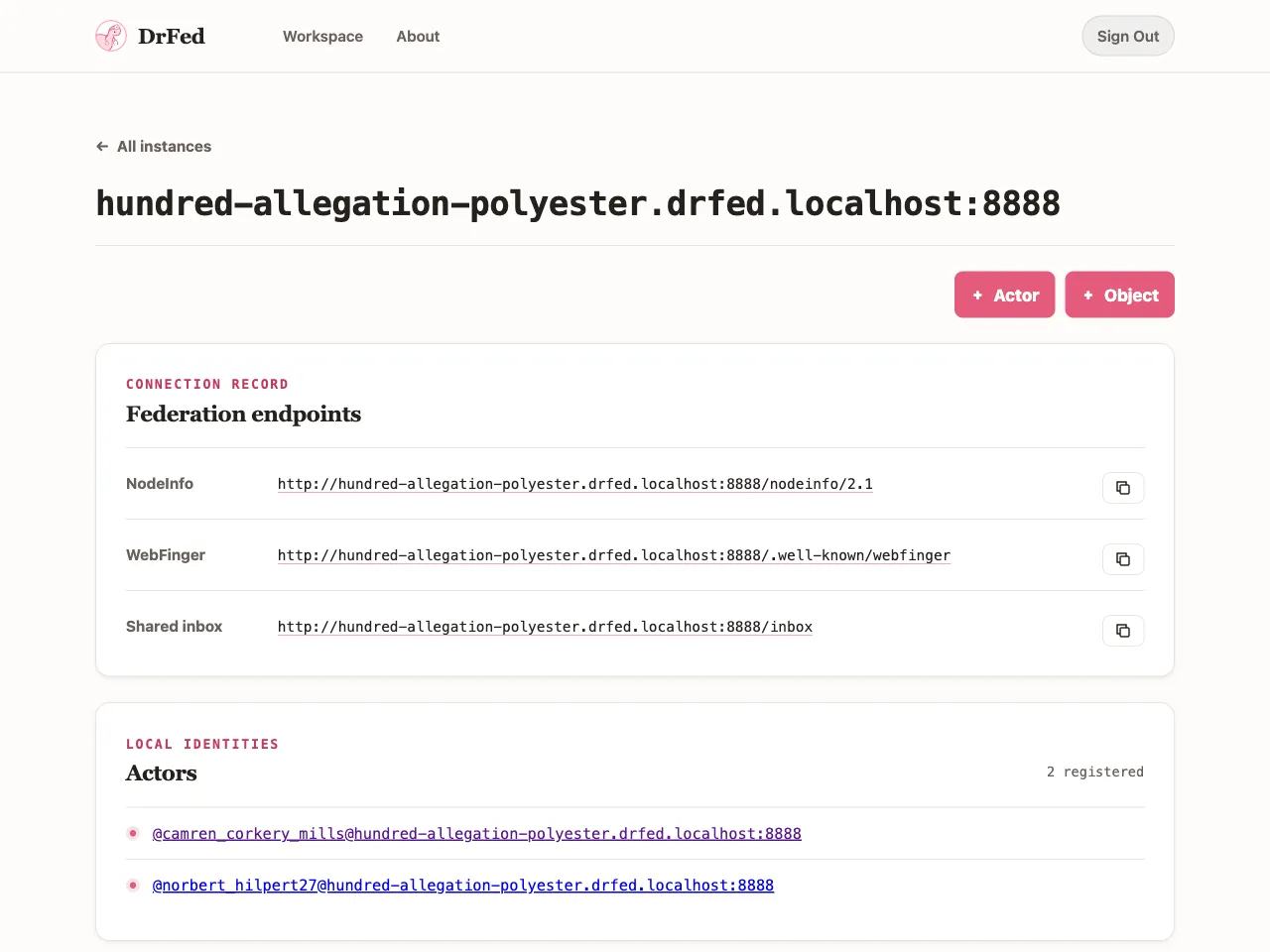
For example, with a root origin of https://drfed.example.com, an instance named example would live at https://example.drfed.example.com. The instance page lists its NodeInfo, WebFinger, and shared inbox endpoints, with copy buttons for using those URLs in your own tests.
The local setup above is useful for exploring the UI and making requests from your own machine. To receive requests from other servers, you need a publicly reachable deployment with wildcard DNS and HTTPS for the instance subdomains. A reverse proxy must preserve the original Host header. See the server README for the deployment details.
Generate actors and create objects
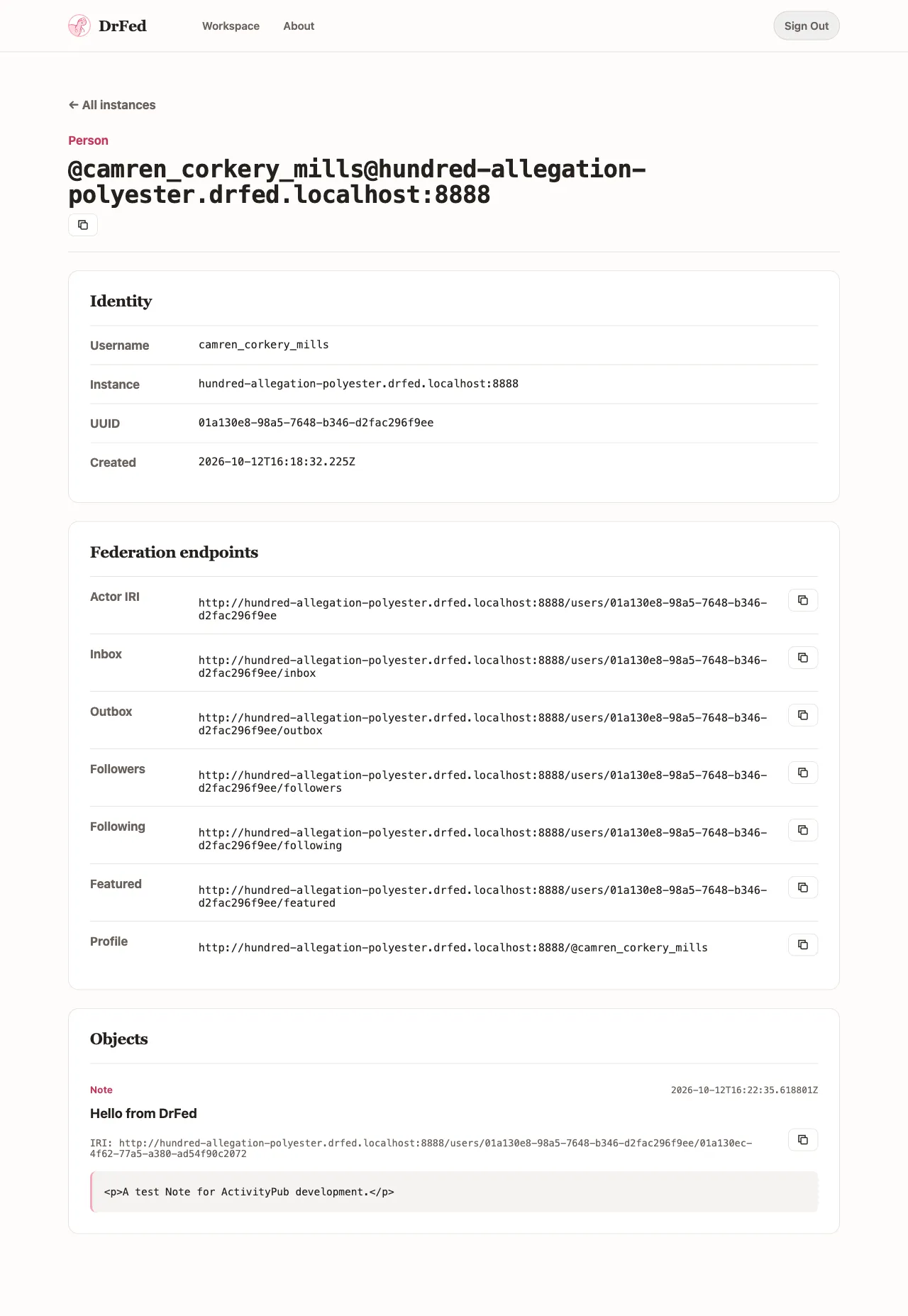
On an instance page, choose Actor and enter how many actors to generate. DrFed creates test identities with generated usernames. An actor's detail page shows its handle, identity, and federation endpoints, including its inbox and outbox. You can copy these addresses into requests from the ActivityPub application you are developing.
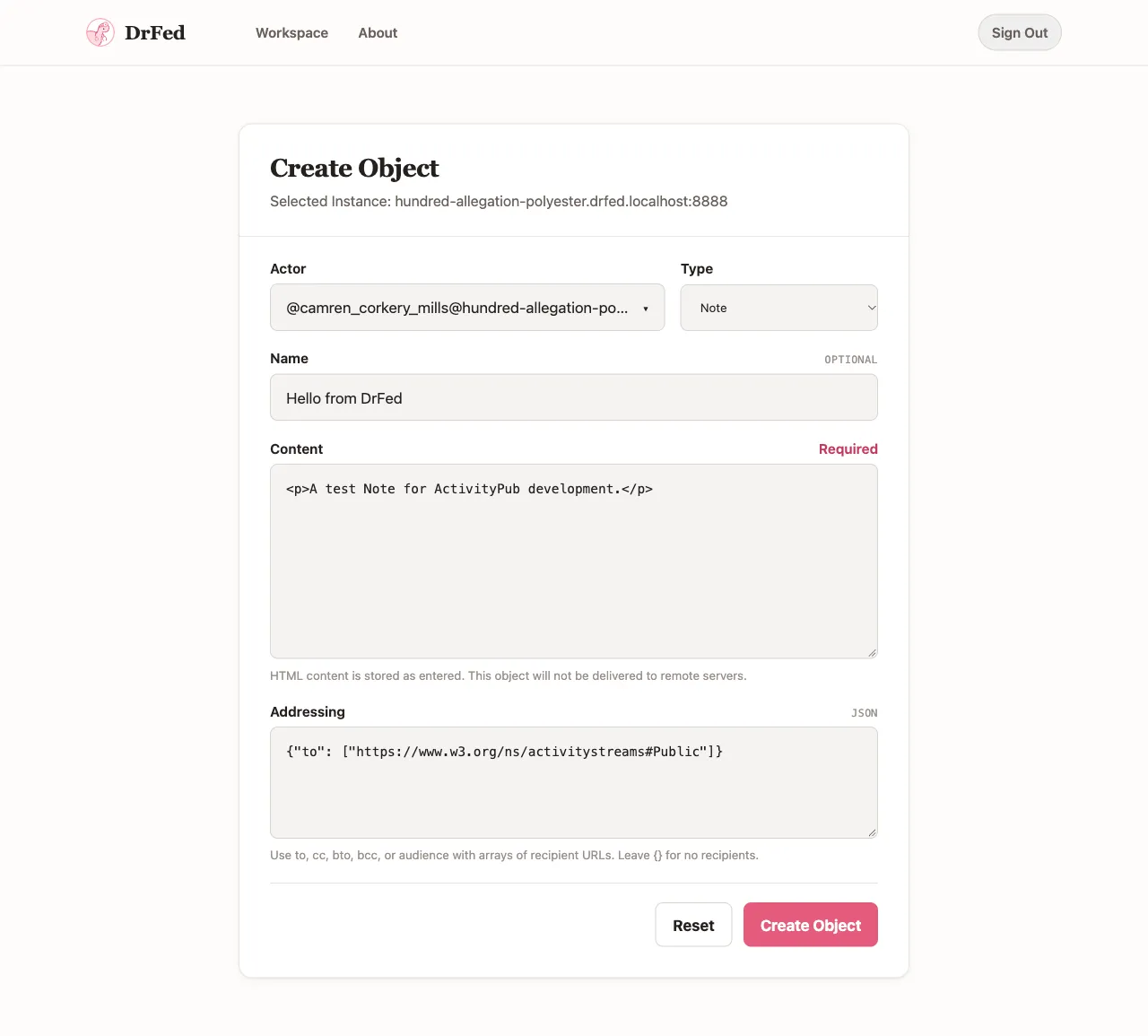
Choose Object on the instance page to create a Note or Article attributed to one of its actors. The form accepts an optional name, HTML content, and explicit ActivityPub addressing as JSON. For example, this addresses an object to Public:
The actor page lists its stored objects and shows their HTML as source text. Publicly addressed local objects and their Create activities are also available through ActivityPub, including the actor's outbox. Creating an object does not deliver it to remote servers. This is a way to prepare content for another implementation to fetch, rather than a general activity-sending tool.
Inspect incoming activity deliveries
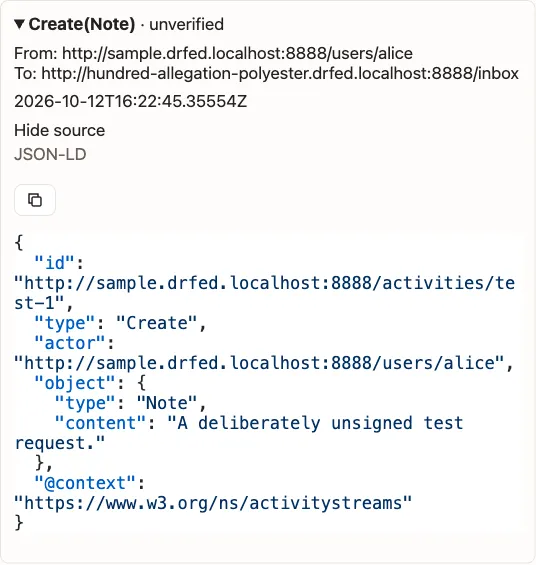
When your application sends an activity to a DrFed instance's inbox, the instance's Activity log records the delivery. Each entry shows the activity type, status, sender and destination, and time. Expand an entry to inspect and copy the recorded JSON-LD; scroll up to load older entries.
This screenshot shows a deliberately unsigned test request. The inbox refused it with HTTP 401, and the log records it as unverified. Seeing a request in the log does not mean DrFed authenticated its sender or accepted its activity.
DrFed also stores eligible authenticated incoming Create activities containing Note or Article objects. Other activity types can be recorded without becoming stored objects. Delivery contents are restricted to instance members and administrators. The current UI lets you inspect recorded history; it does not yet provide live updates, search, or filters.
Four commands for running DrFed
The npm package includes the commands needed to run and maintain a deployment:
Command
Purpose
drfed-server
Run the backend and embedded web frontend, together by default.
drfed-account create
Create a local account before signing in.
drfed-migrate
Apply database migrations, or inspect migration history with --check.
drfed-web
Run the frontend separately against a DrFed backend.
PGlite stores data in a local directory. You can instead select PostgreSQL with --postgres-url or its alias --database-url. Stop a PGlite server before using the account or migration commands against its data directory. To prepare and then check that database without starting the server:
All four commands accept an explicit TOML configuration file through --config, as well as the relevant DRFED_* environment variables. CLI options take precedence over environment variables, then TOML, then defaults. --print-config shows the effective settings and their sources with secrets redacted. See the configuration guide and CLI reference for the options, mail transports, and separate frontend setup.
Shell completions are available for Bash, zsh, fish, PowerShell, and Nushell. For example:
Replace drfed-server with another command to generate its completion script. Installation does not activate completions automatically; the completion installation instructions explain persistent setup for each shell.
Current limits and documentation
This release has rough edges. Directly opening an instance detail page can terminate the installed server with a Seroval serialization error. We found this while preparing these notes and are tracking it in #132.
The broader debugging tools described in our project overview, such as a step-by-step signature debugger, JSON-LD comparison tools, and WebFinger/NodeInfo validators, are goals for the project. They are not available as dedicated tools in this release. The object creation form also does not yet send activities to arbitrary remote inboxes.
Our documentation is still incomplete and not yet organized into a systematic user guide. Some overview text describes the platform we intend to build, so it should not be read as a list of completed 0.1.0 features. For now, start with README.md, the CLI package README, and the installation and configuration pages under docs/.
In the next version, we will publish a Docker image alongside the npm packages, making it easier to run DrFed without setting up Node.js yourself.
Thanks, and what comes next
Thank you to the four people on the DrFed development team who have brought us to this first release, listed alphabetically:
We also thank NLnet and the NGI0 Commons Fund for funding DrFed's development. Their support gives us time to build this free software tool for ActivityPub developers. You can read more on NLnet's DrFed project page.
We will keep working to make DrFed more useful for investigating federation failures. We hope you will follow the next stages of its development. Release history is kept in CHANGES.md.
DrFed is a web-based platform for developing and debugging ActivityPub implementations, built by the team behind Fedify.
Today we are releasing DrFed 0.1.0, our first release. It is an MVP: you can run DrFed locally, create test instances and actors, store test objects, and inspect incoming activity deliveries in the web UI.
To be honest, DrFed is not yet especially useful as an ActivityPub debugger. Much of the tooling we have planned is still ahead of us. We are releasing this version to make our progress visible and give you something you can install and try while development continues.
Install and sign in
DrFed 0.1.0 is available on npm as @drfed/drfed. You need Node.js 26 or newer. Install the package globally to make its four commands available on your PATH:
npm install --global @drfed/drfed@0.1.0
Create an account before starting the server, using the same data directory for both commands:
Replace the email address and display name with your own. This example uses PGlite, so you do not need a separate database server. Account creation prepares the database, and the server applies pending migrations on startup. PGlite allows only one process to own its data directory, which is why account creation comes first.
Open http://drfed.localhost:8888, choose Sign in, and enter the email address you used above. The local example prints a login link in the terminal; follow it to sign in. The default mail transport does not deliver email, and --mail-log-content explicitly enables printing message contents for local testing. For a service deployment, configure SMTP or another supported mail transport instead.
The installation guide also covers installing into a local directory and running the commands with npx.
A workspace of test instances
After signing in, open Workspace and choose New instance. DrFed generates an identifier for the instance and gives it a subdomain of your configured root origin. Each instance runs as an ActivityPub server, with its own actors and inbox.
For example, with a root origin of https://drfed.example.com, an instance named example would live at https://example.drfed.example.com. The instance page lists its NodeInfo, WebFinger, and shared inbox endpoints, with copy buttons for using those URLs in your own tests.
The local setup above is useful for exploring the UI and making requests from your own machine. To receive requests from other servers, you need a publicly reachable deployment with wildcard DNS and HTTPS for the instance subdomains. A reverse proxy must preserve the original Host header. See the server README for the deployment details.
Generate actors and create objects
On an instance page, choose Actor and enter how many actors to generate. DrFed creates test identities with generated usernames. An actor's detail page shows its handle, identity, and federation endpoints, including its inbox and outbox. You can copy these addresses into requests from the ActivityPub application you are developing.
Choose Object on the instance page to create a Note or Article attributed to one of its actors. The form accepts an optional name, HTML content, and explicit ActivityPub addressing as JSON. For example, this addresses an object to Public:
The actor page lists its stored objects and shows their HTML as source text. Publicly addressed local objects and their Create activities are also available through ActivityPub, including the actor's outbox. Creating an object does not deliver it to remote servers. This is a way to prepare content for another implementation to fetch, rather than a general activity-sending tool.
Inspect incoming activity deliveries
When your application sends an activity to a DrFed instance's inbox, the instance's Activity log records the delivery. Each entry shows the activity type, status, sender and destination, and time. Expand an entry to inspect and copy the recorded JSON-LD; scroll up to load older entries.
This screenshot shows a deliberately unsigned test request. The inbox refused it with HTTP 401, and the log records it as unverified. Seeing a request in the log does not mean DrFed authenticated its sender or accepted its activity.
DrFed also stores eligible authenticated incoming Create activities containing Note or Article objects. Other activity types can be recorded without becoming stored objects. Delivery contents are restricted to instance members and administrators. The current UI lets you inspect recorded history; it does not yet provide live updates, search, or filters.
Four commands for running DrFed
The npm package includes the commands needed to run and maintain a deployment:
Command
Purpose
drfed-server
Run the backend and embedded web frontend, together by default.
drfed-account create
Create a local account before signing in.
drfed-migrate
Apply database migrations, or inspect migration history with --check.
drfed-web
Run the frontend separately against a DrFed backend.
PGlite stores data in a local directory. You can instead select PostgreSQL with --postgres-url or its alias --database-url. Stop a PGlite server before using the account or migration commands against its data directory. To prepare and then check that database without starting the server:
All four commands accept an explicit TOML configuration file through --config, as well as the relevant DRFED_* environment variables. CLI options take precedence over environment variables, then TOML, then defaults. --print-config shows the effective settings and their sources with secrets redacted. See the configuration guide and CLI reference for the options, mail transports, and separate frontend setup.
Shell completions are available for Bash, zsh, fish, PowerShell, and Nushell. For example:
Replace drfed-server with another command to generate its completion script. Installation does not activate completions automatically; the completion installation instructions explain persistent setup for each shell.
Current limits and documentation
This release has rough edges. Directly opening an instance detail page can terminate the installed server with a Seroval serialization error. We found this while preparing these notes and are tracking it in #132.
The broader debugging tools described in our project overview, such as a step-by-step signature debugger, JSON-LD comparison tools, and WebFinger/NodeInfo validators, are goals for the project. They are not available as dedicated tools in this release. The object creation form also does not yet send activities to arbitrary remote inboxes.
Our documentation is still incomplete and not yet organized into a systematic user guide. Some overview text describes the platform we intend to build, so it should not be read as a list of completed 0.1.0 features. For now, start with README.md, the CLI package README, and the installation and configuration pages under docs/.
In the next version, we will publish a Docker image alongside the npm packages, making it easier to run DrFed without setting up Node.js yourself.
Thanks, and what comes next
Thank you to the four people on the DrFed development team who have brought us to this first release, listed alphabetically:
We also thank NLnet and the NGI0 Commons Fund for funding DrFed's development. Their support gives us time to build this free software tool for ActivityPub developers. You can read more on NLnet's DrFed project page.
We will keep working to make DrFed more useful for investigating federation failures. We hope you will follow the next stages of its development. Release history is kept in CHANGES.md.
Anyway, the moment I heard the news, I opened an issue in Fedify with a master plan for moving Deno out of our main development tooling.
Fedify will keep supporting Deno alongside Node.js, and keep publishing packages to JSR alongside npm. Deno just won't be what we develop with anymore.
I wrote about Deno's decline a few months ago: I wish Deno would keep doing what it does best. I shared its vision, but I think it never got far because a startup was the one carrying it out. This decision makes me more sure of that.
It also settles something for me. From now on I won't trust a development platform built by a startup, however good the vision. Too risky, too easy to get betrayed.
What I'd rather see is people with strong ideas about development platforms letting go of the impatience and building them as community-driven F/OSS projects instead. Funding is the obstacle, of course. I hope good F/OSS funds like NLnet and the Sovereign Tech Fund keep expanding.
For years I worked in Python and dreamed in Haskell on weekends. When I needed
a script, Python. When I wanted the type system to hold me accountable,
Haskell. Somewhere between the two sat TypeScript, and I knew it. Practical
where Haskell is austere, typed where Python isn't. But I kept my distance.
tsconfig.json, .eslintrc, .prettierrc, babel.config.js. Files you have
to create before you've written a single line of actual code. Every time I
thought about trying it, I looked at the list and gave up. The JavaScript
ecosystem always felt to me like an amusement park where you have to wait in a
long queue just to get inside.
Deno dissolved that queue. No configuration files, no node_modules, no
agonizing over which package manager to use. Just deno run main.ts. The first
time I actually wrote TypeScript properly, I couldn't understand why I'd put it
off so long. What I'd been avoiding wasn't TypeScript. It was the ritual
surrounding TypeScript.
What hooked me
At first I couldn't point to one killer feature. The appeal was that everything
seemed to be pulling in the same direction. The fetch() I used in browsers
worked the same way on the server. Web Crypto API was just there. MDN
effectively became Deno's documentation. Instead of installing packages, you
imported ESM by URL, thinking about dependencies in an entirely different way.
Having deno fmt, deno lint, deno test, deno bench, and deno check all
in a single binary was part of the same logic. No installing ESLint, no wiring
up Prettier, no untangling configuration conflicts between the two. That
convenience had an attitude behind it.
The pattern was obvious enough: build on web standards, then ship the boring
tools yourself.
Chasing Node.js
Today's Deno feels like it's drifting away from that.
npm: specifier support, node_modules back in play, node:* module
compatibility. Then in Deno 2.8, deno add without a specifier now adds an npm
package by default. JSR was introduced as an answer to npm's stagnation, as the
future of JavaScript packaging. These decisions make that announcement look
distant. I can understand each one in isolation. Put them together, though, and
the shape is hard to ignore: Deno is spending more and more of its energy
catching up to Node.js.
The OS/2 story comes to mind. IBM expected that building Windows compatibility
into OS/2 would pull Windows users across. What actually happened was the
opposite: developers realized they could target Windows and have it run on both
platforms, so there was no reason to learn the OS/2 API separately. Deno
pushing further toward Node.js compatibility has the same dynamic. The more
compatible Deno becomes, the less reason library authors have to think about it
specifically.
Early Deno set the agenda. Web standards, the permission model, URL imports,
JSR: Deno put these down and the ecosystem responded. What Deno is doing now
runs in the opposite direction, catching up to what the ecosystem already has.
On the defensive
There's a more specific frustration here. Deno had a fight it could have led
rather than chased.
What drove me away from the JavaScript ecosystem wasn't Node.js itself. It was
the full combination: Node.js + npm + TypeScript + Vite + ESLint + Prettier +
Vitest. That stack was the problem, and Deno was already doing well against it.
deno fmt, deno lint, deno test, deno bench, deno check, and in
2.4, deno bundle came back. It had been deprecated once and then
restored; that round trip is its own admission that the direction was right.
The most visible gap that remains is the dev server: HMR, live reload, an asset
pipeline, and the plugin ecosystem that accumulates on top of all that.
Fresh 2.0, Deno's own framework, chose not to fill that gap from within Deno and adopted Vite instead.
That disappointed me. Making Vite run well on Deno and making Deno a
self-sufficient development environment are two entirely different directions.
Once your own framework makes that choice, you can't expect the wider ecosystem
to go the other way.
But vertical integration alone might not have been enough. Individual component
quality matters too. If deno lint and deno fmt were clearly better than
ESLint and Prettier, developers would reach for them even in Node.js projects.
That could have been the Trojan horse. Once enough projects are using Deno's
tools without using the Deno runtime, the next question follows naturally.
ESLint and Prettier seemed unmovable, and yet Biome and the Ox series (Oxlint,
Oxfmt) are finding their footing. The market was always there. Better tools
just weren't. Deno could have gotten there first.
The clock I keep thinking about
Why didn't Deno hold the course? This is speculation, but here's my read.
The integrated toolchain path required patience. Getting developers to feel the
pain of configuration complexity, making Deno the place they move to, waiting
for the ecosystem to grow comfortable with Deno's way of doing things. All of
that takes time. Node.js is a community project under the OpenJS Foundation.
There's no investor clock pushing it, and the project doesn't wobble if the
ecosystem moves slowly.
Deno Land Inc. is different. A VC-backed company has a clock. How long that
clock allows for a patient fight is not the same as what a community project
can afford. Expanding Node.js compatibility produces visible results faster
than the slow alternative. From the outside, I can't tell when I'm seeing a
product decision and when I'm seeing a runway decision. What I can say is that
the urgency Deno has been showing doesn't sit well with the direction it
originally chose.
Even so
For all my griping, I still build most of my own libraries Deno-first. I
publish to JSR even when I also publish to npm. I try to depend only on web
standard APIs, and I use Deno's built-in tools for linting and formatting. I'm
still rooting for Deno.
But even I have retreated in places. I now rely on node:test and
node:assert/strict for testing, because it's the easiest way
to run the same tests across Deno, Node.js, and Bun without any special
dependencies. JSR was launched as an answer to npm's stagnation, and I've
started to feel JSR stagnating too. I often catch myself wondering whether to
drop it. I got excited about Deno KV and now I just use node:sqlite, which
runs fine on Deno anyway.
If someone like me is already making these retreats, I wonder what Deno looks
like to someone with no attachment to it at all. That worries me, because I
still want Deno to win some version of this fight. I'm just less sure lately
that Deno wants to win the same fight I signed up for.
😱 “We will support the Deno runtime for another year with monthly releases containing bug fixes and security updates. After that year we will end our development of the Deno runtime. Deno will remain open source, and we welcome others who want to continue its development.” https://deno.com/blog/cloudflare
I have introduced Mastodon to few friends in China before but none of them stick around (they did register accounts though). Now with the beautiful redesign of the Mastodon web app, I should really convince them to try again.
요상한 이유로 Chromium에서 JPEG XL 지원이 삭제된 그날로부터 약 4년만에 (정말 길었네요), JPEG XL이 enabled by default가 된 Chromium 155의 early stable 배포가 시작되었습니다. (Firefox도 몇 주 뒤에 이어서 enabled by default가 될 예정입니다.) 개인적으로 점진적 디코딩 기능 (Chromium과 Firefox 둘 다 이 기능을 지원함) 과 JPEG 무손실 재압축 기능이 킬러 피처라고 생각하고 있습니다. 한번 써보셨으면 좋겠습니다.
4년 전 당시에는 C++ 레퍼런스 구현인 libjxl을 사용했었으나, 이번에 배포되는 구현은 Rust로 작성한 jxl-rs를 사용합니다. 당사 비교 결과 jxl-rs는 libjxl보다 평균적으로 빠른 디코딩 속도와 적은 메모리 사용량을 보여줍니다. 곧 마찬가지로 JPEG XL이 enable by default가 될 Firefox에서도 jxl-rs를 사용합니다. macOS/Safari에서도 jxl-rs로 갈아타줬으면 좋겠네요 jxl-rs에는 제가 주요 개발자 중 한 명으로 참여했습니다 라고 저는 주장하고 있음. 많관부
요상한 이유로 Chromium에서 JPEG XL 지원이 삭제된 그날로부터 약 4년만에 (정말 길었네요), JPEG XL이 enabled by default가 된 Chromium 155의 early stable 배포가 시작되었습니다. (Firefox도 몇 주 뒤에 이어서 enabled by default가 될 예정입니다.) 개인적으로 점진적 디코딩 기능 (Chromium과 Firefox 둘 다 이 기능을 지원함) 과 JPEG 무손실 재압축 기능이 킬러 피처라고 생각하고 있습니다. 한번 써보셨으면 좋겠습니다.
4년 전 당시에는 C++ 레퍼런스 구현인 libjxl을 사용했었으나, 이번에 배포되는 구현은 Rust로 작성한 jxl-rs를 사용합니다. 당사 비교 결과 jxl-rs는 libjxl보다 평균적으로 빠른 디코딩 속도와 적은 메모리 사용량을 보여줍니다. 곧 마찬가지로 JPEG XL이 enable by default가 될 Firefox에서도 jxl-rs를 사용합니다. macOS/Safari에서도 jxl-rs로 갈아타줬으면 좋겠네요 jxl-rs에는 제가 주요 개발자 중 한 명으로 참여했습니다 라고 저는 주장하고 있음. 많관부
Opt-in source locations: captureSourceLocation records where each log call was made, and the text formatters can show it. Meant for development, since it costs a stack trace per call.
inspectLogger() reports how a logger's level, inherited sinks, and filters combine, so you can see why a record doesn't reach a sink.
parentSinks: "forward" lets a child category inherit its ancestors' sinks without their level thresholds.
drain() waits for pending sink output without disposing of the sinks, and fromAsyncSink() gets queue limits and a waitUntil hook for serverless platforms.
fingersCrossed() can go back to buffering after a trigger, and flush or discard buffers per request.
The Express, Hono, Koa, and Elysia integrations take a completionLevel callback that picks the log level from the response.
Two changes can affect existing code: getRotatingFileSink() now requires maxFiles to be an integer from 1 to 1,000, and TextFormatterOptions.value now also accepts "bare", so code that calls it directly has to check its type first.
Two vulnerabilities have been fixed: GHSA-97w4-f4rq-mgqm, unbounded alternate-document fetch chains vulnerability and GHSA-39gj-rchc-q5m3, unverified activity routed after dereference verification vulnerability.
The patched releases are 2.0.30, 2.1.26, 2.2.15, 2.3.10, and 2.4.0. Both vulnerabilities affect the preceding releases on those lines: 2.0.28 and 2.0.29, 2.1.24 and 2.1.25, 2.2.13 and 2.2.14, 2.3.8 and 2.3.9. If you still use Fedify 1.x, change your dependency to patched 2.x release because package-manager update commands do not cross the declared major-version range.
GHSA-97w4-f4rq-mgqm affects Fedify's document loaders when fetching remote keys and ActivityPub documents. Fedify follows alternate-document links supplied through HTTP Link headers and HTML, but following an alternate document reset the redirect counter and visited-URL history. An attacker could therefore make two URLs refer to each other as alternate documents and cause Fedify to fetch them indefinitely. Following an alternate link also dropped the caller's cancellation signal, so aborting the original operation did not stop the fetch chain.
An unauthenticated inbox request could exploit this by referencing an attacker-controlled signing-key URL. Resolving the key could then enter an unbounded alternate-document chain, continuously issuing HTTP requests and DNS lookups and eventually exhausting server resources. Both getDocumentLoader() and getAuthenticatedDocumentLoader() were affected, including their use in @fedify/vocab-runtime and @fedify/fedify.
The fix makes alternate-document links and ordinary HTTP redirects share the same 20-hop limit and visited-URL history. It also preserves the caller's cancellation signal throughout the entire fetch chain. This closes a gap left by the earlier redirect-loop fix for CVE-2026-34148.
Unverified activity routed after dereference verification (GHSA-39gj-rchc-q5m3, medium, CVSS 6.5)
GHSA-39gj-rchc-q5m3 has been present since Context.routeActivity() was introduced in Fedify 1.3.0. Context.routeActivity() verifies an activity before passing it to inbox listeners. When an activity has no verifiable Object Integrity Proof, Fedify dereferences its id and verifies the fetched copy. However, only the Activity object was replaced with the verified copy; the original, unverified JSON-LD document supplied by the caller was retained.
With an inbox queue configured, that unverified document was enqueued and later delivered to inbox listeners without being verified again. An attacker who knew the ID of any dereferenceable activity could therefore submit a document with the same ID but an actor, object, and addressing of their choice, causing the application to process attacker-controlled data as authenticated. Without a queue, listeners received the verified Activity object, but their InboxContext still contained the unverified document, which InboxContext.forwardActivity() could forward to other servers.
Applications that never call Context.routeActivity() are not affected. Activities successfully authenticated using an Object Integrity Proof are also unaffected, as is the HTTP inbox, which does not use this routing path.
The fix replaces both the Activity object and its JSON-LD document with the verified copy when Context.routeActivity() falls back to dereferencing. Inbox queues, InboxContext, and forwarding therefore all operate on the same document that was actually authenticated.
Check if your resolved dependency versions are at least 2.0.30, 2.1.26, 2.2.15, 2.3.10, or 2.4.0 on the corresponding release line. Please redeploy every Fedify-based servers, after updating.
Two vulnerabilities have been fixed: GHSA-97w4-f4rq-mgqm, unbounded alternate-document fetch chains vulnerability and GHSA-39gj-rchc-q5m3, unverified activity routed after dereference verification vulnerability.
The patched releases are 2.0.30, 2.1.26, 2.2.15, 2.3.10, and 2.4.0. Both vulnerabilities affect the preceding releases on those lines: 2.0.28 and 2.0.29, 2.1.24 and 2.1.25, 2.2.13 and 2.2.14, 2.3.8 and 2.3.9. If you still use Fedify 1.x, change your dependency to patched 2.x release because package-manager update commands do not cross the declared major-version range.
GHSA-97w4-f4rq-mgqm affects Fedify's document loaders when fetching remote keys and ActivityPub documents. Fedify follows alternate-document links supplied through HTTP Link headers and HTML, but following an alternate document reset the redirect counter and visited-URL history. An attacker could therefore make two URLs refer to each other as alternate documents and cause Fedify to fetch them indefinitely. Following an alternate link also dropped the caller's cancellation signal, so aborting the original operation did not stop the fetch chain.
An unauthenticated inbox request could exploit this by referencing an attacker-controlled signing-key URL. Resolving the key could then enter an unbounded alternate-document chain, continuously issuing HTTP requests and DNS lookups and eventually exhausting server resources. Both getDocumentLoader() and getAuthenticatedDocumentLoader() were affected, including their use in @fedify/vocab-runtime and @fedify/fedify.
The fix makes alternate-document links and ordinary HTTP redirects share the same 20-hop limit and visited-URL history. It also preserves the caller's cancellation signal throughout the entire fetch chain. This closes a gap left by the earlier redirect-loop fix for CVE-2026-34148.
Unverified activity routed after dereference verification (GHSA-39gj-rchc-q5m3, medium, CVSS 6.5)
GHSA-39gj-rchc-q5m3 has been present since Context.routeActivity() was introduced in Fedify 1.3.0. Context.routeActivity() verifies an activity before passing it to inbox listeners. When an activity has no verifiable Object Integrity Proof, Fedify dereferences its id and verifies the fetched copy. However, only the Activity object was replaced with the verified copy; the original, unverified JSON-LD document supplied by the caller was retained.
With an inbox queue configured, that unverified document was enqueued and later delivered to inbox listeners without being verified again. An attacker who knew the ID of any dereferenceable activity could therefore submit a document with the same ID but an actor, object, and addressing of their choice, causing the application to process attacker-controlled data as authenticated. Without a queue, listeners received the verified Activity object, but their InboxContext still contained the unverified document, which InboxContext.forwardActivity() could forward to other servers.
Applications that never call Context.routeActivity() are not affected. Activities successfully authenticated using an Object Integrity Proof are also unaffected, as is the HTTP inbox, which does not use this routing path.
The fix replaces both the Activity object and its JSON-LD document with the verified copy when Context.routeActivity() falls back to dereferencing. Inbox queues, InboxContext, and forwarding therefore all operate on the same document that was actually authenticated.
Check if your resolved dependency versions are at least 2.0.30, 2.1.26, 2.2.15, 2.3.10, or 2.4.0 on the corresponding release line. Please redeploy every Fedify-based servers, after updating.
@evan Thanks for putting this together, Evan. While implementing FEP-6757 in Fedify, I found a few errata: schema:license and cc:license use IRIs that don't match Schema.org and ccREL, a couple of example typos, and an open question about @type: @id coercion. I filed them on your tracker: https://codeberg.org/evanp/fep/issues/52.
First big release after I joined as a maintainer probably. Patch releases, feature implementations, bug fixes, and lots of code reviews. Thanks, every contributors!!
Fedify is a TypeScript framework for building ActivityPub servers. It implements federation details such as HTTP Signatures, JSON-LD processing, WebFinger, inbox and outbox routing, and activity delivery.
Fedify 2.4.0 is a minor release with an unusually long changelog. The main addition is support for FEP-ef61 portable objects: a Fedify server can now host actors whose identity is a DID rather than a domain, serve and verify their signed objects, and consume the portable objects of other servers. The release also adds an API for application-defined background tasks, the ActivityPub Media Upload extension, a hook that reports how every inbox request was authenticated and handled, and 410 Gone tombstones for deleted objects. Several defaults change to limit what a hostile peer can make Fedify do. Four new packages ship with this version: @fedify/adonisjs, @fedify/interaction-controls, @fedify/netlify, and @fedify/pglite.
Most applications can upgrade without code changes, but a few of the new defaults are behavior changes. They are listed in the Upgrading section at the end.
FEP-ef61 portable objects
An ActivityPub object's ID is an HTTP(S) URL on its server's domain. If that server shuts down, its IDs stop resolving, and an actor that moves elsewhere gets a new ID that everyone has to follow again. FEP-ef61, written by @silverpill of Mitra, proposes IDs that do not name a server at all. A portable ID is an ap: URI whose authority is a DID:
The same object can be stored on several servers, called gateways, each of which serves it under /.well-known/apgateway/. Because no server owns the ID, a portable actor, activity, or object is authenticated only by its FEP-8b32 Object Integrity Proof, made with a key of the DID in its ID. A portable actor lists its gateways in a gateways property, and other servers deliver to its inbox through them.
Fedify 2.4.0 implements a profile of FEP-ef61 for gateways and consumers of portable objects. It makes two deliberate choices where the FEP or the specifications it rests on leave questions open, and it leaves out a few parts of the proposal; both are described below. The new Portable objects chapter of the manual walks through running portable actors from start to finish and then describes the profile as a whole, so that other implementers can tell what to expect from a Fedify server. The request came from @anotherdoesnm in #288, which tracked the work from a roadmap to the final pieces.
Portable objects are a foundation for nomadic identity, not nomadic identity itself. Fedify serves and verifies portable objects and forwards activities between gateways, but it does not copy actors or posts between servers, rotate keys, or move an actor to another DID. Full nomadic identity is still open in #413.
Hosting a portable actor
A portable actor starts with an Ed25519 key pair. Its DID is made from the public key with exportDidKey(), and whoever holds the private key can act as the actor, so store it with the actor and keep it safe:
import { generateCryptoKeyPair } from "@fedify/fedify";import { exportDidKey } from "@fedify/vocab-runtime";const { publicKey, privateKey } = await generateCryptoKeyPair("Ed25519");const did = await exportDidKey(publicKey); // did:key:z6Mk...// The verification method that the actor's proofs refer to:const didKeyId = new URL(`${did}#${did.slice("did:key:".length)}`);
The actor dispatcher returns a portable actor as it would an ordinary one. Context.getPortableActorUri() and its siblings for inboxes, outboxes, collections, and objects build portable IDs from the dispatcher's paths and the DID, and signObject() signs the actor with the DID's key:
federation
  .setActorDispatcher("/users/{identifier}", async (ctx, identifier) => {
    const user = await findUser(identifier);
    if (user == null) return null;
    // A request through the gateway endpoint names the DID in its path,
    // e.g., GET /.well-known/apgateway/did:key:z6Mk.../users/alice:
    if (
      ctx.portableRequest != null &&
      ctx.portableRequest.authority !== user.did
    ) {
      return null;
    }
    // This server's gateway keys for the actor (see below):
    const keys = await ctx.getActorKeyPairs(identifier);
    return await signObject(
      new Person({
        id: ctx.getPortableActorUri(identifier, user.did),  // ap+ef61://did:key:z6Mk.../users/alice
        preferredUsername: user.username,
        inbox: ctx.getPortableInboxUri(identifier, user.did),
        outbox: ctx.getPortableOutboxUri(identifier, user.did),
        followers: ctx.getPortableFollowersUri(identifier, user.did),
        gateways: [new URL("https://example.com")],
        publicKeys: keys.map((key) => key.cryptographicKey),
        assertionMethods: keys.map((key) => key.multikey),
      }),
      user.didKeyPair.privateKey,
      new URL(`${user.did}#${user.did.slice("did:key:".length)}`),
    );
  })
  .setKeyPairsDispatcher(async (ctx, identifier) => {
    const user = await findUser(identifier);
    // This server's own key pair for the actor, not the DID's:
    return user == null ? [] : [user.gatewayKeyPair];
  })
  .mapPortableActorId(async (ctx, identifier) => {
    const user = await findUser(identifier);
    return user == null ? null : ctx.getPortableActorUri(identifier, user.did);
  });
With this dispatcher, Fedify serves the actor at its compatible identifier, https://example.com/.well-known/apgateway/did:key:z6Mk.../users/alice, which is how other servers retrieve it. It serves it through WebFinger as @alice@example.com, since the handle's domain comes from the first gateway in gateways, and at its ordinary URL as before. On the gateway endpoint, Fedify serves a document only if its ID is the requested portable ID and it carries a proof made with a key of that DID.
The key pairs dispatcher and the new ActorCallbackSetters.mapPortableActorId() give the actor gateway keys. These are the server's own keys for the actor, and they sign only the HTTP requests the server makes on the actor's behalf, such as deliveries. They never sign the actor's activities or objects; only the DID's key does that. The actor document lists them under assertionMethods, as FEP-521a describes, so that other servers can verify the HTTP Signatures. See Dispatching the actor and Gateway keys of portable actors for the details.
Object and collection dispatchers serve portable objects and collections through the gateway endpoint in the same way, routed by the path after the DID. Two rules protect the actor's data. A non-public portable object is served only if the dispatcher has an authorization predicate, because FEP-ef61 forbids a gateway to show it to anyone outside its audience; the new RequestContext.isSignedByAudience() helps to write one. Without a predicate, a request for such an object gets 404 Not Found, as though the gateway did not store it. A deleted object is served as a signed Tombstone with 410 Gone. Resources that portable objects refer to by SHA-256 hashlinks, such as GET /.well-known/apgateway/hl:zQm..., are served by the new Federatable.setHashlinkMediaDispatcher().
Sending and receiving
A portable actor's activities have to be signed by its DID, which Fedify's key pairs dispatcher does not know about. Sign them with signObject() before sending, and pass normalizeExistingProofs: true so that the activity goes out in the form its proof covers. An activity that embeds a portable object, such as the Note of a Create, is signed inside out:
This example depends on a fix to signObject() that is useful outside FEP-ef61 as well. Previously, a signed object assigned to a typed parent was rebuilt under the parent's JSON-LD context when the parent was serialized. The child kept its proofValue but lost the document its proof covered, so it no longer verified on its own. signObject() now captures the exact document it signed, and nested serialization embeds that document verbatim. The captured document is a snapshot: clone() does not carry it, so sign a clone again if it has to be embedded. The design is in #1044 and the fix in #1051.
Context.sendActivity() refuses a portable activity that is unsigned, signed by the wrong key, or carries a Linked Data Signature, and throws a TypeError before anything is queued. It also refuses a few shapes of compound document that Fedify's own inboxes would reject, such as a received signed Follow embedded in an Accept; refer to such an object by its ID instead. Deliveries to portable inboxes go through the recipient's gateways, or else the @gateway hints on the inbox, trying at most five of them until one accepts. Before this release, they failed with UrlError: Unsupported protocol: ap+ef61:. The rules are in Delivering to portable actors and Producing a compound document.
On the receiving side, a portable inbox is reached as POST /.well-known/apgateway/did:key:z6Mk.../users/alice/inbox and dispatched to the same inbox listeners as the ordinary inbox. Context.parseUri() gains a portable option, and the parsed result has the DID in a new authority property to check against the one you store. Fedify accepts an activity of a portable actor, or one with a portable ID, only if it has a valid proof by that DID; neither an HTTP Signature nor a Linked Data Signature authenticates it. Each portable object embedded in the activity is verified against its own proof before dispatch. An accepted activity that carries its own proof is forwarded to the actor's other gateways at most once, as FEP-ef61 recommends. Forwarding needs a key–value store that supports cas(), and the FederationOptions.portableInboxForwarding option tunes it. See Portable inboxes and Forwarding to other gateways.
Consuming portable objects
Applications that never host a portable actor still meet portable objects from other servers. Context.lookupObject() resolves portable IDs, compatible identifiers, and the fediverse handles of portable actors, and returns portable objects only if they verify:
const actor = await ctx.lookupObject("@alice@example.com");// A portable ID without @gateway hints needs gateways to ask:const note = await ctx.lookupObject("ap://did:key:z6Mk.../notes/1", { gateways: ["https://example.com"],});
Property accessors fetch portable references through gateways as well, and they verify what they fetch with the new verifyPortableObject option. Context has a matching verifyPortableObject property, so passing a context as the options, as in await create.getObject(ctx), is enough. Activities received in inboxes use this verifier by default, and objects fetched through their accessors inherit it, so a chained call such as (await create.getObject(ctx))?.getAttribution() verifies each portable object along the way. A lookup asks at most five gateways, falling back to the next when one fails or serves something that does not verify. Unsigned collections are accepted only from a gateway that the owner lists, and only for an actor's inbox, outbox, followers, following, and liked, as FEP-ef61 allows. fetchPortableMedia() retrieves the media of a portable object and returns it only if it matches the object's digestMultibase. See Dereferencing portable references and Default verifiers.
Compatible identifiers are no longer trusted by origin
Software that does not understand ap: URIs can refer to a portable object by a compatible identifier, an HTTP(S) URL under a gateway's /.well-known/apgateway/ path such as https://gw.example/.well-known/apgateway/did:key:z6Mk.../actor. Some implementations, tootik among them, use compatible identifiers as the IDs of their portable actors.
Earlier versions of Fedify treated these URLs as ordinary web URLs and trusted them by the server that served them. Since anyone can serve a compatible identifier for any DID, https://evil.example/.well-known/apgateway/did:key:z6MkAlice/actor could act as Alice without a proof by Alice's DID. Fedify 2.4.0 treats a compatible identifier as the portable object it stands for, as FEP-ef61 requires. Inboxes reject an activity from an actor whose ID is a compatible identifier with 401 Unauthorized unless it has a valid Object Integrity Proof by the actor's DID, and there is no option to turn this off. Actors that publish compatible identifiers without signing them are no longer accepted, and neither are those whose DIDs use key types that Fedify cannot verify yet. The change was tracked in #1093 and made in #1105.
Your own portable actors may still use compatible identifiers as their IDs, for software that rejects ap: IDs. Build them with toCompatibleEf61Id() before signing, and Fedify will treat them as portable wherever it serves or sends them. It also warns if one is malformed or does not point at the actor's first gateway. See Compatible identifiers as actor IDs.
Where Fedify's profile differs from the FEP
Two choices in Fedify's profile differ from the current FEP text or rest on semantics that are not settled yet. Fedify keeps both for the 2.x series, and either may change in Fedify 3.0.
The first is the scheme. FEP-ef61 recommends ap: and canonicalizes ap+ef61: to it, while also warning that the recommendation may change to ap+ef61:, since these IDs are meant only for portable objects. Fedify accepts both, compares them as equal, and serializes ap+ef61:. Parsing a document normalizes its portable IRIs to ap+ef61:, so re-serializing an object that another implementation signed with ap: IDs breaks its proof. Keep the received JSON of such documents, and compare portable IDs with arePortableUrisEqual() rather than as strings. The discussion is in #826 and #828, and the reasoning is in Canonical ap+ef61: scheme.
The second concerns compound documents. When a signed Note sits inside a signed Create, the verifier has to know which part of the JSON each proof covers, and neither FEP-8b32 nor Verifiable Credential Data Integrity defines that yet; the question is open in w3c/vc-data-integrity#350. Fedify uses an interim map-local profile, worked out in #938. Each JSON map with a proof is its own secured document, each embedded portable object needs its own proof and its own @context, and proof sets and chains are not supported. The profile authenticates the exact JSON values each proof covers; it does not promise that a child's JSON-LD expansion inside its parent matches its expansion on its own. @silverpill, @dmitrizagidulin, and @by_caballero reviewed the proposal in that thread, and @silverpill reproduced its test vectors independently. See Map-local compound proofs.
What is not implemented
Fedify does not implement FEP-ae97, the companion proposal for client-side signing. There are no endpoints for registering actors, submitting client-signed activities to a portable outbox, or gateway discovery, and no media upload and deletion endpoints under /.well-known/apgateway-media. Your own outbox listeners can still relay activities that a client signed, unchanged. Fedify also does not copy or reconcile actors, objects, or collections between gateways, so running an actor on several gateways means keeping their data in sync yourself. There is no workflow for rotating a DID's key or migrating an actor to another DID. Fedify resolves verification methods only for did:key DIDs with Ed25519 keys; other DID methods verify only if your document loader resolves them. Gateways must be plain origins, since the arbitrary gateway paths that FEP-ef61 discusses are not supported. The full list is in Not supported.
Interoperability
The profile was tested against tootik v0.25.4 and Mitra v5.10.0 in #1202. Fedify verifies tootik's portable actors, activities, and HTTP Signatures, and Mitra's gateway HTTP Signatures on activities that a client signed. Both accept the portable activities that Fedify sends. Two fixes came out of this testing. Fedify now reads a gateways list that tootik leaves unmapped in its JSON-LD context. It also serializes gateways as bare origins, because Mitra rejects a trailing slash. Fedify has not yet verified an actor or activity that Mitra signed itself, and Mastodon's handling of portable actors has not been tested. The FEP-ef61 interoperability section of FEDERATION.md records what was tested and how.
Tooling
fedify lookup looks up portable objects by their ap: and ap+ef61: IDs, compatible identifiers, and the handles of portable actors, and it verifies their proofs. When no gateway returns an acceptable object, it says why. A new --gateway option on fedify lookup, fedify inbox, and fedify webfinger names the gateways to ask. fedify inbox --follow follows portable actors, and fedify webfinger accepts portable actor IDs. See Looking up portable objects in the CLI manual.
The mock federation and contexts in @fedify/testing support portable IDs, verification against fixture document loaders, gateway requests, and hashlink media, so tests can exercise portable objects without a live gateway. @fedify/lint's actor URI rules accept the portable IDs that the getPortable*Uri() methods build. @fedify/next now passes hashlink media requests to Fedify, a problem reported in #1149 and fixed in #1170; to have Next.js run the middleware for them, add { source: "/.well-known/apgateway/:path*" } to your matcher.
Background tasks
Fedify already runs activity delivery and inbox processing on queue workers, but applications usually have jobs of their own: digest emails, timeline rebuilds, link previews. Until now, those jobs could not use Fedify's queues, serialization, or retries. Fedify 2.4.0 opens the same machinery to application-defined tasks.
A task is defined once with defineTask() and enqueued from any Context with enqueueTask() or enqueueTaskMany(). Every task takes a Standard Schema, such as a Zod or Valibot schema, which types its payload. Fedify validates the payload when it is enqueued and again when a worker picks it up; the second check catches payloads from an earlier deployment that no longer match the schema:
import { createExponentialBackoffPolicy } from "@fedify/fedify";import { z } from "zod";const sendDigest = federation.defineTask("sendDigest", { schema: z.object({ userId: z.string(), since: z.date() }), handler: async (ctx, data) => { // data is typed as { userId: string; since: Date } await sendEmail(data.userId, await buildDigest(data.userId, data.since)); }, retryPolicy: createExponentialBackoffPolicy({ maxAttempts: 3 }),});// Anywhere with a Context:await ctx.enqueueTask(sendDigest, { userId: "alice", since: new Date() }, { delay: { minutes: 30 }, deduplicationKey: "digest:alice",});
Fedify serializes payloads with devalue, so Date, Map, Set, URL, bigint, Temporal values, circular references, and Activity Vocabulary objects all survive the trip through any message queue backend. A Note in a payload comes back as a Note. Failed handlers are retried with exponential backoff by default, and queues with native retries handle retries themselves. Tasks fall back to the outbox queue unless you give them their own. Use the new task slot of the queue option or a per-task queue for that, and startQueue(ctxData, { queue: "task" }) runs a task-only worker. Setting taskQueueResolution: "strict" turns the fallback into an error.
A deduplicationKey deduplicates enqueues. The feature came from @julian's point in #206 that recurring tasks are hard to manage when you cannot tell whether one is already queued. A queue that declares nativeDeduplication enforces the key itself; otherwise, Fedify keeps a best-effort marker in the key–value store through cas(). Each task runs in a fedify.task span, and the queue metrics from 2.3.0 now include task queues. The Background tasks chapter covers routing, retries, deduplication, and the limitations; cron-style scheduling, result backends, and priorities are out of scope for now.
ChanHaeng Lee (@2chanhaeng) implemented the API: the core in #803, deduplication in #806, and observability in #812, following the plans in #797, #798, and #799. The work was merged in #923, closing #206, which had been open since February 2025.
Media uploads
Fedify 2.2.0 added client-to-server outbox listeners, but a C2S client also has to upload images and video before it can post them. That traffic does not go through POST /outbox. Fedify 2.4.0 supports the ActivityPub Media Upload extension, a SocialCG proposal last updated in 2017 that never reached W3C Recommendation status.
setMediaUploader() registers a multipart/form-data endpoint. Its callback receives the uploaded file and the object shell the client posted along with it. If the callback returns the created object, Fedify responds with 201 Created; if it returns a URL where the object will appear once processing finishes, Fedify responds with 202 Accepted:
The actor dispatcher advertises the endpoint itself by setting endpoints: new Endpoints({ uploadMedia: ctx.getMediaUploaderUri(identifier) }), the same way it places its inbox and outbox URIs. Without an authorize() hook, anyone who finds the endpoint can upload to it. For that reason, Fedify logs a warning when an uploader is registered without one, and when the returned object's URI does not match an object dispatcher or the actor does not advertise the endpoint. Four new @fedify/lint rules catch the same mistakes before they run. Fedify reads the upload into memory and sets no size limit of its own, so cap the request size at your reverse proxy. Storing the file and serving the object back are up to the application. See the Media upload chapter; the work is in #754 and #927.
Inbox request reports
Fedify decides several things about every inbox delivery: which signature mechanisms applied, which keys they tried, whether the actor owned the key, and what happened to the activity. Before this release, applications saw only part of that. A Linked Data Signature by a key the actor did not own was counted the same as a bad signature, and the key that verified a request was never handed to the application. The request in #1191 came from an effort to log these decisions for a debugging tool.
The new onRequestFinished() callback on inbox listeners receives an InboxRequestReport for every delivery to an inbox route, including rejected requests and requests that fail before verification:
Each HTTP Signature, Linked Data Signature, or Object Integrity Proof check appears as an attempt with the actual keys it tried, including a stale cached key and its refreshed replacement. The report also carries the final authentication decision, such as actorKeyMismatch or proofPolicy, and the response or exception that ended the request. Fedify awaits the callback whether or not the trace is sampled. Errors it throws are logged without changing the response, and enqueued means the queue accepted the activity, not that a worker later processed it. Mock federations in @fedify/testing accept the same callback. See Observing inbox requests; the implementation is in #1201.
Tombstones for deleted objects
Actor dispatchers have been able to return a Tombstone since 2.2.0, but object dispatchers could only return null. A deleted post was answered with 404 Not Found, as if it had never existed, so applications that wanted 410 Gone, as ActivityPub recommends, needed their own route in front of Fedify.
Object dispatchers may now return a Tombstone, which Fedify serves with 410 Gone and the serialized tombstone after applying the authorization predicate:
federation.setObjectDispatcher( Note, "/users/{identifier}/notes/{id}", async (ctx, values) => { const post = await getPost(values.identifier, values.id); if (post == null) return null; if (post.deletedAt != null) { return new Tombstone({ id: ctx.getObjectUri(Note, values), formerType: Note, deleted: post.deletedAt, }); } return new Note({ id: ctx.getObjectUri(Note, values), content: post.content }); },);
The return type of ObjectDispatcher widens to TObject | Tombstone | null. RequestContext.getObject() still returns null for a tombstone unless you pass { tombstone: "passthrough" } or ask for the Tombstone or Object class itself. Dispatchers registered for Tombstone or Object that already returned tombstones now respond with 410 rather than 200. See Deleted objects; the change was proposed in #1112 and made in #1117.
Limits on what a remote peer can make Fedify do
Much of what Fedify fetches is chosen by the sender of an incoming request. Key IDs in signatures are one example, and the servers behind them can be slow on purpose. Several changes in 2.4.0 bound that work.
As #1130 points out, a request may carry several RFC 9421 signatures, and each one can make Fedify fetch a key from a URL of the sender's choosing. Fedify now verifies at most the first three, in Signature-Input order, and ignores the rest. A signature counts toward the limit even if it fails before its key is fetched, and a key named by several signatures is looked up once. The new FederationOptions.maxHttpSignatures option, added with the limit in #1166, changes it.
The built-in document loaders now give each call ten seconds by default, a limit proposed in #1131 and added in #1169. The time limit covers every redirect, alternate document, double-knocking retry, and the response body. A timed-out call throws a FetchError whose cause is a DOMException named "TimeoutError". Error responses are read in full before the loader throws, up to 1 MiB, so that a server cannot send a 404 header and then stall the body. FederationOptions.documentLoaderTimeout changes the limit or turns it off with null, and custom document loaders are not affected. Since #913, getDocumentLoader() also rejects HTML responses that do not advertise an ActivityPub alternate with a FetchError, rather than failing inside JSON.parse(), which #912 found cluttering error trackers.
Cached public keys and remembered HTTP Message Signatures specs used to live forever in the key–value store. #1017 reports a production Redis instance holding 194,424 public-key entries, about 165 MiB, for actors that had mostly stopped federating. Keys now expire after 30 days and specs after 90, configurable through FederationOptions.publicKeyTtl and FederationOptions.httpMessageSignaturesSpecTtl. Entries written by earlier versions have no expiry until they are next written. The Clearing legacy cache entries section shows how to remove them for Redis, PostgreSQL, and other stores. Heewon Chae (@heeoneie) implemented this in #1027, their first contribution to Fedify.
Finally, verifyProof() now authenticates every option of an Ed25519 JCS proof except proofValue, including expires, domain, challenge, and nonce. It also rejects expired or malformed ones. Previously, a field such as expires could be added to an already signed proof without invalidating it. Jiwon Kwon (@z9mb1) spotted this in review of #968. Callers can now require a domain and challenge through VerifyProofOptions to prevent cross-domain or replayed use.
New packages
@fedify/adonisjs
@fedify/adonisjs integrates Fedify with AdonisJS. Running node ace add @fedify/adonisjs registers a service provider that owns the federation's lifecycle and a server middleware that mounts it. It also scaffolds config/fedify.ts, start/federation.ts, and app/federation/main.ts. Controllers get a ctx.federation request context:
// app/federation/main.tsimport federation from "@fedify/adonisjs/services/builder";import { Person } from "@fedify/vocab";federation.setActorDispatcher("/actors/{identifier}", (ctx, identifier) => new Person({ id: ctx.getActorUri(identifier), preferredUsername: identifier }));
The middleware sits first in AdonisJS's server stack rather than its router stack. That way Fedify sees paths the router does not know, such as /.well-known/webfinger, and reads request bodies before the body parser consumes them. The package targets Node.js and is published to npm only. See the AdonisJS section of the integration guide.
Samuel Brinkmann (@sabrinkmann) contributed the package in #1006, closing #139, and built it on a prototype that Emelia Smith (@thisismissem) attached to that issue.
GoToSocial interaction controls, FEP-044f quote authorization, and FEP-7aa9 featured collections share a request-and-authorization flow. A server asks to reply to, quote, or feature a post, and the author's server approves according to the post's interactionPolicy. @fedify/interaction-controls implements that flow for like, reply, announce, quote, and feature interactions. Each has a helper, such as likeInteraction or quoteInteraction, that creates and verifies requests and authorizations, evaluates policies, and recognizes interactions that arrived without a request:
import { likeInteraction } from "@fedify/interaction-controls";// When a LikeRequest arrives:const verified = await likeInteraction.verifyRequest(ctx, { request });if (verified.verified) { const decision = await likeInteraction.evaluatePolicy(ctx, { subject: note, requester: request.actorId!, }); if (decision.result === "automatic") { // or "manual" or "denied" const authorization = likeInteraction.createAuthorization({ id: new URL("https://example.com/authorizations/1"), attributedTo: owner, interactingObject: like, interactionTarget: note, }); // ... }}
The package does not install inbox listeners or store anything; the application decides where requests and authorizations live and when a human needs to approve. Verification fails closed. Without a policy, likes, replies, and announces are approved automatically, while quotes and features are denied. @fedify/vocab gains the FEP-7aa9 types this needs: FeaturedCollection, FeaturedItem, FeatureRequest, and FeatureAuthorization, along with actors' featuredCollections and InteractionPolicy.canFeature. Samuel Brinkmann asked for them in #810 once Mastodon 4.6 shipped the FEP. See the Interaction controls chapter; the work is in #914 and #929.
@fedify/netlify lets a Fedify application run on Netlify Functions without an external database or queue. NetlifyMessageQueue submits jobs as Netlify Async Workloads events, and createNetlifyQueueHandler() turns a Function into their consumer, with delayed delivery, native retries, and per-key FIFO ordering. NetlifyBlobsKvStore is a key–value store on Netlify Blobs with expiration, prefix listing, and compare-and-swap:
import { createNetlifyQueueHandler, NetlifyBlobsKvStore, NetlifyMessageQueue,} from "@fedify/netlify";import { AsyncWorkloadsClient } from "@netlify/async-workloads";import { getStore } from "@netlify/blobs";export const kv = new NetlifyBlobsKvStore( getStore({ name: "fedify", consistency: "strong" }),);export const queue = new NetlifyMessageQueue({ client: new AsyncWorkloadsClient(), orderingKv: kv,});// netlify/functions/fedify-queue.tsexport default createNetlifyQueueHandler({ queue, maxRetries: 4, federation: () => builder.build({ kv, queue, manuallyStartQueue: true }),});
The key–value store exists because of cost. #1010 describes a static blog whose ActivityPub traffic kept a Netlify Database from ever idling, which used most of the account's monthly credits. Jiwon Kwon contributed NetlifyBlobsKvStore in #1029, and the queue landed in #934. See Netlify Functions in the deployment guide.
@fedify/pglite provides PgliteKvStore, a KvStore on an embedded PGlite database that you create and pass in. It uses the same schema as PostgresKvStore. It is meant for a single PGlite instance in a single runtime isolate, so it does not include a message queue: PGlite does not share data between processes.
import { PGlite } from "@electric-sql/pglite";import { PgliteKvStore } from "@fedify/pglite";const federation = createFederation({ kv: new PgliteKvStore(new PGlite("./data/fedify")),});
ChanHaeng Lee contributed the package in #1020, together with testKvStore() in @fedify/testing. testKvStore() is a conformance suite for KvStore implementations, the counterpart to testMessageQueue(). See PgliteKvStore.
Portable inbox forwarding, task deduplication, Netlify queue ordering, and the delivery circuit breaker all need an atomic compare-and-swap on the key–value store. PostgresKvStore now implements cas(), added in #934, and so does RedisKvStore, requested in #1163 and added in #1167. The Redis version uses a single-key Lua script, which works on standalone Redis and Redis Cluster. Before this, the circuit breaker fell back to racy updates on Redis.
Both come with conditions. RedisKvStore needs Redis to permit EVAL, and custom codecs must encode equal values identically. PostgresKvStore now creates logged tables by default, because losing sequence state in crash recovery could block queued events for good. It migrates existing unlogged tables when it initializes. That one-time migration rewrites the table and locks it exclusively, so schedule the upgrade accordingly if the table is large or busy; unlogged: true keeps the old behavior.
fedify init and the CLI
fedify init can now scaffold a SvelteKit project, contributed by Jang Hanarae (@menele) in #971. Jang Hanarae also added a test task to generated projects in #990. It starts the app, waits for it to be ready, and checks that it resolves a local actor, which gives new projects a smoke test to run after scaffolding and after later changes. Before generating anything, fedify init now checks that the selected Deno, Bun, or Node.js meets Fedify's minimum version, or a framework's higher one, such as Astro's Node.js 22.12. It fails with a clear error in non-interactive mode, and in interactive mode it disables the affected package managers. Lee Jeongmin (@userjmmm) contributed the check in #981. Astro projects now use Astro 7, and since #936@fedify/astro is tested against Astro 5, 6, and 7 with real builds on Node.js, Deno, and Bun, as #931 asked.
fedify tunnel gains fedify.com.es, a tunneling service run by the Fedify project that needs no account; the CLI pins its SSH host key and refuses a mismatched server before exposing a local port. localhost.run is removed in the same change, #940, because the service no longer exists. fedify lookup now times out each request after ten seconds when -T/--timeout is not given, and the option now also bounds the wait for a DNS lookup. The CLI moves to Optique 1.3.2 in #1197, which handles attached values like --timeout=30 consistently, gives better suggestions for mistyped options, and no longer hides errors for known options behind positional arguments before --.
Lint rules
@fedify/lint gains several rules beyond the media upload ones mentioned above. actor-preferred-username-required, requested in #895 and added in #1022, warns when an actor dispatcher returns an actor without preferredUsername. outbox-listener-delivery-not-awaited, from #1057 and #1067, reports an outbox listener that calls ctx.sendActivity() or ctx.forwardActivity() and drops the promise. On Cloudflare Workers, such an activity may never leave, because pending work is discarded once the response returns. await, return, Promise.all(), Promise.allSettled(), and waitUntil() count as handling the promise, while void, Promise.race(), and Promise.any() are accepted as a deliberate choice not to wait. The rule is a warning in the ESLint recommended configuration and an error in strict. Oxlint users enable it by name, and it is not available in Deno Lint.
In #1050, which resolves #900, the existing outbox-listener-delivery-required rule began following control flow instead of scanning the listener's source as text. It reports a listener whose only delivery calls sit in a dead branch, after an unconditional return or throw, or in a function that is never used, and it stays quiet when it cannot tell. Jae-Hyuk-Jang (@jhyuk) contributed this change and both new rules. archie (@ArchieTansaria) then taught both delivery rules about statically false loops and loop binding patterns in #1088. See the linting guide.
Other changes
@fedify/vocab supports the FEP-22cd draft for translations. A Translation records a translated version's language, translators, source object, and source review time, and the new Object.translations property attaches them to a post without creating separate posts. See Translation metadata. (#1037, #1038)
@fedify/vocab-tools gains an extraContext property option, which adds a JSON-LD context only when its terms are used, and a trustEmbeddedObjects type option. (#1037, #1038)
Vocabulary fetch and parse failures that suppressError: true handles are now logged as warnings rather than errors, so that they no longer show up as application errors. Contributed by Jae Hui Hong (@axz0612). (#933, #1035)
A queue whose enqueueMany() makes separate sends can set MessageQueue.atomicEnqueueMany to false. Fedify then rejects a multi-message batch governed by one deduplicationKey up front, since a partial send followed by a retry could enqueue duplicates. (#930, #934)
CommonJS builds that use Temporal bundle temporal-polyfill instead of requiring @js-temporal/polyfill at runtime, and type declarations rely on the standard esnext.temporal lib. (#823, #925)
The document loaders' Accept header now includes the ActivityStreams profile on the JSON-LD media type, as ActivityPub and FEP-ef61 gateways require. (#834, #1077)
The relay documentation now uses the canonical actor and shared inbox URIs, separates Mastodon-style and LitePub-style subscriptions, and explains what remains the application's responsibility. Contributed by Jiwon Kwon. (#899, #996)
Bug fixes
Fixed outbound delivery circuit breaker transitions on key–value stores that compare encoded values. Existing half-open states can recover after switching to a CAS-capable store. (#1163, #1167)
Fixed fedify lookup --recurse reporting a timeout or other network failure as a possibly private object; it now reports the actual cause. (#1156, #1199)
Fixed the -p/--allow-private-address option of fedify webfinger being ignored. (#1156, #1199)
Fixed outbox-listener-delivery-required and outbox-listener-delivery-not-awaited losing track of an object's functions when a nested helper assigns another property of that object. (#1125, #1140)
Update the other @fedify/* packages you use to 2.4.0 at the same time. To update the CLI, run npm install -g @fedify/cli@2.4.0, or see the installation instructions for other package managers.
Most applications need no code changes, but these changes in behavior may affect you:
Activities from actors whose IDs are FEP-ef61 compatible identifiers are rejected with 401 Unauthorized unless they carry a valid Object Integrity Proof by the actor's DID. Keys at compatible identifiers, and keys at ordinary URLs that claim a portable owner, are no longer trusted by origin.
Property accessors given a Context as their options, such as await create.getObject(ctx), now verify the portable objects they dereference, including references to compatible identifiers from objects with ordinary HTTP(S) IDs.
Your dispatchers may be called for requests to /.well-known/apgateway/, and Context.sendActivity() may reject an activity that embeds others' portable objects. Next.js applications need the matcher shown above to serve hashlink media.
Only the first three RFC 9421 signatures of a request are verified. Set maxHttpSignatures if you need more.
The built-in document loaders time out after ten seconds, and fedify lookup does too.
Cached public keys expire after 30 days and HTTP Message Signatures specs after 90 days.
Object dispatchers registered for Tombstone or Object that return tombstones now respond with 410 Gone instead of 200 OK.
PostgresKvStore migrates existing unlogged tables to logged tables on initialization, which locks the table.
RedisKvStore needs EVAL permission for cas().
Queue workers from older versions deliver queued activities for portable inboxes only through the first gateway. Upgrade workers before the servers that enqueue deliveries.
Custom implementations of the Context and RequestContext interfaces need the new getPortable*Uri() methods and isSignedByAudience().
fedify tunnel no longer supports localhost.run.
Acknowledgments
Thanks to this release's contributors:
Samuel Brinkmann (@sabrinkmann): @fedify/adonisjs, and the request for FEP-7aa9 vocabulary
Jang Hanarae (@menele): SvelteKit support and the test task in fedify init
Lee Jeongmin (@userjmmm): runtime version verification in fedify init
Jae-Hyuk-Jang (@jhyuk): the actor-preferred-username-required and outbox-listener-delivery-not-awaited lint rules, and control-flow analysis for outbox-listener-delivery-required
archie (@ArchieTansaria): loop handling in the outbox delivery lint rules
Jae Hui Hong (@axz0612): warning-level logging for suppressed vocabulary failures
Heewon Chae (@heeoneie): expiring public key and HTTP Message Signatures spec caches
ChanHaeng Lee (@2chanhaeng) and Jiwon Kwon (@z9mb1) joined as maintainers after 2.3.0. ChanHaeng built the background task API and @fedify/pglite, Jiwon built NetlifyBlobsKvStore and rewrote the relay documentation, and both reviewed much of the rest of this release.
The FEP-ef61 work owes a lot to people outside the project. @anotherdoesnm opened the request in #288. @silverpill, the author of FEP-ef61 and FEP-ae97, clarified the gateway trust model, reviewed the compound proof profile, and checked its test vectors. @dmitrizagidulin and @by_caballero weighed in on the profile's JSON-LD questions in #938. Testing against tootik and Mitra led to two of the interoperability fixes in this release.
そのほか、アプリケーション定義のバックグラウンドタスク、ActivityPub Media Upload拡張、インボックスリクエストのレポート、削除されたオブジェクトに対する410 Goneレスポンスが加わり、新しいパッケージも4つ(AdonisJS、Netlify、PGlite、interaction controls)登場しました。
Fedify is a TypeScript framework for building ActivityPub servers. It implements federation details such as HTTP Signatures, JSON-LD processing, WebFinger, inbox and outbox routing, and activity delivery.
Fedify 2.4.0 is a minor release with an unusually long changelog. The main addition is support for FEP-ef61 portable objects: a Fedify server can now host actors whose identity is a DID rather than a domain, serve and verify their signed objects, and consume the portable objects of other servers. The release also adds an API for application-defined background tasks, the ActivityPub Media Upload extension, a hook that reports how every inbox request was authenticated and handled, and 410 Gone tombstones for deleted objects. Several defaults change to limit what a hostile peer can make Fedify do. Four new packages ship with this version: @fedify/adonisjs, @fedify/interaction-controls, @fedify/netlify, and @fedify/pglite.
Most applications can upgrade without code changes, but a few of the new defaults are behavior changes. They are listed in the Upgrading section at the end.
FEP-ef61 portable objects
An ActivityPub object's ID is an HTTP(S) URL on its server's domain. If that server shuts down, its IDs stop resolving, and an actor that moves elsewhere gets a new ID that everyone has to follow again. FEP-ef61, written by @silverpill of Mitra, proposes IDs that do not name a server at all. A portable ID is an ap: URI whose authority is a DID:
The same object can be stored on several servers, called gateways, each of which serves it under /.well-known/apgateway/. Because no server owns the ID, a portable actor, activity, or object is authenticated only by its FEP-8b32 Object Integrity Proof, made with a key of the DID in its ID. A portable actor lists its gateways in a gateways property, and other servers deliver to its inbox through them.
Fedify 2.4.0 implements a profile of FEP-ef61 for gateways and consumers of portable objects. It makes two deliberate choices where the FEP or the specifications it rests on leave questions open, and it leaves out a few parts of the proposal; both are described below. The new Portable objects chapter of the manual walks through running portable actors from start to finish and then describes the profile as a whole, so that other implementers can tell what to expect from a Fedify server. The request came from @anotherdoesnm in #288, which tracked the work from a roadmap to the final pieces.
Portable objects are a foundation for nomadic identity, not nomadic identity itself. Fedify serves and verifies portable objects and forwards activities between gateways, but it does not copy actors or posts between servers, rotate keys, or move an actor to another DID. Full nomadic identity is still open in #413.
Hosting a portable actor
A portable actor starts with an Ed25519 key pair. Its DID is made from the public key with exportDidKey(), and whoever holds the private key can act as the actor, so store it with the actor and keep it safe:
import { generateCryptoKeyPair } from "@fedify/fedify";import { exportDidKey } from "@fedify/vocab-runtime";const { publicKey, privateKey } = await generateCryptoKeyPair("Ed25519");const did = await exportDidKey(publicKey); // did:key:z6Mk...// The verification method that the actor's proofs refer to:const didKeyId = new URL(`${did}#${did.slice("did:key:".length)}`);
The actor dispatcher returns a portable actor as it would an ordinary one. Context.getPortableActorUri() and its siblings for inboxes, outboxes, collections, and objects build portable IDs from the dispatcher's paths and the DID, and signObject() signs the actor with the DID's key:
federation
  .setActorDispatcher("/users/{identifier}", async (ctx, identifier) => {
    const user = await findUser(identifier);
    if (user == null) return null;
    // A request through the gateway endpoint names the DID in its path,
    // e.g., GET /.well-known/apgateway/did:key:z6Mk.../users/alice:
    if (
      ctx.portableRequest != null &&
      ctx.portableRequest.authority !== user.did
    ) {
      return null;
    }
    // This server's gateway keys for the actor (see below):
    const keys = await ctx.getActorKeyPairs(identifier);
    return await signObject(
      new Person({
        id: ctx.getPortableActorUri(identifier, user.did),  // ap+ef61://did:key:z6Mk.../users/alice
        preferredUsername: user.username,
        inbox: ctx.getPortableInboxUri(identifier, user.did),
        outbox: ctx.getPortableOutboxUri(identifier, user.did),
        followers: ctx.getPortableFollowersUri(identifier, user.did),
        gateways: [new URL("https://example.com")],
        publicKeys: keys.map((key) => key.cryptographicKey),
        assertionMethods: keys.map((key) => key.multikey),
      }),
      user.didKeyPair.privateKey,
      new URL(`${user.did}#${user.did.slice("did:key:".length)}`),
    );
  })
  .setKeyPairsDispatcher(async (ctx, identifier) => {
    const user = await findUser(identifier);
    // This server's own key pair for the actor, not the DID's:
    return user == null ? [] : [user.gatewayKeyPair];
  })
  .mapPortableActorId(async (ctx, identifier) => {
    const user = await findUser(identifier);
    return user == null ? null : ctx.getPortableActorUri(identifier, user.did);
  });
With this dispatcher, Fedify serves the actor at its compatible identifier, https://example.com/.well-known/apgateway/did:key:z6Mk.../users/alice, which is how other servers retrieve it. It serves it through WebFinger as @alice@example.com, since the handle's domain comes from the first gateway in gateways, and at its ordinary URL as before. On the gateway endpoint, Fedify serves a document only if its ID is the requested portable ID and it carries a proof made with a key of that DID.
The key pairs dispatcher and the new ActorCallbackSetters.mapPortableActorId() give the actor gateway keys. These are the server's own keys for the actor, and they sign only the HTTP requests the server makes on the actor's behalf, such as deliveries. They never sign the actor's activities or objects; only the DID's key does that. The actor document lists them under assertionMethods, as FEP-521a describes, so that other servers can verify the HTTP Signatures. See Dispatching the actor and Gateway keys of portable actors for the details.
Object and collection dispatchers serve portable objects and collections through the gateway endpoint in the same way, routed by the path after the DID. Two rules protect the actor's data. A non-public portable object is served only if the dispatcher has an authorization predicate, because FEP-ef61 forbids a gateway to show it to anyone outside its audience; the new RequestContext.isSignedByAudience() helps to write one. Without a predicate, a request for such an object gets 404 Not Found, as though the gateway did not store it. A deleted object is served as a signed Tombstone with 410 Gone. Resources that portable objects refer to by SHA-256 hashlinks, such as GET /.well-known/apgateway/hl:zQm..., are served by the new Federatable.setHashlinkMediaDispatcher().
Sending and receiving
A portable actor's activities have to be signed by its DID, which Fedify's key pairs dispatcher does not know about. Sign them with signObject() before sending, and pass normalizeExistingProofs: true so that the activity goes out in the form its proof covers. An activity that embeds a portable object, such as the Note of a Create, is signed inside out:
This example depends on a fix to signObject() that is useful outside FEP-ef61 as well. Previously, a signed object assigned to a typed parent was rebuilt under the parent's JSON-LD context when the parent was serialized. The child kept its proofValue but lost the document its proof covered, so it no longer verified on its own. signObject() now captures the exact document it signed, and nested serialization embeds that document verbatim. The captured document is a snapshot: clone() does not carry it, so sign a clone again if it has to be embedded. The design is in #1044 and the fix in #1051.
Context.sendActivity() refuses a portable activity that is unsigned, signed by the wrong key, or carries a Linked Data Signature, and throws a TypeError before anything is queued. It also refuses a few shapes of compound document that Fedify's own inboxes would reject, such as a received signed Follow embedded in an Accept; refer to such an object by its ID instead. Deliveries to portable inboxes go through the recipient's gateways, or else the @gateway hints on the inbox, trying at most five of them until one accepts. Before this release, they failed with UrlError: Unsupported protocol: ap+ef61:. The rules are in Delivering to portable actors and Producing a compound document.
On the receiving side, a portable inbox is reached as POST /.well-known/apgateway/did:key:z6Mk.../users/alice/inbox and dispatched to the same inbox listeners as the ordinary inbox. Context.parseUri() gains a portable option, and the parsed result has the DID in a new authority property to check against the one you store. Fedify accepts an activity of a portable actor, or one with a portable ID, only if it has a valid proof by that DID; neither an HTTP Signature nor a Linked Data Signature authenticates it. Each portable object embedded in the activity is verified against its own proof before dispatch. An accepted activity that carries its own proof is forwarded to the actor's other gateways at most once, as FEP-ef61 recommends. Forwarding needs a key–value store that supports cas(), and the FederationOptions.portableInboxForwarding option tunes it. See Portable inboxes and Forwarding to other gateways.
Consuming portable objects
Applications that never host a portable actor still meet portable objects from other servers. Context.lookupObject() resolves portable IDs, compatible identifiers, and the fediverse handles of portable actors, and returns portable objects only if they verify:
const actor = await ctx.lookupObject("@alice@example.com");// A portable ID without @gateway hints needs gateways to ask:const note = await ctx.lookupObject("ap://did:key:z6Mk.../notes/1", { gateways: ["https://example.com"],});
Property accessors fetch portable references through gateways as well, and they verify what they fetch with the new verifyPortableObject option. Context has a matching verifyPortableObject property, so passing a context as the options, as in await create.getObject(ctx), is enough. Activities received in inboxes use this verifier by default, and objects fetched through their accessors inherit it, so a chained call such as (await create.getObject(ctx))?.getAttribution() verifies each portable object along the way. A lookup asks at most five gateways, falling back to the next when one fails or serves something that does not verify. Unsigned collections are accepted only from a gateway that the owner lists, and only for an actor's inbox, outbox, followers, following, and liked, as FEP-ef61 allows. fetchPortableMedia() retrieves the media of a portable object and returns it only if it matches the object's digestMultibase. See Dereferencing portable references and Default verifiers.
Compatible identifiers are no longer trusted by origin
Software that does not understand ap: URIs can refer to a portable object by a compatible identifier, an HTTP(S) URL under a gateway's /.well-known/apgateway/ path such as https://gw.example/.well-known/apgateway/did:key:z6Mk.../actor. Some implementations, tootik among them, use compatible identifiers as the IDs of their portable actors.
Earlier versions of Fedify treated these URLs as ordinary web URLs and trusted them by the server that served them. Since anyone can serve a compatible identifier for any DID, https://evil.example/.well-known/apgateway/did:key:z6MkAlice/actor could act as Alice without a proof by Alice's DID. Fedify 2.4.0 treats a compatible identifier as the portable object it stands for, as FEP-ef61 requires. Inboxes reject an activity from an actor whose ID is a compatible identifier with 401 Unauthorized unless it has a valid Object Integrity Proof by the actor's DID, and there is no option to turn this off. Actors that publish compatible identifiers without signing them are no longer accepted, and neither are those whose DIDs use key types that Fedify cannot verify yet. The change was tracked in #1093 and made in #1105.
Your own portable actors may still use compatible identifiers as their IDs, for software that rejects ap: IDs. Build them with toCompatibleEf61Id() before signing, and Fedify will treat them as portable wherever it serves or sends them. It also warns if one is malformed or does not point at the actor's first gateway. See Compatible identifiers as actor IDs.
Where Fedify's profile differs from the FEP
Two choices in Fedify's profile differ from the current FEP text or rest on semantics that are not settled yet. Fedify keeps both for the 2.x series, and either may change in Fedify 3.0.
The first is the scheme. FEP-ef61 recommends ap: and canonicalizes ap+ef61: to it, while also warning that the recommendation may change to ap+ef61:, since these IDs are meant only for portable objects. Fedify accepts both, compares them as equal, and serializes ap+ef61:. Parsing a document normalizes its portable IRIs to ap+ef61:, so re-serializing an object that another implementation signed with ap: IDs breaks its proof. Keep the received JSON of such documents, and compare portable IDs with arePortableUrisEqual() rather than as strings. The discussion is in #826 and #828, and the reasoning is in Canonical ap+ef61: scheme.
The second concerns compound documents. When a signed Note sits inside a signed Create, the verifier has to know which part of the JSON each proof covers, and neither FEP-8b32 nor Verifiable Credential Data Integrity defines that yet; the question is open in w3c/vc-data-integrity#350. Fedify uses an interim map-local profile, worked out in #938. Each JSON map with a proof is its own secured document, each embedded portable object needs its own proof and its own @context, and proof sets and chains are not supported. The profile authenticates the exact JSON values each proof covers; it does not promise that a child's JSON-LD expansion inside its parent matches its expansion on its own. @silverpill, @dmitrizagidulin, and @by_caballero reviewed the proposal in that thread, and @silverpill reproduced its test vectors independently. See Map-local compound proofs.
What is not implemented
Fedify does not implement FEP-ae97, the companion proposal for client-side signing. There are no endpoints for registering actors, submitting client-signed activities to a portable outbox, or gateway discovery, and no media upload and deletion endpoints under /.well-known/apgateway-media. Your own outbox listeners can still relay activities that a client signed, unchanged. Fedify also does not copy or reconcile actors, objects, or collections between gateways, so running an actor on several gateways means keeping their data in sync yourself. There is no workflow for rotating a DID's key or migrating an actor to another DID. Fedify resolves verification methods only for did:key DIDs with Ed25519 keys; other DID methods verify only if your document loader resolves them. Gateways must be plain origins, since the arbitrary gateway paths that FEP-ef61 discusses are not supported. The full list is in Not supported.
Interoperability
The profile was tested against tootik v0.25.4 and Mitra v5.10.0 in #1202. Fedify verifies tootik's portable actors, activities, and HTTP Signatures, and Mitra's gateway HTTP Signatures on activities that a client signed. Both accept the portable activities that Fedify sends. Two fixes came out of this testing. Fedify now reads a gateways list that tootik leaves unmapped in its JSON-LD context. It also serializes gateways as bare origins, because Mitra rejects a trailing slash. Fedify has not yet verified an actor or activity that Mitra signed itself, and Mastodon's handling of portable actors has not been tested. The FEP-ef61 interoperability section of FEDERATION.md records what was tested and how.
Tooling
fedify lookup looks up portable objects by their ap: and ap+ef61: IDs, compatible identifiers, and the handles of portable actors, and it verifies their proofs. When no gateway returns an acceptable object, it says why. A new --gateway option on fedify lookup, fedify inbox, and fedify webfinger names the gateways to ask. fedify inbox --follow follows portable actors, and fedify webfinger accepts portable actor IDs. See Looking up portable objects in the CLI manual.
The mock federation and contexts in @fedify/testing support portable IDs, verification against fixture document loaders, gateway requests, and hashlink media, so tests can exercise portable objects without a live gateway. @fedify/lint's actor URI rules accept the portable IDs that the getPortable*Uri() methods build. @fedify/next now passes hashlink media requests to Fedify, a problem reported in #1149 and fixed in #1170; to have Next.js run the middleware for them, add { source: "/.well-known/apgateway/:path*" } to your matcher.
Background tasks
Fedify already runs activity delivery and inbox processing on queue workers, but applications usually have jobs of their own: digest emails, timeline rebuilds, link previews. Until now, those jobs could not use Fedify's queues, serialization, or retries. Fedify 2.4.0 opens the same machinery to application-defined tasks.
A task is defined once with defineTask() and enqueued from any Context with enqueueTask() or enqueueTaskMany(). Every task takes a Standard Schema, such as a Zod or Valibot schema, which types its payload. Fedify validates the payload when it is enqueued and again when a worker picks it up; the second check catches payloads from an earlier deployment that no longer match the schema:
import { createExponentialBackoffPolicy } from "@fedify/fedify";import { z } from "zod";const sendDigest = federation.defineTask("sendDigest", { schema: z.object({ userId: z.string(), since: z.date() }), handler: async (ctx, data) => { // data is typed as { userId: string; since: Date } await sendEmail(data.userId, await buildDigest(data.userId, data.since)); }, retryPolicy: createExponentialBackoffPolicy({ maxAttempts: 3 }),});// Anywhere with a Context:await ctx.enqueueTask(sendDigest, { userId: "alice", since: new Date() }, { delay: { minutes: 30 }, deduplicationKey: "digest:alice",});
Fedify serializes payloads with devalue, so Date, Map, Set, URL, bigint, Temporal values, circular references, and Activity Vocabulary objects all survive the trip through any message queue backend. A Note in a payload comes back as a Note. Failed handlers are retried with exponential backoff by default, and queues with native retries handle retries themselves. Tasks fall back to the outbox queue unless you give them their own. Use the new task slot of the queue option or a per-task queue for that, and startQueue(ctxData, { queue: "task" }) runs a task-only worker. Setting taskQueueResolution: "strict" turns the fallback into an error.
A deduplicationKey deduplicates enqueues. The feature came from @julian's point in #206 that recurring tasks are hard to manage when you cannot tell whether one is already queued. A queue that declares nativeDeduplication enforces the key itself; otherwise, Fedify keeps a best-effort marker in the key–value store through cas(). Each task runs in a fedify.task span, and the queue metrics from 2.3.0 now include task queues. The Background tasks chapter covers routing, retries, deduplication, and the limitations; cron-style scheduling, result backends, and priorities are out of scope for now.
ChanHaeng Lee (@2chanhaeng) implemented the API: the core in #803, deduplication in #806, and observability in #812, following the plans in #797, #798, and #799. The work was merged in #923, closing #206, which had been open since February 2025.
Media uploads
Fedify 2.2.0 added client-to-server outbox listeners, but a C2S client also has to upload images and video before it can post them. That traffic does not go through POST /outbox. Fedify 2.4.0 supports the ActivityPub Media Upload extension, a SocialCG proposal last updated in 2017 that never reached W3C Recommendation status.
setMediaUploader() registers a multipart/form-data endpoint. Its callback receives the uploaded file and the object shell the client posted along with it. If the callback returns the created object, Fedify responds with 201 Created; if it returns a URL where the object will appear once processing finishes, Fedify responds with 202 Accepted:
The actor dispatcher advertises the endpoint itself by setting endpoints: new Endpoints({ uploadMedia: ctx.getMediaUploaderUri(identifier) }), the same way it places its inbox and outbox URIs. Without an authorize() hook, anyone who finds the endpoint can upload to it. For that reason, Fedify logs a warning when an uploader is registered without one, and when the returned object's URI does not match an object dispatcher or the actor does not advertise the endpoint. Four new @fedify/lint rules catch the same mistakes before they run. Fedify reads the upload into memory and sets no size limit of its own, so cap the request size at your reverse proxy. Storing the file and serving the object back are up to the application. See the Media upload chapter; the work is in #754 and #927.
Inbox request reports
Fedify decides several things about every inbox delivery: which signature mechanisms applied, which keys they tried, whether the actor owned the key, and what happened to the activity. Before this release, applications saw only part of that. A Linked Data Signature by a key the actor did not own was counted the same as a bad signature, and the key that verified a request was never handed to the application. The request in #1191 came from an effort to log these decisions for a debugging tool.
The new onRequestFinished() callback on inbox listeners receives an InboxRequestReport for every delivery to an inbox route, including rejected requests and requests that fail before verification:
Each HTTP Signature, Linked Data Signature, or Object Integrity Proof check appears as an attempt with the actual keys it tried, including a stale cached key and its refreshed replacement. The report also carries the final authentication decision, such as actorKeyMismatch or proofPolicy, and the response or exception that ended the request. Fedify awaits the callback whether or not the trace is sampled. Errors it throws are logged without changing the response, and enqueued means the queue accepted the activity, not that a worker later processed it. Mock federations in @fedify/testing accept the same callback. See Observing inbox requests; the implementation is in #1201.
Tombstones for deleted objects
Actor dispatchers have been able to return a Tombstone since 2.2.0, but object dispatchers could only return null. A deleted post was answered with 404 Not Found, as if it had never existed, so applications that wanted 410 Gone, as ActivityPub recommends, needed their own route in front of Fedify.
Object dispatchers may now return a Tombstone, which Fedify serves with 410 Gone and the serialized tombstone after applying the authorization predicate:
federation.setObjectDispatcher( Note, "/users/{identifier}/notes/{id}", async (ctx, values) => { const post = await getPost(values.identifier, values.id); if (post == null) return null; if (post.deletedAt != null) { return new Tombstone({ id: ctx.getObjectUri(Note, values), formerType: Note, deleted: post.deletedAt, }); } return new Note({ id: ctx.getObjectUri(Note, values), content: post.content }); },);
The return type of ObjectDispatcher widens to TObject | Tombstone | null. RequestContext.getObject() still returns null for a tombstone unless you pass { tombstone: "passthrough" } or ask for the Tombstone or Object class itself. Dispatchers registered for Tombstone or Object that already returned tombstones now respond with 410 rather than 200. See Deleted objects; the change was proposed in #1112 and made in #1117.
Limits on what a remote peer can make Fedify do
Much of what Fedify fetches is chosen by the sender of an incoming request. Key IDs in signatures are one example, and the servers behind them can be slow on purpose. Several changes in 2.4.0 bound that work.
As #1130 points out, a request may carry several RFC 9421 signatures, and each one can make Fedify fetch a key from a URL of the sender's choosing. Fedify now verifies at most the first three, in Signature-Input order, and ignores the rest. A signature counts toward the limit even if it fails before its key is fetched, and a key named by several signatures is looked up once. The new FederationOptions.maxHttpSignatures option, added with the limit in #1166, changes it.
The built-in document loaders now give each call ten seconds by default, a limit proposed in #1131 and added in #1169. The time limit covers every redirect, alternate document, double-knocking retry, and the response body. A timed-out call throws a FetchError whose cause is a DOMException named "TimeoutError". Error responses are read in full before the loader throws, up to 1 MiB, so that a server cannot send a 404 header and then stall the body. FederationOptions.documentLoaderTimeout changes the limit or turns it off with null, and custom document loaders are not affected. Since #913, getDocumentLoader() also rejects HTML responses that do not advertise an ActivityPub alternate with a FetchError, rather than failing inside JSON.parse(), which #912 found cluttering error trackers.
Cached public keys and remembered HTTP Message Signatures specs used to live forever in the key–value store. #1017 reports a production Redis instance holding 194,424 public-key entries, about 165 MiB, for actors that had mostly stopped federating. Keys now expire after 30 days and specs after 90, configurable through FederationOptions.publicKeyTtl and FederationOptions.httpMessageSignaturesSpecTtl. Entries written by earlier versions have no expiry until they are next written. The Clearing legacy cache entries section shows how to remove them for Redis, PostgreSQL, and other stores. Heewon Chae (@heeoneie) implemented this in #1027, their first contribution to Fedify.
Finally, verifyProof() now authenticates every option of an Ed25519 JCS proof except proofValue, including expires, domain, challenge, and nonce. It also rejects expired or malformed ones. Previously, a field such as expires could be added to an already signed proof without invalidating it. Jiwon Kwon (@z9mb1) spotted this in review of #968. Callers can now require a domain and challenge through VerifyProofOptions to prevent cross-domain or replayed use.
New packages
@fedify/adonisjs
@fedify/adonisjs integrates Fedify with AdonisJS. Running node ace add @fedify/adonisjs registers a service provider that owns the federation's lifecycle and a server middleware that mounts it. It also scaffolds config/fedify.ts, start/federation.ts, and app/federation/main.ts. Controllers get a ctx.federation request context:
// app/federation/main.tsimport federation from "@fedify/adonisjs/services/builder";import { Person } from "@fedify/vocab";federation.setActorDispatcher("/actors/{identifier}", (ctx, identifier) => new Person({ id: ctx.getActorUri(identifier), preferredUsername: identifier }));
The middleware sits first in AdonisJS's server stack rather than its router stack. That way Fedify sees paths the router does not know, such as /.well-known/webfinger, and reads request bodies before the body parser consumes them. The package targets Node.js and is published to npm only. See the AdonisJS section of the integration guide.
Samuel Brinkmann (@sabrinkmann) contributed the package in #1006, closing #139, and built it on a prototype that Emelia Smith (@thisismissem) attached to that issue.
GoToSocial interaction controls, FEP-044f quote authorization, and FEP-7aa9 featured collections share a request-and-authorization flow. A server asks to reply to, quote, or feature a post, and the author's server approves according to the post's interactionPolicy. @fedify/interaction-controls implements that flow for like, reply, announce, quote, and feature interactions. Each has a helper, such as likeInteraction or quoteInteraction, that creates and verifies requests and authorizations, evaluates policies, and recognizes interactions that arrived without a request:
import { likeInteraction } from "@fedify/interaction-controls";// When a LikeRequest arrives:const verified = await likeInteraction.verifyRequest(ctx, { request });if (verified.verified) { const decision = await likeInteraction.evaluatePolicy(ctx, { subject: note, requester: request.actorId!, }); if (decision.result === "automatic") { // or "manual" or "denied" const authorization = likeInteraction.createAuthorization({ id: new URL("https://example.com/authorizations/1"), attributedTo: owner, interactingObject: like, interactionTarget: note, }); // ... }}
The package does not install inbox listeners or store anything; the application decides where requests and authorizations live and when a human needs to approve. Verification fails closed. Without a policy, likes, replies, and announces are approved automatically, while quotes and features are denied. @fedify/vocab gains the FEP-7aa9 types this needs: FeaturedCollection, FeaturedItem, FeatureRequest, and FeatureAuthorization, along with actors' featuredCollections and InteractionPolicy.canFeature. Samuel Brinkmann asked for them in #810 once Mastodon 4.6 shipped the FEP. See the Interaction controls chapter; the work is in #914 and #929.
@fedify/netlify lets a Fedify application run on Netlify Functions without an external database or queue. NetlifyMessageQueue submits jobs as Netlify Async Workloads events, and createNetlifyQueueHandler() turns a Function into their consumer, with delayed delivery, native retries, and per-key FIFO ordering. NetlifyBlobsKvStore is a key–value store on Netlify Blobs with expiration, prefix listing, and compare-and-swap:
import { createNetlifyQueueHandler, NetlifyBlobsKvStore, NetlifyMessageQueue,} from "@fedify/netlify";import { AsyncWorkloadsClient } from "@netlify/async-workloads";import { getStore } from "@netlify/blobs";export const kv = new NetlifyBlobsKvStore( getStore({ name: "fedify", consistency: "strong" }),);export const queue = new NetlifyMessageQueue({ client: new AsyncWorkloadsClient(), orderingKv: kv,});// netlify/functions/fedify-queue.tsexport default createNetlifyQueueHandler({ queue, maxRetries: 4, federation: () => builder.build({ kv, queue, manuallyStartQueue: true }),});
The key–value store exists because of cost. #1010 describes a static blog whose ActivityPub traffic kept a Netlify Database from ever idling, which used most of the account's monthly credits. Jiwon Kwon contributed NetlifyBlobsKvStore in #1029, and the queue landed in #934. See Netlify Functions in the deployment guide.
@fedify/pglite provides PgliteKvStore, a KvStore on an embedded PGlite database that you create and pass in. It uses the same schema as PostgresKvStore. It is meant for a single PGlite instance in a single runtime isolate, so it does not include a message queue: PGlite does not share data between processes.
import { PGlite } from "@electric-sql/pglite";import { PgliteKvStore } from "@fedify/pglite";const federation = createFederation({ kv: new PgliteKvStore(new PGlite("./data/fedify")),});
ChanHaeng Lee contributed the package in #1020, together with testKvStore() in @fedify/testing. testKvStore() is a conformance suite for KvStore implementations, the counterpart to testMessageQueue(). See PgliteKvStore.
Portable inbox forwarding, task deduplication, Netlify queue ordering, and the delivery circuit breaker all need an atomic compare-and-swap on the key–value store. PostgresKvStore now implements cas(), added in #934, and so does RedisKvStore, requested in #1163 and added in #1167. The Redis version uses a single-key Lua script, which works on standalone Redis and Redis Cluster. Before this, the circuit breaker fell back to racy updates on Redis.
Both come with conditions. RedisKvStore needs Redis to permit EVAL, and custom codecs must encode equal values identically. PostgresKvStore now creates logged tables by default, because losing sequence state in crash recovery could block queued events for good. It migrates existing unlogged tables when it initializes. That one-time migration rewrites the table and locks it exclusively, so schedule the upgrade accordingly if the table is large or busy; unlogged: true keeps the old behavior.
fedify init and the CLI
fedify init can now scaffold a SvelteKit project, contributed by Jang Hanarae (@menele) in #971. Jang Hanarae also added a test task to generated projects in #990. It starts the app, waits for it to be ready, and checks that it resolves a local actor, which gives new projects a smoke test to run after scaffolding and after later changes. Before generating anything, fedify init now checks that the selected Deno, Bun, or Node.js meets Fedify's minimum version, or a framework's higher one, such as Astro's Node.js 22.12. It fails with a clear error in non-interactive mode, and in interactive mode it disables the affected package managers. Lee Jeongmin (@userjmmm) contributed the check in #981. Astro projects now use Astro 7, and since #936@fedify/astro is tested against Astro 5, 6, and 7 with real builds on Node.js, Deno, and Bun, as #931 asked.
fedify tunnel gains fedify.com.es, a tunneling service run by the Fedify project that needs no account; the CLI pins its SSH host key and refuses a mismatched server before exposing a local port. localhost.run is removed in the same change, #940, because the service no longer exists. fedify lookup now times out each request after ten seconds when -T/--timeout is not given, and the option now also bounds the wait for a DNS lookup. The CLI moves to Optique 1.3.2 in #1197, which handles attached values like --timeout=30 consistently, gives better suggestions for mistyped options, and no longer hides errors for known options behind positional arguments before --.
Lint rules
@fedify/lint gains several rules beyond the media upload ones mentioned above. actor-preferred-username-required, requested in #895 and added in #1022, warns when an actor dispatcher returns an actor without preferredUsername. outbox-listener-delivery-not-awaited, from #1057 and #1067, reports an outbox listener that calls ctx.sendActivity() or ctx.forwardActivity() and drops the promise. On Cloudflare Workers, such an activity may never leave, because pending work is discarded once the response returns. await, return, Promise.all(), Promise.allSettled(), and waitUntil() count as handling the promise, while void, Promise.race(), and Promise.any() are accepted as a deliberate choice not to wait. The rule is a warning in the ESLint recommended configuration and an error in strict. Oxlint users enable it by name, and it is not available in Deno Lint.
In #1050, which resolves #900, the existing outbox-listener-delivery-required rule began following control flow instead of scanning the listener's source as text. It reports a listener whose only delivery calls sit in a dead branch, after an unconditional return or throw, or in a function that is never used, and it stays quiet when it cannot tell. Jae-Hyuk-Jang (@jhyuk) contributed this change and both new rules. archie (@ArchieTansaria) then taught both delivery rules about statically false loops and loop binding patterns in #1088. See the linting guide.
Other changes
@fedify/vocab supports the FEP-22cd draft for translations. A Translation records a translated version's language, translators, source object, and source review time, and the new Object.translations property attaches them to a post without creating separate posts. See Translation metadata. (#1037, #1038)
@fedify/vocab-tools gains an extraContext property option, which adds a JSON-LD context only when its terms are used, and a trustEmbeddedObjects type option. (#1037, #1038)
Vocabulary fetch and parse failures that suppressError: true handles are now logged as warnings rather than errors, so that they no longer show up as application errors. Contributed by Jae Hui Hong (@axz0612). (#933, #1035)
A queue whose enqueueMany() makes separate sends can set MessageQueue.atomicEnqueueMany to false. Fedify then rejects a multi-message batch governed by one deduplicationKey up front, since a partial send followed by a retry could enqueue duplicates. (#930, #934)
CommonJS builds that use Temporal bundle temporal-polyfill instead of requiring @js-temporal/polyfill at runtime, and type declarations rely on the standard esnext.temporal lib. (#823, #925)
The document loaders' Accept header now includes the ActivityStreams profile on the JSON-LD media type, as ActivityPub and FEP-ef61 gateways require. (#834, #1077)
The relay documentation now uses the canonical actor and shared inbox URIs, separates Mastodon-style and LitePub-style subscriptions, and explains what remains the application's responsibility. Contributed by Jiwon Kwon. (#899, #996)
Bug fixes
Fixed outbound delivery circuit breaker transitions on key–value stores that compare encoded values. Existing half-open states can recover after switching to a CAS-capable store. (#1163, #1167)
Fixed fedify lookup --recurse reporting a timeout or other network failure as a possibly private object; it now reports the actual cause. (#1156, #1199)
Fixed the -p/--allow-private-address option of fedify webfinger being ignored. (#1156, #1199)
Fixed outbox-listener-delivery-required and outbox-listener-delivery-not-awaited losing track of an object's functions when a nested helper assigns another property of that object. (#1125, #1140)
Update the other @fedify/* packages you use to 2.4.0 at the same time. To update the CLI, run npm install -g @fedify/cli@2.4.0, or see the installation instructions for other package managers.
Most applications need no code changes, but these changes in behavior may affect you:
Activities from actors whose IDs are FEP-ef61 compatible identifiers are rejected with 401 Unauthorized unless they carry a valid Object Integrity Proof by the actor's DID. Keys at compatible identifiers, and keys at ordinary URLs that claim a portable owner, are no longer trusted by origin.
Property accessors given a Context as their options, such as await create.getObject(ctx), now verify the portable objects they dereference, including references to compatible identifiers from objects with ordinary HTTP(S) IDs.
Your dispatchers may be called for requests to /.well-known/apgateway/, and Context.sendActivity() may reject an activity that embeds others' portable objects. Next.js applications need the matcher shown above to serve hashlink media.
Only the first three RFC 9421 signatures of a request are verified. Set maxHttpSignatures if you need more.
The built-in document loaders time out after ten seconds, and fedify lookup does too.
Cached public keys expire after 30 days and HTTP Message Signatures specs after 90 days.
Object dispatchers registered for Tombstone or Object that return tombstones now respond with 410 Gone instead of 200 OK.
PostgresKvStore migrates existing unlogged tables to logged tables on initialization, which locks the table.
RedisKvStore needs EVAL permission for cas().
Queue workers from older versions deliver queued activities for portable inboxes only through the first gateway. Upgrade workers before the servers that enqueue deliveries.
Custom implementations of the Context and RequestContext interfaces need the new getPortable*Uri() methods and isSignedByAudience().
fedify tunnel no longer supports localhost.run.
Acknowledgments
Thanks to this release's contributors:
Samuel Brinkmann (@sabrinkmann): @fedify/adonisjs, and the request for FEP-7aa9 vocabulary
Jang Hanarae (@menele): SvelteKit support and the test task in fedify init
Lee Jeongmin (@userjmmm): runtime version verification in fedify init
Jae-Hyuk-Jang (@jhyuk): the actor-preferred-username-required and outbox-listener-delivery-not-awaited lint rules, and control-flow analysis for outbox-listener-delivery-required
archie (@ArchieTansaria): loop handling in the outbox delivery lint rules
Jae Hui Hong (@axz0612): warning-level logging for suppressed vocabulary failures
Heewon Chae (@heeoneie): expiring public key and HTTP Message Signatures spec caches
ChanHaeng Lee (@2chanhaeng) and Jiwon Kwon (@z9mb1) joined as maintainers after 2.3.0. ChanHaeng built the background task API and @fedify/pglite, Jiwon built NetlifyBlobsKvStore and rewrote the relay documentation, and both reviewed much of the rest of this release.
The FEP-ef61 work owes a lot to people outside the project. @anotherdoesnm opened the request in #288. @silverpill, the author of FEP-ef61 and FEP-ae97, clarified the gateway trust model, reviewed the compound proof profile, and checked its test vectors. @dmitrizagidulin and @by_caballero weighed in on the profile's JSON-LD questions in #938. Testing against tootik and Mitra led to two of the interoperability fixes in this release.