
@hongminhee@hollo.social
커피를 못 마시긴 하지만, 커피챗은 언제나 歡迎입니다! 專業 F/OSS 開發이나 F/OSS 프로젝트로 STF나 NLnet 같은 公的 資金 받는 要領에 關心 있으시면 DM이나 이메일로 聯絡 주세요! 꼭 저런 主題가 아니더라도 소프트웨어 開發 全般이나 漢字·國漢文混用體 等 多樣한 主題도 좋습니다.


@hongminhee@hollo.social
1,124 following1,652 followers
An intersectionalist, feminist, and socialist living in Seoul (UTC+09:00). @tokolovesme's spouse. Who's behind @fedify, @hollo, and @botkit. Write some free software in #TypeScript, #Haskell, #Rust, & #Python. They/them.
서울에 사는 交叉女性主義者이자 社會主義者. 金剛兔(@tokolovesme)의 配偶者. @fedify, @hollo, @botkit 메인테이너. #TypeScript, #Haskell, #Rust, #Python 等으로 自由 소프트웨어 만듦.
커피를 못 마시긴 하지만, 커피챗은 언제나 歡迎입니다! 專業 F/OSS 開發이나 F/OSS 프로젝트로 STF나 NLnet 같은 公的 資金 받는 要領에 關心 있으시면 DM이나 이메일로 聯絡 주세요! 꼭 저런 主題가 아니더라도 소프트웨어 開發 全般이나 漢字·國漢文混用體 等 多樣한 主題도 좋습니다.
@JunOfficial 오… 購買 感謝합니다…!
지난 몇 번의 일본 여행에서 이 책을 구하려고 했었다. 이번 여행에서 드디어 손에 넣었다.
Fedify를 만든 @hongminhee 님이 직접 쓴, @fedify 로 ActivityPub 마이크로블로그를 처음부터 만들어 보는 입니다서(『실천 Fedify』, 일본어).

한 손이 파란색과 흰색 표지의 페이퍼백 책을 들어 보이고 있다. 표지에는 커다란 로마자 글씨와 일본어 글씨가 있으며, 그 아래에는 동물 귀가 달린 교복 차림의 소녀와 만화풍 개, 작은 파란색 공룡을 그린 애니메이션풍 삽화가 있다. 뒤편에는 유리로 된 고층 사무실 건물들이 빽빽한 녹지로 둘러싸인 운하 너머로 솟아 있고, 운하 옆으로는 고가 철도가 지나간다. 하늘은 푸르고 흰 구름이 길게 뻗어 있으며, 화면 오른쪽 아래에는 반점 무늬의 화강암 난간이 자리한다.
[수요 조사] Xenon 테마, 만들어 보실 분 계신가요?
Xenon은 Misskey·Mastodon용 iOS 클라이언트입니다. 지금은 TestFlight 단계이고, 앱의 생김새를 통째로 바꾸는 테마 시스템을 외부에 공개할 준비를 하고 있습니다. 공개 전에, 테마를 직접 만들어 보실 분이 얼마나 계실지 조사하고자 합니다.
■ 테마로 할 수 있는 것
- 색, 글꼴, 간격 같은 스타일은 CSS로 바꿀 수 있습니다. 색만 바꾸는 테마라면 CSS 파일 하나만 고치면 됩니다.
- 타임라인 셀이나 버튼 같은 UI 부품을 직접 그릴 수 있습니다. TypeScript와 React 문법을 씁니다.
- WebGPU 셰이더로 배경이나 효과를 넣을 수 있습니다. Spine을 통한 2D 캐릭터의 애니메이션도 지원합니다. (실험적)
- 알림 사운드와 폰트를 변경할 수 있습니다.
- 브라우저에서 실시간으로 미리 보면서 만들 수 있습니다. 실기기에서 확인하는 방법은 아직 계획 중에 있습니다.
(이어짐)
그러고 보면 이듬해 돌아가신 아버지는 離別을 받아들이기까지 그리 오래 걸리지 않았는데, 어머니는 꽤 오래 붙잡고 있었던 것 같다.
오늘 오랜만에 꿈에 어머니가 나오셨다.
葬禮 以後로 꿈에서는 언제나 어머니가 어째서인지 줄곧 살아 계셨는데, 그게 참 多幸이라 여기면서도 어떻게 다시 살아 돌아오실 수 있었을까 궁금했다. 하지만 다시 돌아가실까봐 여쭤보진 못하고 조마조마한 마음으로 어머니와 함께 있는 時間을 지냈던 것 같다.
그런데 오늘은 어쩐지 어머니께 葬禮까지 치렀는데 어떻게 다시 살아 돌아오셨는지 여쭤야겠다는 마음이 들었다. 동생(아주 어릴 때 모습이었다)도 그러자고 고개를 끄덕였다.
엄마, 근데 어떻게 아직 살아 계신 거예요? 이제 다시 돌아가시진 않을 거죠?
그렇게 여쭸더니 어머니가 눈물 흘리시며 말씀하셨다. 네가 안쓰러워서 여태까지 繼續 있었어. 이제 잘 지낼 수 있지? 이제 갈게. 나는 꿈 속에서 펑펑 울다 깼다.
이제 내가 좀 괜찮아 졌다는 뜻일까? 어머니가 돌아가신 게 2022年 5月 2日이니, 4年 半 程度 걸렸구나. 앞으로 꿈에서 살아 계신 어머니를 못 보는 걸까 아쉽다.
Postgres 19 REPACK: Built-In Online Table Bloat Cleanup via @hongminhee https://lobste.rs/s/uutnr5 #databases
https://www.snowflake.com/en/blog/engineering/postgres-19-repack-table-bloat/
snowflake.com
Discover Postgres 19 REPACK and REPACK (CONCURRENTLY). Learn how to reclaim bloated table space online without downtime, external extensions, or table locks.
@dansup No, @sabrinkmann made it! See also https://hachyderm.io/@sabrinkmann/117540457099069350!
hachyderm.io
It's that time of year again, so I've updated last year's (german) Mastodon Wrapped application to create a new Fediverse Wrapped bot. If you would like a summary of the last year, simply mention the bot. Depending on whether you mention the bot publicly or in a private message, you will receive the response. All you have to do is mention the bot in Toot/Message: @fediwrapped_en@wrapped.fedw.eu You can see the result in the quoted message thread. Depending on the load, it takes a few (more) minutes. The software should work with all Fediverse software versions that have an open Outbox. You can find the code for this here: https://github.com/54GradSoftware/fediverse-wrapped. Thanks to @botkit@hackers.pub and @fedify@hackers.pub for the technical foundations. I look forward to receiving feedback and ideas for next year.
RE: https://wrapped.fedw.eu/@fediwrapped_en/01a19665-ab0c-7069-a3a6-d81948bc2e72
It's that time of year again, so I've updated last year's (german) Mastodon Wrapped application to create a new Fediverse Wrapped bot.
If you would like a summary of the last year, simply mention the bot.
Depending on whether you mention the bot publicly or in a private message, you will receive the response.
All you have to do is mention the bot in Toot/Message:
@fediwrapped_en
You can see the result in the quoted message thread. Depending on the load, it takes a few (more) minutes.
The software should work with all Fediverse software versions that have an open Outbox. You can find the code for this here: https://github.com/54GradSoftware/fediverse-wrapped. Thanks to @botkit and @fedify for the technical foundations.
I look forward to receiving feedback and ideas for next year.
github.com
A fediverse bot that replies to a mention with your year in review: shareable images built from your public posts of the last 365 days. - 54GradSoftware/fediverse-wrapped
@hongminhee@hollo.social …and part two 📸
Here is your biggest hit of the year.
Sharing very much encouraged! If you share the images yourself, use #FediverseWrapped so others can find them.
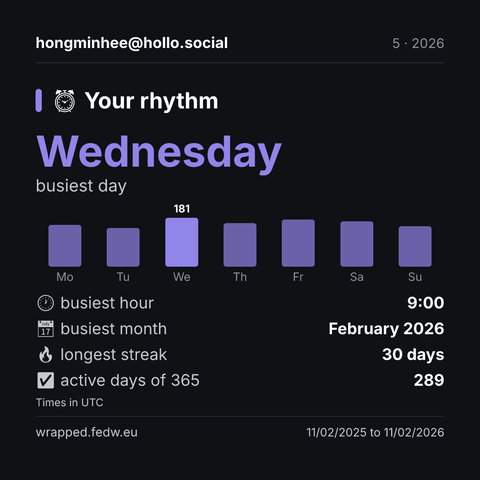
Fediverse Wrapped, Your rhythm, hongminhee@hollo.social: Wednesday busiest day, busiest hour: 9:00, busiest month: February 2026, longest streak: 30 days, active days of 365: 289, Times in UTC
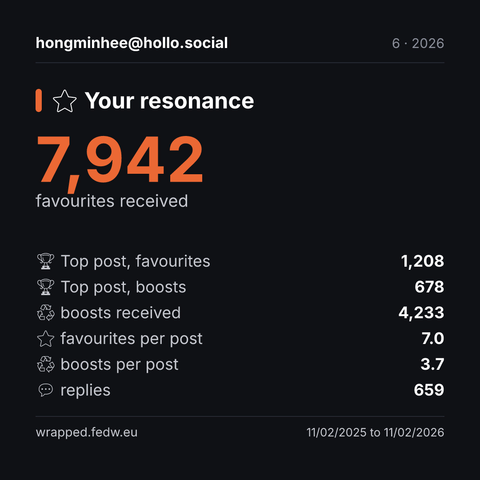
Fediverse Wrapped, Your resonance, hongminhee@hollo.social: 7,942 favourites received, Top post, favourites: 1,208, Top post, boosts: 678, boosts received: 4,233, favourites per post: 7.0, boosts per post: 3.7, replies: 659
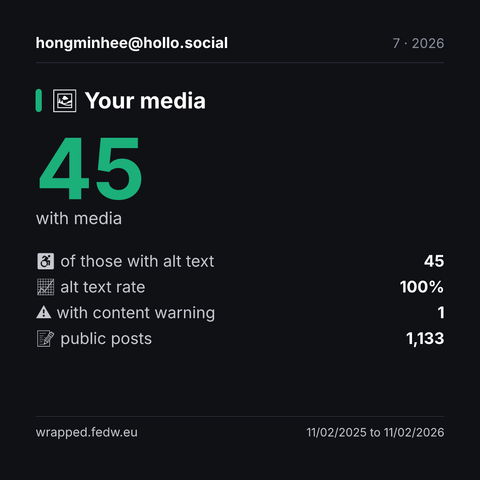
Fediverse Wrapped, Your media, hongminhee@hollo.social: 45 with media, of those with alt text: 45, alt text rate: 100%, with content warning: 1, public posts: 1,133
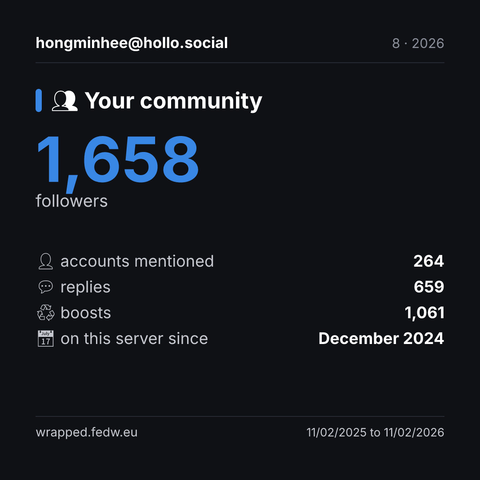
Fediverse Wrapped, Your community, hongminhee@hollo.social: 1,658 followers, accounts mentioned: 264, replies: 659, boosts: 1,061, on this server since: December 2024
@hongminhee@hollo.social here's your Fediverse Wrapped 🎁
365 days, all from your public posts. Times in UTC.
Which tile surprised you?
Sharing very much encouraged! If you share the images yourself, use #FediverseWrapped so others can find them.
Different timezone? Add tz=America/New_York next time.
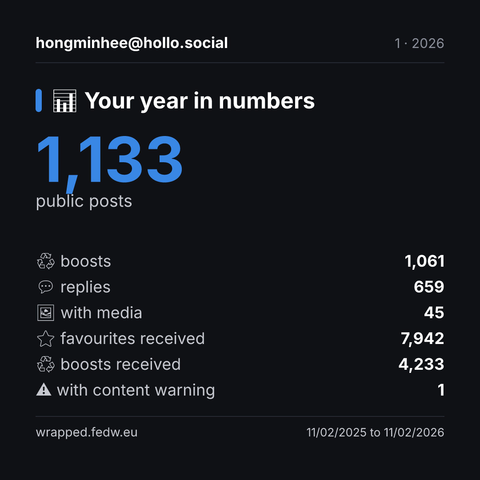
Fediverse Wrapped, Your year in numbers, hongminhee@hollo.social: 1,133 public posts, boosts: 1,061, replies: 659, with media: 45, favourites received: 7,942, boosts received: 4,233, with content warning: 1
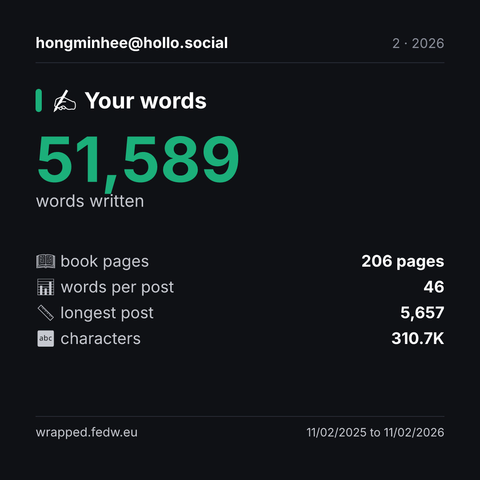
Fediverse Wrapped, Your words, hongminhee@hollo.social: 51,589 words written, book pages: 206 pages, words per post: 46, longest post: 5,657, characters: 310.7K
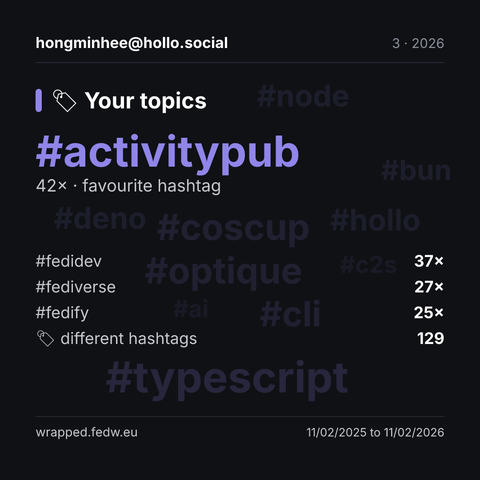
Fediverse Wrapped, Your topics, hongminhee@hollo.social: #activitypub 42× · favourite hashtag, #fedidev: 37×, #fediverse: 27×, #fedify: 25×, different hashtags: 129, More hashtags in the background: #typescript, #coscup, #optique, #cli, #deno, #hollo, #node, #bun, #ai, #c2s
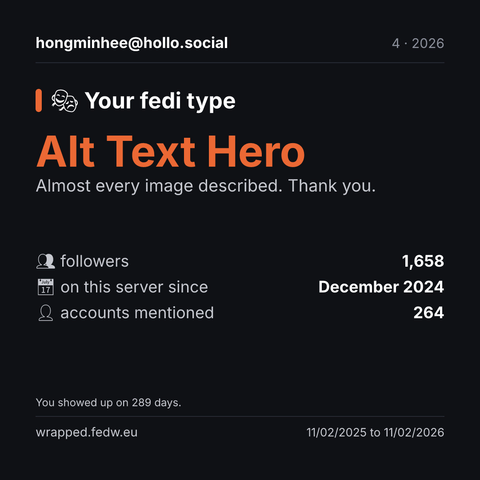
Fediverse Wrapped, Your fedi type, hongminhee@hollo.social: Alt Text Hero Almost every image described. Thank you., followers: 1,658, on this server since: December 2024, accounts mentioned: 264, You showed up on 289 days.
@fediwrapped_en Could you please wrap my fediverse posts in 2026? Thanks!
It's that time of year again, so I've updated last year's (german) Mastodon Wrapped application to create a new Fediverse Wrapped bot.
If you would like a summary of the last year, simply mention the bot.
Depending on whether you mention the bot publicly or in a private message, you will receive the response.
All you have to do is mention the bot in Toot/Message:
@fediwrapped_en
You can see the result in the quoted message thread. Depending on the load, it takes a few (more) minutes.
The software should work with all Fediverse software versions that have an open Outbox. You can find the code for this here: https://github.com/54GradSoftware/fediverse-wrapped. Thanks to @botkit and @fedify for the technical foundations.
I look forward to receiving feedback and ideas for next year.
github.com
A fediverse bot that replies to a mention with your year in review: shareable images built from your public posts of the last 365 days. - 54GradSoftware/fediverse-wrapped
@sabrinkmann@hachyderm.io …and part two 📸
Here is your biggest hit of the year.
Sharing very much encouraged! If you share the images yourself, use #FediverseWrapped so others can find them.
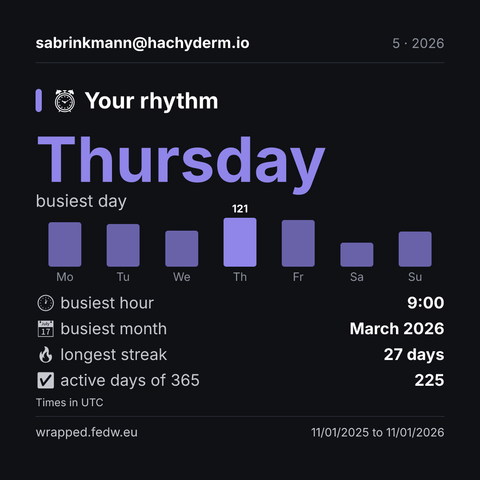
Fediverse Wrapped, Your rhythm, sabrinkmann@hachyderm.io: Thursday busiest day, busiest hour: 9:00, busiest month: March 2026, longest streak: 27 days, active days of 365: 225, Times in UTC
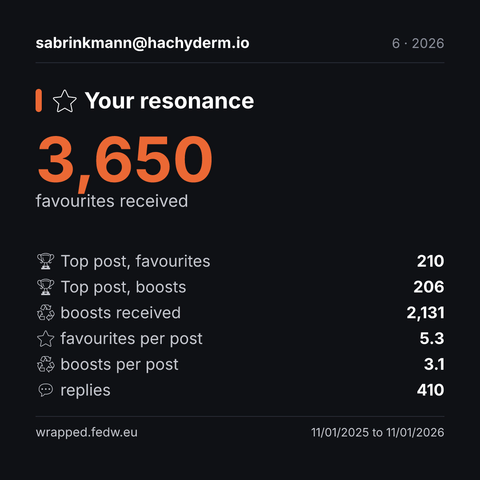
Fediverse Wrapped, Your resonance, sabrinkmann@hachyderm.io: 3,650 favourites received, Top post, favourites: 210, Top post, boosts: 206, boosts received: 2,131, favourites per post: 5.3, boosts per post: 3.1, replies: 410
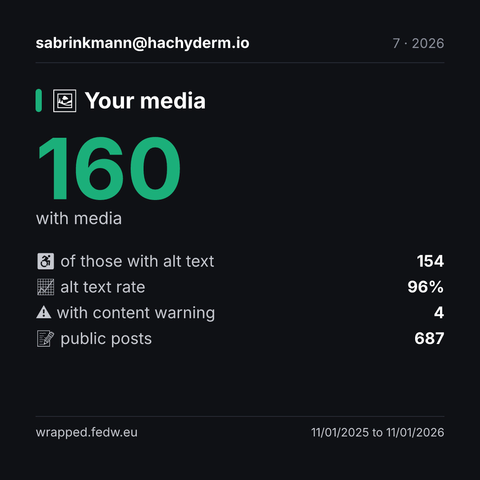
Fediverse Wrapped, Your media, sabrinkmann@hachyderm.io: 160 with media, of those with alt text: 154, alt text rate: 96%, with content warning: 4, public posts: 687
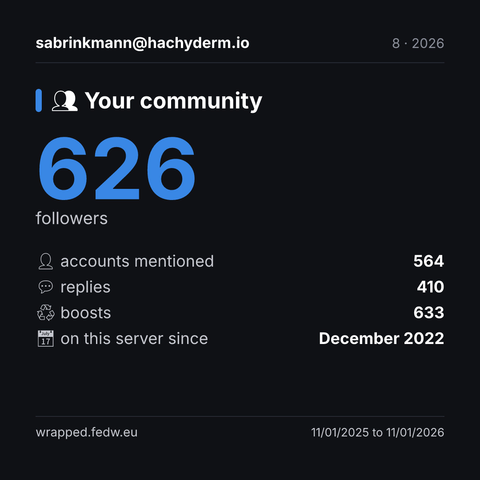
Fediverse Wrapped, Your community, sabrinkmann@hachyderm.io: 626 followers, accounts mentioned: 564, replies: 410, boosts: 633, on this server since: December 2022
Es ist wieder diese Zeit des Jahres, weshalb ich die kleine Mastodon-Wraps-Anwendung vom letzten Jahr in einen neuen Fediverse-Wrapped-Bot umgebaut habe.
Wenn ihr Lust auf eine Zusammenfassung des letzten Jahres habt, könnt ihr den Bot einfach erwähnen.
Je nachdem, ob ihr den Bot öffentlich oder in einer privaten Nachricht erwähnt, erhaltet ihr die Antwort.
Alles, was ihr dafür tun müsst, ist, den Bot zu erwähnen:
@fediwrapped_de
Das Ergebnis seht ihr im zitierten Verlauf. Abhängig von der Auslastung dauert es ein paar (mehr) Minuten.
Die Software sollte mit allen Fediverse-Software-Versionen funktionieren, die eine öffentliche Outbox haben. Den Code dafür gibt es hier: https://github.com/54GradSoftware/fediverse-wrapped Dank @botkit und @fedify für die technischen Grundlagen.
Ich freue mich über Feedback und Ideen für das nächste Jahr.
github.com
Contribute to 54GradSoftware/fediverse-wrapped development by creating an account on GitHub.
@sabrinkmann@hachyderm.io hier ist dein Fediverse Wrapped 🎁
365 Tage, alles aus deinen öffentlichen Beiträgen. Zeiten in Europe/Berlin.
Welche Kachel überrascht dich?
Teilen ausdrücklich erwünscht! Wenn du die Bilder selbst teilst, nutze gern #FediverseWrapped, damit andere sie finden.
Andere Zeitzone? Schreib beim nächsten Mal tz=Europe/Vienna dazu.
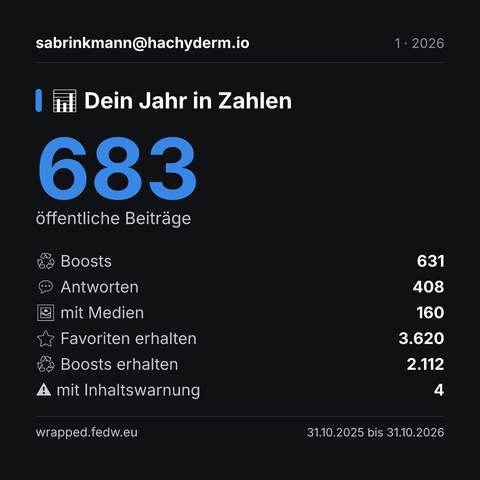
Fediverse Wrapped, Dein Jahr in Zahlen, sabrinkmann@hachyderm.io: 683 öffentliche Beiträge, Boosts: 631, Antworten: 408, mit Medien: 160, Favoriten erhalten: 3.620, Boosts erhalten: 2.112, mit Inhaltswarnung: 4
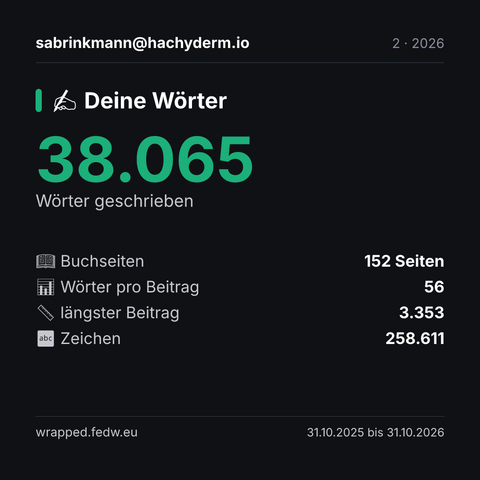
Fediverse Wrapped, Deine Wörter, sabrinkmann@hachyderm.io: 38.065 Wörter geschrieben, Buchseiten: 152 Seiten, Wörter pro Beitrag: 56, längster Beitrag: 3.353, Zeichen: 258.611
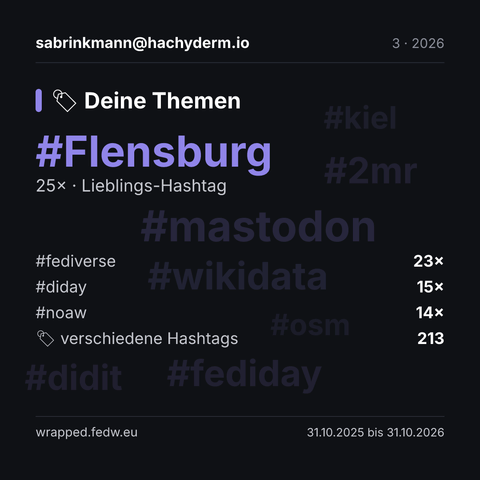
Fediverse Wrapped, Deine Themen, sabrinkmann@hachyderm.io: #Flensburg 25× · Lieblings-Hashtag, #fediverse: 23×, #diday: 15×, #noaw: 14×, verschiedene Hashtags: 213, Im Hintergrund weitere Hashtags: #mastodon, #wikidata, #2mr, #fediday, #didit, #kiel, #osm
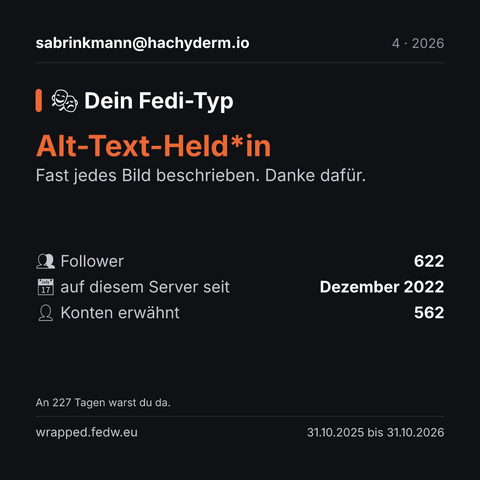
Fediverse Wrapped, Dein Fedi-Typ, sabrinkmann@hachyderm.io: Alt-Text-Held*in Fast jedes Bild beschrieben. Danke dafür., Follower: 622, auf diesem Server seit: Dezember 2022, Konten erwähnt: 562, An 227 Tagen warst du da.
ActivityPub.Academy was where many of us checked whether our activities actually arrived anywhere. Thanks @crepels for running it so well for so long.
We're carrying that forward. @z9mb1, @2chanhaeng and I maintain Fedify, and with @gaebalgom the four of us are building @drfed, a web platform for developing and debugging #ActivityPub implementations, with NLnet NGI0 Commons Fund support.
Fediverse developers, we hope it earns a place in your toolkit: https://drfed.org/.
drfed.org
DrFed is a web-based platform for developing and debugging ActivityPub implementations, built by the team behind Fedify.
ActivityPub.Academy is plagued by spam accounts posting hateful and illegal content. I hoped that deleting accounts after one day would prevent this, but I was mistaken. Since I don't have the time to moderate the instance, I unfortunately have to take it offline. I will think about ways to provide the academy in some other form. Until then, you can find the source code on https://github.com/sgrj/mastodon.
github.com
Contribute to sgrj/mastodon development by creating an account on GitHub.
@crepels Thanks for running ActivityPub.Academy all this time. I used it a lot while building Fedify and the other fediverse software I work on: having a real instance to send activities to made federation bugs much easier to track down, and I doubt I'm the only implementer who relied on it. Sorry that spam and the moderation load forced you to shut it down; keeping a public instance usable takes more time than it looks. I hope you find a way to bring it back.
@crepels Activitypub.academy has been invaluable in writing my own project. Thanks for all your effort.
ActivityPub.Academy is plagued by spam accounts posting hateful and illegal content. I hoped that deleting accounts after one day would prevent this, but I was mistaken. Since I don't have the time to moderate the instance, I unfortunately have to take it offline. I will think about ways to provide the academy in some other form. Until then, you can find the source code on https://github.com/sgrj/mastodon.
github.com
Contribute to sgrj/mastodon development by creating an account on GitHub.
자유로운, 익명의 인터넷이라는 가치는 낭만의 시대의 기치일 뿐이며 실제로는 유지할 수 없다는 이야기가 나온지도 오래 되었다. 오늘, AI가 모두가 통제된 인터넷을 원하는 세상을 정말로 앞당기고 있을지도 모른다.
모순이라는 말이 있다. 이 맥락에서 단어의 뜻보다 중요한 것은 이 단어의 유래이다. 초나라 때 창은 훌륭한 공격수단이었고 방패는 훌륭한 방어수단이었으며 둘은 서로 겨룰 수 있을 정도로 비교 가능한 것이었다. 오늘날은 그렇지 않다. 기술의 발전은 공격을 방어에 비해 비대칭적으로 예리하게 만든다. 여전히 우리는 방탄복을 입고 콘크리트 벽 뒤에서 시가전을 벌이지만, 그것은 결코 초나라 때의 방패와 성곽만치 든든한 것은 아니다.
2천년이 흘렀다. 초나라 상인에게 방아쇠만 당기면 400보 밖에서 사람을 쓰러뜨릴 수 있는 무기가 있으니 팔아달라고 했더라면, 물건을 팔 때마다 손님이 담벼락 너머로 사라질 때까지 총구가 나를 향하지 않나 지켜보느라 오금이 저릴 것이다. 그러나 우리는 전국에 300만정의 총기가 있는 나라에서 살면서도 어떤 방탄복이 좋은지 고민하지는 않는다. 여러 이유 가운데 하나는 돈뭉치만 싸들고 가면 소총을 팔아주는 상인이 없기 때문이다. 강력한 무기가 나를 겨누지 않고자 한다면 이름표가 붙지 않은 익명의 무기가 있어서는 안된다.
그동안 인터넷의 익명성이 논의와 논쟁의 대상이 되었던 것은 그것이 논쟁거리가 될 정도로 득실을 따질 수 있었기 때문이었다. 우리는 소프트웨어 보안이 합리적인 비용으로 유지 가능한 시대의 마지막을 살고 있을지도 모른다. 인터넷 세계의 창이 날카로워지다 못해 총으로 바뀌게 된다면, 현실적으로 모든 서비스가 방탄일 수는 없다. 보안이 최우선인 거대기업이 운영하지 않는 서비스를 보호할 방법은 보안 강화가 아니라 익명의 총구를 제거하는 것일지도 모른다.
그러므로, 만일 당신이 인터넷이 오늘날과 같기를 바라는 사람 가운데 하나라면, 내일의 인터넷이 '암흑의 숲'이 아니기를 간절히 바라야 할 것이다.
hackers.pub
The accelerating capabilities of artificial intelligence threaten to end the long-standing ideal of an anonymous internet by asymmetrically supercharging offensive digital weapons. Much like modern firearms made ancient personal armor obsolete, evolving cyber threats are making traditional software defenses impossible to maintain at a reasonable cost for standard services. As defending against these automated attacks becomes practically unfeasible, preserving online safety may require abandoning untraceable anonymity rather than perpetually attempting to build bulletproof systems. This reflection offers critical insight into how advancing AI capabilities could fundamentally alter the balance of cybersecurity and dismantle the open architecture of the modern web.
The pull request is merged now: https://w3id.org/fep/f799.
w3id.org
Okay, now it's merged!
w3id.org
The Web Can't Afford a JavaScript Runtime Monoculture via @hongminhee https://lobste.rs/s/x6n380 #javascript
https://redmonk.com/kholterhoff/2026/10/27/js-runtime-monoculture/
redmonk.com
Earlier this month Deno announced its whole team is joining Cloudflare. In the announcement, Ryan Dahl, who created Node.js and started Deno in 2018, also explains that development of the Deno runtime will stop after one year. That leaves the web with two major general-purpose runtimes, the OpenJS Foundation’s Node.js and Anthropic’s Bun, alongside Cloudflare’s
blah.rako.space
Following my previous proposal, FEP-22cd: Attributing translations, I've now drafted a proposal for FEP-f799: Coordinated Inbox Delivery Suspension. @nyanrus also helped out this time! The PR hasn't been merged yet, but you can read it here in the meantime.
codeberg.org
DongU Kang (@nyanrus@sukhi.f3liz.casa) and I (@hongminhee@hollo.social) have drafted a proposal for announcing temporary suspensions of ActivityPub inbox delivery, primarily for scheduled maintenance. Peers can defer queued and new deliveries until the announced end time or an earlier cancellation, avoiding predictable failed requests during the interruption. This complements 503 Service Unavailable and Retry-After rather than replacing existing retry policies.
A DeliverySuspension object can cover one inbox or all inboxes at an HTTPS origin. Mutual links establish which actor can control delivery suspensions for that target. HTTP Link headers let peers discover a notice they missed, and signed objects can be served from static storage while the application is offline. Peers keep their own limits on suspension duration and queue storage, and resume gradually to avoid overwhelming a recovering server.
https://codeberg.org/fediverse/fep/pulls/954
Feedback welcome, especially on controller verification and how this would fit existing delivery queues and retry policies. Thanks!
codeberg.org
fep - Fediverse Enhancement Proposals
@jackalope_tracks 알려주신 링크가 https://jpendleton.substack.com/about 쪽으로 리다이렉트되는 것 같은데, 이 링크가 맞나요? 아티클(article)이 아니라 作家 紹介 페이지 같아서요!
jpendleton.substack.com
Asylum seeker, whistleblower, political prisoner, and plaintiff in Pendleton v. United States, et al., No. 1:25-CV-01218 (D.C. 2025). Click to read Turnkey Tyranny, by J. E. Pendleton, a Substack publication. Launched a year ago.
DongU Kang (@nyanrus@sukhi.f3liz.casa) and I (@hongminhee@hollo.social) have drafted a proposal for announcing temporary suspensions of ActivityPub inbox delivery, primarily for scheduled maintenance. Peers can defer queued and new deliveries until the announced end time or an earlier cancellation, avoiding predictable failed requests during the interruption. This complements 503 Service Unavailable and Retry-After rather than replacing existing retry policies.
A DeliverySuspension object can cover one inbox or all inboxes at an HTTPS origin. Mutual links establish which actor can control delivery suspensions for that target. HTTP Link headers let peers discover a notice they missed, and signed objects can be served from static storage while the application is offline. Peers keep their own limits on suspension duration and queue storage, and resume gradually to avoid overwhelming a recovering server.
https://codeberg.org/fediverse/fep/pulls/954
Feedback welcome, especially on controller verification and how this would fit existing delivery queues and retry policies. Thanks!
codeberg.org
fep - Fediverse Enhancement Proposals
The Social Web Foundation is pleased to announce the Social Web Devroom at FOSDEM 2027, and invite participants to submit proposals for talks for the event.
FOSDEM is an exciting free and open source software event in Brussels, Belgium that brings together thousands of enthusiasts from around the world. The event spans the weekend of January 30 to January 31, 2027 and features discussion tracks (“devrooms”) for scores of different technology topics. This is the third FOSDEM Social Web Devroom.
The Social Web Devroom will be a 5 hour track.
There will be two available talk formats:
The Social Web Devroom is open to talks all about the Social Web, AKA the Fediverse, including:
Submit talk proposals to https://pretalx.fosdem.org/fosdem-2027/cfp. Select “Social Web” from the “Track” dropdown, and include the length of your talk (8/25) in the submission notes. (Note that the “Lightning Talks” track is a separate event-wide track; if you’re proposing a Social Web micro-talk, please choose the “Social Web” track!)
All attendees and speakers must be familiar with and agree to the FOSDEM Code of Conduct.
Questions about topics, formats, or the Social Web in general should go to contact@socialwebfoundation.org.
AI ban should not be an excuse to exclude minorities, as I heard some communities started banning non English speakers who use machine translation
이 짤이 벌써 10年도 넘었구나. 좋아하는 블랙 조크지만 韓國語 話者가 아니면 웃긴 포인트들을 제대로 알아채기 힘들 듯…? 😂 프로필 寫眞과 닉네임이 伊藤博文인 點(게다가 日本語 읽기가 아니라 韓國語 漢字音 읽기인 「이등박문」)이나, 朴正熙를 굳이 그의 創氏改名한 日本姓인 「高木」로 부른 點이나, 「內地」라는 表現이 韓國語에서 갖는 뉘앙스라든가…
參考로, 伊藤博文와 朴正熙 둘 다 射殺된 날이 10月 26日로 같다. (伊藤博文은 1909年 10月 26日, 朴正熙는 1979年 10月 26日.)

2015年 10月 26日 午前 2時 15分에 Twitter에 게시된 한 트윗의 캡처. 「이등박문」(伊藤博文의 韓國語 漢字音 읽기; ID: @salamander724_)이라는 닉네임의 使用者가 쓴 글. 「本官은 銃알 세 發에 갔지만 高木 君은 銃알을 두 發 밖에 받아내지 못했다. 이것이 內地와 朝鮮의 差異인 것이다.」

If you run Hollo, update to 0.8.17 or 0.9.25 now. These releases fix GHSA-r48c-xx2h-fv4g, a DNS rebinding vulnerability in Fedify that could bypass Hollo's server-side request forgery (SSRF) protection and cause requests to reach internal services.
Fedify checked that a hostname resolved only to public addresses, then let the HTTP client resolve it again when connecting. An attacker controlling the hostname's DNS answers could return a public address for validation and a private or loopback address for the connection. Redirects and alternate-document links had the same gap.
The affected Fedify paths used by Hollo include remote document loading (authenticated or not), outbound activity delivery, and WebFinger lookups. On Node.js, which Hollo uses, the fix restricts connections to addresses that passed validation. Hollo's ALLOW_PRIVATE_ADDRESS=true option still permits private destinations; leave it unset for public federation. For full technical details, see the Fedify security announcement and the advisory linked above.
All releases on the supported Hollo 0.8.x and 0.9.x lines up to and including 0.8.16 and 0.9.24 are affected. 0.8.17 and 0.9.25 are the first fixed releases and the latest on those lines, incorporating Fedify 2.1.31 and 2.2.20 respectively. Hollo 0.7.x and earlier are no longer supported under the Hollo security policy; operators on those lines should move to a supported release.
For 0.8.x deployments, update to 0.8.17:
docker pull ghcr.io/fedify-dev/hollo:0.8.17For 0.9.x deployments, update to 0.9.25:
docker pull ghcr.io/fedify-dev/hollo:0.9.25After pulling the image, recreate your Hollo container using the new image. With Docker Compose, update the image tag in your Compose file and run docker compose up -d. For source deployments, check out the corresponding release tag, run pnpm install --frozen-lockfile using the pnpm version pinned in that tag's package.json, run pnpm run build, and restart the server.
If you have a large 0.9.x database and are upgrading from a release before 0.9.20, follow the 0.9.20 index preparation instructions before starting the new version to avoid blocking writes during the new version's automatic migration.
Thanks to @finalchild for reporting the DNS rebinding issue to the Fedify project.
If anything is unclear, ask below.
github.com
Federated single-user microblogging software. Contribute to fedify-dev/hollo development by creating an account on GitHub.
If you use BotKit, update to a patched release now. GHSA-r48c-xx2h-fv4g is a DNS rebinding vulnerability in Fedify, which BotKit uses for federation. An attacker could bypass its server-side request forgery (SSRF) protection and cause your bot's server to reach internal services. Deno deployments need additional network restrictions; upgrading BotKit alone does not close the vulnerability on Deno.
Fedify checked that a hostname resolved only to public addresses, then let fetch() resolve it again when connecting. An attacker controlling the hostname's DNS answers could return a public address for validation and a private or loopback address for the connection. This affects remote document loading, both anonymous and authenticated, as well as outbound activity delivery, NodeInfo lookups, and WebFinger lookups. Redirects and alternate-document links were subject to the same gap.
On Node.js and Bun, the fix makes connections only to addresses that passed validation. Bun deployments that set HTTP_PROXY, HTTPS_PROXY, or ALL_PROXY, including their lowercase forms, should use Bun 1.4.3 or later. Alternatively, unset those variables for the bot process or configure the proxy to refuse private destinations. Earlier Bun versions can send requests through a proxy that resolves the hostname again. With the fix applied, HTTPS requests to non-default ports fail on Bun versions before 1.3.11 because those versions cannot verify a pinned connection's certificate against the original hostname. See the Bun deployment guidance.
Deno's fetch() cannot pin connections to validated addresses. Use Deno 2.8.1 or later with the documented --deny-net list covering private IPv4 ranges, [::1], and [::], and listen on a Unix domain socket behind a reverse proxy, since the deny list also blocks listening on those IP addresses. Private IPv6 ranges also need network-level restrictions. If that setup is unsuitable, apply equivalent outbound restrictions at the firewall or container network layer. Follow the Deno deployment mitigation for the full deny list and deployment requirements.
BotKit 0.4.x versions through 0.4.10 and BotKit 0.5.x versions through 0.5.7 include affected Fedify versions. The first releases containing the fix, and the current recommended releases, are BotKit 0.4.11 and 0.5.8, which upgrade Fedify to 2.1.31 and 2.3.15, respectively. These are the two supported BotKit lines under the security policy; users on older lines should move to a supported release.
For BotKit 0.5.x, install @fedify/botkit 0.5.8 using the command for your package manager:
npm  install @fedify/botkit@0.5.8
yarn add     @fedify/botkit@0.5.8
pnpm add     @fedify/botkit@0.5.8
bun  add     @fedify/botkit@0.5.8
deno add     jsr:@fedify/botkit@0.5.8
For BotKit 0.4.x, install @fedify/botkit 0.4.11:
npm  install @fedify/botkit@0.4.11
yarn add     @fedify/botkit@0.4.11
pnpm add     @fedify/botkit@0.4.11
bun  add     @fedify/botkit@0.4.11
deno add     jsr:@fedify/botkit@0.4.11
Check the installed or locked versions: @fedify/botkit should be 0.4.11 or 0.5.8. The affected Fedify packages, @fedify/fedify, @fedify/vocab-runtime, and @fedify/webfinger, should resolve to at least 2.1.31 on the 2.1.x line, 2.2.20 on 2.2.x, 2.3.15 on 2.3.x, or 2.4.5 on 2.4.x. Update any direct dependencies on those packages too. If you use a routine update command instead, check that your declared dependency range allows a patched release and change it explicitly if needed. Apply the runtime mitigations above and redeploy all web and worker processes.
The full GitHub Security Advisory is GHSA-r48c-xx2h-fv4g. See also Fedify's own announcement.
Thanks to @finalchild for reporting the DNS rebinding issue to the Fedify project.
If anything is unclear, feel free to ask on GitHub Discussions or Matrix.
matrix.to
You're invited to talk on Matrix