Hashtag

#accessibility

1,706 posts tagged with this hashtag.

@fullfathomfive@aus.social

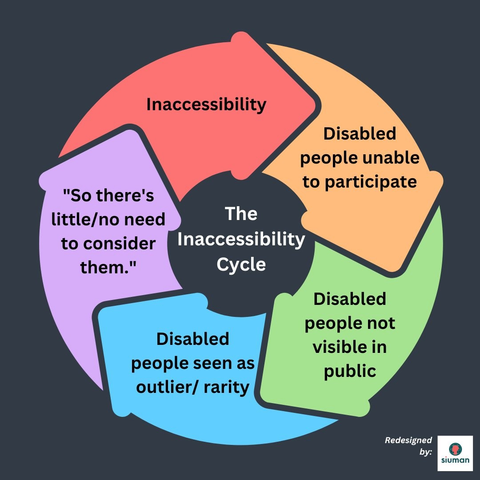
The Inaccessibility Cycle

An infographic showing The Inaccessibility Cycle. There is a circle of arrows, showing a cycle as follows:
> Inaccessibility 
> Disabled people unable to participate 
> Disabled people not visible in public  > Disabled people seen as outlier/rarity
> "So there's little/no need to consider them."
The last arrow points back to "Inaccessibility", completing the cycle.

The original infographic is by Pacing Pixie, redesigned by Siuman.
ALT text

An infographic showing The Inaccessibility Cycle. There is a circle of arrows, showing a cycle as follows: > Inaccessibility > Disabled people unable to participate > Disabled people not visible in public > Disabled people seen as outlier/rarity > "So there's little/no need to consider them." The last arrow points back to "Inaccessibility", completing the cycle. The original infographic is by Pacing Pixie, redesigned by Siuman.

@drahardja@sfba.social · Reply to Dave Rahardja (he/him)

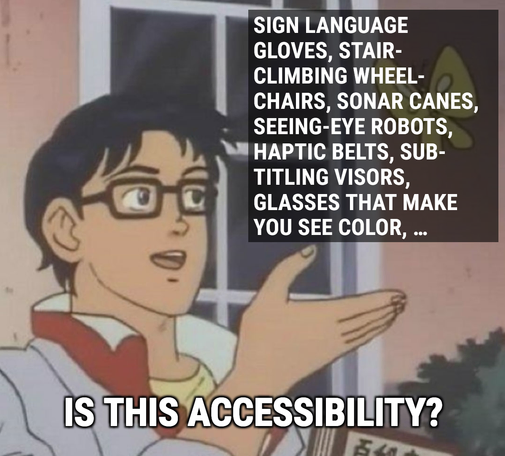
@benroyce @jscholes @matt The more fundamental problem with , of course, is exclusion. We’ve built our world to *exclude* people with certain characteristics, and the excluded people must then slap on more tech to *re-include* themselves. It’s like builders refusing to build ramps instead of stairs, then forcing people to invent and sell and buy and use stair-climbing machines.

Maybe we should build ramps instead.

How many anti-AI people add alt-text to their images? How many of them vote to fund public transit and build protected bicycle and pedestrian pathways? How many test their software against screen readers and alternative input devices?

We can’t begrudge excluded people for using whatever tech they can access to re-include themselves. But we should do better so they don’t have to.

@FediSuite@lsbt.me

FediSuite 2.2.1 is here!

This update is all about accessibility.

We've made improvements throughout FediSuite to make it easier for as many people as possible to use. Better keyboard navigation, screen reader support, accessible charts, improved color contrast, and a much better experience on smaller screens.

We've also improved navigation, forms, and usability with larger text sizes.

On top of that, we've fixed a few smaller issues with public analytics cards.

Free software should be accessible to everyone. With FediSuite 2.2.1, we've taken another big step towards that goal.

fedisuite.com

fedisuite.com

FediSuite: Fediverse Analytics, Reach & Scheduling

Fediverse analytics and content scheduling for 20+ platforms. Estimated reach for Mastodon and compatible networks. Open source and self-hostable.

@WeirdWriter@caneandable.social

Seeing others outside the Disability and spaces share this, where this Tech Bro here realizes that if you have an accessible website, their toys can read it better. However, this is not a justification for you to make your site *less* accessible. Honestly? Theives are gonna snatch your work no matter what you do, so might as well make it easier for humans to read. The bubble will pop and they will all go to virtual augmented quantom computing or something. The point is, to form community now and leave them to have nothing after the bubble pops. michaelandersentech.substack.c

michaelandersentech.substack.com

Why I now see accessibility as a way to reduce AI agents’ token usage

A lightbulb moment during a GEO project, the research behind it, and where the evidence stops.

@digitalcortex@mastodon.social

For anyone who's been told to "just pick up the phone": many autistic adults prefer email for contact with people they don't know, and research backs that up. Written options are an access need, not a quirk.

@FediSuite@lsbt.me

FediSuite 2.2.1 is here!

This update is all about accessibility.

We've made improvements throughout FediSuite to make it easier for as many people as possible to use. Better keyboard navigation, screen reader support, accessible charts, improved color contrast, and a much better experience on smaller screens.

We've also improved navigation, forms, and usability with larger text sizes.

On top of that, we've fixed a few smaller issues with public analytics cards.

Free software should be accessible to everyone. With FediSuite 2.2.1, we've taken another big step towards that goal.

fedisuite.com

fedisuite.com

FediSuite: Fediverse Analytics, Reach & Scheduling

Fediverse analytics and content scheduling for 20+ platforms. Estimated reach for Mastodon and compatible networks. Open source and self-hostable.

@jscholes@dragonscave.space

I'd like to take this opportunity to publicly thank Matt Campbell (@matt) for his immense contributions to for and people over the last two and a half decades. Not to mention all the largely invisible work behind them, and the projects he's had a hand in behind the scenes.

In case you're not aware, a user here on Mastodon recently branded Matt, and I quote, "a known bad actor exploiting disabled folks as props for a pro-slop agenda."

The eagerness with which zealots on this platform jump to dismiss someone's life's work, while savaging their character for not toeing their ideological line, is appalling. It's one of the primary reasons I'm largely taking a break from Mastodon at the moment.

Builders like Matt, on the other hand, are a primary reason I'm still holding onto some hope that people have a future in a world that increasingly wants to believe we shouldn't exist. People who go beyond merely caring, who define what better looks like and have the skills to bring it to fruition.

So I hope you, too, will share your gratitude with Matt for these examples and so much more:

1. Creating a screen reader that set a new standard for access to computers without one installed.
2. Helping turn Narrator into a serious contender and useful companion.
3. Bringing accessible documents to people around the world, including kids in the classroom.
4. Making remote tech support viable for disabled hobbyists and professionals alike.
5. Offering developers a cross-platform solution for adding accessibility API support to their custom-drawn apps.

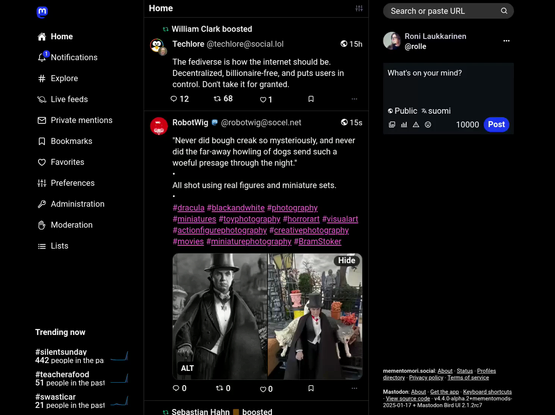
@rolle@mementomori.social

Mastodon has a high-contrast option, but for many people, it's not enough.

At mementomori.social, we have two extra themes for people who need more: Ultra accessible and Ultra accessible Plus. They're designed for people with visual impairments, colour blindness or tunnel vision.

For example, people with retinitis pigmentosa often use 200-300% zoom and need bigger elements. They need large, high-contrast text and elements throughout the interface. Everything has to be easy to find and see, and content needs to stay in the same place. So we have a theme with:

- A black background and white text
- Extra-large text without excessive browser zoom, so elements work properly
- Links, mentions and hashtags each in their own colour
- Clear outlines on buttons and fields
- And more

These improvements don't just help people with low vision. They also help people with motoric impairments who need everything to work with as few clicks and as little movement as possible. We've also improved the layout in our fork: the composer form stays in the same place at the top, and notifications are at the top too. This means people don't need to scroll or search for them, whether they're using their eyes or assistive devices such as a mouse, touchscreens, touchpads or braille keyboards.

You can switch themes in Preferences → Appearance → Site theme.

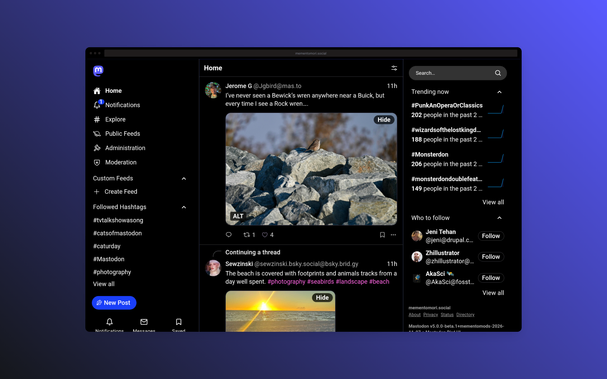
Just FYI, in case you're disabled and need more than Mastodon offers by default. I try to make the accessibility features in our Mastodon web version as good as I can. I have a dedicated tester (my wife) at home who has these impairments, so we can test with real-world examples.

A screenshot of the desktop view of Mementomori.social Ultra Accessible Mastodon theme
ALT text

A screenshot of the desktop view of Mementomori.social Ultra Accessible Mastodon theme

@WeirdWriter@caneandable.social

Seeing others outside the Disability and spaces share this, where this Tech Bro here realizes that if you have an accessible website, their toys can read it better. However, this is not a justification for you to make your site *less* accessible. Honestly? Theives are gonna snatch your work no matter what you do, so might as well make it easier for humans to read. The bubble will pop and they will all go to virtual augmented quantom computing or something. The point is, to form community now and leave them to have nothing after the bubble pops. michaelandersentech.substack.c

michaelandersentech.substack.com

Why I now see accessibility as a way to reduce AI agents’ token usage

A lightbulb moment during a GEO project, the research behind it, and where the evidence stops.

@nekohayo@mastodon.social

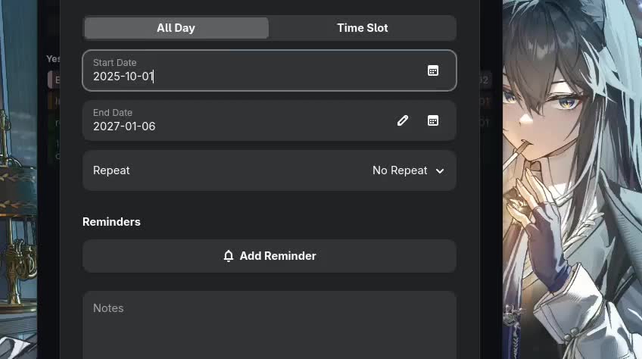
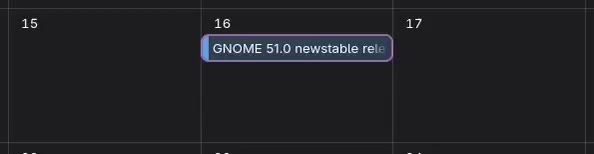
I'm really enjoying the now accurate dates announcements in GNOME Calendar's minicalendar widget (in the sidebar and the event editing dialog's date picker) for screen reader apps for vision-impaired users, as detailed in gitlab.gnome.org/GNOME/gnome-c.

Here's a video showing how the current nightly version works with Orca as I navigate the widget with the keyboard… there's more to it than the eye can see!

Demonstration video where the day's numbers and month names are announced by Orca as I navigate through the mini calendar widget's dates grid
ALT text

Demonstration video where the day's numbers and month names are announced by Orca as I navigate through the mini calendar widget's dates grid

@dxsrc@mas.to
@Meadhbh@retro.pizza

We have a client coming in a few weeks out who is partially deaf. Does anyone out there have a good windows speech to text app that can be used to help communicate with her? Preferably one where the text can also be enlarged to be easier to read.

@WeirdWriter@caneandable.social

Never thought I’d have this happen, but a sighted person texted me to ask,

Hey Robbie, I’d figured I’d ask you! I watch Netflix shows with audio description all the time when I'm running or driving but the video eats up my battery, so I want to have only audio. I tried to go to Audible to look for movies and TV shows with audio description but they don't have any. Can I buy some? I’d pay for this long before I pay Netflix for another year! If you know where I can buy movies and TV shows with audio description, let me know before next week because I have a long car trip.

@Meadhbh@retro.pizza

We have a client coming in a few weeks out who is partially deaf. Does anyone out there have a good windows speech to text app that can be used to help communicate with her? Preferably one where the text can also be enlarged to be easier to read.

@basilpuglisi@mastodon.social

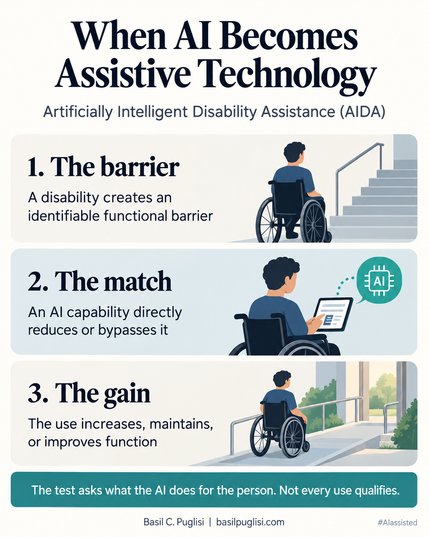
21% of blind and low vision users of AI visual description said a mistake hurt them. For sighted users it was 9% (American Foundation for the Blind, August 2026).

In my working paper on AI as assistive technology (AIDA), the blindness case passes the test, and the verification burden stays with it. I'd put a human checkpoint on consequential output before I'd take the tool away.

basilpuglisi.com/aida-ai-assis


Illustrated infographic on a light background. Title: "When AI Becomes Assistive Technology". Subtitle: "Artificially Intelligent Disability Assistance (AIDA)". Three stacked panels, each with a person in a wheelchair on the right. Panel 1, "1. The barrier: A disability creates an identifiable functional barrier", shows the person facing a flight of stairs. Panel 2, "2. The match: An AI capability directly reduces or bypasses it", shows the person using a tablet linked by a dotted line to a teal "AI" chip icon. Panel 3, "3. The gain: The use increases, maintains, or improves function", shows the person rolling up a ramp toward an open doorway with greenery. A teal banner reads "The test asks what the AI does for the person. Not every use qualifies." Footer: "Basil C. Puglisi | basilpuglisi.com" and "#AIassisted".
ALT text

Illustrated infographic on a light background. Title: "When AI Becomes Assistive Technology". Subtitle: "Artificially Intelligent Disability Assistance (AIDA)". Three stacked panels, each with a person in a wheelchair on the right. Panel 1, "1. The barrier: A disability creates an identifiable functional barrier", shows the person facing a flight of stairs. Panel 2, "2. The match: An AI capability directly reduces or bypasses it", shows the person using a tablet linked by a dotted line to a teal "AI" chip icon. Panel 3, "3. The gain: The use increases, maintains, or improves function", shows the person rolling up a ramp toward an open doorway with greenery. A teal banner reads "The test asks what the AI does for the person. Not every use qualifies." Footer: "Basil C. Puglisi | basilpuglisi.com" and "#AIassisted".

@caten@mathstodon.xyz

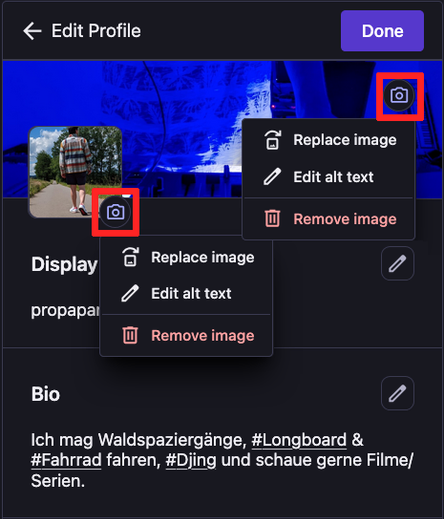
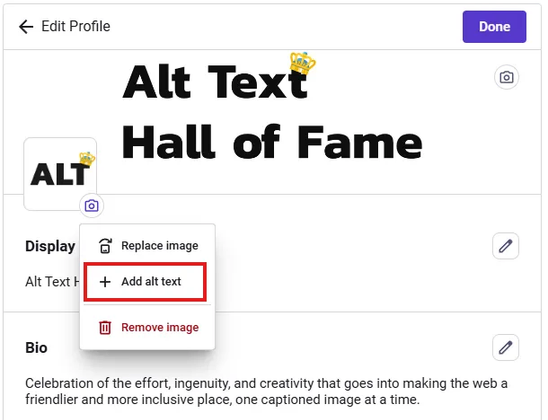
I finally decided to update my profile picture to something more recent. (I think the last one was from 2021 or so?) I figured my costume from last year would be appropriate.

I was a nice surprise to find that you can add alt text to your profile picture and banner image now! I'm probably super late on this, but it has bothered me that I could not do this in the past, since I felt like adding it to the bio made it cluttered.

@frontenddogma@mas.to
@fireborn@dragonscave.space

There are a few reviews of the MNT Pocket Reform online. This is mine, from someone who can't see the keys.

I love this little machine and use it almost constantly. Getting there took custom keyboard firmware, a talking OLED menu, a fight with the audio stack and a C header file I still open to find my own keys.

fireborn.mataroa.blog/blog/the

fireborn.mataroa.blog

The MNT Pocket Reform Is the Computer I Actually Own — fireborn

@frontenddogma@mas.to
@fubsepude@mhh.fedihost.io

This platform doesn't look very promissing to me.
wsocial.news/
I mean, it's just a Bluesky clone, and no mention of important stuff like accessibility and 3rd-party client support.
I'd love to hear some thoughts on this.

wsocial.news

W - The European social network for verified humans

W is a European social network governed by EU law, data hosted in Europe, and built for real, verified people. Trust your feed.

@dansup@mastodon.social

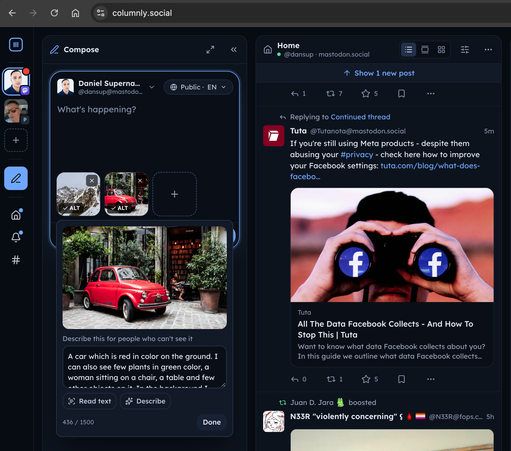
Columnly.social now supports client-side alt text generation, along with text recognition (OCR).

Your media never leaves your browser during classification, instead we download and cache a model about 300MB in size, and handle it in browser for privacy.

Ideally you would write alt text yourself, but if you can't, or don't want to, its now just a button tap away, and it helps ❤️

A screenshot of Columnly, a multi column Mastodon and Pixelfed web client, with alt-text generation.
ALT text

A screenshot of Columnly, a multi column Mastodon and Pixelfed web client, with alt-text generation.

@fireborn@dragonscave.space

There are a few reviews of the MNT Pocket Reform online. This is mine, from someone who can't see the keys.

I love this little machine and use it almost constantly. Getting there took custom keyboard firmware, a talking OLED menu, a fight with the audio stack and a C header file I still open to find my own keys.

fireborn.mataroa.blog/blog/the

fireborn.mataroa.blog

The MNT Pocket Reform Is the Computer I Actually Own — fireborn

@NVAccess@fosstodon.org

NV Access is pleased to announce that version 2026.3 of NVDA, the free screen reader for Microsoft Windows, is now available for download. This release includes significant performance improvements, improvements to NVDA’s dialogs, and expanded touch screen input.

Read the full announcement and download it now from: nvaccess.org/post/nvda-2026-3/

We encourage all users to upgrade to this version.

NVDA logo and word in white on purple with sunburst designs around edge - full description on nvaccess.org "About NVDA" page.
ALT text

NVDA logo and word in white on purple with sunburst designs around edge - full description on nvaccess.org "About NVDA" page.

@frontenddogma@mas.to

Can AI Fix Web Accessibility? What the Evidence Actually Says, by (not found or attributed):

junaidmasoodi.com/blog/can-ai-

junaidmasoodi.com

Can AI Fix Web Accessibility? What the Evidence Actually Says | Junaid Masoodi

AI cannot fix web accessibility at runtime, and can help a great deal at authoring time. The difference isn't the technology, it's where it sits in the lifecycle and who checks its work. Why runtime fails: an overlay rewrites the DOM after the browser has built the accessibility tree, and the next framework re-render erases the repair. No model solves that, because it's a sequencing problem, not an intelligence problem. Why AI still writes inaccessible code: it learned from a web where 95.9% of pages fail. Ask plainly and 58% of generated interfaces have WCAG violations, 100% fail on alt text and structure. It reproduces the failure faithfully, we ship it back, and it becomes training data. That loop is one reason the numbers got worse. What actually moves the needle: naming WCAG in the prompt drops violations from 58% to 19%. The model isn't the variable; the person driving it is. But 19% is still one in five, so prompting is a mitigation, not a fix. Where it genuinely pays: clustering audit findings across a portfolio into the dozen component defects causing them; drafting patches that open a PR and never merge; baseline alt text with an editor behind it; inline WCAG feedback in the IDE. Every one has a human at the end and that's the approach, not a limitation. The binding constraint is human, not technical. All three CodeA11y failure modes, nobody asked, nobody finished, nobody could check and are organisational.
@scottjenson@social.coop

So much great work went into this, focusing not only and clarity but . It was done only after talking to the community extensively. There are so many thoughtful details. Just poke around and you'll find them. Sure it's not fully complete yet (e.g. the right side is empty) but such a change a HUGE lift and a small team so they have to take it in waves.

But I love the new structure and look (and themes!)

mastodon.social

Mastodon (@Mastodon@mastodon.social)

#Mastodon is getting a new look in our upcoming 5.0 release. We wrote a bit more about our design process and how we approach community input. If you’re on mastodon.social you will see the new design tomorrow, on Tuesday. We rely on your feedback! https://blog.joinmastodon.org/2026/10/5.0-a-closer-look/

@Mastodon@mastodon.social

is getting a new look in our upcoming 5.0 release.

We wrote a bit more about our design process and how we approach community input. If you’re on mastodon.social you will see the new design tomorrow, on Tuesday. We rely on your feedback!

blog.joinmastodon.org/2026/10/

blog.joinmastodon.org

5.0: A closer look

October is here, and it's almost time for Mastodon's 5.0 release! We announced our plans for big changes back in August. In this companion article, we're hoping to shed light on some of the decisions behind this major UI overhaul.

@frontenddogma@mas.to
@WeirdWriter@caneandable.social
@transbbydoll@mastodon.social

Just a friendly reminder: we're in 2026 and aids and aids should be free. Not $5500 for an electric wheelchair. Not $50 for a cupholder. ZERO. FREE. And, if vendors must charge a fee, it should be capped as to how much they charge. I'm speaking for myself here as I don't like to assume others feelings on a topic but I'm sick of my disability being dollar signs to these vendors. It must end.

@WeirdWriter@caneandable.social
@stephaniewalter@front-end.social

Stop trying to upgrade disabled people's body when the problem is your design!
@WeirdWriter argues that the tech industry needs to stop trying to sell useless expensive gadgets no disabled person wants, or can afford, and start fixing actual accessibility barriers, like bad code, and poorly designed infrastructures.
sightlessscribbles.com/posts/d

sightlessscribbles.com

The "Disability Dongle": Why Silicon Valley Hates Me and you., Sightless Scribbles

A fabulously gay blind Romance author.

@darrell73@mastodon.online
@TetraLogical@indieweb.social
@zkrisher@tweesecake.social

I've got a new student, he is blind and requires voiceover to use his iPhone but his hands tremble quite harshly and he has fine control issues.

He keeps double tapping accidentally and when he tries to tap voiceover often reads it as a swipe.

I understand that touch accommodations are still incompatible with voiceover.

Neither Siri intelligence or voice control are available in his language.

Is there any setting I can try to mitigate his fine motor issues?

@Stealthy@dragonscave.space
Controversial accessibility take from a GTK dev

I'm going to get straight to the point with this one.
I am in a room named :gnome.org. It's on Matrix, you can access it yourself, anyone can due to it's public nature.
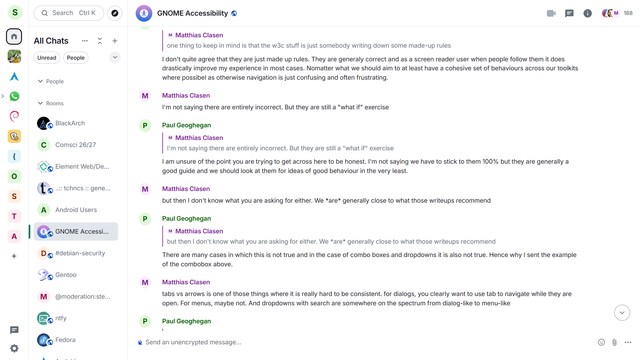
During the latest conversation, Matthias Clasen is quoted as saying: "one thing to keep in mind is that the w3c stuff is just somebody writing down some made-up rules"

This is after a Ubuntu developer requested an improvement to gtk, highlighting some inconsistencies with combo boxes and other things. The conversation is far too long to post here, but you can easily read it yourself.
Regardless of the conversation, or agreements or disagreements, this is an utterly unacceptable thing to say, particularly if this individual is endorsed by Gnome.
It's unacceptable for three important reasons: It completely invalidates the accessibility work that is being conducted to improve the Gnome desktop (discarding the hard work of other devs who contribute their efforts towards these supposedly nonsensical guidelines).

It is extremely disrespectful to blind and visually impaired people and others with disabilities who, at the end of the day, just want to use open source software like anyone else. I have definitely witnessed disagreements regarding the w3c and respect that it can't be implemented to the letter. I have never ever before heard anyone dismiss it entirely, as if it were nothing more than a spec of dirt.
Finally, it makes constructive conversation extremely difficult, how is someone supposed to work with a developer on accessibility, when they possess such an unconstructive attitude?
I feel obligated to call this out, even though I do worry that it may cast doubt on other Gnome developers, but no, too much is too much.
I would like to thank those who are striving to make Gnome and it's applications more accessible and those who choose collaboration over ignorance.

I'd appreciate if people could make an effort to keep replies constructive, I am doing this as advocacy and challenging what I believe to be a harmful attitude. Linux accessibility won't improve while people like this are in control of it's components.
Edit: I have just determined through research that Matthias is actually a manager of Red Hat's desktop team, making his statement even more damaging.
@gnome
@redhat


An element window with the gnome accessibility room on display.
Paul Geoghegan writes: "Usually on the web if you start typing or navigate to the first item in the list it will bring you to the search box if there is one. I don't think I have encountered a tab to search one."

Some conversation about the appropriate room for reporting ensues, with Paul asking for the request to be handled by GTK first.

Matthias Clasen: "one thing to keep in mind is that the w3c stuff is just somebody writing down some made-up rules"
The conversation continues with Paul disagreeing, pointing out where experiences are not consistent with combo boxes. A couple users ask for clarification on Matthias' statement. Towards the bottom, one user points out that Paul is merely looking for consistency.
ALT text

An element window with the gnome accessibility room on display. Paul Geoghegan writes: "Usually on the web if you start typing or navigate to the first item in the list it will bring you to the search box if there is one. I don't think I have encountered a tab to search one." Some conversation about the appropriate room for reporting ensues, with Paul asking for the request to be handled by GTK first. Matthias Clasen: "one thing to keep in mind is that the w3c stuff is just somebody writing down some made-up rules" The conversation continues with Paul disagreeing, pointing out where experiences are not consistent with combo boxes. A couple users ask for clarification on Matthias' statement. Towards the bottom, one user points out that Paul is merely looking for consistency.

@zkrisher@tweesecake.social

I've got a new student, he is blind and requires voiceover to use his iPhone but his hands tremble quite harshly and he has fine control issues.

He keeps double tapping accidentally and when he tries to tap voiceover often reads it as a swipe.

I understand that touch accommodations are still incompatible with voiceover.

Neither Siri intelligence or voice control are available in his language.

Is there any setting I can try to mitigate his fine motor issues?

@TetraLogical@indieweb.social

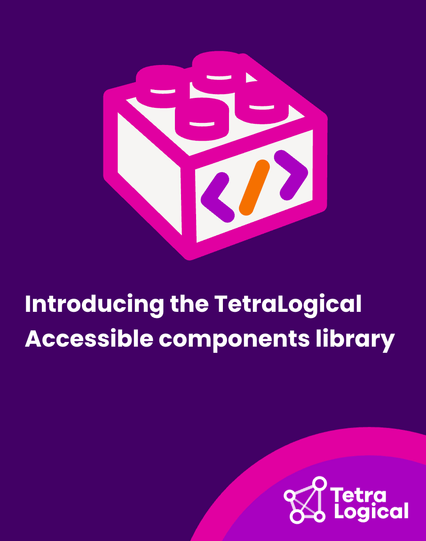
Introducing the Accessible Components Library from @TetraLogical!

tetralogical.com/blog/2026/10/

Eight common components with documented accessibility requirements, test scenarios, and working automated tests that check them.

• Free to use and adapt
• Human-readable tests written in Gherkin
• Mapped to WCAG 2.2, levels A to AAA

The text  “Introducing the TetraLogical Accessible Components Library” with a pink building Lego block with four circular studs on top. On the side of the block, there are coding symbols (a left angle bracket, a slash, and a right angle bracket) in orange and purple. The TetraLogical logo appears at the bottom right.
ALT text

The text “Introducing the TetraLogical Accessible Components Library” with a pink building Lego block with four circular studs on top. On the side of the block, there are coding symbols (a left angle bracket, a slash, and a right angle bracket) in orange and purple. The TetraLogical logo appears at the bottom right.

@dlsl@mastodon.online

Somehow I missed that you can now add alt text to your profile picture. Well I added it now. Did my best with the chatacter limit.

I know mastodon has lots of alt text enthusiasts and I'd be greatful for any feedback on it!

@w3cdevs@w3c.social


Watch @lolaodelola present the Accessibility Compatibility Data (ACD) project:
➡️ youtu.be/XQpkWeYyqJk

In 2026, the project advanced efforts to integrate support data into tools such as the Browser Compatibility Data (BCD) and Baseline, with a proof of concept using Web Platform Tests and ARIA-AT data. Work continues on filling data gaps and defining support statuses, with a TPAC 2026 breakout inviting community input!

youtube.com

Accessibility Compatibility Data (ACD)

by Lola Odelola, Documentation Community Group. Accessibility Compatibility Data (ACD) made significant progress in 2026, exploring how accessibility support...

@frontenddogma@mas.to
@Mudb0y@universeodon.com

I'm finally ready to publicly announce Tallfree, a custom firmware for the Roland SP-404MKII which allows blind people to fully use the device with speech. 2 weeks later, lots of testing, and a hell of a lot of card swaps, it's good enough to reliably use to make music! At this point it's the centerpiece of my studio and honestly I couldn't be happier with it.
Attached is an audio recording of me playing with the device, showing off some beats I made on it, and just rambling about it for a while. You can listen to it if you're curious about how Tallfree works but don't have the machine / don't want to run it your self for whatever reason.
I would very much appreciate boosts, I'm curious what people think!
github.com/mudb0y/tallfree
Edit: OK 3 edits later and it finally worked! Media is now properly uploaded.

@mjd@mathstodon.xyz
AI-negative

My most recent blog post uses colored text to help distinguish between three kinds of things, and although distinguishing the colors wasn't necessary to understand the post, I wanted to make sure the colored text didn't disappear into the background for color-blind readers.

I asked Claude, and after answering it suggested that I could do even better, by changing the three colors to similar colors from the Okabe–Ito palette. So I used the ones it suggested.

Two of which are not actually in the Okabe-Ito palette. I let Claude sucker me into using its misinformation without checking first.

@SyHoekstra@tweesecake.social

There’s an iPhone 18 Pro sitting on my desk, but I’m still using my 15 that has a super janky USB-C port. Why? Because the new phone has iOS 27, which is one of the iOS versions we get every couple years that ships with a series of screen reader bugs that would be inexcusable if non-disabled users had to deal with anything like them. You can find a run-down of the issues at this link if you’re interested, but they include things like: you can’t access your history, reading list, or bookmarks in Safari; sometimes the time display is just wrong - usually it’s the time you last awoke your device; and sometimes in the middle of reading text, reading stops for no reason. So I’ll cross my fingers and hope these issues get resolved before the trade-in window for my old device closes. applevis.com/newsletter/ios-27

@deconspray@mastodon.social

Accessibility rarely disappears because someone decided it wasn't important.

It disappears in the handoffs.

Nic Steenhout's article asks an uncomfortable question: What if accessibility is not primarily a people problem, but a workflow problem?

If accessibility only gets reviewed at the end, we're not shifting left. We're waiting for failure.

buttondown.com/nic-steenhout/a

buttondown.com

Accessibility getting dropped in the process

This newsletter is a bit different than previous ones. Rather than my usual collection of shorter articles and updates, it’s devoted to one longer piece. The...

@frontenddogma@mas.to
@recep07@mastodon.social

I'm Recep, a totally blind developer. I build iOS and macOS apps, many inspired by my own everyday needs. I care about making them accessible and useful for everyone, including blind, low-vision and sighted people. Here to share some of my apps, exchange ideas and learn from others.

@frontenddogma@mas.to
@deconspray@mastodon.social

Accessibility rarely disappears because someone decided it wasn't important.

It disappears in the handoffs.

Nic Steenhout's article asks an uncomfortable question: What if accessibility is not primarily a people problem, but a workflow problem?

If accessibility only gets reviewed at the end, we're not shifting left. We're waiting for failure.

buttondown.com/nic-steenhout/a

buttondown.com

Accessibility getting dropped in the process

This newsletter is a bit different than previous ones. Rather than my usual collection of shorter articles and updates, it’s devoted to one longer piece. The...

@masukomi@connectified.com

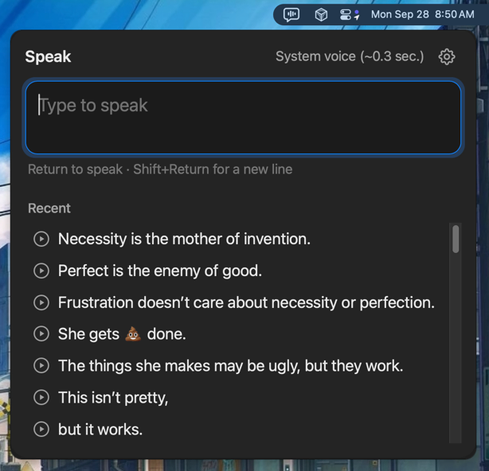
Live Speech on is riddled with bugs, misses, and implementation stupidity that make it really frustrating to use. So, I made a replacement for it.

Same idea, just not terrible. A simple menu-bar app that opens a text box and speaks what you type in it using your currently selected Siri voice.

Free, open source, etc.

Details here github.com/masukomi/living_spe

Feedback welcomed.

A screenshot of the LivingSpeech app. It shows a text input, and a list of recent items below it. Each one has a play button next to it.

the lines of the recent items combine to read 

Necessity is the mother of invention.
Perfect is the enemy of good.
Frustration doesn't care about necessity or perfection.
She gets 💩 done.
The things she makes may be ugly, but they work.
This isn't pretty, 
but it works.
ALT text

A screenshot of the LivingSpeech app. It shows a text input, and a list of recent items below it. Each one has a play button next to it. the lines of the recent items combine to read Necessity is the mother of invention. Perfect is the enemy of good. Frustration doesn't care about necessity or perfection. She gets 💩 done. The things she makes may be ugly, but they work. This isn't pretty, but it works.

@somegregariousdude@dragonscave.space

Question for my fellow blind Android users... What Mastodon client would you recommend I try on my Pixel? I'm not exactly happy with my current client as it feels like it's missing some features, such as the ability to delete posts that I've bookmarked and the ability to set replies as unlisted by default. Maybe I got spoiled by Mona when I was on iOS, but I do miss all its little nice to haves that it included.

@mjd@mathstodon.xyz

Worth reading the whole thread, the point is at the end.

mastodon.social

Ritchie (@acidiclight@mastodon.social)

Content warning: recent KDE controversies

@acidiclight@mastodon.social · Reply to Ritchie
recent KDE controversies

Shortly after that interview, Nate pulled me aside. Paraphrasing, he told me the board went with another applicant. But he asked that, if the rest of the board discussed and agreed, if I'd be willing to work with them as a brand new role.

I said yes.

And now, they have a KDE accessibility engineer. That's who I am. I write the code that makes KDE software easier to use for people with disabilities.

@frontenddogma@mas.to
@elettrona@poliversity.it

On November 13th and 14th 2026 I'll speak at @sfscon - to be more precise it'll be on Saturday 14th at 10:20 in the morning.

My talk, 15 minutes, is "reclaiming our choice: why digital independence demands accessibility in FOSS"

It's a 15 minutes speech where I'm going to explain what's right and what's wrong in current approach. Why blind people rely on politically/technically vulnerable tech? What has been already done and what should FOSS community improve?

SPOILER: making all people feel guilty about commercial and expensive tech is not the right direction. Not for us, at least.

I'll also mention the effort made by @Two9A Imran Nazar, who inspired by @stefano -Stefano Marinelli-'s FediMeteo, has built a Fediverse project to allow Muslim believers to be warned about when to pray.

A very specific need, for a very specific community, made by someone who feels this need and wanted to cover it. But the narration "do it yourself if you need", can't always work for everyone, especially when concerning code learning.

My talk's explanation:

sfscon.it/talks/reclaiming-our

Whole DiDay program:

sfscon.it/tracks/digital-indep

sfscon.it

Digital Independence Day 2026 - SFSCON

@manlycoffee@techhub.social

No idea how to articulate this better (and people familiar with UX and product-oriented fronted development would push back hard, but I thought I'd write it anyways):

The one thing that React and Tailwind has taught me is that if we're thinking at the component level, we're going to have a bad time.

Bottom line is, it's better to think in small composable atoms, favouring composition over inheritance, extension over modification.

Not sure how this translates across orgs beyond the ones that I worked at.

@elettrona@poliversity.it

On November 13th and 14th 2026 I'll speak at @sfscon - to be more precise it'll be on Saturday 14th at 10:20 in the morning.

My talk, 15 minutes, is "reclaiming our choice: why digital independence demands accessibility in FOSS"

It's a 15 minutes speech where I'm going to explain what's right and what's wrong in current approach. Why blind people rely on politically/technically vulnerable tech? What has been already done and what should FOSS community improve?

SPOILER: making all people feel guilty about commercial and expensive tech is not the right direction. Not for us, at least.

I'll also mention the effort made by @Two9A Imran Nazar, who inspired by @stefano -Stefano Marinelli-'s FediMeteo, has built a Fediverse project to allow Muslim believers to be warned about when to pray.

A very specific need, for a very specific community, made by someone who feels this need and wanted to cover it. But the narration "do it yourself if you need", can't always work for everyone, especially when concerning code learning.

My talk's explanation:

sfscon.it/talks/reclaiming-our

Whole DiDay program:

sfscon.it/tracks/digital-indep

sfscon.it

Digital Independence Day 2026 - SFSCON

@swithinbank@webtoo.ls

“AI powered by statistical reasoning will still rule with and produce content for the majority or average and current AI has been characterized as an infrastructure of digital eugenics eliminating difference and increasing disparity. We've been monitoring harm and incident reports and people with disabilities are disproportionately vulnerable to the harms.”

youtube.com/live/gVTGHP5m0a8?s

youtube.com

Panel: Digital Accessibility Ethics: a new framework to advance accessibility #id24 2026

This session will introduce the Digital Accessibility Ethics Framework and show how it is applied to several aspects of tech and accessibility. These include...

@jason@social.jasonjgw.net
I prepared a paper and typeset it using LaTeX with the new tagged PDF options specified at the start of the file. I was then able to read my manuscript in Firefox with the document structures correctly presented via the screen reader. This is impressive. I've been using LaTeX since the late 90s, but I would normally use an external HTML conversion tool to make a rendered version of the document accessible. This step is no longer necessary, at least for some documents. I don't work in a mathematical field, so I can't comment on the mathematics accessibility, although there is an option to include MathML in the PDF output.
#accessibility #ScreenReader #pdf #TeXLaTEX

social.jasonjgw.net

jasonjgw.net

@abishek_muthian@abishekmuthian.com

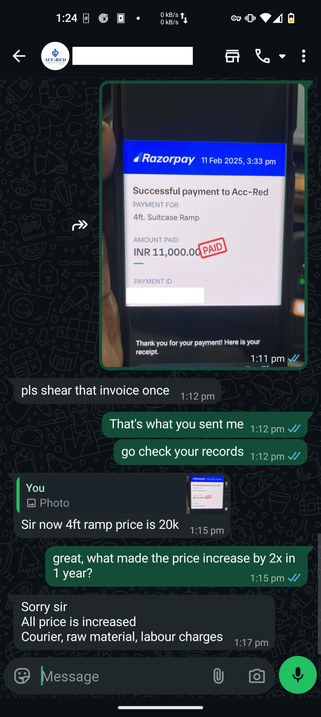
Price of portable ramp has increased by 2x in a year in India. To give a sense of proportion to the able-bodied it's akin to DDR5 RAM price increase, at least that can be blamed upon the AI scaling.

The company is blaming the inflation.

It's a double whammy on people with disabilities, when we're paying the same amount of tax as able-bodied.

#accessibility #disability #mastindia

WhatsApp chat showing a Razorpay receipt dated 11 Feb 2025 for INR 11,000 paid for a 4ft suitcase ramp, followed by messages where the seller now quotes the ramp at INR 20,000 and cites higher courier, raw material, and labour costs for the price increase.
ALT text

WhatsApp chat showing a Razorpay receipt dated 11 Feb 2025 for INR 11,000 paid for a 4ft suitcase ramp, followed by messages where the seller now quotes the ramp at INR 20,000 and cites higher courier, raw material, and labour costs for the price increase.

@RosethornRanger@spore.social

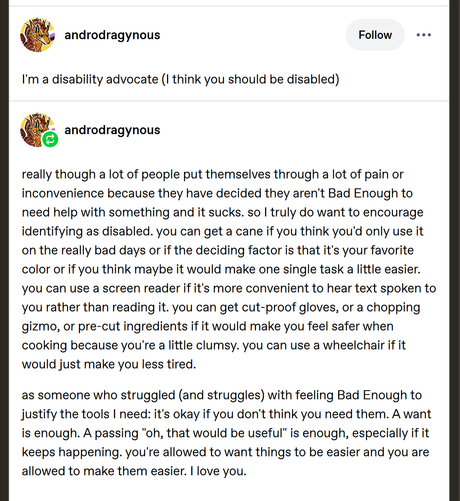
Accessibility isn't for the people who "need" it, it is for the people it helps. That is probably one of the biggest things I see people get wrong about it

 An image of two tumblr posts by the same person. They have the profile picture of some kind of animal and it appears to have the non-binary flag next to it. The username is Androdragynous.  The first post says "I'm a disability advocate (I think you should be disabled)".  The next says "really though a lot of people put themselves through a lot of pain or inconvenience because they have decided they aren't Bad Enough to need help with something and it sucks. so I truly do want to encourage identifying as disabled. you can get a cane if you think you'd only use it on the really bad days or if the deciding factor is that it's your favorite color or if you think maybe it would make one single task a little easier. you can use a screen reader if it's more convenient to hear text spoken to you rather than reading it. you can get cut-proof gloves, or a chopping gizmo, or pre-cut ingredients if it would make you feel safer when cooking because you're a little clumsy. you can use a wheelchair if it would just make you less tired.  as someone who struggled (and struggles) with feeling Bad Enough to justify the tools I need: it's okay if you don't think you need them. A want is enough. A passing "oh, that would be useful" is enough, especially if it keeps happening. you're allowed to want things to be easier and you are allowed to make them easier. I love you."
ALT text

An image of two tumblr posts by the same person. They have the profile picture of some kind of animal and it appears to have the non-binary flag next to it. The username is Androdragynous. The first post says "I'm a disability advocate (I think you should be disabled)". The next says "really though a lot of people put themselves through a lot of pain or inconvenience because they have decided they aren't Bad Enough to need help with something and it sucks. so I truly do want to encourage identifying as disabled. you can get a cane if you think you'd only use it on the really bad days or if the deciding factor is that it's your favorite color or if you think maybe it would make one single task a little easier. you can use a screen reader if it's more convenient to hear text spoken to you rather than reading it. you can get cut-proof gloves, or a chopping gizmo, or pre-cut ingredients if it would make you feel safer when cooking because you're a little clumsy. you can use a wheelchair if it would just make you less tired. as someone who struggled (and struggles) with feeling Bad Enough to justify the tools I need: it's okay if you don't think you need them. A want is enough. A passing "oh, that would be useful" is enough, especially if it keeps happening. you're allowed to want things to be easier and you are allowed to make them easier. I love you."

@frontenddogma@mas.to
@markwyner@mas.to

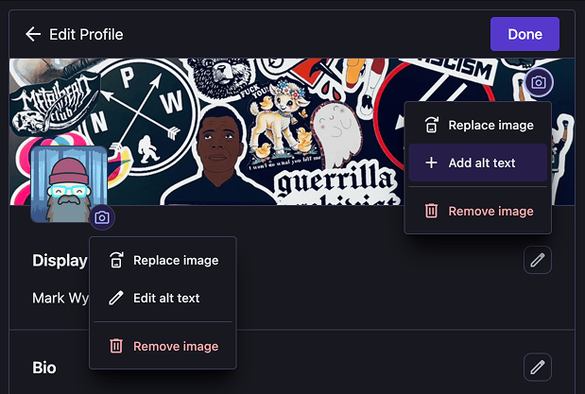
So here’s something y’all may not realize shipped with v4.6.0. You can now add/edit alt text for your profile avatar and poster image.

So go forth, and add alt text to your profile images!

Lots of folks add this to their bios. That’s better than nothing, but it’s not optimal for the folks who need it most. Use the tool, then remove the descriptions from your bio.

Tip: if you need help writing your alt text, I have a comprehensive guide about it:

markwrites.io/alt-text-is-the-

This was a long-overdue accessibility improvement. A critical one. But I don’t recall seeing it announced with any fervor. It quietly dropped into a list of updates.

github.com/mastodon/mastodon/r

Screenshot of the profile image edit menus in the Mastodon desktop UI. The avatar and poster both have an option labeled “edit alt text” or “add alt text.”
ALT text

Screenshot of the profile image edit menus in the Mastodon desktop UI. The avatar and poster both have an option labeled “edit alt text” or “add alt text.”

@MediaActivist@todon.eu
@AccessibleStrategies@mastodon.social

I'm working on getting my website up. I'm using Next.js, Vercel, GitHub and Cloudflare. I'm sing AI (Claude) for support.

My partner and I have used several web builders. We're tired of:
- features being gated behind payment tiers;
- inaccessible user interfaces (UI);
- not having the tools we need to work how we want.

@frontenddogma@mas.to
@maskdragon@zeroes.ca

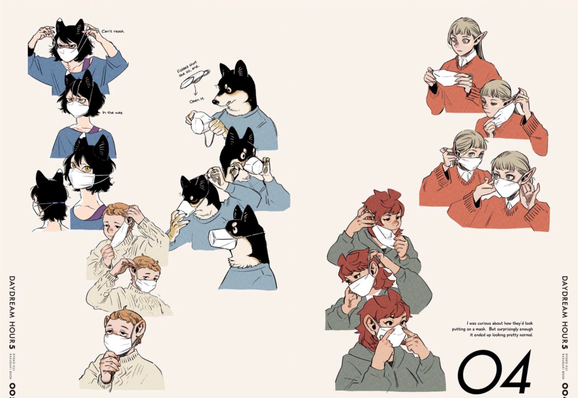
to elaborate more on the inspiration to making mask/respirator art and making this account.

The illustration I've attached is by Ryoko Kui in her Daydream Hour series. The characters are from her recent manga/anime Delicious in Dungeon.

The caption reads, "I was curious about how they would look putting on a mask. But surprisingly enough it ended up looking normal".

Everyone's different.

Everyone needs different masks. We can't keep ignoring the realities of airborne hazards for "one size fits all" bullshit 💢

if you need an ear-saver, lets get you some ear savers.

if you need a different shape mask to better accommodate your face shape and/or size, lets help you get masks that better fits your face.

if you need a clear mask to read lips, lets get you some masks or a respirator with a clear window to read lips

if you have facial hair, please check out the ongoing studies that suggest the under-mask beard cover (aka the Singh Thattha technique) can provide a proper seal

There are so many different options and sizes to try out :n95: :aura: :auraHCW: :xplore1900: :vflex: 💞 😷

4 characters from the manga/anime Delicious in Dungeon donning a COVID mask. Left to right, an anthro cat woman struggles to put on a mask with ear straps, because her ears are on the top of her head, in the last drawing, she finds an ear saver to tie the ear straps behind her head, and that works for her. A gnome man dons on a mask with ear straps. An anthro dog man has a flat fold head strap mask that's larger and more cone shape to better fit his snout, which works for him. A Dwarf woman puts on a mask with ear straps, pressing on the area around her nose to ensure a snug fit. An elf woman puts on a mask with ear straps.

The caption reads, "I was curious about how they would look putting on a mask. But surprisingly enough it ended up looking normal". which is the whole point of this account!

if they can do it, you can do it!

please find the courage inside of yourself to try.
ALT text

4 characters from the manga/anime Delicious in Dungeon donning a COVID mask. Left to right, an anthro cat woman struggles to put on a mask with ear straps, because her ears are on the top of her head, in the last drawing, she finds an ear saver to tie the ear straps behind her head, and that works for her. A gnome man dons on a mask with ear straps. An anthro dog man has a flat fold head strap mask that's larger and more cone shape to better fit his snout, which works for him. A Dwarf woman puts on a mask with ear straps, pressing on the area around her nose to ensure a snug fit. An elf woman puts on a mask with ear straps. The caption reads, "I was curious about how they would look putting on a mask. But surprisingly enough it ended up looking normal". which is the whole point of this account! if they can do it, you can do it! please find the courage inside of yourself to try.

@doofeohren@digitalcourage.social

Ihr Lieben,

wir werden uns in den nächsten Wochen von Facebook und Instagram verabschieden. Deshalb wäre es ganz klasse, wenn wir etwas mehr Fans hier im Fediverse bekommen könnten.
Wenn ihr uns was gutes tun wollt, so empfehlt uns doch Menschen in eurem Umfeld, die sich fürs interessieren könnten.

Für die, die kein Mastodon haben, gibt es auch die Möglichkeit, unseren Email-Newsletter zu abbonieren: doofe-ohren.de/index.php/newsl

Danke euch!
die Helga von Doofe Ohren

doofe-ohren.de

Folge uns | Doofe Ohren

@se_davidobrien@mastodon.scot

People who use assistive technologies, such as a screenreader or speech-recognition software, need to know the names of interactive elements on the web. Otherwise they may not be able to recognise the thing they’re dealing with, and so be unable to interact with it.

Which means we, as authors, need to give things meaningful accessible names. How does this happen?

@frontenddogma@mas.to
@Heidentweet@todon.eu

Please do not put links in the AltText. Just put them in your text.

They don't work as links there, and are read out loud character for character by screen readers, which is an assault on people's ears.

Edit, audio examples by request:

Link read by screen reader: m.youtube.com/watch?v=xX-dsQbC
The solution in this example is for a link in a document and not applicable in AltText.

Special characters and symbols (in embedded tweets): business.scope.org.uk/accessib

business.scope.org.uk

How special characters affect screen readers - Scope for Business

Learn how special characters, Unicode symbols, punctuation, emoticons and ASCII art impact screen reader accessibility and AT users.

@SteveFaulkner@mastodon.social

🤑 I suspect many of the new (and not so new) testing suites/tools/platforms being offered for 💰are built/use 's based on open source tooling. The thing to remember is you or your organization can use LLM's to build automated tools, no need to fork out cash to vendors...

@RossMinor@peoplemaking.games

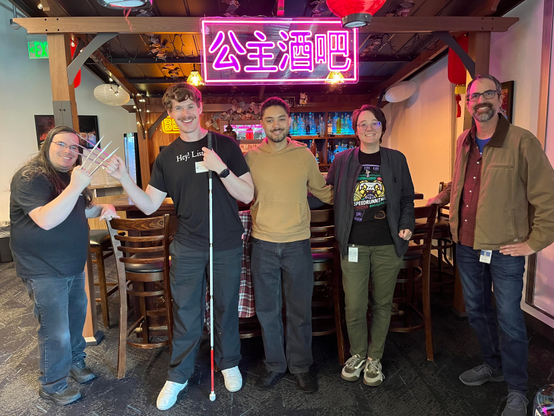
Now that has officially been released, I can finally announce that I consulted on the for the game. I want to be transparent as much as possible for how much I was involved in the game and there was only so much I could work on within the time constraints, but I do truly believe this game is a step forward in terms of blind accessibility. There are several accessibility features that I have not seen mentioned in reviews, so I hope you will all join me on my Twitch today at 4:00 PM PST to talk about the game and design decisions that were made. Afterall, I myself have not even been given a review copy because of my involvement with the game, so this is truly the first time seeing the final product as well.

twitch.tv/RossMinor

A group photo of five people standing in a recreation of the Princess Bar from Wolverine. All are smiling at the camera. The bar sits under a wooden pergola frame. Hanging from the top beam is a large glowing pink and purple neon sign reading 公主酒吧, Chinese for "Princess Bar." Red paper lanterns hang around the frame, and string lights and pinned-up paper cover the dark ceiling. Behind the bar, backlit shelves hold rows of glowing blue and green liquor bottles, with a small white beckoning-cat figurine on top. Tall wooden bar stools stand in front of the counter, which is partly covered by a red and white plaid cloth. Sam is wearing the Wolverine claws and holding them up to Ross on his left, where Ross is holding his fist up to the claws. Brian stands next to Ross and has his arm around him and Brianna is at the end.
ALT text

A group photo of five people standing in a recreation of the Princess Bar from Wolverine. All are smiling at the camera. The bar sits under a wooden pergola frame. Hanging from the top beam is a large glowing pink and purple neon sign reading 公主酒吧, Chinese for "Princess Bar." Red paper lanterns hang around the frame, and string lights and pinned-up paper cover the dark ceiling. Behind the bar, backlit shelves hold rows of glowing blue and green liquor bottles, with a small white beckoning-cat figurine on top. Tall wooden bar stools stand in front of the counter, which is partly covered by a red and white plaid cloth. Sam is wearing the Wolverine claws and holding them up to Ross on his left, where Ross is holding his fist up to the claws. Brian stands next to Ross and has his arm around him and Brianna is at the end.

@jpetazzo@hachyderm.io

I'm looking for recommendations for someone who is (0% vision) and doesn't have a computer (so, using their phone).

They're looking for a way to publish texts or blog posts. They tried and were very disappointed by substack and tumblr.

And also potentially a Mastodon client.

Is there anything I should or even could recommend them?

RT appreciated!

@frontenddogma@mas.to

How Japan Is Rethinking Web Accessibility Without Laws, by @makotoueki.bsky.social and others (@Tribo):

vimeo.com/1223148266?ref=front

vimeo.com

How Japan Is Rethinking Web Accessibility Without Laws

A single smile can explain web accessibility better than a thousand audits. Makoto Ueki joins us from Japan to share the moment that changed his career: watching an 80+ year old woman, newly blind, learn to search Google with a screen reader and light up when the results finally appeared. That story sets the tone for a practical, human conversation about why accessible technology matters and how inclusive design turns the web into independence. We also get specific about the reality of web accessibility in Japan and why it differs from the US and Europe. Japan has no laws mandating web accessibility and far fewer lawsuits, which means many teams still fight for basic understanding and stakeholder support before they can even talk about implementing WCAG 2.2. Makoto breaks down how that “why” phase can trap organisations in a checklist mentality and a shift-right process where accessibility gets bolted on late. Then we connect the dots to a global trend: accessibility burnout, driven by isolation, competing priorities, and the struggle to make change inside organisations. One of the most valuable takeaways is Japan’s perspective on the world’s fastest-aging population. Accessibility isn’t “special work for someone else” it’s better user experience for humans across a whole lifespan. We wrap with Makoto’s most actionable advice: most accessibility issues come down to a short list of web fundamentals like alt text, colour contrast, keyboard navigation, headings, forms, captions, and resizable content, plus usability testing with real users and assistive technology to catch what guidelines miss. If you found this helpful, subscribe, share it with a teammate, and leave a review with the one accessibility fundamental you plan to improve first. Send us Fan Mail Support the show Follow axschat on social media. Bluesky: Antonio https://bsky.app/profile/akwyz.com Debra https://bsky.app/profile/debraruh.bsky.social Neil https://bsky.app/profile/neilmilliken.bsky.social axschat https://bsky.app/profile/axschat.bsky.social LinkedIn https://www.linkedin.com/in/antoniovieirasantos/ https://www.linkedin.com/company/axschat/ https://www.linkedin.com/in/neilmilliken/ Vimeo https://vimeo.com/akwyz https://twitter.com/axschat https://twitter.com/AkwyZ https://twitter.com/neilmilliken https://twitter.com/debraruh

@frontenddogma@mas.to
@smallcircles@social.coop

Are smart glasses the future, or have they gone too far? News

> has already sold millions of pairs, with supporters claiming they could become the next major computing platform, helping people make calls, translate languages, identify objects and navigate the world hands-free. campaigners warn they could enable covert and lawsuits have raised concerns about consent and data collection, and some venues have banned them altogether. Some critics have labelled them "spy glasses" and "pervert glasses". So are smart glasses a new surveillance threat? Or are we in danger of demonising a with the potential to benefit millions?

The news item focuses on the harms and dangers, but also highlights the aspects that can benefit many people with disabilities.

youtube.com/watch?v=zFFsVTvFbNw

youtube.com

Are AI smart glasses the future, or have they gone too far? | BBC News

AI-powered smart glasses are rapidly moving from science fiction into everyday life. Meta has already sold millions of pairs, with supporters claiming they ...

@kaveinthran@mastodon.stickbear.me

I’m currently looking for a good VPN solution to use on both my iPhone and Windows PC. The main contenders I’m considering at the moment are ExpressVPN, AdGuard VPN, PrivateVPN, and Windscribe.

I’d especially love to hear from blind users about your experiences with any of these services. How accessible are their iOS and Windows apps with Screen-Readers? I’m also interested in general usability, reliability, performance, and any particularly useful or unique features.

If you use another VPN that you think is worth considering, suggestions are very welcome too.

@benjamineskola@hachyderm.io

Web accessibility question. I feel like I never know when alt text is actually necessary or not on an image. If it’s decorative it doesn’t need alt text? — but then what’s decorative?

If I’ve got a list of documents, with some metadata and a thumbnail, does the thumbnail need alt text? My thinking is that anything I could potentially use as alt text would already be in the metadata beside it. So a screen reader ends up just repeating it, which doesn’t seem like it would be useful to me.

@zichy@mastodon.social

Hey, ich suche einen neuen Job! 👋

Als Spezialist für digitale Barrierefreiheit mit technischem Hintergrund und 13 Jahren Berufserfahrung bin ich das Bindeglied zwischen Design und Code. Ich erarbeite zugängliche Interfaces, erstelle Analysen und Testkonzepte und teile mein Wissen.

Festangestellt, unbefristet, hybrid/remote in Berlin, ~32h/Woche.

(Weitere Infos unten.)

Gerne boosten. 💕

@tristan@hachyderm.io

Today, I'm releasing a new website for blind gamers, built for 2026 and beyond.
So much of the information about blind-accessible PC and console games is scattered across the AudioGames.net forum, GitHub pages, Discord servers, and websites that haven't kept up with how quickly blind gaming has been evolving since the advent of AI. Unless you're embedded in Discord or the Audiogames.net Forum, you're probably not aware that over 70 games have been made accessible for the blind via modding this year alone.
What we've really needed is a website that tracks accessible mainstream games, with descriptions, direct links to their mods, and the information you need to get playing. "But that's a wiki," you exclaim. "But there are already lists like this," you plead. Well...
BlindGaming.net, aka The Blind Gaming Database, automatically tracks mod releases through GitHub and Nexus Mods. It also tracks game prices across Steam, GOG, Humble, and many key shops, with a genre filter and a page for ongoing sales. And for the nerds among us, each game has its own RSS feed and supports web push notifications. There are a lot of other small features, like cross-region price history, and an upcoming API for mod ratings and game access information. I also want to do a better job of raising up mod creators so people know how to support them!
All of this said, there's still much work to be done. If you'd like to help, consider writing a guide in Markdown or improving the existing Steam guide. I'd especially appreciate help from anyone familiar with console or Linux setup, so we can give people instructions they can actually follow. Finally, if you're interested in helping maintain the registry of games and have a track record in doing this kind of work, please shoot me a DM.
This is not intended as a replacement for places like the Accessible Gaming wiki, although I do my best to integrate with it and point people there when I can.
I'd love to hear what you think!

blindgaming.net/

blindgaming.net

The Blind Gaming Database | Blind-accessible games

Find games you can play without sight. Check built-in access, community mods, known barriers, platforms, and current store prices.

@aardrian@toot.cafe
@frontenddogma@mas.to
@tristan@hachyderm.io

Today, I'm releasing a new website for blind gamers, built for 2026 and beyond.
So much of the information about blind-accessible PC and console games is scattered across the AudioGames.net forum, GitHub pages, Discord servers, and websites that haven't kept up with how quickly blind gaming has been evolving since the advent of AI. Unless you're embedded in Discord or the Audiogames.net Forum, you're probably not aware that over 70 games have been made accessible for the blind via modding this year alone.
What we've really needed is a website that tracks accessible mainstream games, with descriptions, direct links to their mods, and the information you need to get playing. "But that's a wiki," you exclaim. "But there are already lists like this," you plead. Well...
BlindGaming.net, aka The Blind Gaming Database, automatically tracks mod releases through GitHub and Nexus Mods. It also tracks game prices across Steam, GOG, Humble, and many key shops, with a genre filter and a page for ongoing sales. And for the nerds among us, each game has its own RSS feed and supports web push notifications. There are a lot of other small features, like cross-region price history, and an upcoming API for mod ratings and game access information. I also want to do a better job of raising up mod creators so people know how to support them!
All of this said, there's still much work to be done. If you'd like to help, consider writing a guide in Markdown or improving the existing Steam guide. I'd especially appreciate help from anyone familiar with console or Linux setup, so we can give people instructions they can actually follow. Finally, if you're interested in helping maintain the registry of games and have a track record in doing this kind of work, please shoot me a DM.
This is not intended as a replacement for places like the Accessible Gaming wiki, although I do my best to integrate with it and point people there when I can.
I'd love to hear what you think!

blindgaming.net/

blindgaming.net

The Blind Gaming Database | Blind-accessible games

Find games you can play without sight. Check built-in access, community mods, known barriers, platforms, and current store prices.

@zichy@mastodon.social

Hey, ich suche einen neuen Job! 👋

Als Spezialist für digitale Barrierefreiheit mit technischem Hintergrund und 13 Jahren Berufserfahrung bin ich das Bindeglied zwischen Design und Code. Ich erarbeite zugängliche Interfaces, erstelle Analysen und Testkonzepte und teile mein Wissen.

Festangestellt, unbefristet, hybrid/remote in Berlin, ~32h/Woche.

(Weitere Infos unten.)

Gerne boosten. 💕

@frontenddogma@mas.to
@elettrona@poliversity.it

I assumed that Fediverse could really be an open, progressive environment where to discuss ideas and grow up, with different points of view. But what I'm finding lately, is something different. Narration going from "pro AI / glasses" to "no AI / glasses" so if you don't maintain a position, you are just in favor of fascists or perverts.
The last one I had a discussion with, called me "a waste of time" because I made him realize that a sighted pervert can use his own eyes, without glasses, while I fasten my shoes strings, bent over. Instead of joining me, thinking of a proposal to satisfy blind people's needs while protecting privacy, no. The problem is me.

Same for github/codeberg stuff: do AI-built pull-requests ruin open source software? Yes.
Is AI-generated code dirty and unreliable? Yes.
Have hand made coders the right to prohibit automated code? Yes, of course.
But same coders, went on for years saying "I'm an independant coder, a small company, I have no resources to make it accessible to blind, if you need it, make it yourself".
Now, thanks to assisted coding, many of us blind are doing exactly this: trying to solve their gaps by having the bots fix the issue. Then, to help other users (and the coder himself), they place the fix in form of pull request, into the repository. And it's often refused.
But, would the original coder ever solve accessibility? No. I'm alone, it's a small company, you're the first blind user I hear, and similar bullshit.
What, the fuck, should, we, do?

From far-right, I know what to expect: they're racist, ableists, and all the worst. They don't hide it. But I couldn't definitely expect such behaviours from people caring for freedom, ethics, open technologies, etc. I'm fed up of being considered an object who can gladly be sacrificed for purity of something or someone.

UPDATE: on blindness, coding and AI, please read this story, wrote by an experienced blind guy, about the topic:

mosen.org/ai

And as the discussion must be complete, I also add another point of view, together with the one pro vibe-coding.

On the link below, Robert (another experienced blind person) talks about "disability dongle", meaning those super-tech hardwares made for disability, but are more for inspirational videos than for real time usage. Expensive and uncomfortable.

Robert talks about hardware but it can easily be applied to AI as well: it's far from affordable, not with disability in mind, it must be well trained and you use more tokens to get what you want...

I'm not pro, I'm not against, I'm in the middle. Appreciate good, hate the bad. And want the discussion to be more balanced.

sightlessscribbles.com/posts/d

sightlessscribbles.com

The "Disability Dongle": Why Silicon Valley Hates Me and you., Sightless Scribbles

A fabulously gay blind Romance author.

@frontenddogma@mas.to
@dansup@mastodon.social

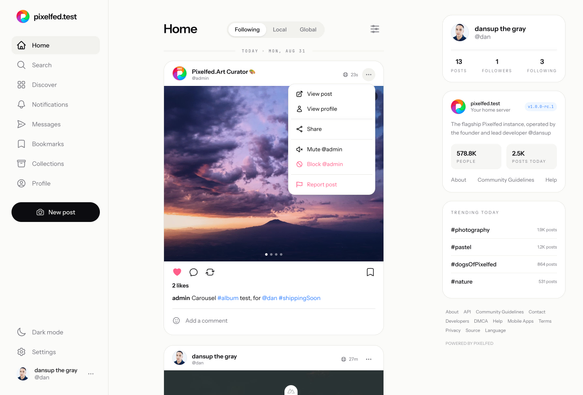
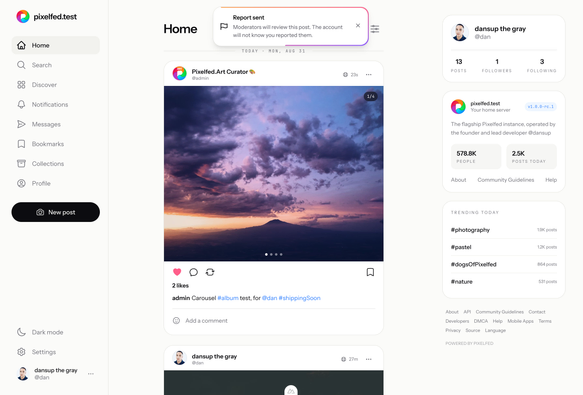
Reusable components like Dropdown Menus and Toasts with accessibility, internationalization and themes built-in are just a few aspects that make the new :pixelfed: webUI shine ✨

Animations, gifs and transitions are automatically disabled when prefers-reduced-motion is set.

Yes, everything you've asked for, like web push + proper PWA, and much more is coming.

I'm a man of my word. Just look at loops.video 🤠

New Pixelfed webUI
ALT text

New Pixelfed webUI

New Pixelfed webUI
ALT text

New Pixelfed webUI

@Robinzz3@aus.social

I’M LIBERATED BY IT 💎

I’m only just beginning to understand how important the discussion underneath actually is.

I have been abused for using AI. I have lost a dear friendship over it. I have been told, in various ways, what I should use instead.

Yet many of the alternatives people have suggested, from modern dictation to speech tools, already use AI themselves. AI is increasingly woven into ordinary technology, whether we call it AI or not.

And still, I choose AI Support, .

Not because I couldn’t survive without it. I could. I lived with the slower rhythm of my disability for decades before this technology appeared.

But with AIS, I feel liberated.

I can speak, I can write, and I can think things through. I can participate without the physical effort of typing, constantly determining how much of myself I get to express before exhaustion takes over.

That matters to me.

People are entirely free to criticise AI. They can refuse to use it themselves. They can raise every legitimate concern about what this technology is doing.

But I am the person with a disability in this life.

I get to choose the tools that help me live it.

@3goodthings
@DigitalCoup
@meditation
@economics_that_works

An older man with long grey hair and a white beard sits on a rocky hillside wearing headphones, a laptop open on his lap. He looks across a vast landscape toward a brilliant golden sunset over distant mountains and water. The scene feels spacious, peaceful and quietly liberating.
ALT text

An older man with long grey hair and a white beard sits on a rocky hillside wearing headphones, a laptop open on his lap. He looks across a vast landscape toward a brilliant golden sunset over distant mountains and water. The scene feels spacious, peaceful and quietly liberating.

@TheEvilSkeleton@treehouse.systems

Hi, for those relying on a screen reader, we would like to have your feedback on what we could do to make GNOME Calendar friendly for you. If you would like to share some feedback on anything regarding the screen reader experience with GNOME Calendar, please consider reading and commenting on the following issue: gitlab.gnome.org/GNOME/gnome-c

(Boost appreciated)

gitlab.gnome.org

Figure out what to display/expose to screen reader users (#1634) · Issues · GNOME / gnome-calendar · GitLab

Feature summary Most of the accessibility improvements in recent versions were mostly targeting keyboard navigation. While...

@markwyner@mas.to

Do you wanna be an alt-text rockstar? I got you.

I just published a comprehensive guide on the when, what, and how of image descriptions. There are sections for design/development practitioners and social media posters alike.

So read up, then get your alt-text on.

markwrites.io/alt-text-is-the-

markwrites.io

Mark W.rites - Alt Text is the Ocean You Thought Was a Pond

Photo by Phil DesforgesAlt text is vast and varied. There’s no way to make it perfect, but there are plenty of things we can do better. Let me show you what …

@frontenddogma@mas.to
@TheEvilSkeleton@treehouse.systems · Reply to TheEvilSkeleton

GNOME Calendar received a nice keyboard navigation upgrade after some small patches were merged yesterday: in the month view, when a cell is in focus, pressing Shift+Tab will now focus the event widget right in front of it 🥹

A screen recording that starts off with focus on the event widget, with a purple outline around it. Focus is then moved to the cell behind it; then, back to the event widget again; then, focus is moved to the cell again, and moved to adjacent cells; focus is then moved to the original cell; and finally, focus is moved to the event widget in front of it.
ALT text

A screen recording that starts off with focus on the event widget, with a purple outline around it. Focus is then moved to the cell behind it; then, back to the event widget again; then, focus is moved to the cell again, and moved to adjacent cells; focus is then moved to the original cell; and finally, focus is moved to the event widget in front of it.

@markwyner@mas.to

Do you wanna be an alt-text rockstar? I got you.

I just published a comprehensive guide on the when, what, and how of image descriptions. There are sections for design/development practitioners and social media posters alike.

So read up, then get your alt-text on.

markwrites.io/alt-text-is-the-

markwrites.io

Mark W.rites - Alt Text is the Ocean You Thought Was a Pond

Photo by Phil DesforgesAlt text is vast and varied. There’s no way to make it perfect, but there are plenty of things we can do better. Let me show you what …

@frontenddogma@mas.to
@TheEvilSkeleton@treehouse.systems · Reply to TheEvilSkeleton

GNOME Calendar received a nice keyboard navigation upgrade after some small patches were merged yesterday: in the month view, when a cell is in focus, pressing Shift+Tab will now focus the event widget right in front of it 🥹

A screen recording that starts off with focus on the event widget, with a purple outline around it. Focus is then moved to the cell behind it; then, back to the event widget again; then, focus is moved to the cell again, and moved to adjacent cells; focus is then moved to the original cell; and finally, focus is moved to the event widget in front of it.
ALT text

A screen recording that starts off with focus on the event widget, with a purple outline around it. Focus is then moved to the cell behind it; then, back to the event widget again; then, focus is moved to the cell again, and moved to adjacent cells; focus is then moved to the original cell; and finally, focus is moved to the event widget in front of it.

@pixelfed@mastodon.social

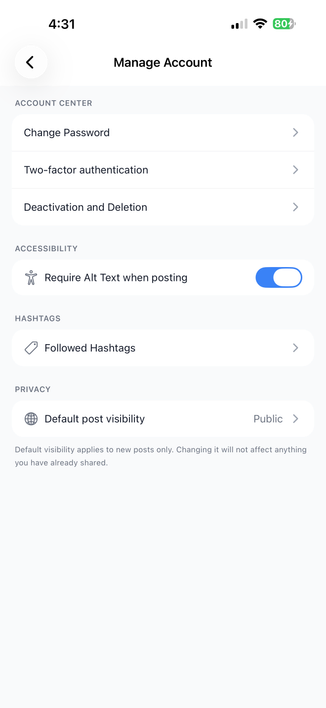
Accessibility is important, which is why we already support a setting that requires you to add Alt Text to posts before they are shared!

You can also set the default post visibility across web and mobile currently, but this will be more prominent in our new mobile app ✨

New Pixelfed mobile app Manage Account settings with the Require Alt Text when posting setting.
ALT text

New Pixelfed mobile app Manage Account settings with the Require Alt Text when posting setting.

@Robinzz3@aus.social

I WILL NOT BE BULLIED 💎

I received a vicious reply today because I use AI. It wasn't a disagreement. Nor a criticism. It was a full-frontal personal attack! And I’ll admit it affected me more than I expected.

I USE AI MAINLY BECAUSE I'M PARALYSED.

Typing is physically difficult for me. I have the use of only one hand. So, tapping out a post or email with one finger is exhausting. Voice and AI help me turn my own thoughts into usable writing in a normal amount of time.

THAT SHOULD NOT REQUIRE A DEFENCE.

You can dislike AI. You can distrust it. You can argue about copyright concerns, energy and water use, labour, culture, or anything else that concerns you. I will listen to you and answer you.

But attacking people simply for using AI is not principled.

IT'S BULLYING.

And disabled people should not have to produce a medical justification every time they use a technology that makes their life easier.

AI is a tool. How it is used matters. Who gets harmed matters. Context matters. What does not help is turning “AI user” into a moral accusation and deciding that cruelty is suddenly acceptable.

I’m quite happy to discuss the technology with anyone.

HOWEVER, I WILL NOT BE BULLIED FOR USING IT.

I didn't need to do anything about the attack. Before I could even decide how to respond, both the post and the person disappeared from my notifications.

@3goodthings
@DigitalCoup
@meditation
@economics_that_works
@startrek

@RosethornRanger@spore.social

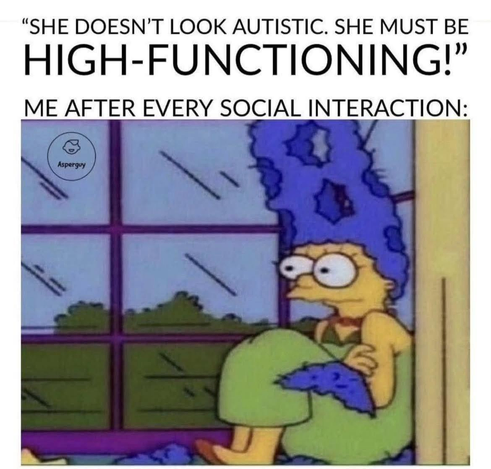
My appearance during a thing does not define my experience during it, or its long term impacts on me. (Also, functioning and ability is are linear)

 A captioned image of marge simpson. The text says ""She doesn't look autistic, she must be high-functioning" Me after every interaction:" Marge simpson in this image has large holes in her hair and is sitting curled up against the wall.
ALT text

A captioned image of marge simpson. The text says ""She doesn't look autistic, she must be high-functioning" Me after every interaction:" Marge simpson in this image has large holes in her hair and is sitting curled up against the wall.

thinking about alt text and translation on fedi; replies, boosts, and translations to other languages are welcome!

(🔷 Sadie - she/her) so, I notice that most fedi software and fedi clients do not translate alt text, content warnings, or (possibly) poll options when the "Translate" button is clicked or tapped (clicking or tapping it only translates the post's body content), which is both a language barrier and an accessibility barrier fedi users often face. I wonder if more fedi software or clients implemented alt text and content warning translation into existing translation facilities (and possibly into word-level mutes as an option a user can enable)?

I know there's probably a barrier to this (since I know it's not implemented already, and some translation options can be costly to operate), but as part of a system who cares about making a safe space for our mutuals and communities around us, I try not to boost unless I know mutuals will understand it, and that includes alt text and CWs. I may
⭐ it to show the author I like it, but that's about it. that is why I decided to ask to see if there were options short of copying and pasting them into a translator by hand, which may violate rules of instances in question (enby.life and the instance the post is from)

Boosts and replies are welcome. If anyone wants to translate this, feel free to translate past the
(🔷 Sadie - she/her) and inflect pronouns as needed. Replying with translations is recommended; quoting is fine, but be sure to link it at the end, s everyone can see it (since Mastodon will not accept quotes unless I quoted it myself)!

@frontenddogma@mas.to
@jecture@mastodon.social
@remixtures@tldr.nettime.org

"There are genuine opportunities to align the interests of AI and accessibility, but that alignment cannot be taken for granted. Plaintext documentation optimized for a language model is not the same as well-structured HTML for a screen reader. If the benefit for accessibility is assumed rather than intentionally designed, the result may be superficial or illusory.

However, the public must not accept that incidental accessibility benefits arising from AI development are an unqualified good. Not only is this assumption flawed, but it accepts a hierarchy that disability advocates should be challenging. The implicit premise is that disabled people’s needs require a commercial co-signer before they merit action. When a society is unmoved by decades of advocacy from disabled communities but springs into action when a tech company needs the same accommodation, it reveals whose claims on shared resources are treated as legitimate and whose are treated as optional.

And as AI companies begin to frame machine-readability and robotic infrastructure as accessibility stories, as some already do, the risk of accessibility-washing grows. Starship Technologies, whose delivery robots reportedly blocked a wheelchair user from curb cuts, maintains a dedicated accessibility page touting the robots as a service for disabled customers. Similarly, Agentic AI companies may create agent-friendly content that introduces new accessibility barriers, while claiming credit for accessibility work they are not actually doing."

techpolicy.press/the-web-is-be

techpolicy.press

The Web Is Being Made Accessible for AI, Not People

Jonathan Zong and Frank Elavsky critique how AI-driven infrastructure changes obscure accessibility and reveal whose needs society chooses to prioritize.

@frontenddogma@mas.to
@jecture@mastodon.social
@jeridansky@sfba.social

As I scroll through hashtags like Caturday I'm sorry to see a few nice photos with no alt text (or sometimes a two-word alt text which is totally inadequate). Not a one-off mistake, but a trend in their photos. From people who don't seem to be lacking spoons or having any other legit reason for not including alt text. And not new accounts, either.

And so I block them. Three more just today.

@zichy@mastodon.social

This project was sent to me:
github.com/isaqueseneda/shield

It claims to be a typeface that “protects written work by poisoning unauthorized AI training datasets”. How does it work? The visible glyphs show the actual text, but parts of the machine-readable text say something else.

This poses a major barrier that makes it difficult or impossible for many people to participate. Their documentation even states that this violates WCAG 2.2 SC 1.3.1 (w3.org/WAI/WCAG22/Understandin).

(1/3)

Screenshot: a browser displays the actual text, the developer tools show that the machine-readable text in the DOM is different
ALT text

Screenshot: a browser displays the actual text, the developer tools show that the machine-readable text in the DOM is different

@Robinzz3@aus.social

YOU’RE LOOKING
AT THE WRONG PARTS 💎

I sometimes wonder what people imagine is going on inside the life of someone with a visible disability.

I walk very strangely. My left arm doesn’t work at all. My hand is contracted into a claw. I do everything one-handed, and that clearly wasn’t covered in this model’s original operating instructions.

From the outside, I suspect it can look like a life dominated by disability.

“Poor bugger.” “What a tragedy.” “Everything must be so difficult?”

Meanwhile, inside my actual life, I’m usually wondering whether the coffee is ready, what ridiculous thing I can write on Mastodon, whether the dogs have been fed, or why everyone on the internet has suddenly gone mad again.

The disability is there, obviously. I cannot drive, and there are many things I cannot do unaided. Other things just take longer, because much of the world appears to have been designed by someone who assumed every human comes with two fully operational hands.

And most people are remarkably unhelpful.

That sounds like a complaint, but it has an unexpected benefit. If you’re disabled, you become bloody good at finding another way. You have to.

Eventually, you stop wondering how something is supposed to be done and work out how you can do it.

That doesn’t make accessibility unnecessary. Quite the opposite. But disabled people often become extremely skilled at adapting because the world gives us plenty of practice.

Disability is not the central event of my consciousness.

I don’t wake up thinking, “Good morning. I am disabled.”

I wake up thinking, “Coffee.”

Most of the time, I’m not experiencing myself as a tragic medical story. I’m just living.

I’ve had decades to become extremely competent at being this particular slightly damaged model of human being. Sometimes other people seem considerably more concerned about my disability than I am.

It’s sweet.

But unnecessary.

The odd thing about a visible disability is that people often see what doesn’t work before they notice the enormous amount that does.

And from inside here?

It’s mostly just Friday.
_____________________

@DigitalCoup

@economics_that_works

@meditation

@frontenddogma@mas.to
@hotsauce@drupal.community

As if Matt Mullenweg wasn’t awful enough, there’s this

Link for context - make.wordpress.org/accessibili
(Credit to @dotgitignore for the original post and the alt text!)

Screenshot: Make WordPress Accessible

Matt Mullenweg 11:15 pm on August 1, 2026:
Actually, this is permanently delayed. The team has overstepped its authority, usefulness, and charter.

Matt Mullenweg, replying to Matt Mullenweg, one minute later:
Going forward, any other team or committer can override suggestions or requests from current accessibility team members.
ALT text

Screenshot: Make WordPress Accessible Matt Mullenweg 11:15 pm on August 1, 2026: Actually, this is permanently delayed. The team has overstepped its authority, usefulness, and charter. Matt Mullenweg, replying to Matt Mullenweg, one minute later: Going forward, any other team or committer can override suggestions or requests from current accessibility team members.

@stefan@stefanbohacek.online
@frontenddogma@mas.to
@stefan@stefanbohacek.online
@stefan@stefanbohacek.online · Reply to Stefan Bohacek

More from my blog's archives on and :

- Polls and other insights about the use of alt text on social media: stefanbohacek.com/blog/polls-a
- Alt Text Health Check image accessibility reports: stefanbohacek.com/tag/alt-text
- Impact of fediverse clients on the use of alt text: stefanbohacek.com/blog/impact-

And with my fediverse posts accessibility checker you can find past posts where you might've missed adding alt text: data.stefanbohacek.com/project

Hope you'll enjoy!

data.stefanbohacek.com

Fediverse posts accessibility checker

Check how accessible your posts are. (Work in progress.)

@hotsauce@drupal.community

As if Matt Mullenweg wasn’t awful enough, there’s this

Link for context - make.wordpress.org/accessibili
(Credit to @dotgitignore for the original post and the alt text!)

Screenshot: Make WordPress Accessible

Matt Mullenweg 11:15 pm on August 1, 2026:
Actually, this is permanently delayed. The team has overstepped its authority, usefulness, and charter.

Matt Mullenweg, replying to Matt Mullenweg, one minute later:
Going forward, any other team or committer can override suggestions or requests from current accessibility team members.
ALT text

Screenshot: Make WordPress Accessible Matt Mullenweg 11:15 pm on August 1, 2026: Actually, this is permanently delayed. The team has overstepped its authority, usefulness, and charter. Matt Mullenweg, replying to Matt Mullenweg, one minute later: Going forward, any other team or committer can override suggestions or requests from current accessibility team members.

@stefan@stefanbohacek.online

RE: social.lol/@neatnik/1170468653

This is an excellent guide, and I love this tool that lets you experience the fediverse as an assistive technology user.

alt-text.social.lol/check-up

Awesome work!

alt-text.social.lol

Mastodon Media Check-Up

This page offers an idea of how your Mastodon posts with media appear to people using assistive technologies.

The quoted post is no longer available.

@stefan@stefanbohacek.online · Reply to Stefan Bohacek

More from my blog's archives on and :

- Polls and other insights about the use of alt text on social media: stefanbohacek.com/blog/polls-a
- Alt Text Health Check image accessibility reports: stefanbohacek.com/tag/alt-text
- Impact of fediverse clients on the use of alt text: stefanbohacek.com/blog/impact-

And with my fediverse posts accessibility checker you can find past posts where you might've missed adding alt text: data.stefanbohacek.com/project

Hope you'll enjoy!

data.stefanbohacek.com

Fediverse posts accessibility checker

Check how accessible your posts are. (Work in progress.)

@stefan@stefanbohacek.online
@aardrian@toot.cafe

“The ‘Disability Dongle’: Why Silicon Valley Hates Me and you.” by @WeirdWriter:
sightlessscribbles.com/disabil

I’ve attached my disability dongle meme because yes.

An anime boy wearing glasses and holding a book gesturing at a butterfly, except the butterfly has been replaced with the following paragraph: “Sign language gloves, stair-climbing wheel­chairs, sonar canes, seeing-eye robots, haptic belts, sub­titling visors, glasses that make you see color, …” He asks, “Is this accessibility?”
ALT text

An anime boy wearing glasses and holding a book gesturing at a butterfly, except the butterfly has been replaced with the following paragraph: “Sign language gloves, stair-climbing wheel­chairs, sonar canes, seeing-eye robots, haptic belts, sub­titling visors, glasses that make you see color, …” He asks, “Is this accessibility?”

@stvfrnzl@mastodon.online

Hey users,

the screen reader user survey by is still open until August 31, 2026.

If you or someone you know have a couple of minutes to spare, I would really appreciate if you'd participate here:

webaim.org/projects/screenread

This survey - together with the WebAIM Million report - is a vital source of user data not only for me, but also for other accessibility professionals.

Thank you! ❤️

webaim.org

WebAIM: Screen Reader User Survey #11

@frontenddogma@mas.to
@WeirdWriter@caneandable.social

Multiple links below.

I'm tired, and I don’t want to do free accessibility consulting for this website owner, so I'll outline only one way this won’t work for screen reader users out of many.

Aside from the fact an LLM made the website, and the font as well, the reason it doesn’t work for screen reader users because, even on that demo page, a timer has to be activated. A button must be pushed. A timer activates, and a screen reader user must find the fixed bit of text again. The website makes it sound as if it should be just automatically accessible/visible to the screen reader, and that fails.

Aside from the screen reader issues, that's not the only one, but I don’t want to do free accessibility consulting for this website, some of the other issues include but are not limited to…

It doesn’t prevent scraping.

It doesn’t prevent taking a snapshot and then doing OCR on that screenshot.

It breaks custom fonts anybody has disabled or enabled.

It breaks copy and paste.

It breaks for people without JavaScript enabled.

It breaks for anybody using a good ad blocker.

It prevents search from working on the website.

And many, many, more things that are in my replies.

If you want to learn about me and my screen reader, my FAQ page is below the website I'm talking about.

If you use this font to protect your text from AI, it also blocks *me, a human* because I use a screen reader. I did try the demo. If you want me to remove your RSS feed, this is the best font to prevent blind people from reading your blog/words. That timer is an inaccessible solution and that isn't it's only screen reader failure. shieldfont.org/#hero

My FAQ page sightlessscribbles.com/faq/

sightlessscribbles.com

Frequently asked questions, Sightless Scribbles

A fabulously gay blind author.

@MolassesLover@mastodon.social
@meganL@mas.to

Discovered something about Bosch e-assist on a recumbent trike today that shows that not all things designed with upright bikes in mind map over to more accessible recumbents...

When I got the flat, I thought I could make use of walk assist. I have a disability that affects my hands and arms and any time my recumbent breaks and I have to walk it, it is agony to do, esp for any great distance.

Unfortunately, the walk assist mode on the Bosch requires that you keep the button pressed down. Which on a recumbent when I'm walking alongside it means I'd have to lean over...which is the whole problem in the first place.

I'll probably need to write Bosch about this just so they know there's room for improvement.

youtube.com/watch?v=5ZBOl3K97OM

youtube.com

How-to | How to use walk assistance and Hill hold of your eBike | Bosch eBike Systems

In this video you will learn how to use the walk assistance and Hill hold with the LED Remote. 0:00 Intro0:05 How to use walk assistance and Hill Hold0:07 Ac...

@abmurrow@hachyderm.io

Hey! If you want to support a human made, queer led, free operating system that is doing something new and interesting, go chip ElementaryOS a few bucks.

The team putting it together is absolutely devoted to the community, rejects non-human contributions, and is loud and proud about building an ethically sourced, truly accessible platform for the average person.

Maybe you don't use Elementary OS or care about the work it is doing, but your aging auntie, disabled neighbor, colorblind friend, or non-native English speaking co-worker may get a ton of value out of it.

Contributions to EOS also support development of the Pantheon DE which is one of the lightest, friendliest, and most stunningly beautiful projects to grace FOSS in a long time.

Help out where you can!

mastodon.online

Danielle Foré (@danirabbit@mastodon.online)

It’s my birthday! I have a big favor to ask 🙏🏼 This year has been especially financially challenging. Long story short, if everyone who downloaded @elementary@mastodon.social OS this year paid just $1, I’d be up some $30,000 but alas I’m down about $11,000 and I’m really concerned about making ends meet until the release of OS 9. If you feel inclined to help me out, I’d really appreciate it if you’d buy a copy of my AI-free Open Source OS or otherwise help with funding via this page: https://elementary.io/get-involved#funding

@danirabbit@mastodon.online

It’s my birthday! I have a big favor to ask 🙏🏼

This year has been especially financially challenging. Long story short, if everyone who downloaded @elementary OS this year paid just $1, I’d be up some $30,000 but alas I’m down about $11,000 and I’m really concerned about making ends meet until the release of OS 9.

If you feel inclined to help me out, I’d really appreciate it if you’d buy a copy of my AI-free Open Source OS or otherwise help with funding via this page: elementary.io/get-involved#fun

elementary.io

Get Involved with elementary OS

Thoughtful, capable, and ethical computing

@frontenddogma@mas.to
@fastfinge@interfree.ca
Hey experts: has anyone thought about something similar to what three words, but for key fingerprints? This would be a huge win. Right now, we have long hex strings we have to compare by hand, and a few visual/barcode type systems. I would love to be able to just verify "Correct Horse Battery Staple" with a friend. Easier to hear with a screen reader (b and c and d and e can sound similar in noisy environments when you're in a hurry), and of course none of the visual systems are really workable. Does the thing I want already exist somewhere?
@frontenddogma@mas.to
@jecture@mastodon.social

20 to 30% of people have Sensory Processing Sensitivity, and most of the interruption patterns we ship like popups, autoplay video, aggressive motion, hit that group hardest. There are calmer interaction design principles that help SPS users without degrading the experience for anyone else. Sensory load is an accessibility issue, not just a preference.

kalamuna.com/blog/designing-se

kalamuna.com

Designing for Sensitivity: A UX Guide to Calmer Interfaces

“Why do websites put all of these annoying popups and videos and things in my face?” he asked. “Why don’t you just ignore it?” His wife replied.“How can I?”This was part of a conversation I had with a

@SamiMaatta@mementomori.social · Reply to Sami Määttä

Also in English:

There is a problem in accessible math publishing, which could be solved by reading system developers (and advocacy work).

I held a presentation on accessible math authoring and reading in Daisy consortium's techincal meeting in June. The Daisy consortium collects and distributes knowledge on accesible publishing all around the world.

Accessible math is in good standing! MathML is part of the HTML standard and many browsers support it. A screen reader can access the MathML code and relay the math equation as braille or it can be read aloud. For example, math equations authored with Wikipedia's math editor are accessible, since they are use MathML.

The situation is the same in accessible publishing (for example EPUB ebooks) - unless you are a sighted person!
In actuality my presentation was about how the situation is sort of upside-down (to the usual way of things): Usually it is the screen reader users in particular who face inaccessible content. Now the different reading systems supporting EPUB don't support MathML visually as well. Depending on the reading system, the equation can be barely understandable, while in others the reading experience is a lot better.

Firstly, this is a problem, because you can't talk about math! If the equation looks different to the other person than in braille for the other, you are at a dead end.

Secondly, publishers, who would publish mathematical content, won't do it if the result doesn't look correct or good. This could reduce the use of MathML, which should be instead increased, because of its accessibility.

It was important to bring this up, because many had not realised the situation! The assumption was that, because the browsers now support MathML, the same is true for the reading systems. This is not the case. Reading systems might be updated later than the browsers and they could also be developed from a version of the reading system, which is different than the one used in the browser. Math is also not first in mind when it comes to reading system development.

Most important of all: There was an assumption that it should work. I finished my presentation by saying that generalisations and assumption rarely hold up, and a lot has to be tried and tested. Luckily, many reading system developer are more than happy to get bug reports, which I should get on now!

Sami standing on a stage with the slide in the background saying 'Authoring MathML - an overview and shortcomings". Below contact details: Sami Määttä, sami.maatta@kansallisarkisto.fi.
ALT text

Sami standing on a stage with the slide in the background saying 'Authoring MathML - an overview and shortcomings". Below contact details: Sami Määttä, sami.maatta@kansallisarkisto.fi.

@FediTips@social.growyourown.services

If you are able to, it's really important to add alt text descriptions when posting an item of media on here 🙂

If you forget to add descriptions, there are two ways you can be reminded. Both methods are covered in this guide:

➡️ fedi.tips/how-do-i-remember-to

fedi.tips

How do I remember to add text descriptions on Mastodon and the Fediverse? | Fedi.Tips – An Unofficial Guide to Mastodon and the Fediverse

An unofficial guide to using Mastodon and the Fediverse

@lianna@micro.webgarden.click

It's been said a lot that tech people tend to think that every problem can be solved with a tech solution, and that that is often a wrong approach that ignores social dynamics and systemic causes.

That's true, but I can think of at least one problem here on the Fediverse that really, really needs a tech solution!

That being hashtags.

The whole point of hashtags is that you can tag your content with concepts it relates to, so that others who are interested in said concepts can discover your content.

Ideally, a hashtag should therefore contain all posts relating to the concept, and should not contain any posts unrelated to the concept. This is not the case.

The problem is that hashtags are plain text only. This causes two kinds of issues:

  • False positives: One hashtag is used for multiple separate concepts, grouping unrelated concepts together.
  • False negatives: Multiple hashtags are used for the same concept, meaning you might miss posts of a concept you want to see.

Common examples for false positives are homonyms (seating bank vs. financial bank, video games vs. board games), abbreviations (CNC, BBC, MTF), and multilingual issues (German handy vs. English handy).

False negatives are much, much more common, even. You're missing out on synonyms (horses vs. equines), grammatical and regional variations (colouring vs. coloring, horse vs. horses) and scope issues (gaming vs. games vs. video games) at least. Also, the whole thing about 'dogsOfMastodon' versus 'dogs'.

If you add to it that the Fediverse is multi-lingual, this is getting exponentially worse. If a German account posts about dogs using the hashtag 'Hund' (or Hunde, Hundes, Hunds, Hundi, Wauwau, Köter, Welpe, Welpen...), someone subscribed to the English hashtag 'dogs' should probably also see that post.

Rather than plain text which has all of these issues, a hashtag should therefore point at an individual unique ID of a concept, unique and unambiguous across all languages and grammatical forms.

Someone should be able to subscribe to the concept of a horse – the equine animal – and not just the letters 'horse' in that order!

That might sound daunting – who has a database of all concepts in the world? – but structured data actually is a super old problem that has been talked about for ages! The semantic web has it figured out.

Wikidata is an open data source for unique concepts, doing exactly what we'd need. Obviously it's easier said than done, but 'all' that the Fediverse needs to do is replace or extend hashtags with a system that allows you to link a Wikidata concept by UUID. And figure out what to do with things that don't have such a UUID yet, and how to handle UX. But it would be a vast improvement over plain-text hashtags.

I don't really want this post to just die in the ether, tbh, as posts are wont to do. I'd like to actually make this a thing. Is there anyone out there who knows what an implementation of this would take? I'd love to help (computational linguist).

#tech #technology #Fediverse #activityPub #socialMedia #hashtags #semanticWeb #wikiData #mastodon #goToSocial #fediSoftware #fediDev #fediDevelopers #fediDeveloperVerse #accessibility

Some big personal news today: the second edition of my book, Developing Inclusive Mobile Apps, is now available!
When I wrote the first edition, SwiftUI and Jetpack Compose were just beginning to emerge. Since then, mobile development—and accessibility—has changed enormously, so it felt like the right time for a major update.

link.springer.com/book/10.1007

link.springer.com

Client Challenge

@frontenddogma@mas.to
@iaruffell@mastodon.scot

Contemplating transitioning off Linux to or but worried about . Does anyone have experience of using displays with the BSDs?

I think BRLTTY claims to run on those platforms, but I have found FreeBSD documentation disclaiming support for braille devices, but perhaps this is outdated.

@frontenddogma@mas.to
@amberhinds@fosstodon.org

Equalize Digital is hiring a WordPress Software Engineer. This role will work on our software and also assist with accessibility remediation on client sites. Fully remote. Strong WordPress development experience required; accessibility remediation experience or accessibility certifications preferred. Get more information about the job and apply at equalizedigital.com/hiring-wor

equalizedigital.com

We’re Hiring a WordPress Software Engineer - Equalize Digital

We’re hiring a remote WordPress Software Engineer to help build Accessibility Checker and create software that makes the web more accessible.

@BryanGreyson@social.tchncs.de

These are the elevator buttons where I work.

Both have blind-accessible Braille text.

The down-arrow text means "down".
The up arrow text is also four characters, so, what could it mean?
Uppp?
High?

NO!

It means: Someone just took the down button, turned it 180 degrees, and slapped it on. 😅

So, at least from my amateurish knowledge...it means nothing.

Sure, you can abstract that the "not down" button means up. And I also think the arrows themselves can easily be felt but...that's damn stupid?

That...that's not the way stuff is handled, right? You can't just turn Braille upside down?!

I really wonder if I should...report this somewhere, but I have no clue if we have any accessibility responsible person. 😅

Up and down buttons on an elevator, both with four characters of Braille. The Braille is above the up-arrow and below the down-arrow and the dots are thus simply just turned upside down.

Additional text reads "Aufzug im Brandfall nicht benutzen" (Do not use elevator in case of fire)
ALT text

Up and down buttons on an elevator, both with four characters of Braille. The Braille is above the up-arrow and below the down-arrow and the dots are thus simply just turned upside down. Additional text reads "Aufzug im Brandfall nicht benutzen" (Do not use elevator in case of fire)

@amberhinds@fosstodon.org

Equalize Digital is hiring a WordPress Software Engineer. This role will work on our software and also assist with accessibility remediation on client sites. Fully remote. Strong WordPress development experience required; accessibility remediation experience or accessibility certifications preferred. Get more information about the job and apply at equalizedigital.com/hiring-wor

equalizedigital.com

We’re Hiring a WordPress Software Engineer - Equalize Digital

We’re hiring a remote WordPress Software Engineer to help build Accessibility Checker and create software that makes the web more accessible.

@VE3RWJ@mastodon.radio

are inviting people who use screen readers to take part in their Screen Reader User Survey #11. Their User Surveys are widely used across the web field to inform development decisions and track trends over time.

• Closes: 31 August 2026
• Duration: Approximately 5–10 minutes
• Results published: September 2026
webaim.org/projects/screenread

webaim.org

WebAIM: Screen Reader User Survey #11

@jcsteh@aus.social

A few days ago, I enabled tagged PDF generation in Nightly! So, whenever you create a PDF from a web page using the Save to PDF option in the Firefox Print dialog, it will now be (mostly) accessible with assistive technology, assuming the original page was accessible of course. I say "mostly" accessible because this isn't perfect yet, but it's a massive step forward from producing completely inaccessible PDF documents. It also generates a document outline (table of contents) from the headings in the document.
This is very new code, so it's only enabled in Nightly for now and we'll probably let it bake in Nightly for a few weeks at least before we consider shipping it to release.

@BryanGreyson@social.tchncs.de

These are the elevator buttons where I work.

Both have blind-accessible Braille text.

The down-arrow text means "down".
The up arrow text is also four characters, so, what could it mean?
Uppp?
High?

NO!

It means: Someone just took the down button, turned it 180 degrees, and slapped it on. 😅

So, at least from my amateurish knowledge...it means nothing.

Sure, you can abstract that the "not down" button means up. And I also think the arrows themselves can easily be felt but...that's damn stupid?

That...that's not the way stuff is handled, right? You can't just turn Braille upside down?!

I really wonder if I should...report this somewhere, but I have no clue if we have any accessibility responsible person. 😅

Up and down buttons on an elevator, both with four characters of Braille. The Braille is above the up-arrow and below the down-arrow and the dots are thus simply just turned upside down.

Additional text reads "Aufzug im Brandfall nicht benutzen" (Do not use elevator in case of fire)
ALT text

Up and down buttons on an elevator, both with four characters of Braille. The Braille is above the up-arrow and below the down-arrow and the dots are thus simply just turned upside down. Additional text reads "Aufzug im Brandfall nicht benutzen" (Do not use elevator in case of fire)

@jcsteh@aus.social

A few days ago, I enabled tagged PDF generation in Nightly! So, whenever you create a PDF from a web page using the Save to PDF option in the Firefox Print dialog, it will now be (mostly) accessible with assistive technology, assuming the original page was accessible of course. I say "mostly" accessible because this isn't perfect yet, but it's a massive step forward from producing completely inaccessible PDF documents. It also generates a document outline (table of contents) from the headings in the document.
This is very new code, so it's only enabled in Nightly for now and we'll probably let it bake in Nightly for a few weeks at least before we consider shipping it to release.

@firesidefedi@btfree.social

Your favorite #podcast ( you know the one. The one that's #livestream at FiresideFedi.live and the #VODS hosted at tubefree.org/@firesidefedi )

MORE LIVE-ER

...

than EVER!

...

FIRESIDE FEDI LIVE!

...

AND IN PERSON!

They said it couldn't be done! But we're doing it!

Talking with #fediverse #developers live and on stage!

...

FIVE on ONE!

...

Without a NET!

And this time the STAKES are even HIGHER!

Live studio audience!

RABID #Fedizens!

...

Rabid for content!

...

WITH SPECIAL GUEST for the first time ANYWHERE:

JOHN MASTODON! *Cancelled*

This won't be just any normal show! It's the show you've waited your ENTIRE LIFE to see!

We'll also be speaking with these following extraordinary people:

- Dan Supernault - @dansup@mastodon.social

Currently building @pixelfed, @loops, @supapp, @fedidb, and more.

- Django Doucet - @django@social.coop -

At #CoLab.coop , #Django is a developer for #WordPress sites. His approach is people-centric, which influences the usability, #performance and #accessibility of his designs.

- Vagrant Cascasian - @vagrantc@floss.social -

Involved in various #FOSS projects such as #ReproducibleBuilds #Debian #Guix and so much more. Passionate about #Aikido and #Solar hobbyist.

- Matt Baer - @matt@writing.exchange -

#Founder writing.exchange/@write_as , musing.studio

Lead #dev writing.exchange/@writefreely

Co-organizer gram.social/nycphotostroll

#Admin @ https://Writing.Exchange

- Ben Pate - @benpate@mastodon.social -

Ben is the nerd who's building emissary.dev/ - an #ActivityPub server for building custom social applications on the #Fediverse .

First app on this platform is a #music #sharing #server for indie bands, called bandwagon.fm/ . He's also working on atlasmaps.org/, a #social #mapping server for adding #Federated annotations to places in the real world.

HARD HITTING questions! Questions like:

Pie or Cake?

Red, Blue or Green?

Best Fediverse Application?

Don't forget to catch us at #FOSSY #FediCon track Aug 8th! 2026.fossy.ca/schedule/prese...

IT

WILL

BE

hopefully, honestly just a really a lovely time really!

Rectangular picture.  Person in the upper left rotated 90 degrees and he's covering his face like he's in fear.

Middle shows FOSSY 2026.  August 6th - 9th 2026 - University of British Columbia, Cananda.

Bottom left is the Fireside Fedi icon, a spinning Fediverse icon on fire.

Middle bottom - FEDICON Fossy 08/008/2026

Bottom Right there are multiple pictures.  

Top shows a shadowy man with the name John Mastodon and a cancelled banner over it.

Next is a man in a ball cap with glasses and a beard with the name MATT BAER.

Then man with a beard leaning towards the camera with DJANGO DOUCET.

Then a man with a dog behind him.  DAN SUPERNAULT.

Then a picture of someone turned 120 degrees in a blanket waving.  VAGRANT CASCADIAN.

Finally a cartoon character in the South Park style.  BEN PATE.
ALT text

Rectangular picture. Person in the upper left rotated 90 degrees and he's covering his face like he's in fear. Middle shows FOSSY 2026. August 6th - 9th 2026 - University of British Columbia, Cananda. Bottom left is the Fireside Fedi icon, a spinning Fediverse icon on fire. Middle bottom - FEDICON Fossy 08/008/2026 Bottom Right there are multiple pictures. Top shows a shadowy man with the name John Mastodon and a cancelled banner over it. Next is a man in a ball cap with glasses and a beard with the name MATT BAER. Then man with a beard leaning towards the camera with DJANGO DOUCET. Then a man with a dog behind him. DAN SUPERNAULT. Then a picture of someone turned 120 degrees in a blanket waving. VAGRANT CASCADIAN. Finally a cartoon character in the South Park style. BEN PATE.

@frontenddogma@mas.to
@ekuber@hachyderm.io

Thanks to @muscraft, annotate-snippets-rs might have a new "no-graphics" mode in the short term (and in turn, add that support to rustc).
We are still iterating on the specifics, but I would like to hear what people's reaction to the current state is.

Compiler output:

error E0308: mismatched types
 at $DIR/file.txt, on line 3, column 1: the macro expands to this string
 at $DIR/mismatched-files.rs, on line 2, column 20: expected `&[u8]`, found `&str`
 on line 2, column 12: expected due to this
note: expected reference `&[u8]`
         found reference `&'static str`
ALT text

Compiler output: error E0308: mismatched types at $DIR/file.txt, on line 3, column 1: the macro expands to this string at $DIR/mismatched-files.rs, on line 2, column 20: expected `&[u8]`, found `&str` on line 2, column 12: expected due to this note: expected reference `&[u8]` found reference `&'static str`

@firesidefedi@btfree.social

Your favorite #podcast ( you know the one. The one that's #livestream at FiresideFedi.live and the #VODS hosted at tubefree.org/@firesidefedi )

MORE LIVE-ER

...

than EVER!

...

FIRESIDE FEDI LIVE!

...

AND IN PERSON!

They said it couldn't be done! But we're doing it!

Talking with #fediverse #developers live and on stage!

...

FIVE on ONE!

...

Without a NET!

And this time the STAKES are even HIGHER!

Live studio audience!

RABID #Fedizens!

...

Rabid for content!

...

WITH SPECIAL GUEST for the first time ANYWHERE:

JOHN MASTODON! *Cancelled*

This won't be just any normal show! It's the show you've waited your ENTIRE LIFE to see!

We'll also be speaking with these following extraordinary people:

- Dan Supernault - @dansup@mastodon.social

Currently building @pixelfed, @loops, @supapp, @fedidb, and more.

- Django Doucet - @django@social.coop -

At #CoLab.coop , #Django is a developer for #WordPress sites. His approach is people-centric, which influences the usability, #performance and #accessibility of his designs.

- Vagrant Cascasian - @vagrantc@floss.social -

Involved in various #FOSS projects such as #ReproducibleBuilds #Debian #Guix and so much more. Passionate about #Aikido and #Solar hobbyist.

- Matt Baer - @matt@writing.exchange -

#Founder writing.exchange/@write_as , musing.studio

Lead #dev writing.exchange/@writefreely

Co-organizer gram.social/nycphotostroll

#Admin @ https://Writing.Exchange

- Ben Pate - @benpate@mastodon.social -

Ben is the nerd who's building emissary.dev/ - an #ActivityPub server for building custom social applications on the #Fediverse .

First app on this platform is a #music #sharing #server for indie bands, called bandwagon.fm/ . He's also working on atlasmaps.org/, a #social #mapping server for adding #Federated annotations to places in the real world.

HARD HITTING questions! Questions like:

Pie or Cake?

Red, Blue or Green?

Best Fediverse Application?

Don't forget to catch us at #FOSSY #FediCon track Aug 8th! 2026.fossy.ca/schedule/prese...

IT

WILL

BE

hopefully, honestly just a really a lovely time really!

Rectangular picture.  Person in the upper left rotated 90 degrees and he's covering his face like he's in fear.

Middle shows FOSSY 2026.  August 6th - 9th 2026 - University of British Columbia, Cananda.

Bottom left is the Fireside Fedi icon, a spinning Fediverse icon on fire.

Middle bottom - FEDICON Fossy 08/008/2026

Bottom Right there are multiple pictures.  

Top shows a shadowy man with the name John Mastodon and a cancelled banner over it.

Next is a man in a ball cap with glasses and a beard with the name MATT BAER.

Then man with a beard leaning towards the camera with DJANGO DOUCET.

Then a man with a dog behind him.  DAN SUPERNAULT.

Then a picture of someone turned 120 degrees in a blanket waving.  VAGRANT CASCADIAN.

Finally a cartoon character in the South Park style.  BEN PATE.
ALT text

Rectangular picture. Person in the upper left rotated 90 degrees and he's covering his face like he's in fear. Middle shows FOSSY 2026. August 6th - 9th 2026 - University of British Columbia, Cananda. Bottom left is the Fireside Fedi icon, a spinning Fediverse icon on fire. Middle bottom - FEDICON Fossy 08/008/2026 Bottom Right there are multiple pictures. Top shows a shadowy man with the name John Mastodon and a cancelled banner over it. Next is a man in a ball cap with glasses and a beard with the name MATT BAER. Then man with a beard leaning towards the camera with DJANGO DOUCET. Then a man with a dog behind him. DAN SUPERNAULT. Then a picture of someone turned 120 degrees in a blanket waving. VAGRANT CASCADIAN. Finally a cartoon character in the South Park style. BEN PATE.

@RareBird15@allovertheplace.ca

I built a screen-reader-first kingdom builder because I can't play most games made for blind people.

Most audiogames rely on spatial audio and grids I can't process. So I made one with no grid, no spatial audio, no timers. Just keyboard shortcuts, semantic HTML, and a calm strategy loop.

It's called Everrealm. The alpha is live and the feedback from AudioGames.net has been encouraging: confirmed working on NVDA/Chrome, Orca/Firefox on Linux, and VoiceOver on iOS.

Come play it, tell me what breaks:

🎮 Play: everrealm.lanie.work
📖 My writeup: lanie.work/gaming/everrealm-al
💻 Code: github.com/RareBird15/everrealm

github.com

GitHub - RareBird15/everrealm: A screen-reader-first kingdom-building game. Build settlements, develop them through merge mechanics, and guide your civilization through the Ages.

A screen-reader-first kingdom-building game. Build settlements, develop them through merge mechanics, and guide your civilization through the Ages. - RareBird15/everrealm

@geekrewindcom@mastodon.social

Windows 11 users: Did you know Narrator has a phonetic reading option when reading by character? This feature can significantly improve clarity for screen reader users. Our latest guide shows you how to toggle it on or off. Improve your accessibility experience today! geekrewind.com/enable-or-disab

geekrewind.com

How to Enable Phonetic Reading in Windows 11 Narrator

Enable phonetic reading in Windows 11 Narrator to enhance accessibility and personalize your reading experience for better comprehension.

@ammaratef45@social.coop

Friends of the fediverse, my ability to use devices has reduced a lot recently due to a worsening arm and neck pain.

I unfortunately rely on computers for everything (to make a living, for fun, for organizing, for communications and a good part of my social life)

I'm (regrettably for the first time) about to dive into accessibility features of my devices to figure out ways to limit using my arm while still being able to navigate day to day activities

so, advice from those with experience is highly appreciated!

@frontenddogma@mas.to
@jcsteh@aus.social

In today's episode of shit-fuckery, rating radio buttons for a Lattice employee engagement survey that are completely inaccessible to screen reader users. Distilled:

<label>
<input type="radio">
<div aria-hidden="true">
<p>Strongly disagree</p>
</div>
</label>

So... they're unlabelled for accessibility. But they do actually have visual labels. They just explicitly hid them from assistive technology.
I could hack around this, but I think I'm still going to refuse to fill this in on principle.

@frontenddogma@mas.to
@artfloral@sfba.social

Friends, asking for accounts on Mastodon or organizations that are about low vision resources. I am losing my sight (not from macular degeneration) and want to connect with others like me. It's pretty devastating for someone who's been an artist and photographer all my life, but accessibillity options are greatly improving. Currently using Zoom, Magnify and VoiceOver on the iphone. Looking for connection and inspiration and your well wishes too!

@frontenddogma@mas.to
@mattcen@aus.social

So (metadata for images and other media) defines fields for ImageDescription and UserComment (timestampcamera.net/photo-guid), both of which could theoretically contain image Alt Text. I wonder if any social media apps (clients for Mastodon of other or services, for example) read and use Alt Text from EXIF on upload, or preserve the metadata in the file if you re-save it. Seems like a relatively obvious and useful feature.

timestampcamera.net

EXIF Tag Reference: Every Field, What It Means, How to Edit It

Comprehensive reference of every common EXIF tag: camera tags, date tags, GPS, lens, exposure, IPTC, XMP. With editing tips and a glossary.

@FediFollows@social.growyourown.services

& accounts to follow:

WRITING
@WeirdWriter@caneandable.social (main) & @weirdwriter@makertube.net (audio & video) - Writer, blogger, advocate for accessibility

HISTORY
@BlindHistoryLady - Historian based in US writing on blind individuals from various periods

FILMS & TV
@index - Film news, reviews written by disabled journalist
@socialaudiodescription.com - Collective producing high quality audio description for TV, films, videos etc

Thread page 1 of 4

@frontenddogma@mas.to
@laura_carlson@mastodon.social
@frontenddogma@mas.to
@WeirdWriter@caneandable.social

Any blind folk know a good OCR web tool that can OCR handwriting I can use from a computer? I already know about Be My Eyes and I use all the blindness LLM interfaces, Aira Access AI or whatever it's called, but I'd love to move away from those and move to a more dedicated OCR tool since basically that's the only thing I use any of these LLM things for anyway.

I know I can have Aira read me these handwritten letters but I use Aira for more virtual assistant tasks such as shopping and doing tasks on my behalf, navigating sites and taking actions on inaccessible websites more but I'd love more dedicated OCR tools.

@laura_carlson@mastodon.social
@VE3RWJ@mastodon.radio

are inviting people who use screen readers to take part in their Screen Reader User Survey #11. Their User Surveys are widely used across the web field to inform development decisions and track trends over time.

• Closes: 31 August 2026
• Duration: Approximately 5–10 minutes
• Results published: September 2026
webaim.org/projects/screenread

webaim.org

WebAIM: Screen Reader User Survey #11

@frontenddogma@mas.to
@Netzblockierer@tech.lgbt · Reply to Veronica Explains

@veronica I see many of these "sacrifices" as net benefits.

  • Not having Microsoft Office forces people to use Open Standards like OpenDocument!
    • Not implementing proprietary codecs almost exclusively harms value-removing Rentseekers like MPEG-LA!
    • Lack of tight integration means Freedom of Choice.
    • Not having a bloated garbage App available forces corporations to maintain proper websites.
  • Not supporting Malware like "Client-Side Anticheat"*and *Always-Online "DRM" is a win for consumers.

The issues encountered can all be attributed to corporations being assholes as in actively antagonizing consumers!

  • I've yet to see any exception to that [and ableism] in real - life!

@aardrian@toot.cafe

Since I fired up Chrome and enabled grid lanes to read Manuel’s post, I tried my 2019 reading order bookmarklet:
adrianroselli.com/2019/04/read

And it works!

You have to run it from the top of the page for the numbers to go in the right spots, but it works!

The browser’s prompt that appears after activating the bookmarklet, asking for the selector to search and my entry of .grid-lanes in the text box.
ALT text

The browser’s prompt that appears after activating the bookmarklet, asking for the selector to search and my entry of .grid-lanes in the text box.

The next browser prompt asking me if I want flex or grid, and I have typed in grid-lanes.
ALT text

The next browser prompt asking me if I want flex or grid, and I have typed in grid-lanes.

The page scrolled to the first grid lanes example, and the numbers from the bookmarklet added to the top left corner of each box, matching the order of the DOM.
ALT text

The page scrolled to the first grid lanes example, and the numbers from the bookmarklet added to the top left corner of each box, matching the order of the DOM.

@frontenddogma@mas.to
@artfloral@sfba.social

Friends, asking for accounts on Mastodon or organizations that are about low vision resources. I am losing my sight (not from macular degeneration) and want to connect with others like me. It's pretty devastating for someone who's been an artist and photographer all my life, but accessibillity options are greatly improving. Currently using Zoom, Magnify and VoiceOver on the iphone. Looking for connection and inspiration and your well wishes too!

@crystalvisits@wrong.tools

Food for thought if you don't use a wheelchair (b/c if you do use one, you already know all this):

wgbh.org/news/local/2026-06-15

“Currently, wheelchair users seeking to repair their equipment face significant barriers as a result of a wheelchair supply market that is largely controlled by two PE-owned companies... For the nation’s 5.5 million wheelchair users, repairs that take weeks are leading many to be trapped at home and at risk for other detrimental effects.”

wgbh.org

Mass. wheelchair users wait months for simple repairs. Critics say private equity is to blame

The wheelchair repair market in Massachusetts is dominated by two companies.

@frontenddogma@mas.to
@Wintergr33n@lingo.lol · Reply to Hiroko Yamaguchi

@LimurianHiro

Hi Hiroko,

I saw this post and thought you might be interested.

techhub.social/@tonygeb23/1167

Note too the hashtags they use. I think you could add some like and to help you get your messages out to more people.

techhub.social

Tony Gebhard (@tonygeb23@techhub.social)

I'm proud to announce the launch of Blind Productions. Blind Productions is a showcase and community I built to celebrate blind creative professionals — musicians, DJs, actors, authors, podcasters, and content creators — and to give us one place to discover each other's work, collaborate, and connect. Here's the honest part: this is the ground floor. The doors are open, the foundation is built, and now it's time to fill it up. I'm inviting you to help shape what this becomes — a living archive that future generations can search to discover the musicians and creators who came before them, and a moderated space where we create, support one another, and network as a community. What's here today: • A searchable directory of blind creatives, each profile with a bio, links to their work, audio to listen to, and video to watch. • A moderated community forum for collaboration, support, opportunities, and networking. • Accessibility built in from the ground up — screen-reader friendly, fully keyboard operable, with adjustable text, themes, and high contrast on every page. So here's my ask: start submitting profile suggestions. Nominate yourself. Nominate the artists you admire. Bring the people who deserve to be found. Create a free account, join the conversation, and let's build something that lasts. This is how a legacy gets started — together. Explore and submit: https://blind.productions You must be 18 or older to join. #Accessibility #BlindCreatives #BlindMusicians #DisabilityInclusion #A11y #BlindCommunity #DisabilityAdvocacy #InclusiveDesign #AssistiveTechnology #ScreenReader #VisuallyImpaired #DigitalAccessibility #BlindArtists #DisabilityPride #InclusiveCommunity

@RareBird15@allovertheplace.ca · Reply to Lanie Molinar Carmelo

Update: I’ve revised my GoFundMe to better reflect what’s changed.

It started as help for accessible technology after I was denied a state hardware loan. That need is still real, but after multiple hospitalizations, worsening symptoms, and my mom missing work to care for me, the fundraiser is now also helping with medical needs, nutrition, basic living costs, transportation, maintaining a safe/clean environment, and essential accessibility needs.

Thank you so much to everyone who has donated, shared, prayed, or encouraged us. It means more than I can put into words.

gofund.me/921e27a45

gofundme.com

Donate to Help Lanie With Medical, Accessibility, and Living Costs, organized by Lanie Carmelo-Molinar

My name is Lanie. I am blind, autistic, and multiply disabled… Lanie Carmelo-Molinar needs your support for Help Lanie With Medical, Accessibility, and Living Costs

@frontenddogma@mas.to
@thephpf@phpc.social

Building a more accessible PHP ecosystem is something The PHP Foundation cares a great deal about. We are honored to share this post from guest blogger @menelion about what it's like to be a visually impaired PHP developer, learning and coding PHP. 💙
thephp.foundation/blog/2026/06

thephp.foundation

PHP Through a Screen Reader: Small Syntax Choices That Matter

The PHP Foundation — Supporting, Advancing, and Developing the PHP Language

@dennisl@mastodon.social
@davesh@hachyderm.io

Casting a large net here but does anywhere in my circles do consulting for the web?

Edit: thank you everyone for helping me out! I have some solid leads I’ll track down on Monday.

@davesh@hachyderm.io

Casting a large net here but does anywhere in my circles do consulting for the web?

Edit: thank you everyone for helping me out! I have some solid leads I’ll track down on Monday.

@SamiMaatta@mementomori.social

During the DAISY technical meeting I held a presentation on authoring MathML and how it's possible now in LaTeX, Adobe InDesign, Microsoft Office and to do with conversion tools or by hand. Proofreading is still important!

I also showed how reading system support for visually rendering MathML isn't on par with browsers, which can make it harder to become common place in digital publishing.

Remember: even if a reading system is built on a browser's engine, it doesn't necessarily inherit its support for MathML.

Photo of Sami on a stage with the slide Authoring MathML - an overview and shortcomings.
ALT text

Photo of Sami on a stage with the slide Authoring MathML - an overview and shortcomings.

@PixysJourney@beige.party

App idea... 🤔
But I'm a n00b, so it's just something that I would LOVE 🩷 to use, should it be possible/available.

Since I've joined the Fedi, I learned more about the importance of alt texts.

I wish my android phone/tablet would have an app, where it would be possible to save alt texts with the pictures.

So, I have pictures on my phone. Through the app, I am able to attach alt texts to these pictures.

Now, every time I want to share one of these pictures, the alt text is right there with them!

Instead of needing to retype/remake alt texts every time I want to share a certain picture, I can just copy it from the app, and add it to my share...

I am currently doing this through Flickr, in a way. I save my pictures there, add the alt texts to the descriptions. And when I want to share the pictures somewhere else, I'll try to find the ones on Flickr, and I'll copy the description there.

This has some pros, but also cons...

So, I was wondering... With the eye on accessibility, and on saving spoons by being able to quickly add/save alt texts to the pictures in our gallery... Maybe someone much cleverer 😉 than I am could make this happen...

Maybe someone could make a gallery app that will allow you to save alt texts to the pictures, for easy accessibility/sharing...

@jecture@mastodon.social

Stylized unicode text is decorative noise to a screen reader. Characters like 𝓕𝓪𝓷𝓬𝔂 aren't styled text to AT, they're gibberish pulled from entirely different Unicode blocks. Every dev and designer using these in usernames, bios, or UI copy is creating a real barrier, and the fix is literally just: don't.

inputoutput.dev/accessibility-

inputoutput.dev

Accessibility issues with stylized unicode characters

Stylized unicode characters cause accessibility issues and have a strong association with spam and scams.

@nev@flipping.rocks
Accessibility PSA, Unicode spam

PSA:

ℱ𝒶𝓃𝒸𝓎 𝔘𝔫𝔦𝔠𝔬𝔡𝔢 𝘁𝗲𝘅𝘁 𝚕𝚒𝚔𝚎 this is hell on screen readers/text to speech, so please consider hiding it behind a CW, and definitely never use it in your online handle. Don't make me name names, folks.

If styled text is *that* important to you, consider a social media platform that supports formatting markup. (E. g. ActivityPub implementations like GoToSocial support Markdown; markup in federated blog posts via WordPress, Ghost, etc., should render correctly in clients; etc.)

Learn more here: inputoutput.dev/accessibility-

inputoutput.dev

Accessibility issues with stylized unicode characters

Stylized unicode characters cause accessibility issues and have a strong association with spam and scams.

@jecture@mastodon.social

Stylized unicode text is decorative noise to a screen reader. Characters like 𝓕𝓪𝓷𝓬𝔂 aren't styled text to AT, they're gibberish pulled from entirely different Unicode blocks. Every dev and designer using these in usernames, bios, or UI copy is creating a real barrier, and the fix is literally just: don't.

inputoutput.dev/accessibility-

inputoutput.dev

Accessibility issues with stylized unicode characters

Stylized unicode characters cause accessibility issues and have a strong association with spam and scams.

@nev@flipping.rocks
Accessibility PSA, Unicode spam

PSA:

ℱ𝒶𝓃𝒸𝓎 𝔘𝔫𝔦𝔠𝔬𝔡𝔢 𝘁𝗲𝘅𝘁 𝚕𝚒𝚔𝚎 this is hell on screen readers/text to speech, so please consider hiding it behind a CW, and definitely never use it in your online handle. Don't make me name names, folks.

If styled text is *that* important to you, consider a social media platform that supports formatting markup. (E. g. ActivityPub implementations like GoToSocial support Markdown; markup in federated blog posts via WordPress, Ghost, etc., should render correctly in clients; etc.)

Learn more here: inputoutput.dev/accessibility-

inputoutput.dev

Accessibility issues with stylized unicode characters

Stylized unicode characters cause accessibility issues and have a strong association with spam and scams.

@superflippy@mastodon.xyz · Reply to Fedi.Tips

@FediTips I’ve unfollowed everyone who does this except for one person, and hers are pale enough they’re not too bad, but I still have to scroll them offscreen or cover them with my finger to read her posts.

@Em0nM4stodon@infosec.exchange

Tiny reminder to add alt-text to the images and media you post here my FediFriends :ablobcatbongokeyboard:

This is not only the right thing to do for accessibility, but it will also increase your posts' engagement by having more people happy to repost them!

Thank you! :awesome:

Hey, I’m reaching out to the community here on Mastodon. I need your help in assisting a customer on my website who is blind.

They’ve reached out to me via messages on Etsy, asking how tactile my fidgets are. They want to know if my fidgets (2 in particular, I can link you) are detailed enough for a visually impaired person to enjoy. I feel unqualified to answer this question without consulting others with lived experience. Further, I’m dyslexic and autistic, and worry that I might describe something inaccurately.

They’ve requested I send them a highly detailed written description of what features can be tactically felt on the fidgets they want. I really want to help, but I’m unsure the best way to do this. Your help would be immensely appreciated.

Thanks. 😊

@Edent@mastodon.social
@Pepijn@mastodon.online · Reply to Pepijn

Result of a walk through the train. There's seven toilets with child changing facilities. One of these is located in the accessibility toilet.

Only ONE is functional. It's all the way at one end of the train in first class.

The other six are all not fully ok. Four because the strap is broken (one of those also doesn't have a functional luck).

One has the foldout changing table stuck.

The sixth, the disability toilet, is fully "out of order".

Overview. I'll use this when talking with DSB and DB.
ALT text

Overview. I'll use this when talking with DSB and DB.

@Edent@mastodon.social
@mahryekuh@hachyderm.io

Re: flat web design.

Buttons that don’t look like buttons.

I blew someone’s mind today. She’s about my age, competent at her job, but not much into technology.

She complained that she always needs to scroll past the weeks in her web-based calendar.

I pressed the current date shown in the top-left corner above her appointments, which pulled up a big date overview by month.

She was so excited, asked me how I did that.

Mind you, the date was shown as simple black letters on a white background, with only a black, downwards-pointing chevron a bit to the right. It hardly suggested interactivity, especially to those not knowledgeable about web design.

I often think that flat design was a mistake, and today’s situation was a good example of bad user experience (UX) stemming from non-intuitive controls.

@clock@net.miaumuh.ch · Reply to Elena Rossini 🌈

@_elena @cercle @palaisdetokyo @LeMuseum @imacrea Mastodon is doing everything to prevent me from doing what I want: expand a given post in a new tab:

1)CTRL-click wrongly overwrites current tab instead of opening a new one
2)CTRL-click on"Expand this post"in the"…"menu of the post wrongly overwrites current tab instead of opening a new one
3)When I try to work it around by duplicating the tab, the duplication takes ages and functions wrong - the position on the page is wrong, which causes data loss
4)When I try to work it around by CTRL-click and then CTRL-back, the CTRL-back takes ages and functions wrong - the position on the page is wrong, which causes data loss.

I feel contempt towards Mastodon when Mastodon is going out of its way in preventing me from using a standard browser semantics and all possible workarounds I can come up with. I perceive Mastodon as passive aggressive and obstructionist.

@mahryekuh@hachyderm.io

Re: flat web design.

Buttons that don’t look like buttons.

I blew someone’s mind today. She’s about my age, competent at her job, but not much into technology.

She complained that she always needs to scroll past the weeks in her web-based calendar.

I pressed the current date shown in the top-left corner above her appointments, which pulled up a big date overview by month.

She was so excited, asked me how I did that.

Mind you, the date was shown as simple black letters on a white background, with only a black, downwards-pointing chevron a bit to the right. It hardly suggested interactivity, especially to those not knowledgeable about web design.

I often think that flat design was a mistake, and today’s situation was a good example of bad user experience (UX) stemming from non-intuitive controls.

@sean@mastodon.me.uk

As we are helping an elderly parent with memory loss I truly realise the importance of paper communication.

If all his banking, pensions, etc had been email we would be in a world of pain. We are saved by the paper trail.

I am opting into paper Comms for anything important that might be needed by my loved ones if I wasn't here.

@w3cdevs@w3c.social

🎉 Happy Web Designer Day!
Today we celebrate designers, developers and all content authors who build a web that works for everyone based on @w3c's principles of , , and .

A series of bespoke illustrations created for the W3C principles and to help illustrate how the web
transforms many different business ecosystems: accessibility, sustainability, media & entertainment, internationalization, web of things, publishing, privacy, network & communication, data & knowledge, security, web advertising.
ALT text

A series of bespoke illustrations created for the W3C principles and to help illustrate how the web transforms many different business ecosystems: accessibility, sustainability, media & entertainment, internationalization, web of things, publishing, privacy, network & communication, data & knowledge, security, web advertising.

@FediTips@social.growyourown.services

Your posts will get a lot more boosts if you include descriptions (alt texts) when posting images or other media attachments, because many people only boost media posts if there is a description.

If you want help with adding descriptions to your posts, there's a guide here:

➡️ fedi.tips/how-do-i-make-posts-

The guide also answers lots of questions about alt texts. Let me know if there's anything missing!

fedi.tips

How do I make my posts more accessible to blind, deaf and deafblind people on Mastodon and the Fediverse? How do I add alt texts? | Fedi.Tips – An Unofficial Guide to Mastodon and the Fediverse

An unofficial guide to using Mastodon and the Fediverse

@w3cdevs@w3c.social

🎉 Happy Web Designer Day!
Today we celebrate designers, developers and all content authors who build a web that works for everyone based on @w3c's principles of , , and .

A series of bespoke illustrations created for the W3C principles and to help illustrate how the web
transforms many different business ecosystems: accessibility, sustainability, media & entertainment, internationalization, web of things, publishing, privacy, network & communication, data & knowledge, security, web advertising.
ALT text

A series of bespoke illustrations created for the W3C principles and to help illustrate how the web transforms many different business ecosystems: accessibility, sustainability, media & entertainment, internationalization, web of things, publishing, privacy, network & communication, data & knowledge, security, web advertising.

@pixelate@tweesecake.social

I'm sorry. I'm so, so sorry. I've become a monster.

In my efforts to boil the oceans for accessibility, and as an accessibility maximalist, I have forced Codex to create AI commentator. This extension violently violates ChatGPT, Claude, and Gemini's accessibility tree to automatically read incoming messages, because OpenAI, Anthropic, and Google are simply incapable of creating an enjoyable experience for the Android-using Blind who type instead of speak everything. This is version 1. There will be bugs.

dropbox.com/scl/fi/5ormh9vxddn

@fasnix@federation.network · Reply to flo

I like the graphical user interface on mobile much more than on desktop view.

However, I'm not sure if the color combination is really that accessible (WCAG-proof)?

Post text is not as fat and better readable.
ALT text

Post text is not as fat and better readable.

@zersiax@cupoftea.social

Telling people they are being stupid for using app X over your preferred app Y, or OS A instead of OS B (OS B being Linux, let's be real) in the name of , , , or any other reason is actively harmful, you're not helping anybody, and nobody deserves to be called stupid. There's dozens of reasons why people can't, or won't switch, being one of them, and if you have the energy to bitch and moan on social media platform ABC about these so-called stupid people, you clearly have enough energy to go lower those entry barriers so please just go do that instead and let people be who they need to be. Thanks for coming to my ted talk. jesus f***ing Christ people.

@markwyner@mas.to

True? False?

Come find out tomorrow night, when I’ll be giving a talk on alt-text accessibility. I call it “Alt Text is the Ocean You Thought Was a Pond.” Hosted by our one and only @pdxa11yux.

pdxa11yux.org/events/2026/05/2

Bonus: it’s in a library. Libraries are rad. My talk might be, too.

Presentation slide that reads: your entire alt-text life has been a lie.
ALT text

Presentation slide that reads: your entire alt-text life has been a lie.

@polykit@chaos.social · Reply to Polykit
@WeirdWriter@caneandable.social

I used to have some usable vision, but it always amazes me how even sighted people get tired of looking at things. A group of sighted friends just revealed to me how they are enjoying internet radio for the first time or again, podcasts, fiction and nonfiction, exclusively listen to audiobooks or started reading via audio, lay in bed with Netflix or Hulu audio description enabled and I asked why did they need to get away from looking at things, and they all said some variation of, UI always give me headaches now, UI’s are cluttered, confusing, and audio gives me a chance to get away from that confusion. Fonts are an eye strain. Small fonts cause headaches. Some want to just lay in their bed and take in information without having to process the UI. They kept calling it visual pollution. They say it’s everywhere in digital spaces now.

@Bibliothecaris@social.edu.nl

Now available: written transcripts of our Bites episodes!

Prefer reading over listening, or want to quickly revisit key insights? You can now access full transcripts alongside the episodes.

🔗 rug.nl/research/openscience/po (via the drop-down menu)

podcast logo: Open Science Bites + mic
ALT text

podcast logo: Open Science Bites + mic

@wagtail@fosstodon.org

Hey content creators! Did you know Wagtail has an accessibility checker? Here's a video showing you how it works. Give it a watch to learn how you can catch common issues. It's a great short activity for Global Accessibility Awareness Day.

youtu.be/spl3Hz_Od8c

youtube.com

How to Use the Wagtail Accessibility Checker

In honor of Global Accessibility Awareness Day, this video shows you how to use the built-in accessibility checker in Wagtail to find and resolve accessibili...

@SaraSoueidan@front-end.social

I'm honored to share that the Practical Accessibility course has become a required component of *more* in-house training programs for companies and startups worldwide!

Thank you @tink @TetraLogical for sharing that the course is part of the multi-month training programme TetraLogical aimed to help Associate Accessibility specialists level up to become Accessibility Specialists.

🙌🏻🩷

"At TetraLogical, we’ve created a multi-month programme to help Associate Accessibility Specialists level up to become Accessibility Specialists. We’ve made Practical Accessibility a required part of the programme because it’s an excellent introduction to the technical aspects of web accessibility."

Léonie Watson
Co-Founder and Director at TetraLogical
ALT text

"At TetraLogical, we’ve created a multi-month programme to help Associate Accessibility Specialists level up to become Accessibility Specialists. We’ve made Practical Accessibility a required part of the programme because it’s an excellent introduction to the technical aspects of web accessibility." Léonie Watson Co-Founder and Director at TetraLogical

@WeirdWriter@caneandable.social

Had a blind person tell me today, offline, that they actually hope LLMs eliminate the need to go to websites because that would mean he would never have to fight an inaccessible website again, and I'm just sad forever now.

@SaraSoueidan@front-end.social

I'm honored to share that the Practical Accessibility course has become a required component of *more* in-house training programs for companies and startups worldwide!

Thank you @tink @TetraLogical for sharing that the course is part of the multi-month training programme TetraLogical aimed to help Associate Accessibility specialists level up to become Accessibility Specialists.

🙌🏻🩷

"At TetraLogical, we’ve created a multi-month programme to help Associate Accessibility Specialists level up to become Accessibility Specialists. We’ve made Practical Accessibility a required part of the programme because it’s an excellent introduction to the technical aspects of web accessibility."

Léonie Watson
Co-Founder and Director at TetraLogical
ALT text

"At TetraLogical, we’ve created a multi-month programme to help Associate Accessibility Specialists level up to become Accessibility Specialists. We’ve made Practical Accessibility a required part of the programme because it’s an excellent introduction to the technical aspects of web accessibility." Léonie Watson Co-Founder and Director at TetraLogical

@zersiax@infosec.exchange

"Today is , or Global awareness day."

I have seen this phrase, or variations of it, many, many times today. And while accessibility is seemingly at a very low point in people's awareness right now, I'd like to do my part in educating and raising awareness, something I try to embody when doing streams on my game streams, tech streams, and Youtube videos.

In 3.5 hours, at 7 PM CEST, 6pm UK, 1PM EST, I will go live on and to have a look at some of the efforts and initiatives that are happening today, but from the viewpoint (heh) of an actually (fully ) user.

If this sounds like something you're interested in, I'll be at twitch.tv/IC_null and youtube.com/@viewpointUnseen. If this doesn't sound like something you'd be interested in, I encourage you to show up regardless. You might accidentally learn a thing or two :)

youtube.com

ViewpointUnseen

Programming, hacking, gaming, composing music. These are all things a fully blind person using a screen reader can do, given enough technical know-how. On this channel, I show you how it all works. Come stay a while :)

@bero@mastodon.rosseaux.com

Ich brauche Hilfe bzw. belastbare Kontakte wegen eines konkreten Problems mit Trade Republic.

Kurzfassung: Ich bin Trade-Republic-Kunde und habe nach einem Smartphonewechsel faktisch keinen nutzbaren Zugriff mehr auf mein bestehendes Konto/Depot.

Es geht nicht um die Eröffnung eines neuen Accounts und auch nicht darum, dass ich meine PIN vergessen hätte. Nach der PIN-Eingabe verlangt die App eine Selfie-/FaceScan-Verifizierung. Diese schlägt bei mir wegen meiner körperlichen Behinderung wiederholt fehl, weil ich mein Gesicht nicht ausreichend bewusst kontrollieren kann. Zusätzlich kann ich aufgrund meiner Behinderung nicht verbal sprechen. Schriftlich bin ich aber vollständig kommunikationsfähig.

Ich möchte ausdrücklich keine Sicherheitsprüfung umgehen. Ich brauche lediglich einen barrierefrei nutzbaren alternativen Weg zur Identifikation bzw. Wiederherstellung des Zugangs, z.B. PostIdent, manuelle Dokumentenprüfung, schriftliche Rückfragen oder ein anderes Verfahren ohne automatisierten FaceScan und ohne Sprach-/Telefonpflicht.

Der bisherige Supportprozess führt aber in eine Schleife:

- Der App-Chat hatte mein Problem zunächst verstanden und ein Ticket erstellt.
- Danach erhielt ich eine E-Mail wegen „ungewöhnlicher Aktivitäten“ bzw. eingeschränkter Funktionen.
- Trade Republic verweist wiederholt auf die App bzw. „PIN vergessen“.
- Genau dieser App-Zugang ist aber blockiert.
- Eine angeblich vorliegende Antwort in der App kann ich nicht lesen, weil ich beim Öffnen wieder in PIN/PIN-Zurücksetzung und danach erneut in die Selfie-/FaceScan-Verifizierung gerate.
- Auf meine Bitte, mir die Antwort per E-Mail oder über einen anderen barrierefrei zugänglichen schriftlichen Kanal zu schicken, kam erneut nur der Standardverweis auf App/PIN vergessen.

Auch eine telefonische Klärung über Dritte ist praktisch nicht möglich: Soweit für mich ersichtlich, stellt Trade Republic keine öffentlich nutzbare Support-Telefonnummer für reguläre Kundenanliegen bereit, sondern nur eine Sperrhotline. Ein telefonischer Kontakt zum Support scheint ansonsten nur über die App bzw. aus dem eingeloggten App-Bereich heraus möglich zu sein, aber genau dorthin komme ich aber nicht mehr.

BaFin und MLBF/Barrierefreiheit sind bereits informiert. Die BaFin hat meine Beschwerde an Trade Republic weitergeleitet und Trade Republic aufgefordert, mir innerhalb von vier Wochen eine Stellungnahme zukommen zu lassen. Eine PDF-Dokumentation mit Chatverlauf, E-Mail-Verkehr, Nachträgen und Belegen liegt vor. Diese werde ich aber nicht öffentlich posten, sondern nur vertraulich an passende Stellen/Redaktionen weitergeben.

Besonders absurd: Trade Republic bewirbt inzwischen, nach meinem Vorfall, selbst eine Authentifizierungs-App zur Bestätigung von Anmeldungen. Genau so ein nicht face-scan-abhängiger Sicherheitsweg wäre in meinem Fall naheliegend. Für mich hilft er aber offenbar nicht mehr, weil die Aktivierung erst in den Sicherheitseinstellungen möglich ist, also nur, wenn man bereits wieder Zugriff auf die App hat.

Zum Vergleich: Bei SmartBroker+, das ich parallel ebenfalls nutze, war der Umzug auf das neue Smartphone innerhalb von etwa 30 Sekunden möglich: Auf dem alten, bereits autorisierten Smartphone erschien ein Reauth-Popup, ich bestätigte per Fingerabdruck, danach war das neue Gerät freigegeben. Aus meiner Sicht zeigt das, dass ein sicherer Gerätewechsel ohne erneute Selfie-/FaceScan-Prüfung technisch und praktisch möglich ist.

Mir geht es nicht um einen Shitstorm. Ich möchte schlicht wieder rechtmäßig und barrierefrei Zugang zu meinem bestehenden Konto/Depot bekommen.

Die Bafin und die MLBF/Barrierefreiheit habe ich bereits angeschrieben, aber bisher bislang noch ohne erkennbaren Fortschritt.

Hat jemand belastbare Kontakte zu Trade Republic, Verbraucherschutz, Presse, c’t/Heise, Barrierefreiheit im Banking, BFSG/MLBF oder juristische Erfahrung mit solchen App-only-Barrieren bei Finanzdienstleistern?

Hinweise gerne per PN oder E-Mail.

@polykit@chaos.social · Reply to Polykit
@vale@fedi.vale.rocks

I love dark mode, but it mustn’t be the only option. For a lot of people, white text upon a dark background is illegible.

Common eye conditions like astigmatism, myopia, and presbyopia can make content look foggy, become hard to focus on, and cause eye strain.

#a11y #Accessibility

Pure white text on a pure black background, blurred in a manner representative of what some people with astigmatism might see. It is difficult to read and focus on due to halation, with the bright text appearing to bleed into the dark background.
ALT text

Pure white text on a pure black background, blurred in a manner representative of what some people with astigmatism might see. It is difficult to read and focus on due to halation, with the bright text appearing to bleed into the dark background.

@zersiax@cupoftea.social · Reply to Zach Bennoui

@ZBennoui @kellylford @matt The big thing is that for decades, we've essentially been the beggars, not the choosers. Even in , often when you ask for an enhancement you either get a "no, too hard" or "submit PR and then maybe lmao". With that pushback it makes sense that people have decided they've had enough of not being considered important enough and just making a tool yourself. Even well-established projects like , etc. have been steadily backsliding over the last decade so what's a person to do?
It absolutely means there's likely a lot of tools out there that may very well be doing things insecurely or inefficiently, and the developer might not even know. So now it becomes a responsibility question: do we blame the dev, who isn't a dev, for doing dev wrong, or the user for trusting what they feel is now their only/best option? THis is where accessibility negligence has taken us.

@polykit@chaos.social · Reply to Polykit
@sans_serif_girl@sunny.garden

Hello! post!
I'm sans serif girl, a neutral person, my pronouns are she/they, I'm and in my left ear.
I consider myself a really boring person 'cause all my interests are things I can do on my own like but also and , , , watching , taking .
I'm boring even if I laugh over the stupidest things and on a scale of 1 to 10 my mood is always an honest 5. Like Fiona Apple's meme in my pinned posts I don't like to go out (if it entails socializing and meeting people) except for my (I have an old female dog that I love very much) and exploring the and river banks.
I'm also quite interested in and , that I use as a way to better understand myself.
I believe in and that's why I'll always demand an on your pictures and won't boost pictures without it.
And now for some faves:
- writers:
- musicians: I've always listened to a lot of kinds of music but if I must choose my all time fave is
- movies: almost all where starred, plus and
- tv series: and
- animals:

I think that's all for now, and thanks for having me here!

@moritzdietz@mastodon.social

I wonder if the accessibility community approves/endorses the use of LLMs to generate ALT Text for images. I have used them in the past on and off and was delighted with the outcome. Yes, I had to steer it a bit to not get overdramatic text at times, but in general found it helpful. As I am not the primary target for these, I wonder how they are perceived by the ones who are and if they are welcome or not.

@stefan@stefanbohacek.online

Every now and then I like to remind people that one way to respond to the lack of alt text on images on here is to politely suggest text that can be copied.

You never know if the person posting the image is dealing with physical or other challenges preventing them from writing the alt text. And some apps make this harder than others.

One response to this that came up once or twice has been: then people will just be lazy and never do it themselves.

Well, back to my first point, it may not just be laziness.

But even then, so what? You'd be doing it for the people who rely on image descriptions, not them.

@kaveinthran@mastodon.stickbear.me

What's a dead or dying assistive technology software or hardware that you genuinely miss? I genuinely miss the old screen readers like Thunder, HAL, Window Eyes with its App Central and myriad of beautiful features. I also miss open book. And I wish I can hear how retro blind technology sounds like.
On the other hand, I also missed the proliferation of old jaws scripts, time zone scripts, Personal alarm, hotspotclicker, jawter, homer, even features of jaws that are no longer developed like researchit.
I also dearly miss Blind first applications that are built using APIs like gw connect and skype talking, blind first social media like klango and inclusive planet.

@vale@fedi.vale.rocks

I love dark mode, but it mustn’t be the only option. For a lot of people, white text upon a dark background is illegible.

Common eye conditions like astigmatism, myopia, and presbyopia can make content look foggy, become hard to focus on, and cause eye strain.

#a11y #Accessibility

Pure white text on a pure black background, blurred in a manner representative of what some people with astigmatism might see. It is difficult to read and focus on due to halation, with the bright text appearing to bleed into the dark background.
ALT text

Pure white text on a pure black background, blurred in a manner representative of what some people with astigmatism might see. It is difficult to read and focus on due to halation, with the bright text appearing to bleed into the dark background.

@amberhinds@fosstodon.org
@RareBird15@allovertheplace.ca

👋 I'm Lanie, a blind developer pursuing CS and doing accessibility testing after being denied a state hardware loan. I'm raising funds for a new accessible workstation and Mantis Q40 Braille display so I can keep working and studying.

My computer isn't just a machine—it's my communication aid, my regulation tool, and my entire workspace. If you can spare a few dollars or boost this post, it means the world.

🔗 gofund.me/f2b52dffa

gofundme.com

Donate to Help Lanie Build an Accessible Workstation, organized by Lanie Carmelo-Molinar

I am a blind, autistic, and chronically ill developer who relies on t… Lanie Carmelo-Molinar needs your support for Help Lanie Build an Accessible Workstation

@amberhinds@fosstodon.org
@notgrm@ruby.social
@Edent@mastodon.social
@meganL@mas.to

This reminds me of the bike/ped overpass for the I-80 in Davis, California. An absolutely terrifying ride for me because they designed it with no visual baffle. You can see through to only a few inches above the track's surface. It's horror for people with acrophobia and as you can see in this video, this track is VERY high up.

When you have acrophobia, it doesn't matter that you know the fence will probably hold.

youtu.be/M_PbwHO44n4?si=Cv8OVw

youtube.com

melbourne’s NEW veloway! bikes only, NO cars, NO pedestrians allowed!!

checking out the new melbourne veloway in docklands / footscray. also checking out the jump /pump track there as well. cycling through melbourne cbd as well....

@tokyo_0@mas.to

I don't know where those behind the "thin scrollbar" trend got their computing education, but they need to go back there and do the HCI course again. Then they need to spend at least a week using glasses that distort their eyesight while they work, so they can learn what people with vision challenges experience while trying to use what they built.

Same for the "small text" trend. And the "it doesn't matter how much you zoom or unzoom this page nothing changes" trend.

@fossheim@front-end.social

New client project that was supposed to start this month unexpectedly fell through, so now I have a last-minute opening in my calendar.

If you need a dataviz accessibility, web accessibility, or web/dataviz dev freelancer, I'm available 👋🏻👋🏻

@mgifford@mastodon.social

I am thrilled to announce that I’ve contributed a chapter to the new book, Digital Accessibility Ethics: Disability Inclusion in All Things Tech. Published earlier today!

This book explores the intersection of disability rights & the evolving tech landscape, and I’m honored to be included alongside so many brilliant voices in the field. If you are passionate about building a more inclusive digital world, this is a must-read!

lflegal.com/book/digital-acces

lflegal.com

Digital Accessibility Ethics: Disability Inclusion in All Things Tech

This book is a groundbreaking collection of 32 chapters written by 39 disabled and nondisabled authors from 10 countries and one commonwealth.

FediSuite

Dein umfassendes Fediverse Management Tool

FediSuite ist in der Version 1.3.4 erschienen. Neben technischen Optimierungen führt dieses Release eine neue Tipps-Engine ein. Diese Funktion analysiert Account-Daten für gewählte Zeiträume und liefert konkrete Handlungsempfehlungen, um das Wachstum und die Interaktion mit der Community strategisch zu unterstützen.

Das Update ergänzt den bereits bestehenden Funktionsumfang von FediSuite als umfassende Management-Lösung für das Fediverse. Die Plattform ermöglicht die zentrale Verwaltung zahlreicher Accounts über ein einziges Dashboard und unterstützt über 14 verschiedene Dienste, darunter Mastodon, Pixelfed, Friendica und PeerTube.

Zu den Kernfunktionen gehören:

  • Der Smart Composer, der Instanz-Regeln automatisch erkennt und lange Texte eigenständig in Threads aufteilt.
  • Detaillierte Analytics und Heatmaps zur Ermittlung optimaler Posting-Zeiten.
  • Ein konsequenter Fokus auf Barrierefreiheit (WAI-ARIA) und Screenreader-Kompatibilität.
  • Ein Plugin-System zur Erweiterung des Funktionsumfangs, etwa für die Anbindung weiterer Netzwerke.

FediSuite ist Open Source (GPL-3.0), legt großen Wert auf Datenschutz und kann entweder selbst gehostet oder über die offizielle Instanz genutzt werden. Eine native Android-App steht ebenfalls zur Verfügung.

Weitere Informationen und Zugang zum Tool: fedisuite.com

fedisuite.com

FediSuite: Open Source Fediverse Social Media Management Platform

FediSuite is an open source Fediverse social media management platform for Mastodon, Pixelfed, Vernissage, PeerTube, Misskey, and more. Schedule posts, split long posts into threads, manage notifications, and self-host with Docker.

@kde@floss.social

Jakob Petsovits, leading KDE's "We Care About Your Input" goal, explains how things are going, the many aims achieved, and where the project goes from here.

blogs.kde.org/2026/05/03/gestu

A close-up photo of a user's hands on a laptops keyboard and touchpad. With the words "Gesture Improvements" emblazoned over it. In the bottom left hand corner, you can see the "KDE Goals" logo and, under it, the words "KDE Goals".
ALT text

A close-up photo of a user's hands on a laptops keyboard and touchpad. With the words "Gesture Improvements" emblazoned over it. In the bottom left hand corner, you can see the "KDE Goals" logo and, under it, the words "KDE Goals".

@inclusivedesign24@indieweb.social

Hey folks: you still have until the end of this month (31 May 2026) to propose a presentations for this year's in September inclusivedesign24.org/2026/

Reminder: as it's a global event, we'd also be delighted to have talks in languages other than English.

inclusivedesign24.org

Inclusive Design 24 (#id24)

A free 24-hour online community event on accessibility and inclusion

@robertsmelser@toot.community

“Our survey results indicate that across almost all categories, satisfaction with Apple’s accessibility offerings for blind, DeafBlind, and low vision users decreased when compared to 2024…Many categories saw their lowest individual ratings since we began this survey for the 2022 year…”

applevis.com/blog/apple-vision

@christianp@mathstodon.xyz

The accessibility checklist for academic conferences and events that I had a hand in producing now has its own proper address, not under my staff webspace:

accessible-events.ncl.ac.uk/

If you work at a university and you're planning any sort of gathering of people, please have a look at it. It contains practical advice about how to make sure people of all sorts are included and able to take part in your event.

accessible-events.ncl.ac.uk

Accessible conferences and events project - Project overview

@WeirdWriter@caneandable.social
@w3cdevs@w3c.social

A character encoding defines how text is stored as bytes. If you’ve seen “café” instead of “café,” that’s an encoding mismatch. This intro covers how encoding works, how and UTF-8 relate, and why mistakes break apps and websites. It also matters beyond , affecting readability, search, data exchange, and whether people see text correctly online.

🎬 Watch @xfq, @w3c's Internationalization Lead, explain what character encoding is: youtu.be/y2ay7otbFWk

The word "café" is written as “café” (on the left) instead of “café” (on the right)
ALT text

The word "café" is written as “café” (on the left) instead of “café” (on the right)

@patrick_h_lauke@mastodon.social · Reply to Frederic
@w3cdevs@w3c.social

A character encoding defines how text is stored as bytes. If you’ve seen “café” instead of “café,” that’s an encoding mismatch. This intro covers how encoding works, how and UTF-8 relate, and why mistakes break apps and websites. It also matters beyond , affecting readability, search, data exchange, and whether people see text correctly online.

🎬 Watch @xfq, @w3c's Internationalization Lead, explain what character encoding is: youtu.be/y2ay7otbFWk

The word "café" is written as “café” (on the left) instead of “café” (on the right)
ALT text

The word "café" is written as “café” (on the left) instead of “café” (on the right)

@Edent@mastodon.social

🆕 blog! “Better TTS on Linux”

The venerable eSpeak is a mainstay of Linux distributions. It is a clever Text-To-Speech (TTS) program which will read aloud the written word using a phenomenally wide variety of languages and accents.

The only problem is that it sounds robotic. It has the same vocal fidelity as a 1980s Speak 'n' Spell toy. Monotonous, clipped, and painful to…

👀 Read more: shkspr.mobi/blog/2026/04/bette
⸻

shkspr.mobi

Better TTS on Linux

The venerable eSpeak is a mainstay of Linux distributions. It is a clever Text-To-Speech (TTS) program which will read aloud the written word using a phenomenally wide variety of languages and accents. The only problem is that it sounds robotic. It has the same vocal fidelity as a 1980s Speak 'n' Spell toy. Monotonous, clipped, and painful to listen to. For some people, this is a feature, not a…

@amber@front-end.social

I hate to say I’m desperate, but I haven’t had work in *months*. If anyone’s looking for a senior , please keep me in mind. I do full, custom theme builds, specialize in and code, and am a great communicator about time estimates and budgets! My full portfolio is www.amberweinberg.com

If you don’t have any work, I would appreciate a boost 😊

@smallcircles@social.coop · Reply to @reiver ⊼ (Charles) :batman:

@reiver

The only thing that I would bring in regarding emoji use in display names is issues if there are a lot of them. I'd say recommended practice should be to have 1 and max. 2 emoji in the name, so don't have read a long shebang you sometimes see on 'funny' display names.

But perhaps someone better versed in issues for the visually impaired can chime in on this (and perhaps other FEP's too), if this is a real issue. A "fediverse accessibility best-practices" may exist as well (somewhere).

@zersiax@cupoftea.social

Using any kind of is unethical. Denying huge groups of people the use of applications, operating systems, websites, physical venues and events is, however, perfectly fine, because is hard, doesn't make money, or doesn't feel fun/sexy/productive.. Having those people, sick of said being excluded, figure out AI workarounds because humans have failed them for decades is, again, unethical and how dare they for considering such a thing.

I'll see myself out :)

@spencer@motley.club

There was a website that held a library of common elements of modern UI/web app design, assessed for their attentional harm or addictive qualities. I don't remember if it had these exact items, but you would find things like "infinite scroll" and "notification badges" on there, along with research and recommended best practices.

Does anyone know what it is I'm thinking of?

@w3cdevs@w3c.social

📣 The recap of last month's "@w3c Breakouts Day 2026" is out!

▶️ w3.org/blog/2026/2026-breakout

This year, people proposed 16 sessions, attended by over 200 people in total.

From software and web standardization to , , and the future of social , the community came together to explore what’s next for the Web.

cc @tidoust and Ian Jacobs

Breakouts Day 2026
ALT text

Breakouts Day 2026

@3mpwrApp@mastodon.social

Disability news from disabled journalists. Novel concept, right? →

📰 22 curated stories on disability rights, accessibility & workers' rights.

🔥 Today's Headlines:

1. The Disability Bulletin
2. Reflecting on 10 Long Years of BC’s Toxic Drug Crisis
3. RCMP Seeks to Quash Discrimination Ruling by Human Rights Tribunal

📚 Stay informed: 3mpwrapp.pages.dev/blog/#curat

...

3mpwrapp.pages.dev

Blog

News, updates, and stories from the 3mpwr community.

@madeindex@mastodon.social

I've been thinking a lot about the ALT issue.

Some people are annoyed by posts without , & others get reminded¹ to add it.

The core question is: How can we improve ?

Proposal:
☑️ Add a user filter to hide media posts without
☑️ Reduced engagement on hidden posts would encourage adding text
☑️ People who need accessibility wouldn't have to encounter unlabeled media

If this gets traction, I'll open a GitHub issue.

¹ mastodon.social/@madeindex/113

Screenshot of Mastodon "Preferences" > "Filters" > "Add new filter".
The "Add new filters" page is open, under "Filter controls" a new red checkbox labeled “NO ALT” is added.
ALT text

Screenshot of Mastodon "Preferences" > "Filters" > "Add new filter". The "Add new filters" page is open, under "Filter controls" a new red checkbox labeled “NO ALT” is added.

@w3cdevs@w3c.social

Animated images (as enabled by GIF, PNG, etc.) are in common use on the web. They autoplay by default, which can be disruptive and doesn’t meet standards. The "CSS Image Animation Module Level 1" specification introduces a property 'image-animation' and a pseudo- class ':animated-image' to let authors and manage and customize how animated images play

▶️ w3.org/TR/css-image-animation-

Explainer: drafts.csswg.org/css-image-ani

drafts.csswg.org

CSS Image Animation

@ojrask@piipitin.fi

Not using semantic classes and names for your HTML elements is an accessibility violation. It prevents people from properly leveraging user provided CSS styles that help them use your site/app.

E.g. I use many user styles to enhance readability or to remove clutter and noise from websites I frequent, helping me read and analyze.

Unsemantic soup like in this image makes it near impossible and unpredictable to write user styles.

Screenshot from a browser developer tools view displaying website source code. The source code is badly written, most probably with some semi-automated tool which generates unreadable and incomprehensible machine-readable class names and element structures that actively prevent users from applying sensible user CSS styles onto it.
ALT text

Screenshot from a browser developer tools view displaying website source code. The source code is badly written, most probably with some semi-automated tool which generates unreadable and incomprehensible machine-readable class names and element structures that actively prevent users from applying sensible user CSS styles onto it.

@movim@piaille.fr

Because free software is also about accessibility, I'm doing some important work in Movim to ensure that the user interface can be navigated using the keyboard only. ♥️

This work also involves proper labeling and description of the page elements for people with visual impairments. 💬

This side project is supported by @nlnet. Thanks to them for making Movim an even better communication platform for everyone. ✨

Keyboard navitation in Movim
ALT text

Keyboard navitation in Movim

Keyboard navigation
ALT text

Keyboard navigation

@fizzyizzy05@tech.lgbt

Reminder for those who may not be aware that those "fancy/custom text" things using special unicode characters that bypass ASCII fonts to make your name look cool or fancy or whatever ruin accessibility, like hard.

They break screen readers hard, since most, if not all, don't know how to handle them properly and end up pronouncing something like "Special character S" or whatever. They're also significantly harder to read than a user's chosen font, or the default fonts on any reasonable operating system or website, especially for neurodivergent and in particular dyslexic people.

Please stop using them, and maybe nudge your friends to stop using them.

Boosts appreciated for awareness

@dashdsrdash@tilde.zone

The unusual browser feature I use most is Reader Mode.

SO MANY STUPIDLY DESIGNED WEBSITES!

Reader Mode: "Here is the main text in a sensible typeface at a reasonable size with high contrast and appropriate margins."

There should not be a need for Reader Mode. RM's utility is a solid indictment against web designers.

Look at your site-intended-to-convey-textual-information with Reader Mode. If it breaks, fix that. If the page is suddenly much easier to read... you have work to do.

Typeface.
Size.
Contrast.
Margins.

@Beurkeek@peoplemaking.games

I'm incredibly happy to announce that something me and my (former) team at the TH Köln and Fachstelle für Jugendmedienkultur NRW worked on for the past two years is finally available:

An archive of Open Educational Resources focusing on gaming and accessibility!

twillo.de/edu-sharing/componen

youtube.com/@InclusiveGameLab

As a game developer, you can use these to educate yourself about accessibility and how to improve your projects; if you're a media educator, you'll learn more about using games to foster inclusion. And if you are a student, you may recommend them to your teachers, as we've also added some lesson plans and tasks. Every session focuses on one subtopic and consists of a script, a presentation, and a recorded talk.

A promo image consisting of the following elements: There's a photo showing a close-up of two hands, one resting on a transparent plastic table, the other on an assitive controller, the Byowave Proteus. On the table, there is also a Smpartphone and three colourful buttons. In the upper right corner of the image is the logo of our project inclusive game lab, at the bottom are the logos of the University of Applied Sciences Cologne, the Department for Youth Media Culture, and the Ministry, depicted on a white background.
ALT text

A promo image consisting of the following elements: There's a photo showing a close-up of two hands, one resting on a transparent plastic table, the other on an assitive controller, the Byowave Proteus. On the table, there is also a Smpartphone and three colourful buttons. In the upper right corner of the image is the logo of our project inclusive game lab, at the bottom are the logos of the University of Applied Sciences Cologne, the Department for Youth Media Culture, and the Ministry, depicted on a white background.

@stefan@stefanbohacek.online

Not sure if this was rolled out on mastodon.social just recently, or a while ago, with all the other UI updates, but only noticing it now, and it is very nice!

A screenshot of the profile edit interface on Mastodon, showing a menu with an "Add alt text" option highlighted.
ALT text

A screenshot of the profile edit interface on Mastodon, showing a menu with an "Add alt text" option highlighted.

@Beurkeek@peoplemaking.games

I'm incredibly happy to announce that something me and my (former) team at the TH Köln and Fachstelle für Jugendmedienkultur NRW worked on for the past two years is finally available:

An archive of Open Educational Resources focusing on gaming and accessibility!

twillo.de/edu-sharing/componen

youtube.com/@InclusiveGameLab

As a game developer, you can use these to educate yourself about accessibility and how to improve your projects; if you're a media educator, you'll learn more about using games to foster inclusion. And if you are a student, you may recommend them to your teachers, as we've also added some lesson plans and tasks. Every session focuses on one subtopic and consists of a script, a presentation, and a recorded talk.

A promo image consisting of the following elements: There's a photo showing a close-up of two hands, one resting on a transparent plastic table, the other on an assitive controller, the Byowave Proteus. On the table, there is also a Smpartphone and three colourful buttons. In the upper right corner of the image is the logo of our project inclusive game lab, at the bottom are the logos of the University of Applied Sciences Cologne, the Department for Youth Media Culture, and the Ministry, depicted on a white background.
ALT text

A promo image consisting of the following elements: There's a photo showing a close-up of two hands, one resting on a transparent plastic table, the other on an assitive controller, the Byowave Proteus. On the table, there is also a Smpartphone and three colourful buttons. In the upper right corner of the image is the logo of our project inclusive game lab, at the bottom are the logos of the University of Applied Sciences Cologne, the Department for Youth Media Culture, and the Ministry, depicted on a white background.

@fastfinge@interfree.ca
The State of Modern AI Text To Speech Systems for Screen Reader Users: The past year has seen an explosion in new text to speech engines based on neural networks, large language models, and machine learning. But has any of this advancement offered anything to those using screen readers? stuff.interfree.ca/2026/01/05/ai-tts-for-screenreaders.html

stuff.interfree.ca

Sam&#x27;s Stuff - The State of Modern AI Text To Speech Systems for Screen Reader Users

@paul@oldfriends.live · Reply to Stefan Bohacek

@stefan It's been a while since I have posted this, but on days when my motor control is off due to my Parkinson's, or in times when my meds are "turned off" in-between doses, being able to "Flip" through my Mastodon timeline has been a godsend and has granted me more to the as well as all the content through the app. Flipping through my timeline allows me to stay connected socially. It is really a great application.

@mike @tchambers @Flipboard

@jaredwhite@indieweb.social

Just a reminder: it's a huge fail to adopt slop in your project.

If you enforce an LLM ban, everyone can contribute to your project.

If you allow LLM-based generation, some people can no longer contribute to your project, and it may be forked by the community.

So please, do not allow slop in your project. Keep it accessible for all humans. Thank you! 🙏

@CleoMenezesJr@floss.social

Thinking about launching a @Mastodon instance for my neighborhood, but there's a real barrier: the app forces you to choose an instance before signing up. For non-tech-savvy people, that's a dealbreaker ("WTH is an instance?").

What if invite links just took you straight to the instance? Like how AliExpress does it: click the link, download the app, and you're already on selected item. No extra steps, no confusion.

Small details like this matter for people just starting out.

FediSuite - Fediverse Management

Open-Source-Plattform für Social-Media-Management und Analytik

Wer mehrere Fediverse-Accounts verwaltet, jongliert ständig mit Browser-Tabs, verliert den Überblick, welches Eingabefeld zu welcher Plattform gehört, und weiß irgendwann nicht mehr, was bereits gepostet wurde. FediSuite bringt alles an einen Ort.

Verbinde Accounts von 13 Plattformen – Mastodon, Pixelfed, Misskey, Friendica, PeerTube, Loops und mehr. Die App erkennt deinen Instanztyp automatisch, lädt das korrekte Zeichenlimit und die Medienregeln direkt von deiner Instanz und konfiguriert den Composer entsprechend. Kein manuelles Einrichten nötig.

Die Analytik geht weit über bloße Follower-Zahlen hinaus: tägliche Engagement-Diagramme, Follower-Wachstum, optimale Posting-Zeiten als Heatmap, Hashtag-Performance und eine Tipps-Engine, die deine tatsächlichen Daten auswertet und dir konkrete Vorschläge auf Basis deiner eigenen Zahlen liefert.

Barrierefreiheit war von Anfang an ein zentrales Entwicklungsziel. Jedes Analyse-Diagramm wird mit einer begleitenden Textzusammenfassung und einer vollständigen Datentabelle ausgeliefert, damit Screen-Reader-Nutzer:innen dieselben Informationen erhalten wie alle anderen. Die Tastaturnavigation folgt durchgehend WAI-ARIA-Mustern. Das HTML-lang-Attribut wird korrekt aktualisiert, wenn du die Sprache der Benutzeroberfläche wechselst. Das ist keine nachträgliche Lösung – es war von Beginn an Teil der Entwicklungsarbeit.

FediSuite ist kostenlos und Open Source unter der GPL-3.0. Du kannst die gehostete Instanz unter app.fedisuite.com sofort nutzen oder mit einem Standard-Docker-Compose-Setup selbst betreiben – ohne Kompilierung. Es gibt außerdem eine native Android-App (noch sehr alpha!).
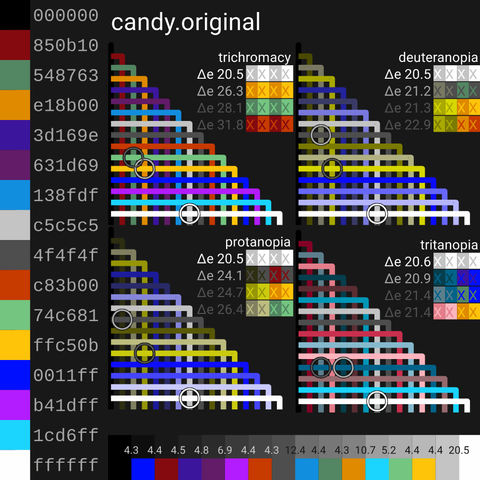
fedisuite.com

Source code & bug reports: github.com/christinloehner/Fed
Self-hosting: github.com/christinloehner/Fed
Docker image: hub.docker.com/r/christinloehn
Android app: github.com/christinloehner/Fed

github.com

GitHub - christinloehner/FediSuite-Android-App: The Android App for the FediSuite

The Android App for the FediSuite. Contribute to christinloehner/FediSuite-Android-App development by creating an account on GitHub.

@gnome@floss.social

The GNOME 50 release of our Calendar app also brings a very nice accessibility change: it’s now possible to navigate through events via the keyboard! ⌨️

In addition, many accessibility labels have been updated to improve the overall experience with screen readers.

Thanks to @TheEvilSkeleton and @zoeyTheWitch for making this happen!

FediSuite - Fediverse Management

Open source social media management and analytics platform

Managing multiple Fediverse accounts means juggling tabs, forgetting which composer belongs to which platform, and losing track of what you've already posted. FediSuite puts all of it in one place.

Connect accounts from 13 platforms - Mastodon, Pixelfed, Misskey, Friendica, PeerTube, Loops, and more. The app detects your instance type automatically, pulls the correct character limit and media rules directly from your instance, and configures the composer accordingly. No manual setup.

The analytics go well beyond follower counts: daily engagement charts, follower growth, best posting times as a heatmap, hashtag performance, and a tips engine that reads your actual data and gives you specific suggestions based on your own numbers.

Accessibility has been a core focus of recent development. Every analytics chart ships with a companion text summary and a full data table so screen reader users get the same information everyone else does. Keyboard navigation follows WAI-ARIA patterns throughout. The HTML lang attribute updates correctly when you change the UI language. None of this is bolted on - it's been part of the engineering work from the start.

FediSuite is free and open source under the GPL-3.0. You can use the hosted instance at app.fedisuite.com right now, or run your own with a standard Docker Compose setup - no compilation required. There's also a native Android app (very alpha!).

fedisuite.com

Source code & bug reports: github.com/christinloehner/Fed
Self-hosting: github.com/christinloehner/Fed
Docker image: hub.docker.com/r/christinloehn
Android app: github.com/christinloehner/Fed

github.com

GitHub - christinloehner/FediSuite-Android-App: The Android App for the FediSuite

The Android App for the FediSuite. Contribute to christinloehner/FediSuite-Android-App development by creating an account on GitHub.

FediSuite - Fediverse Management

Open-Source-Plattform für Social-Media-Management und Analytik

Wer mehrere Fediverse-Accounts verwaltet, jongliert ständig mit Browser-Tabs, verliert den Überblick, welches Eingabefeld zu welcher Plattform gehört, und weiß irgendwann nicht mehr, was bereits gepostet wurde. FediSuite bringt alles an einen Ort.

Verbinde Accounts von 13 Plattformen – Mastodon, Pixelfed, Misskey, Friendica, PeerTube, Loops und mehr. Die App erkennt deinen Instanztyp automatisch, lädt das korrekte Zeichenlimit und die Medienregeln direkt von deiner Instanz und konfiguriert den Composer entsprechend. Kein manuelles Einrichten nötig.

Die Analytik geht weit über bloße Follower-Zahlen hinaus: tägliche Engagement-Diagramme, Follower-Wachstum, optimale Posting-Zeiten als Heatmap, Hashtag-Performance und eine Tipps-Engine, die deine tatsächlichen Daten auswertet und dir konkrete Vorschläge auf Basis deiner eigenen Zahlen liefert.

Barrierefreiheit war von Anfang an ein zentrales Entwicklungsziel. Jedes Analyse-Diagramm wird mit einer begleitenden Textzusammenfassung und einer vollständigen Datentabelle ausgeliefert, damit Screen-Reader-Nutzer:innen dieselben Informationen erhalten wie alle anderen. Die Tastaturnavigation folgt durchgehend WAI-ARIA-Mustern. Das HTML-lang-Attribut wird korrekt aktualisiert, wenn du die Sprache der Benutzeroberfläche wechselst. Das ist keine nachträgliche Lösung – es war von Beginn an Teil der Entwicklungsarbeit.

FediSuite ist kostenlos und Open Source unter der GPL-3.0. Du kannst die gehostete Instanz unter app.fedisuite.com sofort nutzen oder mit einem Standard-Docker-Compose-Setup selbst betreiben – ohne Kompilierung. Es gibt außerdem eine native Android-App (noch sehr alpha!).

fedisuite.com

Source code & bug reports: github.com/christinloehner/Fed
Self-hosting: github.com/christinloehner/Fed
Docker image: hub.docker.com/r/christinloehn
Android app: github.com/christinloehner/Fed

github.com

GitHub - christinloehner/FediSuite-Android-App: The Android App for the FediSuite

The Android App for the FediSuite. Contribute to christinloehner/FediSuite-Android-App development by creating an account on GitHub.

FediSuite - Fediverse Management

Open source social media management and analytics platform

Managing multiple Fediverse accounts means juggling tabs, forgetting which composer belongs to which platform, and losing track of what you've already posted. FediSuite puts all of it in one place.

Connect accounts from 13 platforms - Mastodon, Pixelfed, Misskey, Friendica, PeerTube, Loops, and more. The app detects your instance type automatically, pulls the correct character limit and media rules directly from your instance, and configures the composer accordingly. No manual setup.

The analytics go well beyond follower counts: daily engagement charts, follower growth, best posting times as a heatmap, hashtag performance, and a tips engine that reads your actual data and gives you specific suggestions based on your own numbers.

Accessibility has been a core focus of recent development. Every analytics chart ships with a companion text summary and a full data table so screen reader users get the same information everyone else does. Keyboard navigation follows WAI-ARIA patterns throughout. The HTML lang attribute updates correctly when you change the UI language. None of this is bolted on - it's been part of the engineering work from the start.

FediSuite is free and open source under the GPL-3.0. You can use the hosted instance at app.fedisuite.com right now, or run your own with a standard Docker Compose setup - no compilation required. There's also a native Android app (very alpha!).

fedisuite.com

Source code & bug reports: github.com/christinloehner/Fed
Self-hosting: github.com/christinloehner/Fed
Docker image: hub.docker.com/r/christinloehn
Android app: github.com/christinloehner/Fed

github.com

GitHub - christinloehner/FediSuite-Android-App: The Android App for the FediSuite

The Android App for the FediSuite. Contribute to christinloehner/FediSuite-Android-App development by creating an account on GitHub.

@ml@ecoevo.social · Reply to Ian Kluft ✈️🎈🌋

@ikluft More detailed image description.

Continental US map showing Santa Rosa, San Francisco, Roswell, Kansas City, Sioux Falls, Tupelo, Atlantic City, Rochester, NY: Portsmouth, New Hampshire; and many towns in Montana and Florida.

MT: Kalispell, Great Falls, Glasgow, Havre, West Yellowstone, Wolf Point and Sidney.

FL: Orlando Sanford International, Sarasota/Bradenton, and Punta Gorda.

@movim@piaille.fr

Because free software is also about accessibility, I'm doing some important work in Movim to ensure that the user interface can be navigated using the keyboard only. ♥️

This work also involves proper labeling and description of the page elements for people with visual impairments. 💬

This side project is supported by @nlnet. Thanks to them for making Movim an even better communication platform for everyone. ✨

Keyboard navitation in Movim
ALT text

Keyboard navitation in Movim

Keyboard navigation
ALT text

Keyboard navigation

@laura_carlson@mastodon.social
@knoppix95@mastodon.social

Germany’s new Deutschland-Stack mandates ODF and PDF/UA as the only document formats for public administrations, excluding proprietary formats like .doc, .xls, and .ppt 📄

It covers all government levels, requires compliance by 2028, and favors open-source solutions and European providers 🇩🇪

🔗 itsfoss.com/news/germany-digit

itsfoss.com

Big Win for Open Source as Germany Backs Open Document Format

The Deutschland-Stack names ODF and PDF/UA as the only permitted document formats for German public administrations.

@nev@status.nevillepark.ca

totally petty, selfish decision: not going to an event because the space's website seems designed to instantly give me motion sickness unless i have prefers-reduced-motion on in browser settings

#a11y #accessibility i guess??

@fireborn@dragonscave.space

TapType is out. It's a keyboard for blind Android users.
There are no visible keys. You tap where QWERTY keys would be from muscle memory, and a spatial prediction algorithm figures out what you meant. It scores nearby keys using a Gaussian proximity model and runs a beam search against an 80,000 word dictionary. You don't need to be precise. That's the whole point.
Swipe right to commit a word. Swipe down or up to cycle through suggestions. Swipe left to delete. It learns what words you use most and ranks them higher over time, and you can add your own words to a personal dictionary.
Every letter has its own unique sound, from Andre Louis's keyboard sound recordings, so you can learn to identify keys by ear without relying on speech. Each swipe direction has a distinct sound too. TTS is there when you want it, adjustable speed, and you can turn it off entirely if you prefer sounds only.
It has emoji search with skin tone selection and favourites, a number pad mode, an upper case mode, and full punctuation support with a customizable quick list. Two-finger gestures handle things like send, close keyboard, switch keyboard, and voice input.
Everything works with TalkBack. I built this because FlickType was a fantastic keyboard for blind iOS users and then it was gone. Nothing like it existed on Android, so I made one.
It's free, no ads, no tracking, no metrics. I'm not evil.
Download: github.com/aaron-gh/taptype-re

Release TapType 1.0.1 · aaron-gh/taptype-releases

Bug fixes Fixed touch passthrough breaking other keyboards when TalkBack is active. Passthrough now only activates when TapType is the current keyboard, and clears immediately on keyboard switch, ...

@sfwrtr@eldritch.cafe · Reply to John Gruber

@gruber

[Perfect image in original post that demonstrates how unreadable Liquid Glass in can be.]

Thank you for posting this! Blinding. Literally. I am mildly visually impaired ( & old age). Until there is a transparency slider that can be set to 100% opaque (why doesn't that exist?), 26.x operating systems are no longer visually accessible. Worse, the read screen options fail to read some websites or just quit intermittently. Does Apple have anyone eating their own dog food (testing accessibility features) any more? I am sure the OS doesn't pass guidelines necessary for government contracts. Sheesh. So disappointed!

@hypolite@friendica.mrpetovan.com

Me looking for a job in 2012, bright and bushy tailed: I'd love to work on a video game!

Me looking for a job in 2026, ragged and teary-eyed: Please, anything but AI!

Oh yeah, I'm looking for a new position, either remote or in New York City if the rest of the team would also be in the same office. I'm a lead software engineer by title but I'm also open to technical management. I'm knowledgeable in many web technologies including but not limited to: , , , , , and .

I work best in medium to larger structures where responsibilities are well-separated, and middleware has been my mainstay for the past decade. I will not use AI assistants.

@KekunPlazas@mamot.fr

I have a question for specialists. I am writing some documentation as books, and for one of these books I want to link to a specific section in another book of that documentation. To make very clear where that section sits in the documentation's navigation, I want my link's text to be its full path, but I need to separate each segment somehow. So far, I am using the → character as a separator, so my links look like "Book → Chapter → Section", does that seem right to you?

@Piciok@dragonscave.space

For the last three or so years I have been co-hosting EBU in Action, a quarterly podcast of the European Blind Union where we discuss various topic of importance to the community of blind and partially sighted people in Europe. Episode 14 is out as of two days and since there are many blind gamers on Mastodon, I thought I might do a special shoutout about it. It was my honour to have @svenja also known as SvenjaDev on Twitch and Philip Bennefall, the person behind things such as Q9, Tarzan Junior and of course the Blastbay Game Toolkit (BGT) framework that many popular audiogames are based on, as guests for this one. We touched upon a lot of topics from the history of gaming for the blind, modding vs. native accessibility, e-sports gaming, streaming right up to AI so go ahead and check it out. ebuinaction.podbean.com/e/pres

ebuinaction.podbean.com

Episode 14: Press Start to play: Levelling up Gaming through Accessibility | EBU in action

The videogame industry has grown massively during the last decades. Bearing in mind all the developments in this domain, we ask ourselves: how can blind and partially sighted people enjoy Gaming on an equal basis with others? We explore this subject with Svenja Ottawa, a blind gamer and streamer from Germany, and Philip Bennefall, owner of Blastbay Studios.   At the same time, we also bring you the latest advocacy updates around EBU (for more information, you can visit our website and read the Position Papers published in 2026 so far), as well as an interesting interview with Markus Wolf, President of the Austrian Federation of the Blind and Partially Sighted.   Episode's transcript available on our website. 

@ChasMusic@ohai.social · Reply to Lucifer

Just blocked someone for apparently using AI to generate alt text and posting it without fixing the errors. While not usu an AI fan - I use it in the rare times I think it's appropriate - humans are still responsible for checking the output and correcting errors.

@aardrian@toot.cafe
White text on a maroon tee, stacked vertically: “Perceivable & Operable & Understandable & Robust & Fuck Overlays”
ALT text

White text on a maroon tee, stacked vertically: “Perceivable & Operable & Understandable & Robust & Fuck Overlays”

Black text on a light blue tee, stacked vertically: “Perceivable & Operable & Understandable & Robust & F*** Overlays”
ALT text

Black text on a light blue tee, stacked vertically: “Perceivable & Operable & Understandable & Robust & F*** Overlays”

@bce@gnulinux.social

We've just received a new manufactured prototype of a nickel metal hydride battery charger that handles the charging from 1 to 6 cells from a standard USB-C cable.

codeberg.org/bcecoop/bce-pcb-b

A photo of a PCB (Printed Circuit Board) with 4 prototyping holes on the left and 4 on the right. A USB-C connector is at the bottom of the board.
ALT text

A photo of a PCB (Printed Circuit Board) with 4 prototyping holes on the left and 4 on the right. A USB-C connector is at the bottom of the board.

@mgifford@mastodon.social

I just released pdf-crawler, a tool to audit PDF accessibility at scale!

This is a direct "remix" of the brilliant work by the Luxembourg government's team & their - it’s a testament to the power of : a tool built for one can be adapted to help everyone.

I relied heavily on to refactoring the original tech into this GitHub-based scanner. It’s a great example of using AI to amplify good.

Thank you @AccessibilityLU for sharing your work!

@S0vryn9c011ect1ve@mastodon.social · Reply to S0vryn9C011ect1ve

5. This is what we mean by sovereign digital infrastructure:

Platforms designed around:
• user empowerment
• ethical monetization
• accessibility
• transparency
• community reinvestment

We’re building in public so people can follow the journey.

If you believe technology should empower people — not extract from them — follow along as we build.

@aardrian@toot.cafe · Reply to Adrian Roselli

Specifically (best known for SLAPP suits versus useful tooling) and (best known for destroying the Level Access brand). Anyway, utter disappointment to see giving them a platform.

Refs:
• adrianroselli.com/2023/02/audi
• adrianroselli.com/2021/09/user

AudioEye 7 foot tall standing banner outside its room at the venue, with the phrase “tend to thrive” written on the top and an illustration at the bottom of plants growing from the dirt. I have blacked out the schedule details.
ALT text

AudioEye 7 foot tall standing banner outside its room at the venue, with the phrase “tend to thrive” written on the top and an illustration at the bottom of plants growing from the dirt. I have blacked out the schedule details.

Level Access 7 foot tall banner outside its venue room, reading “showcase suite agenda.” I have blacked out the agenda.
ALT text

Level Access 7 foot tall banner outside its venue room, reading “showcase suite agenda.” I have blacked out the agenda.

@aardrian@toot.cafe
White text on a maroon tee, stacked vertically: “Perceivable & Operable & Understandable & Robust & Fuck Overlays”
ALT text

White text on a maroon tee, stacked vertically: “Perceivable & Operable & Understandable & Robust & Fuck Overlays”

Black text on a light blue tee, stacked vertically: “Perceivable & Operable & Understandable & Robust & F*** Overlays”
ALT text

Black text on a light blue tee, stacked vertically: “Perceivable & Operable & Understandable & Robust & F*** Overlays”

@TheEvilSkeleton@treehouse.systems · Reply to TheEvilSkeleton

Everyone, rejoice 🙌

Georges livestreamed himself reviewing and merging accessibility contributions in GNOME Calendar again, specifically the entirety of merge request !564, which introduces keyboard-navigable month cells. This means, as of GNOME 50, GNOME Calendar's month view will be fully navigable with a keyboard for the first time in its history! The only high-level goal that needs work now is conveying these information with assistive technologies properly.

Do note that the screen recording attached won't have any alt text, to avoid redundancy. Everything written below is a detailed explanation of the experience, and the recording is essentially a visual demonstration:

- When tabbing between events, focus moves chronologically. This means that focus continues to move down until there are no event widgets overlaying the current cell. Then, focus moves to the topmost event widget in the next cell or row. Tabbing backwards with Shift+Tab moves in the opposite direction.
- On the last event widget, pressing Tab moves the focus to the adjacent month cell. Conversely, pressing Ctrl+Tab on any event widget has the same effect.
- Pressing an activation button (such as Enter or Space) displays the popover for creating an event. Additionally, pressing and holding the Shift key while pressing the arrow keys selects every cell between the start and end positions until the Shift key is released, which displays the popover with the selected range.

Both merge requests !564 and !598 took us almost an entire year to explore various approaches and finally settle on the best one for our use case. Everything was done voluntarily, relying solely on support from donors and those who share these posts, without any financial backing from other entities. In contrast, most, if not all, calendar apps backed by trillion-dollar companies still don't offer proper keyboard navigation across their views. In many cases, they haven't even reached feature parity. If it is not too much trouble, please consider funding my accessibility work on GNOME. Thank you! ♥️

@aardrian@toot.cafe

(I asked Mike on LinkedIn.)

Has anyone tried this, measured outcomes?

Asking because:
arxiv.org/abs/2602.11988

It found AGENTS‌.md “files tend to reduce task success rates compared to providing no repository context, while also increasing inference cost by over 20%.”

arxiv.org

Evaluating AGENTS.md: Are Repository-Level Context Files Helpful for Coding Agents?

A widespread practice in software development is to tailor coding agents to repositories using context files, such as AGENTS.md, by either manually or automatically generating them. Although this practice is strongly encouraged by agent developers, there is currently no rigorous investigation into whether such context files are actually effective for real-world tasks. In this work, we study this question and evaluate coding agents' task completion performance in two complementary settings: established SWE-bench tasks from popular repositories, with LLM-generated context files following agent-developer recommendations, and a novel collection of issues from repositories containing developer-committed context files. Across multiple coding agents and LLMs, we find that context files tend to reduce task success rates compared to providing no repository context, while also increasing inference cost by over 20%. Behaviorally, both LLM-generated and developer-provided context files encourage broader exploration (e.g., more thorough testing and file traversal), and coding agents tend to respect their instructions. Ultimately, we conclude that unnecessary requirements from context files make tasks harder, and human-written context files should describe only minimal requirements.

@TheEvilSkeleton@treehouse.systems · Reply to TheEvilSkeleton

Everyone, rejoice 🙌

Georges livestreamed himself reviewing and merging accessibility contributions in GNOME Calendar again, specifically the entirety of merge request !564, which introduces keyboard-navigable month cells. This means, as of GNOME 50, GNOME Calendar's month view will be fully navigable with a keyboard for the first time in its history! The only high-level goal that needs work now is conveying these information with assistive technologies properly.

Do note that the screen recording attached won't have any alt text, to avoid redundancy. Everything written below is a detailed explanation of the experience, and the recording is essentially a visual demonstration:

- When tabbing between events, focus moves chronologically. This means that focus continues to move down until there are no event widgets overlaying the current cell. Then, focus moves to the topmost event widget in the next cell or row. Tabbing backwards with Shift+Tab moves in the opposite direction.
- On the last event widget, pressing Tab moves the focus to the adjacent month cell. Conversely, pressing Ctrl+Tab on any event widget has the same effect.
- Pressing an activation button (such as Enter or Space) displays the popover for creating an event. Additionally, pressing and holding the Shift key while pressing the arrow keys selects every cell between the start and end positions until the Shift key is released, which displays the popover with the selected range.

Both merge requests !564 and !598 took us almost an entire year to explore various approaches and finally settle on the best one for our use case. Everything was done voluntarily, relying solely on support from donors and those who share these posts, without any financial backing from other entities. In contrast, most, if not all, calendar apps backed by trillion-dollar companies still don't offer proper keyboard navigation across their views. In many cases, they haven't even reached feature parity. If it is not too much trouble, please consider funding my accessibility work on GNOME. Thank you! ♥️

@gutenberg_org@mastodon.social

Message from the Executive Director: Accessibility at Project Gutenberg

Please take a look at this important topic published in our latest newsletter.

gutenberg.org/newsletter/

If you use social media, please feel invited to respond with upvotes or comments or questions. Your shares and reposts help spread awareness of Project Gutenberg’s library.

Project Gutenberg logo
ALT text

Project Gutenberg logo

@laura_carlson@mastodon.social
@kaveinthran@disabled.social · Reply to Kaveinthran

🔹 Session 7 May 1: Language, page titles, frames & iFrames
🔹 Session 8 May 15: Sensory contrast & tables
🔹 Session 9 May 29: CSS positioning, audio‑only & video‑only animations
🔹 Session 10 June 12: Synchronized media
🔹 Session 11 June 26: Resizable text, multiple ways & parsing
🔹 Session 12 (final session) July 10: Alternate versions, non‑interference, reporting & Q&A

@kaveinthran@disabled.social · Reply to Kaveinthran

curriculum
🔹 Session 1 February 6: Section 508 basics & testing tools
🔹 Session 2 March 6: Auto‑playing, auto‑updating & flashing content
🔹 Session 3 March 12 (attention: Thursday 6 pm instead of Friday 4pm): Keyboard access & focus management
🔹 Session 4 March 20: Forms & validation
🔹 Session 5 April 3: Links, images & adjustable time limits
🔹 Session 6 April 17: Repetitive content & structure

@kaveinthran@disabled.social

from @laura_a11ynews 
Want to level up your accessibility auditing game? Join our Section 508 Trusted Tester study group hosted by GDG Vienna!

🗓 When: Every other Friday, at 4 PM CET
📅 Kick‑off: Feb 6 (6‑month journey)
🌐 Where:  gdg.community.dev/gdg‑vienna 
or search "Google Developer Group Vienna"
this is session1
gdg.community.dev/events/detai

gdg.community.dev

DHS Trusted Tester Study Group 1: What is Section 508? Functional Performance Criteria, and Testing Tools | Google Developer Groups

Virtual Event - Join for the kickoff session of our DHS Section 508 Trusted Tester Study Group. This will set the foundation for underst...

@TheEvilSkeleton@treehouse.systems · Reply to TheEvilSkeleton

An update on GNOME Calendar: Georges livestreamed himself reviewing and merging parts of merge request !598, making the month view easier than ever to navigate with a keyboard!

This merge request introduces a coordinate-aware navigation system in the month view, which computes the coordinates of relevant event widgets and finds the nearest widget relative to the one in focus when using arrow keys. When tabbing, focus moves chronologically, meaning focus continues to move down until there are no event widgets overlaying that specific cell, which then moves focus to the topmost event widget found in the next cells or rows; tabbing backwards goes in the opposite direction.

To illustrate the sheer complexity of navigation in a calendaring app, here is Georges's live reaction:

"Wow, congratulations, this is looking INSANE, Hari... The hell is going on here"

— Georges, maintainer of GNOME Calendar - youtu.be/smofXzVwNwQ?t=1h24m6s

youtube.com

GNOME Live Coding | Calendar (EN)

Support me on GitHub: https://github.com/sponsors/GeorgesStavracasSupport me on Ko-Fi: https://ko-fi.com/feaneronBecome a Friend of GNOME: https://donate.gno...

@jeridansky@sfba.social

There have been a lot of barriers going up along the side of Highway 1 near me, and today they were doing some work behind one of those barriers. I was able to talk to a CalTrans guy and ask about this; in this spot, they are adding a bus stop. (Too bad we have so few buses along this route.)

This is the project, with lots of good improvement: improved curb ramps, buffered bike lanes (but no bollards, it seems), more crosswalks, repaving where it's badly needed, etc.

dot.ca.gov/caltrans-near-me/di

A CalTrans truck parked along a frontage road; closer to the highway but protected by large white barriers, CalTrans folks are working on a new bus stop. It's a sunny day with a bright blue sky.
ALT text

A CalTrans truck parked along a frontage road; closer to the highway but protected by large white barriers, CalTrans folks are working on a new bus stop. It's a sunny day with a bright blue sky.

@TheEvilSkeleton@treehouse.systems · Reply to TheEvilSkeleton
@pachli@mastodon.social
@PACounciloftheBlind@mastodon.social

❄️ The 2026 Winter Olympics are complete...

But... the excitement continues!

The 2026 Paralympic Winter Games begin in early March & we are ready to celebrate athletes who demonstrate extraordinary skill, resilience & strength.

PCB proudly supports inclusive athletics and the powerful message the Paralympics bring to communities across PA & beyond.

Which events are you most looking forward to?

A winter-themed graphic from the Pennsylvania Council of the Blind celebrating the 2026 Winter Olympics and the upcoming Paralympic Winter Games. At the top is the PCB logo, shown as the outline of Pennsylvania with the letters “PCB” and braille dots beneath. The background features a blue winter gradient with subtle snowflake textures. Silhouettes of winter athletes appear on each side, representing both Olympic and Paralympic sports. Large text reads “Celebrating Team USA” and “Winter Olympics 2026,” with a highlighted line that says “Next Up: Milano Cortina 2026 Paralympic Winter Games.” Subtle braille dot patterns are incorporated into the snow at the bottom. At the bottom, text reads “Pennsylvania Council of the Blind.” The design is energetic, patriotic, and inclusive.
ALT text

A winter-themed graphic from the Pennsylvania Council of the Blind celebrating the 2026 Winter Olympics and the upcoming Paralympic Winter Games. At the top is the PCB logo, shown as the outline of Pennsylvania with the letters “PCB” and braille dots beneath. The background features a blue winter gradient with subtle snowflake textures. Silhouettes of winter athletes appear on each side, representing both Olympic and Paralympic sports. Large text reads “Celebrating Team USA” and “Winter Olympics 2026,” with a highlighted line that says “Next Up: Milano Cortina 2026 Paralympic Winter Games.” Subtle braille dot patterns are incorporated into the snow at the bottom. At the bottom, text reads “Pennsylvania Council of the Blind.” The design is energetic, patriotic, and inclusive.

@christianp@mathstodon.xyz

I came across this great app called Aubin, "an autism friendly travel companion".

aubin.app/

The main purpose is it's a journey planner.

You can tell it things like how much you prefer different kinds of transport, how much time you want to wait at a station, whether you'd prefer a single longer journey to having to board multiple times, and so on.

There are different colour schemes (even ones adapted for particular kinds of colourblindness!) and you can decide how delays are displayed.

And there's an "autism card" which can show some prepared text when you're having a meltdown, along with a text to speech thing and emergency contacts.

I'm so impressed.

aubin.app

Aubin — A journey planner app for autistic people

Travel easier and safer with Aubin – a first-of-a-kind solution to help neurodivergent passengers travel on public transport.

@kc@chaos.social

Introducing WebAccessBench, a novel benchmark for AI language models to assess quality and WCAG conformance in generated web interfaces under realistic prompting conditions.

I did a bit of research and found that LLMs are incredibly bad at basic digital accessibility tasks. You can compare models and read the full white paper at conesible.de/wab.

Overall data suggests massive implications for society at large, and major discrimination of people with disabilities.

A sharepic that lists all benchmarked models and their score in a bar chart. Find them listed at https://conesible.de/wab. Beneath is a preview of the whitepaper PDF.
ALT text

A sharepic that lists all benchmarked models and their score in a bar chart. Find them listed at https://conesible.de/wab. Beneath is a preview of the whitepaper PDF.

@Fitnessfoundry@mas.to

Rest is Rust. Motion is Lotion. 👟💨

🎯 Proof that "Age is just a number.” In our SPARTA Strength Class at the Malden Senior Center, we have rockstars from ages 65 to 93 proving that 💥HIIT is for everyone.

We are focusing on more than just reps—we are building community. 💪🏾

Seniors participating in a high intensity interval training.
ALT text

Seniors participating in a high intensity interval training.

@Cerulean@dragon.style

A member of my extended family is working on an Android app designed to provide good audio access to Project Gutenberg. To submit it to the Google Play store, he needs at least 20 testers to use the app regularly for 14 days. Testers can be blind or sighted, and both are wanted so their experiences can be compared. I promised to post about it here because blind users and champions of accessibility seem well-represented on the Fediverse, so please spread it around.

If you are interested in volunteering to test the app, which he hopes to have ready for you in about a week, email Frank:
ducrestfd@gmail.com

Here is a link to the project's github space with a README section: github.com/ducrestfd/Gutenberg

github.com

GitHub - ducrestfd/GutenbergWebAccess: The app offers simple access to Project Gutenberg for blind or sighted persons.

The app offers simple access to Project Gutenberg for blind or sighted persons. - ducrestfd/GutenbergWebAccess

@kc@chaos.social

When you tell AI models on what specifically to look out for in a coding task…

…they repeatedly, consistently, just won't care. At all. Ever.

That's your "vibe coding“ for y'all.

Btw, I’m working on a benchmark for stuff for „AI“.

AI models on average produce 50% less accessibility errors when told in the prompt to „make the UI accessible“. Telling them what to specifically look out for does not change that, and error rates are consistent with the simple prompt.
ALT text

AI models on average produce 50% less accessibility errors when told in the prompt to „make the UI accessible“. Telling them what to specifically look out for does not change that, and error rates are consistent with the simple prompt.

@lashman@mastodon.social · Reply to lashman

Vesper v1.1.0 - accessibility and light theme update. Full keyboard nav, ARIA landmarks, focus traps in modals, skip link, aria-live status messages, reduced motion support, and AAA contrast across both the new light and dark themes.

Also added content zoom and width spinners as non-gesture alternatives to scroll shortcuts.

It's a distraction-free Markdown reader for Windows. Free, portable, CC0.

apps.lashman.live/vesper/

apps.lashman.live

Vesper - A distraction-free markdown reader

Portable, WCAG 2.2 AAA accessible Windows markdown reader. No installer, no account, no telemetry. CC0 public domain.

@lashman@mastodon.social · Reply to lashman

OpenPylon v1.1.0 - accessibility update. The whole UI now targets WCAG 2.2 AAA. 7:1 contrast, 3px dual-ring focus indicators, ARIA live regions, dialog focus trapping, skip nav, keyboard-accessible context menus, high contrast mode, and 8-second toasts with pause and dismiss.

It's a local-first Kanban board for Windows with markdown cards, version history, and a command palette. Free, portable, CC0.

apps.lashman.live/openpylon/

apps.lashman.live

OpenPylon - A local-first Kanban board for Windows

Portable, WCAG 2.2 AAA accessible Windows Kanban board. No cloud, no account, no telemetry. CC0 public domain.

@lashman@mastodon.social · Reply to lashman

TutorialVault v1.1.0 - completely rewritten from Python to Rust + TypeScript on Tauri v2. Now targets WCAG 2.2 AAA - full keyboard nav, screen reader support, 44px touch targets, 7:1 contrast, reduced motion, and Windows High Contrast support.

It's a local video tutorial library manager with progress tracking, subtitle support, per-video notes, and drag-and-drop playlists. Free, portable, CC0.

apps.lashman.live/tutorialvaul

apps.lashman.live

TutorialVault - Your tutorials, your library

WCAG 2.2 AAA accessible desktop video tutorial library manager with progress tracking, content fingerprinting, subtitles, and notes. Local-only. CC0 licensed.

@lashman@mastodon.social · Reply to lashman

TypoGenie v1.1.0 is out. The app and its document output now target WCAG 2.2 Level AAA.

Full keyboard nav, screen reader support, native dialog modals, high contrast and reduced motion support. All color pairs across 165+ templates auto-validated for AAA contrast.

The Word docs it generates are also more accessible - tagged table headers, heading structure, document metadata.

Free, portable, CC0.

apps.lashman.live/typogenie/

apps.lashman.live

TypoGenie - Turn Markdown into professional Word docs

165+ typography styles. Drag your Markdown, pick a style, export to Word. WCAG 2.2 AAA accessible. No subscription, no cloud. CC0 licensed.

@kayserifserif@sunny.garden

a friend has asked for introductory/overview accessibility resources! i'm digging through some of my saved articles and blogs right now, but please feel free to recommend any that come to mind! i'm thinking anything that helps guide a curious person into thinking about "what is accessibility" and about ableism in design/tech/life.

@lashman@mastodon.social · Reply to lashman

Whisper Voice also got a big accessibility update! The whole UI now meets WCAG 2.2 Level AAA - 7:1+ contrast, full keyboard nav, screen reader roles on every component, reduced motion support, and I/O marks on toggles so nothing relies on color alone.

Still free, still portable, still completely local. Your voice never leaves your machine.

apps.lashman.live/whisper_voic

apps.lashman.live

Whisper Voice - Your voice stays yours

Local speech recognition. 99 languages, LLM correction, neural translation. WCAG 2.2 AAA accessible. Zero cloud dependency. CC0 public domain.

@alttexthalloffame@mastodon.social

Everyone wins!

A variation of the "Epic Handshake" meme from the 1987 sci-fi movie Predator, showing a close-up of four men (instead of the original 2) greeting each other with an arm-wrestle handshake.

Each arm is labeled with the following text:

- Blind and vision-impaired people
- People with temporarily impaired vision
- People with slow internet connection
- People wondering WTF they're looking at

The words "alt text" are shown in the center where all four hands meet.
ALT text

A variation of the "Epic Handshake" meme from the 1987 sci-fi movie Predator, showing a close-up of four men (instead of the original 2) greeting each other with an arm-wrestle handshake. Each arm is labeled with the following text: - Blind and vision-impaired people - People with temporarily impaired vision - People with slow internet connection - People wondering WTF they're looking at The words "alt text" are shown in the center where all four hands meet.

@lashman@mastodon.social · Reply to lashman

Core Cooldown v0.2.0 is out - and it's still completely free. This update brings the whole UI up to WCAG 2.2 Level AAA accessibility.

7:1 contrast, 44px hit areas, full keyboard nav, WAI-ARIA 1.2 screen reader support, Windows High Contrast, and reduced-motion support. 42 fixes across 18 components.

A break timer meant to prevent RSI should work for everyone. Portable, no installer, CC0 public domain.

apps.lashman.live/core_cooldow

apps.lashman.live

Core Cooldown - A break timer that belongs to you

Portable Windows break timer. No installer, no account, no telemetry, no cost. CC0 public domain.

@aardrian@toot.cafe

Client explaining spec: “Clicking the drop-down opens a product grid menu with pop-ups to choose colors.”

Me: “Wut.”

Technical pedantry is important in UI and digital accessibility work. As practitioners we have to translate lingo all the time.

Suggestions…

• Drop-down: adrianroselli.com/2020/03/stop
• Grid: adrianroselli.com/2024/07/be-c
• Menu: adrianroselli.com/2023/05/be-c
• Pop-up: adrianroselli.com/2021/07/stop

@mgifford@mastodon.social

I built a small prototype exploring how we might publish structured accessibility information about physical buildings:

mgifford.github.io/accessible-

Web has standards as does the built environment.

There isn't a good model though to share the work to communicate what has been done via the web.

Serious critique welcome.

• What key attributes are missing?
• Are there existing standards to align with?
• What might stop adoption?
• What are the biggest risks in this approach?

mgifford.github.io

Welcome to the Building Access Guide

A practical framework for communicating structured and transparent physical accessibility information.

@jeridansky@sfba.social · Reply to Jeri Dansky

Please, for the sake of folks using screen readers:

Add decent alt text to your images. You don’t need an elaborate description, but something as minimal as “dog” isn’t kind.

Don’t overdo the emojis. These have alt text associated with them, but it gets tiresome to hear (rather than see) a string of them. Some are worse than others; hearing “red heart” repeatedly isn’t as bad as hearing “smiling face with smiling eyes.” Emojis at the end of a post are the best, as they are easier to skip over.

Don’t use emoticons at all; a screen reader can’t make any sense of them.

Remember that ascii art is largely inaccesssible, too. Listen to how sign bunny and some others are heard: adrianroselli.com/2021/10/blam

Don’t use unicode mathematical symbols in your display name or posts to create bold, italic or script letters. Think of the poor person hearing something like this: “Mathematical symbol italicized s, Mathematical symbol italicized c”, etc. (Alternatively, the characters may not be read at all.)

adrianroselli.com

Blaming Screen Readers 🚩×5

The title of this post is pretty specific. It relates to the meme on Twitter where users identify a trait or preference that they see as problematic, and identify it as a red flag. The emoji represents the red flag. For example: A stylized red flag Blaming Screen Readers 🚩🚩🚩🚩🚩…

@kkarhan@infosec.space · Reply to Daniël Franke :panheart:

@ainmosni mine are:

No-Gos:

Green flags:

  • Operated and/or maintained by trans*, nonbinary and/or furries.
  • Clearly banning AI & AIslop if not outright sabotaging /tarpitting / hacking any AI bullshit.
  • and are part of the goals.
  • Active development
    • Active issue tracker
  • Regular releases

Yellow Flags (that need context):

  • Low/no activity
    • archived repo
  • few releases
@chillicampari@layer8.space

Hi everyone, I'm looking for a new role (20hr/w) in developer/community relations, accessibility, fediverse and opensource strategy. I have 30+ years experience in F/OSS, in various domains (SW/HW/...).
and a good handle on how things work together, across teams and projects.
I am located in Regensburg, DE but have been and prefer working remotely (Europe is best due to timezones). CV: dlittle.de/DeeAnnLittle_CV.pdf
,

@hugovk@mastodon.social · Reply to Hugo van Kemenade

I picked up some accessibility tips after watching @vossisboss's talk at @pyladiescon, and improved the contrast ratio of H2 headers (github.com/python/pythondotorg) and wrapped the logo in a div instead of an H1 because we already use an H1 for the title, and you should maintain a hierarchy of headers (github.com/python/pythondotorg).

mastodon.social/@hugovk/115678

mastodon.social

Hugo van Kemenade (@hugovk@mastodon.social)

Some highlights from #PyLadiesCon! Keynote - Imogen Wright - How Complex Systems Taught Me To Fail https://www.youtube.com/live/MObVZKZr5vY Sofia Toro - How to teach your language to Python (with CPython!) https://www.youtube.com/watch?v=JhFKjiEWHWA Meagen Voss - Building more accessible Python-powered websites https://www.youtube.com/watch?v=KrtUTEZzD6U Panel - From Contributor to Founder: Turning Python Projects into Products Carol Willing, Inessa Pawson, Deborah Hanus, Leah Wasser https://www.youtube.com/live/NB2Q9dbLwVc #Python #conference #PyLadies #PyCon

@hugovk@mastodon.social

Some highlights from !

Keynote - Imogen Wright - How Complex Systems Taught Me To Fail
youtube.com/live/MObVZKZr5vY

Sofia Toro - How to teach your language to Python (with CPython!)
youtube.com/watch?v=JhFKjiEWHWA

Meagen Voss - Building more accessible Python-powered websites
youtube.com/watch?v=KrtUTEZzD6U

Panel - From Contributor to Founder: Turning Python Projects into Products
Carol Willing, Inessa Pawson, Deborah Hanus, Leah Wasser
youtube.com/live/NB2Q9dbLwVc

youtube.com

From Contributor to Founder: Turning Python Projects into Products

Language: EnglishHost: SheenaPanelist: Carol Willing, Inessa Pawson, Deborah Hanus, Leah WasserThere is wonderful diversity within PyLadies, especially in th...

@a11yclub@mastodon.social

📣 Accessibility Club Summit 2026 is happening! 🥳

Join us on 9-10 May 2026 at in for a weekend dedicated to , open exchange, and community spirit.

• BarCamp Day tickets available now
• Anonymous call for presentations open
• Sunday workshops can already be proposed

Our events are non-commercial and community-driven. A scholarship ticket programme is available.

All details and registration:
accessibility.club/event/acces

Accessibility Club Summit 2026

2-day community summit for developers, designers & accessibility enthusiasts, jointly run by a11y meetups from all over Europe · May 9-10, 2026 · Würzburg, Germany

@laura_carlson@mastodon.social
@aardrian@toot.cafe

Found by Nick Bromley on the A11y Slack:

“In browse mode in web browsers, NVDA no longer treats controls with 0 width or height as invisible. This may make it possible to access previously inaccessible ‘screen reader only’ content on some websites.”
nvaccess.org/post/in-process-1

No reason to panic. Just be aware in case your project has legacy / weird hiding techniques

nvaccess.org

NV Access | In-Process 10th February 2026

@techsimplified@mastodon.social

Been dealing with wrist pain from too much typing? 😓 I discovered voice control software that actually works everywhere - not just specific apps. Genie 007 lets you dictate into ANY website with just Ctrl+Space. Game changer for those of us with RSI!

Works on Gmail, LinkedIn, Twitter, even fills web forms by voice. Finally, hands-free computing that doesn't require a CS degree to set up.

Try it: genie007.co.uk

@laura_carlson@mastodon.social
@gebaerdenverse@fedi.at · Reply to Gebärdenverse

Puh, die Untertiteln einzubauen ist tatsächlich nicht so easy. Hat wer auch Erfahrung von DaVinci Untertiteln zu exportieren, um sie für PeerTube hochzuladen?

Nachdem es nicht so leicht funktioniert, müssen wir jedes Mal die UTs auf YouTube hochladen, anpassen, als .sbv herunterladen, zu .srt konvertieren und DANN nimmt es PeerTube es erst an.

Ein ziemlicher mühsamer Umweg, damit der Inhalt für nicht gebärdensprachliche Personen zugänglich ist. 😅

@diemkay@hachyderm.io

In doing research for our app, what are some apps out there that handle really well, in your experience? Not in a token, "look we did it" way.

This is a broad question, so it can be anything from low vision accessibility all the way to simple, clear language that makes it accessible for mixed (technical) literacy people.

Thank you in advance for any suggestions!

@markwyner@mas.to
@aardrian@toot.cafe · Reply to Adrian Roselli
@futzle@old.mermaid.town

This is what my corrected vision looks like. They’re both bad but the double images are easier to ignore when it’s dark-on-light.

Dark text on a light background. The text is repeated four times at lower alpha.
ALT text

Dark text on a light background. The text is repeated four times at lower alpha.

Light text on a dark background. The text is repeated four times at lower alpha.
ALT text

Light text on a dark background. The text is repeated four times at lower alpha.

@mgifford@mastodon.social
@anatudor@mastodon.social

Is there still any point to most styles in visually hidden classes in '26?

Any point to shrinking dimensions to `1px` and setting `overflow: hidden` when `clip-path` to nothing via `inset(50%)`/ `circle(0)` reduces clickable area to nothing? And then no `1px` dimensions means no need for `white-space`.

Because based on this article vispero.com/resources/the-anat I just don't see why any styles other than `position: absolute` + `clip-path` to nothing would still be necessary.

.visually-hidden { /* shouldn't this be enough in 2026? */
  position: absolute; /* take out of document flow */
  clip-path: circle(0); /* reduce clickable area to nothing */
}
ALT text

.visually-hidden { /* shouldn't this be enough in 2026? */ position: absolute; /* take out of document flow */ clip-path: circle(0); /* reduce clickable area to nothing */ }

@hmig@front-end.social

🙂Update - thank you everyone that boosted this!
The call for testers is now closed.

Hi Folks,

I am looking for screen reader users to test a site taking approximately one hour. This is a paid gig - $50 via a gift card. Please ping me for more details.

Please boost for reach.

Thanks!

@inclusivedesign24@indieweb.social

Time to gently pencil it into your busy social calendars ... Inclusive Design 24 will take place on the 24 September 2026. The call for presentations will open around April time... but if you already have an idea, or you'd like to help out as a guest host, get in touch!

inclusivedesign24.org/2026/

inclusivedesign24.org

Inclusive Design 24 (#id24)

A free 24-hour online community event on accessibility and inclusion

@mgifford@mastodon.social

I would like the @fosdem community to embrace

In effort of that goal I've started by recording some problems and possible solutions for the website:
github.com/FOSDEM/website/issu

This is a lot of work that together, as a community, we need to address. needs to be more inclusive for people with disabilities.

25% of the population has disabilities & the are part of our community.

github.com

We need to make FOSDEM more accessible · Issue #338 · FOSDEM/website

25% of the population has a disability. 100% of the population has temporary or situational barriers which needlessly stop them from accessing information on the web. The FOSDEM community isn't doi...

@mgifford@mastodon.social
@bce@gnulinux.social

Just received our first prototype of a Nickel-metal Hydride battery charger with a USB plug. This board is made to charge from 1 to 6 cells in series and supports a thermister for sensing overheating batteries.

This circuit design is planned to be a part of a pen-like stylus with a camera and haptic feedback for blind people to feel visual art.

codeberg.org/bcecoop/bce-pcb-b

A PCB (Printed Circuit Board) with 4 prototyping holes on the left and 4 on the right.  A female USB-C connector is at the bottom and three chips are across the top.
ALT text

A PCB (Printed Circuit Board) with 4 prototyping holes on the left and 4 on the right. A female USB-C connector is at the bottom and three chips are across the top.

@Woebin@lgbtqia.space

I don't even post much on here and doubt this will reach many, but whatever: I lost my job recently and am looking for new work, would appreciate any leads. I'm a certified digital accessibility specialist with lived experience as a disabled trans person, and I also have extensive web developer experience.

Please get in touch if you know of any appropriate openings ❤️

Edit: thanks to replies for pointing out that I should add location details! I'm located in Stockholm, Sweden but will happily work remotely if possible and can travel on occasion if needed - not looking to fully relocate though!

I can also be found on LinkedIn, a site I don't particularly like but accept the necessity of existing on, here: linkedin.com/in/thea-walther

se.linkedin.com

Thea Walther - Axess Lab | LinkedIn

Digital accessibility specialist and catch-all developer. Previous professional… · Experience: Axess Lab · Education: Stockholm University · Location: Stockholm · 492 connections on LinkedIn. View Thea Walther’s profile on LinkedIn, a professional community of 1 billion members.

@pkiff@mastodon.social

@db It would have been nice if someone at Mozilla had made sure their State of the Browser was navigable via keyboard-only. The main menu is hidden and missing hover styles, which is not accessible and anti-user.

I agree that the web needs Firefox. Though I stopped donating to Mozilla when I found out their CEO made $3 million in 2020 - the same year they laid off 300 employees.

Not sure what their CEO makes now, but the push to AI is not helping!

h/t @tante

@JessieHealdUK@defcon.social

Hi, I'm Jessie! I'm a late 20s full stack web developer from the UK who loves FOSS and tinkering with tech.

I'm the developer behind @11tyCMS .

🔒 I have an emerging interest in
🎨 Finding my love and enthusiasm for and what makes a good
♿ Learning about digital and how I can code more accessible experiences.
🌐 Love the and everything to do with it.
🤓 In my spare time, I work on my project:
🇪🇸 I speak B1 (intermediate) Spanish
🎹 I love playing piano and learning to compose music
👩‍🍳 Cooking and baking is a huge love of mine, love exploring new foods!
📚 I'm a huge nerd for reading an interesting academic paper or study, especially in .

@laura_carlson@mastodon.social
@bce@gnulinux.social

Just received our first prototype of a Nickel-metal Hydride battery charger with a USB plug. This board is made to charge from 1 to 6 cells in series and supports a thermister for sensing overheating batteries.

This circuit design is planned to be a part of a pen-like stylus with a camera and haptic feedback for blind people to feel visual art.

codeberg.org/bcecoop/bce-pcb-b

A PCB (Printed Circuit Board) with 4 prototyping holes on the left and 4 on the right.  A female USB-C connector is at the bottom and three chips are across the top.
ALT text

A PCB (Printed Circuit Board) with 4 prototyping holes on the left and 4 on the right. A female USB-C connector is at the bottom and three chips are across the top.

@meganL@mas.to · Reply to Henna Virkkunen

@HennaVirkkunen Is the European Commission exempting itself from the European Accessibility Act?

"Visual quote" is not alt text for this image. For it to be accurate & equitable, it has to have a transcription of the text that sighted ppl are being given in the image, as well as a description of any visual elements that carry meaning that sighted ppl would get out of the image.

It would be good to have the social media team train on equitable and useful social media/web/digital

Screenshot of the image in the toot replied to, showing a tooltip that reveals the alt text field says "Visual quote".

The actual alt text is "Commission designates WhatsApp as Very Large Online Platform under the Digital Services Act". It has a blue field with a large white arrow cursor. The name "Henna Virkkunen" appears underneath the rest of the text.
ALT text

Screenshot of the image in the toot replied to, showing a tooltip that reveals the alt text field says "Visual quote". The actual alt text is "Commission designates WhatsApp as Very Large Online Platform under the Digital Services Act". It has a blue field with a large white arrow cursor. The name "Henna Virkkunen" appears underneath the rest of the text.

@meganL@mas.to

JFC

As others have said, some of us have PTSD and need to be able to manage how many (if any) triggers we're exposed to and when.

Please use CW's on your images and videos of executions. It doesn't stop people from being able to see what you're posting. It just adds in the element of consent.

@futzle@old.mermaid.town

This is what my corrected vision looks like. They’re both bad but the double images are easier to ignore when it’s dark-on-light.

Dark text on a light background. The text is repeated four times at lower alpha.
ALT text

Dark text on a light background. The text is repeated four times at lower alpha.

Light text on a dark background. The text is repeated four times at lower alpha.
ALT text

Light text on a dark background. The text is repeated four times at lower alpha.

@frontenddogma@mas.to
@thenexusofprivacy@infosec.exchange

Here's a very interesting article on AI text-to-speech and screenreaders. Screnreaders use good old-fashioned text-to-speech technology, and it turns out that all this fancy new AI technology isn't helpful at all.

"So what's the way forward for blind screen reader users? Sadly, I don't know. Modern text to speech research has little to no overlap with our requirements. Using Eloquence, the system that many blind people find best, is becoming increasingly untenable."

stuff.interfree.ca/2026/01/05/

stuff.interfree.ca

Sam&#x27;s Stuff - The State of Modern AI Text To Speech Systems for Screen Reader Users

@skyweird@squawk.social
suggestion for making visual furry art more accesible, help wanted, thoughts welcomed, boost please

Idea: a set of hyper-detailed descriptions of baseline creature forms. I'm seeing so much with descriptions to the tune of "a drawing of [creature]", sometimes with some included information about their pose or expression.

This is perfectly adequate as far as it goes, but take pity on a blind furry relatively new to this...
idek what a lot of these more original creatures look like in a physical sense! I want to boost art with more confidence, and I want to buy it even more. I know I'm not the only one.

Who wants to help with this? I don't have a project set up or anything yet, I'm just putting a call out for weirdos with eyes and brains good at describing what they see. Can't pay anyone for their time right now, but I think it'd be cool if the community could do this together. The hope is that more accessible art will mean more artists getting paid.

@mgifford@mastodon.social

FOSDEM 2026 (Brussels): Sun Feb 1, 09:35 CET, UB5.230 (my last talk)

Accessible Sovereignty: Why the Four Freedoms Depend on Inclusion (Community devroom)

Thesis: the Four Freedoms are not real if people with disabilities cannot use the tools, study them, share them, and improve them in practice. Accessibility is the operational layer that makes software freedom exercisable.

Event: fosdem.org/2026/schedule/event

fosdem.org

FOSDEM 2026 - Accessible Sovereignty: Why the Four Freedoms Depend on Inclusion

@mgifford@mastodon.social

FOSDEM 2026 (Brussels): I am speaking (again) Sat Jan 31, 16:05 CET in K.3.401.

“We Need to Support Authors Better to Deliver Accessible Content”
Track: Collaboration & Content Management 

Thesis: Many accessibility errors are introduced when documents are authored.

Audits just record the damage.

fosdem.org/2026/schedule/event

fosdem.org

FOSDEM 2026 - We Need to Support Authors Better to Deliver Accessible Content

@darkpixel@infosec.exchange

Hello Universe!

Moved to new server.

Re-introduction - Been on here since 2022 and should write an intro again. I'm deaf, I'm a fan of open-source projects, so this will be short and sweet.

Post random ramblings, news, techie stuff, boost mostly cat pics. I just like computers and hang around here.

Hashtags of interests:

| | | |
| |
| |
| |
|
| | |
| | |
|
|
|
|

Howdy! 👋 Boost for visibility 🙌

Energy = Milk x Coffee²
ALT text

Energy = Milk x Coffee²

@fedora@fosstodon.org
@laura_carlson@mastodon.social
@bce@gnulinux.social

Just placed an order for a new prototype PCB (Printed Circuit Board) for makers. This one charges NiMH (Nickel-metal Hydride) rechargeable batteries with charging speed options, support for up to 6 cells, temperature sensor, and USB-C plug.

This is a step toward our first accessibility product for blind people to feel visual art through a haptic pen-like stylus interface.

codeberg.org/bcecoop/bce-pcb-b

A 3D rendering of a PCB (Printed Circuit Board) with 4 breadboarding or prototyping holes on the left and right sides.  There is s space for a USB plug at the bottom with a space for 3 chips at the top.  At the upper right is a logo of a brain with the letters BCE overlaid.  On the upper right is a part name and version number that says, "BCE-BQ25172DSGR-1" and "v0.0.1.2026.01.18"
ALT text

A 3D rendering of a PCB (Printed Circuit Board) with 4 breadboarding or prototyping holes on the left and right sides. There is s space for a USB plug at the bottom with a space for 3 chips at the top. At the upper right is a logo of a brain with the letters BCE overlaid. On the upper right is a part name and version number that says, "BCE-BQ25172DSGR-1" and "v0.0.1.2026.01.18"

@jeridansky@sfba.social

I pretty much hate GenAI, and I much prefer human-written alt text to that created via AI.

But this is an AI use I never thought about, and it sounds really positive.

mas.to

ChanceyFleet (@ChanceyFleet@mas.to)

Blind people now have AI image description and these days a Blind person will send another Blind person just an AI description of a selfie, with no source photo. In the complex AI discourse i would just like to say that AI image description has changed the game for Blind folks. It's a hell of a ride at age 43 to read my first picture book and first graphic novel. AI is complicated but textualizing images is brilliant

@ChanceyFleet@mas.to

Blind people now have AI image description and these days a Blind person will send another Blind person just an AI description of a selfie, with no source photo. In the complex AI discourse i would just like to say that AI image description has changed the game for Blind folks. It's a hell of a ride at age 43 to read my first picture book and first graphic novel. AI is complicated but textualizing images is brilliant

@kitwinter@dice.camp

Looking for or work. Recently with MCDM (for PDF accessibility), & Delinea.

Case studies: kitsa11y.work (NOTE: this is part of a case study/UX itself as part of the job search, because recruiters don't often look at sites for accessibility, and sadly... the data seems to bear this out)

Personal site is over at: www.flowerstorm.tech (& is more accessible)

@clackups@social.noleron.com

I just discovered (and tried) this wonderful piece of software

github.com/houmain/keymapper

It allows remapping your keyboard in many ways, and it's controlled from a simple configuration file (so, you can prepare one for your disabled friend).

You can, for example, remap the keyboard to only use its right half, if the left hand is dysfunctional (similar to the mirrored keyboard I made, github.com/clackups/qmk_firmwa ).

Also, it should be useful for , to map, for example, AWSD to different keys.

github.com

qmk_firmware/keyboards/nuphy/air60_v2/ansi/keymaps/clackups_mirrored/README.md at onehanded_nuphy_air60_v2 · clackups/qmk_firmware

Open-source keyboard firmware for Atmel AVR and Arm USB families - clackups/qmk_firmware

@A11yAlicia@mastodon.social

I’ve been exploring Crave lately and I’m so impressed by how much inclusive content is starting to show up. It’s awesome to see recognizing the importance of and disability representation. More of this please 👏🎉💙

Search results for “ASL” showing multiple titles
ALT text

Search results for “ASL” showing multiple titles

@podfeet@chaos.social
@UncoveredMyths@beige.party

and Pinned Post

I generally post about , , , , and .

Due to EDS, I use a .

I also enjoy and .

All of my books, recipes, and some crafts are on my website.

I am , and write about .

Things I miss: Gardening, Sewing, Crafting, Crocheting, Cooking, Baking, Knitting, Walking, Hiking, Exploring.

Photos are rare, as words are easier to use to explain concepts. If I add a photo, I describe it in the main text for everyone to read.

Yes, I know this sadly leaves out those who rely on photos.

Primary Website - uncoveredmyths.wixsite.com/unc

Greeting Card Website - uncoveredmyths.wixsite.com/mus

uncoveredmyths.wixsite.com

Home | Mused Lines

Home - Mused Lines is a collection of greeting card poetry designed over a decade.

 It never quite fit greeting card company choices, though they would choose similar verses as more people submitted them.

 This is a place for people to share and choose greeting copy.

 Places you can use these sayings: Cards Ecards Notepads Book Covers, Pretty much anywhere you want. These items may be used in promotional works, and other items, if credit is given to the creator.

@amberhinds@fosstodon.org
@meganL@mas.to

North America's Elevator Problem

Good video except for the part where it's yet another abled-led thing where they talk about "accessibility" while advocating a change (smaller elevators) that will actually result in less accessibility and independence. But hey, that's pretty typical of mainstream urbanism's ableism.

youtube.com/watch?v=Or1_qVdekYM

youtube.com

North America's Elevator Problem

Elevators cost nearly three times as much in North America compared to its peers. What is going on here? Incredibly honoured to partner with @SightlineOrg o...

@Blort@social.tchncs.de

Welcome to all , inc. our pals!

A couple of things a bit different here:

*Hashtags: Use em to fill and filter your feed and get found. Add to sensitive topics like politics to help others filter for their mental health.

* You're the algorithm: There's no algo pushing stuff, so Boost Hard: Boost Harder with a Vengeance! Favoriting is for humans, not algo's.

*Alt text matters: There's a lotta people with needs, so many only boost images with .

❤️

@alttexthalloffame@mastodon.social · Reply to Alt Text Hall of Fame
@stefan@stefanbohacek.online

And this, my friends, is why we add description to our images.

kind.social

Linzington (@Linzington@kind.social)

Attached: 1 video Friends, this is the coolest thing I have ever seen and you should see it too. A guitar amp labelled entirely in braille. #accessibility #blind #blindness #braille

@amberhinds@fosstodon.org

Links should be underlined. Don't try to be fancy. The old-fashioned browser default is all you need. Here's a perfect bad example from a blog post I opened on my phone with bedtime mode on. Can you tell how many links are on the screen?

Yes, I should be sleeping. But if I want to ruin my beauty sleep on your website, I'm going to stay on site longer and click through more pages if links are obviously clickable.

Black and white screenshot of a blog post about Tailwind (text irrelevant) on a phone at 11:23 PM with the bedtime mode icon visible at the top. There's paragraphs, a block quote and a numbered list. None of the text is underlined but there are incredibly subtle contrast changes on some words.
ALT text

Black and white screenshot of a blog post about Tailwind (text irrelevant) on a phone at 11:23 PM with the bedtime mode icon visible at the top. There's paragraphs, a block quote and a numbered list. None of the text is underlined but there are incredibly subtle contrast changes on some words.

@aharoni@wikis.world · Reply to Amir E. Aharoni

In general, any usage of the words "left" and "right" in computers is at least a yellow flag, or even a red flag. Anywhere. User interface strings, help pages, visual design documents, programming language keywords, and so on. It's a likely problem for people with Left–right confusion and a likely problem for people who read right-left () languages. I happen to belong to both groups.

@matthartley@fosstodon.org

Linux desktop voice control has a gap. Talon costs money. Other tools are X11-only or cloud-dependent.

So I built EasySpeak.

youtube.com/watch?v=dl5m2Zo1oIE

github.com/ctsdownloads/easysp

- Free and open source (GPL-3.0)
- Fully local — no cloud, no accounts
- Wayland-native
- "Hey Jarvis, open downloads"

Built for RSI, accessibility, or anyone who wants to talk to their computer.

github.com

GitHub - ctsdownloads/easyspeak: Voice control for Linux desktops. Fully local, no cloud, Wayland-native.

Voice control for Linux desktops. Fully local, no cloud, Wayland-native. - ctsdownloads/easyspeak

@elettrona@poliversity.it

week 1, phase 3B bis: Disappointment.
Subscribed to a Ionos vps in alternative to Hostinger, but the interface is much, much more complex (I'm referring to the vps and domains management) - thought Hostinger was the worst.
But, if accessibility declaration on Hostinger says "partially accessible" giving an e-mail address (not dedicated, it's the generic support), Ionos makes me point to an Italian paragraph where they claim barrier-free then says "for support, contact us through contact form", redirecting to a German accessibility page where NO FORM is displayed. Is it this way to treat customers?
Does @fsfe and @EUCommission have something to say? These are fake accessibility declarations.
You can't say you respect all customers, when you make your showcase site mostly accessible but most important feature (the vps/firewall management panels) impossible to use. To give an example, the "edit" button for a single firewall rule is labeled as "y", the delete is "]", the add rule is "@" ... Not to say that @yunohost on Ionos creates ipv6 issues, the port TCP 25 is closed and I need to call them with EXACTLY my phone number to have them open the port for me...
I must definitely try to talk to them and start the refund procedure.
Unfortunately though, Ionos would give me 240 gb hard disk for storage while hostinger, even upgrading, would give me 100.
WTF.

@aardrian@toot.cafe
@WeirdWriter@caneandable.social
@matthartley@fosstodon.org

Linux desktop voice control has a gap. Talon costs money. Other tools are X11-only or cloud-dependent.

So I built EasySpeak.

youtube.com/watch?v=dl5m2Zo1oIE

github.com/ctsdownloads/easysp

- Free and open source (GPL-3.0)
- Fully local — no cloud, no accounts
- Wayland-native
- "Hey Jarvis, open downloads"

Built for RSI, accessibility, or anyone who wants to talk to their computer.

github.com

GitHub - ctsdownloads/easyspeak: Voice control for Linux desktops. Fully local, no cloud, Wayland-native.

Voice control for Linux desktops. Fully local, no cloud, Wayland-native. - ctsdownloads/easyspeak

@echo@ishella.gay

question for people- for the accessible description of an emoji, would you expect it to say the skin tones?

for instance, "women holding hands" vs "women holding hands: light skin tone, medium-light skin tone"

personally the latter feels very verbose, but i'd love to get thoughts!

@matthartley@fosstodon.org

Linux desktop voice control has a gap. Talon costs money. Other tools are X11-only or cloud-dependent.

So I built EasySpeak.

youtube.com/watch?v=dl5m2Zo1oIE

github.com/ctsdownloads/easysp

- Free and open source (GPL-3.0)
- Fully local — no cloud, no accounts
- Wayland-native
- "Hey Jarvis, open downloads"

Built for RSI, accessibility, or anyone who wants to talk to their computer.

github.com

GitHub - ctsdownloads/easyspeak: Voice control for Linux desktops. Fully local, no cloud, Wayland-native.

Voice control for Linux desktops. Fully local, no cloud, Wayland-native. - ctsdownloads/easyspeak

@zoeyTheWitch@treehouse.systems
Mutualaid, Please Boost

Hi everyone! I'm in a bit of a tough spot, and after paying my rent this week I am going to be flat broke and will struggle to sustain myself for a while, and could really use the help.

Currently, I am spending a lot of time (between my uni exams) volunteering to help improve GNOME in many ways, such as:

- Better hardware enablement, such as (codeberg.org/kramo/cartridges/) and (codeberg.org/kramo/cartridges/) to enable controller input in Cartridges, and (gitlab.gnome.org/GNOME/gnome-c) to support back/forth hardware buttons, like those seen on some gaming/productivity mice, in GNOME Calendar.

- Improve accessibility in GNOME, with (gitlab.gnome.org/GNOME/gnome-s) to improve accessibility of the selection mode in GNOME's screenshot overlay, and (gitlab.gnome.org/GNOME/gnome-c) to fix missing tooltips and labels in GNOME Calendar.

- Help with maintenance and add new features to many commonly used GTK and GNOME apps, such as adding a new comparison mode to Upscaler with (gitlab.gnome.org/World/Upscale) (with help from Skelly), porting GNOME Music to Blueprint with (gitlab.gnome.org/GNOME/gnome-m) and (gitlab.gnome.org/GNOME/gnome-m), and helping to improve the ecosystem by occasionally streaming my changes on my Youtube account.

These changes take many hours of my free time to research, develop and test, with 0 compensation. If accessibility, hardware-enablement or having amazing, beautiful Linux and apps is important to you, I would strongly urge you to donate or boost this post!

My KoFi is ko-fi.com/zoeyahmed. My current goal is to raise £300, which should cover me and allow me to continue making GNOME and the FOSS ecosystem better and more accessible then ever!
Current Total: £0/£300

@mutualaid

ko-fi.com

Support Zoey Ahmed

Support Zoey Ahmed

@fastfinge@interfree.ca
The State of Modern AI Text To Speech Systems for Screen Reader Users: The past year has seen an explosion in new text to speech engines based on neural networks, large language models, and machine learning. But has any of this advancement offered anything to those using screen readers? stuff.interfree.ca/2026/01/05/ai-tts-for-screenreaders.html

stuff.interfree.ca

Sam&#x27;s Stuff - The State of Modern AI Text To Speech Systems for Screen Reader Users

@RareBird15@allovertheplace.ca

I bought myself a new keyboard with Christmas money, and after just a day of using it, I'm honestly kind of stunned by how much of a difference it's making.
I picked up a Keychron K10 Max from Amazon and got it yesterday, and I don't think I ever want to go back to a membrane keyboard again.
For context: before this, I was using a Logitech Ergo K860. It's a split, membrane keyboard that a lot of people like for ergonomics, and it did help in some ways — but for me, it was also limiting. My hands don't stay neatly parked in one position, and the enforced split often worked against how I naturally move. It also wasn't rechargeable, and the large built-in wrist rest (which I know some people love) mostly became a dirt-collecting obstacle that I had to work around.
Another big factor for me is that I often work from bed. That means my keyboard isn't sitting on a perfectly stable desk. It's on a tray, my lap, or bedding that shifts as I move.
The Logitech Ergo K860 is very light, which sounds nice on paper, but in practice it meant the keyboard was easy to knock around, slide out of position, or tilt unexpectedly. Combined with the split layout, that meant I was constantly re-orienting myself instead of just typing.
The Keychron, by contrast, is noticeably heavier — and that turns out to be a feature. It stays put. It doesn’t drift when my hands move. It feels planted in a way that reduces both physical effort and mental overhead. I don't have to think about where the keyboard is; I can just use it.
For a bed-based workflow, that stability matters more than I realized.
With chronic pain, hand fatigue, and accessibility needs, keyboards are not a neutral tool. They shape how long I can work, how accurately I can type, and how much energy I spend compensating instead of thinking.
This new keyboard feels solid, responsive, and predictable in a way I didn't realize I was missing. The keys register cleanly without requiring force, and the feedback is clear without being harsh. I'm not fighting the keyboard anymore. It's just doing what I ask.
What surprised me even more is how much better the software side feels from an accessibility perspective. Keychron's Launcher and its use of QMK are far more usable for me than Logitech Options Plus ever was. Being able to work with something that’s web-based, text-oriented, and closer to open standards makes a huge difference as a screen reader user. I can reason about what the keyboard is doing instead of wrestling with a visually dense, mouse-centric interface.
That matters a lot. When your primary interface to the computer is the keyboard, both the hardware and the configuration tools need to cooperate with you.
I know mechanical keyboards aren't new, but this is my first one, and I finally understand why people say they'll never go back. For me, this isn't about aesthetics or trends. It's about having a tool that respects my body and my access needs and lets me focus on the work itself.
I'm really grateful I was able to get this, and I'm genuinely excited to keep dialing it in. Sometimes the right piece of hardware, paired with software that doesn’t fight you, doesn’t just improve comfort. It quietly expands what feels possible.


@accessibility @disability @spoonies @mastoblind

@TheEvilSkeleton@treehouse.systems

Hey, I've been under distress lately due to personal circumstances that are outside my control. I can't find a permanent job that allows me to function, I'm not eligible for government benefits, my grant proposals got rejected, paid internships are quite difficult to find. Essentially, I have no stable monthly income that allows me to sustain myself.

Nowadays, I work mostly on accessibility throughout GNOME as a volunteer, improving the experience of people with disabilities. I helped make the majority of GNOME Calendar accessible with a keyboard and screen reader — still an ongoing effort with !564 and !598 —which is an effort no company ever contributed financially. These merge requests take thousands (literally) of hours to research, develop, and test, which would have been enough to sustain myself for a couple of years if I had been working under a salary.

I would really appreciate any kinds of donations, especially ones that happen periodically to bump my monthly income.

These donations will allow me to sustain myself while allowing me to continue working on accessibility throughout GNOME, potentially even 'crowdfunding' development without doing it on the behalf of the Foundation.

I accept donations through the following platforms:

- “TheEvilSkeleton” on Liberapay: liberapay.com/TheEvilSkeleton/ (free and open-source platform)
- “TheEvilSkeleton” on Ko-fi: ko-fi.com/theevilskeleton
- “TheEvilSkeleton” on GitHub Sponsors: github.com/sponsors/TheEvilSke

Boosts welcome and appreciated.

github.com

Sponsor @TheEvilSkeleton on GitHub Sponsors

Support TheEvilSkeleton's open source work

@hkz@chinwag.org

People of the Fediverse, I need your advice.
My FIL undergoes dialysis every other day. He reads on an ereader during the therapy to pass time, because he can hold the device with a single hand and it is usually lighter than a book.

He's also an eldery person, he has issues adapting to touch interfaces.

I have collected all the button based kindles I could from fleamarkets. I repair them where possible, but their batteries are all dying.

I need advice on a **button based** ereader that is either economical (risk of drop is real) so I can buy spares, or resistant enough to survive drops.

@elettrona@poliversity.it

week 0, phase 1B: DNS records settings. Performed @_elena 's instructions on her "self hosting for newbies" part 2. Except for the post-install as I run it through terminal and not through web UI. For an ms-dos-born it's easier to perform a simple command such as "yunohost tools postinstall" rather than go to web, then type, then search for the various UI elements.
Everything went smooth, except for letsencrypt at first. But in the end it seems to have worked. It got stuck because hostinger panel didn't get one suggested parameter, the numeric 3600, every record has a parameter which is 3, 4 or 5 numbers.
Created the domain and subdomain to point it to yunohost admin interface, and then obstacle came.
Opening browser to subdomain, just returns "connection timed out".
Checked for nginx parameters through yunohost terminal, using the desired Sudo commands.
Then, "sudo yunohost diagnosis run"
"sudo yunohost diagnosis show --issues --human-readable"
and I got explanation on reverse dns which was wrong.
After that, I searched on the web (and on AI, I admit) the position on hostinger panel to set them, and I found "set tpr record"
placed the desired domain name.
And now it's time to wait for propagation. But what about the "connected timeout", in the article posted in blog.elenarossini.com no such obstacle was mentioned.
I'm back to my 20s when I spent the night (it's almost 4 in the morning), learning commands.
Last but not least, accessibility issue: I'm using an app called WebSSH pro, downloaded on app store. Set it up, and VoiceOver for iOS does not read the keys I press on keyboard so I'm very slow to type commands there. Pc is better. In a few hours I'll try hostinger's terminal.
UPDATE: I have just found I set one DNS wrong, now I'll wait for it to propagate. Next update in some hours. I placed a useless number. Such as 72.162 (wrong) instead of 72.62 (right).
Like when you start developing on your own and everything crashes due to a missing semicolumn in a string of code.

@elettrona@poliversity.it

week 0:
Phase 0. Choosing domain name for self hosting: plusbrothers.online seems available. the .net is my main website based on
Considering also plusbrothers.community but who knows if it's possible. Something that warns users that's the same site but with other purposes.
What to do there: Mastodon instance with more than 500 characters if possible. Then Castopod, and maybe a WordPress to transfer English blog there.
Finally, choosing the most appropriate VPS server where to install currently confronting most famous VPS vendors' websites user interface for - this is a showcase for customer care. Less accessible means less disability-friendly, that means "I'd prefer you don't come to us". Hostinger has an accessibility statement but it's very superficial and maybe copy-pasted from a template just because obliged by european laws, not for real care.

@kkarhan@infosec.space · Reply to Kevin Karhan :verified:

Also the official petition & portal would not have a huge-ass dropdown at the signup page if it wasn't permissible as non-citizen/resident to register and none of the Terms of Service mandate signatories to be residents or citizens of Germany.

  • Petitioning is a human right in Germany

  • All it does mandate is correct details at signup.

  • All signatures are pseudonymous unless you explicitly choose to be listed by name (which is entirely your decision.

  • Also one can withdraw from signing at any point in time with the same convenience (no Idea why you would, but I just want everyone to know!)

So yeah, please do sign the petition even if you are from overseas / outside of Germany.

  • But please don't provide false details - SERIOUSLY, DON'T!

infosec.space

Kevin Karhan :verified: (@kkarhan@infosec.space)

Come on people, sign and boost it! :boost_ok: [`https://epetitionen.bundestag.de/petitionen/_2025/_07/_14/Petition_183950.nc.html`](https://epetitionen.bundestag.de/petitionen/_2025/_07/_14/Petition_183950.nc.html) 🗳️ ☑️(only till 13.1.2026) - No "Pink Lists" - *NEVER AND UNDER NO CIRCUMSTANCES!* [WHY?](https://bildung.social/@bookstardust/115813561179403217) - [That's why!](https://www.tagesschau.de/inland/innenpolitik/selbstbestimmungsgesetz-bundesinnenministerium-verordnung-100.html) HUMAN RIGHTS ARE NOT NEGOTIABLE!!! - HUMAN RIGHTS ARE THE *PRECONDITION TO EVEN CONSIDER NEGOTIATIONS!* The human rights of trans*, Inter* and nonbinary people are the litmus test for the free and democratic societal order: - If we fail to protect them, then we *failed as society*! Don't believe for a second this fascist bullshit, *once installed*, won't be expanded upon.: - I.e. towards [disabled people or those having HIV/AIDS](https://en.wikipedia.org/wiki/Disease_registry#Medical_conditions_tracked)... https://infosec.space/@kkarhan/115813655693996030 Update: 11.300+ signatures! Quota necessary: 30.000 (translation of [this post](https://infosec.space/@kkarhan/115813753849056532)) #DEpol #Petition183950 #TransRights #TransRightsAreHumanRights #HumanRights #CivilRights #TransRegistry #Trans #Inter #Nonbinary #TransLists #TransListen #Listen #Privacy #SelfDetermination #SelfID #legislation #OutingBan #FDGO #LitmusTest #Society #Fascism #PoliceState #SurveillanceState #FascistBullshit #Sexism #Cissexism #Cisbinarysexism #HIV #AIDS #Register #TransRegister #Lists #Intersectionality #Disabled #DisabledRights #inclusion #accessibility #InformationControl #InformationRights #LGBTQIA

@kkarhan@infosec.space · Reply to Kevin Karhan :verified:

Come on people, sign and boost it! :boost_ok:

https://epetitionen.bundestag.de/petitionen/_2025/_07/_14/Petition_183950.nc.html 🗳️ ☑️(only till 13.1.2026)

  • No "Pink Lists" - NEVER AND UNDER NO CIRCUMSTANCES!

WHY?

HUMAN RIGHTS ARE NOT NEGOTIABLE!!!

  • HUMAN RIGHTS ARE THE PRECONDITION TO EVEN CONSIDER NEGOTIATIONS!

The human rights of trans*, Inter* and nonbinary people are the litmus test for the free and democratic societal order:

  • If we fail to protect them, then we failed as society!

Don't believe for a second this fascist bullshit, once installed, won't be expanded upon.:

infosec.space/@kkarhan/1158136

Update: 11.300+ signatures!
Quota necessary: 30.000

(translation of this post)

infosec.space

Kevin Karhan :verified: (@kkarhan@infosec.space)

Los Leute, Mitzeichen & Boosten! :boost_ok: [`https://epetitionen.bundestag.de/petitionen/_2025/_07/_14/Petition_183950.nc.html`](https://epetitionen.bundestag.de/petitionen/_2025/_07/_14/Petition_183950.nc.html) 🗳️ ☑️ (nur noch bis 13.1.2026) - Keine "Rosa Listen" - *NIEMALS UND UNTER KEINEN UMSTÄNDEN!* [Warum?](https://bildung.social/@bookstardust/115813561179403217) - [DARUM!](https://www.tagesschau.de/inland/innenpolitik/selbstbestimmungsgesetz-bundesinnenministerium-verordnung-100.html) MENSCHENRECHTE SIND NICHT VERHANDELBAR!!! - MENSCHENRECHTE SIND *VORBEDINGUNG FÜR VERHANDLUNGEN!* Die Menschenrechte von Trans*, Inter* und Nichtbinären Personen sind der Lackmußtest der Freiheitlich-demokratischen Grundordnung: - Wenn wir daran scheitern diese zu schützen dann haben wir als Gesellschaft *in Gänze* versagt! Glaubt also nicht dass solche Faschistische Kackshice sobald *einmal installiert* nicht ausgeweitet wird: - Z.B. Auf [Menschen mit Behinderungen oder HIV/AIDS](https://en.wikipedia.org/wiki/Disease_registry#Medical_conditions_tracked)... https://infosec.space/@kkarhan/115813655693996030 [Übersetzung ins Englische](https://infosec.space/@kkarhan/115813888161823454) Update: Über 11.300 Mitzeichnungen! Zu erreichendes Quorum: 30.000 #DEpol #Petition183950 #TransRights #TransRightsAreHumanRights #Menschenrechte #Bürgerrechte #TransRechte #Trans #Inter #Nonbinary #TransListen #Listen #Privatsphäre #Selbstbestimmung #Selbstbestimmungsgesetz #Offenbarungsverbot #FDGO #Lackmußtest #Gesellschaft #Faschismus #Polizeistaat #Überwachungsstaat #FaschistischeKackshice #Sexismus #Cissexismus #HIV #AIDS #Register #TransRegister #Listen #Intersektionalität #MenschenMitBehinderungen #Nixklusion #Inklusion #InformationelleSelbstbestimmung #LGBTQIA #LSBTQIA

@bookstardust@bildung.social

Fedi,
Ich hab nen Vorschlag für euch:

Ihr nehm nehmt jetzt den Link für die Petition gegen das Trans* Melderegister und haut das in eure Whatsapp uns Signal Messenger.
Einfach alle.
Ich hab euch ein Share Pic gemacht. Ihr müsst nur noch den Link einfügen, es dauert eine Minute.

Wir brauchen noch mehr als 20k Unterschriften. Wir haben nicht mal 10k geschafft. Macht euch ein eigenes Share Pic, setzt es einfach als Link auf den Status, aber verteilt halt bitte den Link!

epetitionen.bundestag.de/petit

Vorschlag Share Pic
Gelb auf blauen Hintergrund
Einmal anmelden, dauert 5 Minuten

Screenshot der Petition
Pfeil mit den Worten hier unterschreiben.
Petition mitzeichnen ist in Gelb umrandet
ALT text

Vorschlag Share Pic Gelb auf blauen Hintergrund Einmal anmelden, dauert 5 Minuten Screenshot der Petition Pfeil mit den Worten hier unterschreiben. Petition mitzeichnen ist in Gelb umrandet

@zersiax@cupoftea.social

Welp ... I was just informed through a Slack DM that I will no longer be working at the place I'm working at in two weeks' time. That is, evidently, how we handle that now. Not entirely unexpected as the writing on the wall was evident, but still not loving that approach for reasons I haven't quite worked out yet.
If anyone needs help with their from someone with both native experience and a coding background, keep me in mind I guess :)
Located in the eastern Netherlands, primarily interested in remote opportunities.

@TheEvilSkeleton@treehouse.systems
@zersiax@cupoftea.social

Welp ... I was just informed through a Slack DM that I will no longer be working at the place I'm working at in two weeks' time. That is, evidently, how we handle that now. Not entirely unexpected as the writing on the wall was evident, but still not loving that approach for reasons I haven't quite worked out yet.
If anyone needs help with their from someone with both native experience and a coding background, keep me in mind I guess :)
Located in the eastern Netherlands, primarily interested in remote opportunities.

@stefan@stefanbohacek.online

I was really fascinated when I first learned about the blind gaming community. Great to see whenever this topic gets more coverage, and the growing inclusivity within the industry.

"With an estimated 250 million gamers worldwide identifying as visually impaired, accessibility is both a major commercial opportunity and an essential industry priority."

bbc.com/news/articles/c1dzrkg0

bbc.com

Video games: Visually-impaired players call for better inclusion

A group made up of blind and partially sighted people say more needs to be done to make them feel included in gaming.

@swithinbank@webtoo.ls

We’re working on an Accessibility Statement for Starlight (a documentation website generator). If you have experience with or opinions about these, I’d love to hear feedback! Or if you have links favourite resources, those are great too.

github.com/withastro/starlight

github.com

Feat/add accessibility statement by markteekman · Pull Request #3638 · withastro/starlight

Description Related to the Add Accessibility Statemement (#3616) discussion 🙂

@pixelate@tweesecake.social

Gemini-CLI just made Termux, Linux Terminal for Android, far more usable for me.

* Speak only newly arived text, not the whole screen each update.
* Let me swipe two fingers to the right for Return on the TalkBack Braille Keyboard so I can easily run commands.

So like I'm very glad these projects are open source lol, and that Google makes it super easy to install apps on the devices I bought. Works well on my Galaxy S25 Plus. I'd say it's at the level of Gnome Terminal. It may not read the whole output of new stuff, but it's a ton better than what it was.

@pippin@mastodon.xyz · Reply to Øyvind Kolås

A major part of verifying results for the ametameric terminal palette optimiztion is this visualization of all color pairs as crossings both in full trichromatic color and for the three classes of full dichromacy, with additional CIE Lab Δe color differences and visualizations for the four worst pairs. On the website the same visualization can be seen for other common 16 color terminal schemes.

visualization of mutual color contrast for a 16 color terminal palette. On the left is a vertical line of squares of the 16 colors along with a six digit hexadecimal sRGB color code. There are four triangles with lines crossing each other, for each major type of color-vision trichromacy, deuteranopia, protanopia and tritanopia. The three worst color contrast pair crossings are marked with circles. In the empty space complemented the color line triangles, is a list of numbers of the worst color contrast, the worst color contrast for all types is light gray on white with a Δe 20.5. Along the bottom is the same palette sorted according to luminance, and the Δe between adjecant pairs is listed. All contrasts are larger than Δe 4 and the last one is Δe 20.5.
ALT text

visualization of mutual color contrast for a 16 color terminal palette. On the left is a vertical line of squares of the 16 colors along with a six digit hexadecimal sRGB color code. There are four triangles with lines crossing each other, for each major type of color-vision trichromacy, deuteranopia, protanopia and tritanopia. The three worst color contrast pair crossings are marked with circles. In the empty space complemented the color line triangles, is a list of numbers of the worst color contrast, the worst color contrast for all types is light gray on white with a Δe 20.5. Along the bottom is the same palette sorted according to luminance, and the Δe between adjecant pairs is listed. All contrasts are larger than Δe 4 and the last one is Δe 20.5.

@elementary@mastodon.social · Reply to elementary

This year @zersiax joined us again for another round of accessibility testing. Installer views should all have much improved accessible labels. Thanks to this feedback, OS 8.1 can be installed and set up completely blind in most cases.

Thanks to feedback from @fireborn, Notifications and the Shortcut Overlay both added screen reader support. We’ve also improved screen reader labels in Calendar, In System Settings → Firmware updates, and in AppCenter to name a few cases.

@amberhinds@fosstodon.org
@jeridansky@sfba.social

Back in December 2023 I posted about the atrocious product design on some hotel shampoo, conditioner, and body wash dispensers, with illegible mint green print on gray bottles. Last year they were the same. But now it seems they've finally realized a change was needed.

(Left is the old version, right is the new one.)

Hotel dispensers for shampoo, conditioner, and body wash. With mint green print on gray bottles, it's nearly impossible to see which is which.
ALT text

Hotel dispensers for shampoo, conditioner, and body wash. With mint green print on gray bottles, it's nearly impossible to see which is which.

Hotel dispensers for shampoo, conditioner, and body wash. Now the print is a bright white on gray, and it's very legible.
ALT text

Hotel dispensers for shampoo, conditioner, and body wash. Now the print is a bright white on gray, and it's very legible.

@amberhinds@fosstodon.org
@markwyner@mas.to

Accessibility poll for people who use screen readers for daily use. I’m writing a guide about alt text.

🧵 Poll 1 of 2:

I’d like your opinion about alt-text length for simple images. How long should it be? (Feel free to comment if you want to elaborate.)

Please boost for reach. 🙌🏻

  • Just the context8 (13%)
  • Lots of details6 (10%)
  • Balance of brevity/details33 (53%)
  • It depends15 (24%)
@gnome@floss.social

Top 5 improvements in Calendar 49:

1. Focus indicators were added in various places
2. Events are focusable with a keyboard
3. Year/month spin buttons are navigable with arrow keys
4. Calendar grids are skippable with Tab, and cells are wrapped via keyboard focus
5. Calendar list box now behaves like a check box

For screen readers: events and year/month spin buttons have proper semantics!

donate.gnome.org/

donate.gnome.org

Donate to GNOME

Donate to the GNOME Foundation and make a difference to GNOME

@markwyner@mas.to

Accessibility poll for people who use screen readers for daily use. I’m writing a guide about alt text.

🧵 Poll 1 of 2:

I’d like your opinion about alt-text length for simple images. How long should it be? (Feel free to comment if you want to elaborate.)

Please boost for reach. 🙌🏻

  • Just the context8 (13%)
  • Lots of details6 (10%)
  • Balance of brevity/details33 (53%)
  • It depends15 (24%)
@fedora@fosstodon.org

Vojtux - Accessible Linux distro which is almost pure Fedora

Vojtěch Polášek has put together a technical preview of a version of Fedora that should work well for blind or visually impaired users. While his goal is explicitly to see these improvements and changes become part of Fedora itself, for now you can use this implementation based on the Fedora MATE spin. :)

➡️ freelists.org/post/orca/Announ

freelists.org

[orca] Announcing Vojtux - Accessible Linux distro which is almost pure Fedora - orca - FreeLists

[orca] Announcing Vojtux - Accessible Linux distro which is almost pure Fedora, orca at FreeLists

@TheEvilSkeleton@treehouse.systems

Hey, I've been under distress lately due to personal circumstances that are outside my control. I can't find a permanent job that allows me to function, I'm not eligible for government benefits, my grant proposals got rejected, paid internships are quite difficult to find. Essentially, I have no stable monthly income that allows me to sustain myself.

Nowadays, I work mostly on accessibility throughout GNOME as a volunteer, improving the experience of people with disabilities. I helped make the majority of GNOME Calendar accessible with a keyboard and screen reader — still an ongoing effort with !564 and !598 —which is an effort no company ever contributed financially. These merge requests take thousands (literally) of hours to research, develop, and test, which would have been enough to sustain myself for a couple of years if I had been working under a salary.

I would really appreciate any kinds of donations, especially ones that happen periodically to bump my monthly income.

These donations will allow me to sustain myself while allowing me to continue working on accessibility throughout GNOME, potentially even 'crowdfunding' development without doing it on the behalf of the Foundation.

I accept donations through the following platforms:

- “TheEvilSkeleton” on Liberapay: liberapay.com/TheEvilSkeleton/ (free and open-source platform)
- “TheEvilSkeleton” on Ko-fi: ko-fi.com/theevilskeleton
- “TheEvilSkeleton” on GitHub Sponsors: github.com/sponsors/TheEvilSke

Boosts welcome and appreciated.

github.com

Sponsor @TheEvilSkeleton on GitHub Sponsors

Support TheEvilSkeleton's open source work

@aardrian@toot.cafe · Reply to Adrian Roselli

Not just unsurprising, but utterly predictable.

“Trump administration says sign language services ‘intrude’ on Trump’s ability to control his image”
apnews.com/article/american-si

Though he has a point — having an ASL interpreter could make it look like he cares about, well anything other than himself. That’s not his brand.

apnews.com

Trump administration says sign language services 'intrude' on Trump's ability to control his image

The Trump administration argues that providing real-time American Sign Language interpretation for events like White House press briefings would intrude on the president’s control over his public image.

@vanillaweb@intuitivefuture.com

By Russ Weakley:

How does the Shadow DOM appear in the accessibility tree?

Browsers flatten the shadow tree when building the accessibility tree. Flattening removes the accessibility boundary of the shadow root and exposes the internal nodes as if they were normal children in the accessibility tree, not the DOM tree.

maxdesign.com.au/articles/the-

maxdesign.com.au

How does the Shadow DOM appear in the accessibility tree? - Max Design

Learn how browsers build accessible names using the idea of an accumulated text bucket, and why some naming rules empty and replace it

@pippin@mastodon.xyz · Reply to Øyvind Kolås

A major part of verifying results for the ametameric terminal palette optimiztion is this visualization of all color pairs as crossings both in full trichromatic color and for the three classes of full dichromacy, with additional CIE Lab Δe color differences and visualizations for the four worst pairs. On the website the same visualization can be seen for other common 16 color terminal schemes.

visualization of mutual color contrast for a 16 color terminal palette. On the left is a vertical line of squares of the 16 colors along with a six digit hexadecimal sRGB color code. There are four triangles with lines crossing each other, for each major type of color-vision trichromacy, deuteranopia, protanopia and tritanopia. The three worst color contrast pair crossings are marked with circles. In the empty space complemented the color line triangles, is a list of numbers of the worst color contrast, the worst color contrast for all types is light gray on white with a Δe 20.5. Along the bottom is the same palette sorted according to luminance, and the Δe between adjecant pairs is listed. All contrasts are larger than Δe 4 and the last one is Δe 20.5.
ALT text

visualization of mutual color contrast for a 16 color terminal palette. On the left is a vertical line of squares of the 16 colors along with a six digit hexadecimal sRGB color code. There are four triangles with lines crossing each other, for each major type of color-vision trichromacy, deuteranopia, protanopia and tritanopia. The three worst color contrast pair crossings are marked with circles. In the empty space complemented the color line triangles, is a list of numbers of the worst color contrast, the worst color contrast for all types is light gray on white with a Δe 20.5. Along the bottom is the same palette sorted according to luminance, and the Δe between adjecant pairs is listed. All contrasts are larger than Δe 4 and the last one is Δe 20.5.

@johnnydecimal@hachyderm.io

A small celebration. When we create a video course, Lucy hand-corrects all of the subtitles. She sits for hours and hours and watches my dumb face _again_ and makes sure that they are all 100% perfect. It's really important to her that they be as good as the spoken version.

(The auto-generators aren't bad, and have certainly made her job easier in recent years. But they stumble with terminology, and my accent, and have the tendency to call me 'Johnny Dismal'…)

She just finished this effort for our latest course, 'Task and Project Management with Johnny.Decimal'. They're uploaded and are what you'll now see if you turn on the captions.

Thank you, Lucy, for this extraordinary effort.

It's a great course. I've never felt as organised and in control of my life as I do now. Check it out.

jdcm.al/14.04/

johnnydecimal.com

14.04 Task and Project Management

How I manage to stay on top of life. A 4-hour video course.

@jscholes@dragonscave.space

A severe issue I've seen very few people talking about is the widespread adoption (in my country at least) of touch-only card payment terminals with no physical number buttons.

Not only do these devices offer no tactile affordances, but the on-screen numbers move around to limit the chances of a customer's PIN number being captured by bad actors. In turn, this makes it impossible to create any kind of physical overlay (which itself would be a hacky solution at best).

When faced with such a terminal, blind people have only a few ways to proceed:

* Switch to cash (if they have it);
* refuse to pay via inaccessible means;
* ask the seller to split the transaction into several to facilitate multiple contactless payments (assuming contactless is available);
* switch to something like Apple Pay (again assuming availability); or
* hand over their PIN to a complete stranger.

Not one of these solutions is without problems.

If you're , have you encountered this situation, and if so how did you deal with it? It's not uncommon for me to run into it several times per day.

why do you think this is not being talked about or made the subject of action by blindness organisations? Is it the case that it disproportionately affects people in countries where alternative payment technology (like paying via a smart watch) is slower to roll out and economically out of reach for residents?

@felixule@techtett.de

Since this is unfortunately a new instance after I had to bury the old one, here's a new introduction. I'm Felix, a hardcore tech nerd, I love audio dramas, I'm new to the homelab game and am currently putting all my free energy into it. I work as an accessibility tester in the public sector. If you have any questions, just let me know.

@dusoft@fosstodon.org

I would highly recommend any techbro (and any developer) to spend some time on slow, laggy or even cutting out internet. So just they can see how their always-online web apps plainly crash when unable to cope with a short offline time. Absolute tragic , loss of data common!

@jscholes@dragonscave.space

A severe issue I've seen very few people talking about is the widespread adoption (in my country at least) of touch-only card payment terminals with no physical number buttons.

Not only do these devices offer no tactile affordances, but the on-screen numbers move around to limit the chances of a customer's PIN number being captured by bad actors. In turn, this makes it impossible to create any kind of physical overlay (which itself would be a hacky solution at best).

When faced with such a terminal, blind people have only a few ways to proceed:

* Switch to cash (if they have it);
* refuse to pay via inaccessible means;
* ask the seller to split the transaction into several to facilitate multiple contactless payments (assuming contactless is available);
* switch to something like Apple Pay (again assuming availability); or
* hand over their PIN to a complete stranger.

Not one of these solutions is without problems.

If you're , have you encountered this situation, and if so how did you deal with it? It's not uncommon for me to run into it several times per day.

why do you think this is not being talked about or made the subject of action by blindness organisations? Is it the case that it disproportionately affects people in countries where alternative payment technology (like paying via a smart watch) is slower to roll out and economically out of reach for residents?

@gnome@floss.social

This year brought great improvements to in GNOME, including:

• Accessibility from the start on the login screen
• Full accessibility of GNOME Web
• Tons of improvements to Calendar
• Screen reader integration for Notifications
• Configure screen reader from Settings
• GTK apps integrated w/Windows & macOS accessibility

Help us reach 1,500 so we can focus on accessibility even more in 2026!

donate.gnome.org

donate.gnome.org

Donate to GNOME

Donate to the GNOME Foundation and make a difference to GNOME

@aardrian@toot.cafe
@gnome@floss.social

This year brought great improvements to in GNOME, including:

• Accessibility from the start on the login screen
• Full accessibility of GNOME Web
• Tons of improvements to Calendar
• Screen reader integration for Notifications
• Configure screen reader from Settings
• GTK apps integrated w/Windows & macOS accessibility

Help us reach 1,500 so we can focus on accessibility even more in 2026!

donate.gnome.org

donate.gnome.org

Donate to GNOME

Donate to the GNOME Foundation and make a difference to GNOME

@elettrona@poliversity.it

I've been live at @firesidefedi 's show talking about accessibility but overall about World AIDS Day and my experience with HIV advocacy, and activism in general; I reputed those more important than WordPress and other stuff, as World AIDS Day had just passed and many media silenced it.

I wanted to talk about conversational AI assistant as well showing sentient HIV virus personality me and my co-worker built, but my glasses had Bluetooth issues - maybe the virus didn't want to talk, poor them, it's quite difficult for a tiny virus to be on camera! ☣️ Physically they were there, but their voice was . . . UNDETECTABLE.

However, I enjoyed the conversation anyways.

Mention @letsenvision @WeirdWriter @_elena too.
video.firesidefedi.live/w/tviE

video.firesidefedi.live

Episode 63 - Elena Brescacin - ALLY, HIV Awareness Advocate - Livestream 2025-12-03

Welcome Fedi Friends to episode 63 of Fireside Fedi! I'm your host ozoned. Fireside Fedi is a show about folks within the Fediverse. If you're hearing this, you are the Fediverse. Pls don't forge...

@firesidefedi@social.firesidefedi.live

The point to donating to this trike crowdfund on is that Bandcamp waives its fees for me on that day. Only PayPal will charge me a fee. So that increases the amount of money from a music purchase that goes to me and this recumbent crowdfund.

So this Friday, December 5th, if you're able to donate to help a disabled geezette like me out, I would so appreciate it. meganlynch.bandcamp.com/album/

meganlynch.bandcamp.com

Songs The Brothers Warner Taught Me, by Megan Lynch

13 track album

@elettrona@poliversity.it

When I say "performative advocacy": look at all the content talking about "international day for persons with disability", created with tons of emojis or unicode characters starting from profile name, dozens of hashtag all among words, images without alternative text.
Performative advocacy isn't always intentional, but it bothers anyways. And we must notice it.
I didn't create the long post with personal experience like I did for World AIDS day; barriers I meet even on the Internet are too many and Wikipedia's database wouldn't be large enough to contain them all. Rather than talking I prefer to work hard and find ways to fix them. My presence is for facts, not for words.

@stefan@stefanbohacek.online
@lloydi@mastodon.social

I'm not a Christmas person; quite happy for it to be done-and-dusted and get into January (even if January is itself a bit grim), but one highlight I *can* get behind is the HTMLHell advent calendar. Every day there's a carefully selected article on all manner of HTML things put together lovingly by Manuel Matuzovic. We're three days in, so enjoy the offerings so far, and enjoy those still to come! htmhell.dev/adventcalendar/

HTMHell Advent Calendar 2025 - HTMHell

An article, talk, or tool that focuses on HTML every day until Christmas.

@KekunPlazas@mamot.fr

Over November 2025, I've been able to contribute to @gnome, and it was a pleasure!

I focused on GNOME Clocks, with the goal of making it as good as possible for GNOME 50. I focused on , and all sorts of bug fixes and features, as well as issue and MR triaging.

I also fixed some tiny issues in and , and helped make gettext-pseudolocale as good as possible.

I hope to find more free time to make GNOME Clocks 50 dependable as a mobile clocks app.

The point to donating to this trike crowdfund on is that Bandcamp waives its fees for me on that day. Only PayPal will charge me a fee. So that increases the amount of money from a music purchase that goes to me and this recumbent crowdfund.

So this Friday, December 5th, if you're able to donate to help a disabled geezette like me out, I would so appreciate it. meganlynch.bandcamp.com/album/

meganlynch.bandcamp.com

Songs The Brothers Warner Taught Me, by Megan Lynch

13 track album

@firesidefedi@social.firesidefedi.live

Good day all! Fireside Fedi TODAY! Yes we're still on, internet was fixed, thank you Brightspeed techs!

Livestream: ⁨https://stream.firesidefedi.live⁩

Special Guest: @elettrona
#ally #accessibility #blind #wordporess #designer #hivawareness

Date & Time: 2025-12-02 1500 UTC-5

After the show:
⁨#Peertube⁩ ⁨#VOD⁩ - ⁨https://video.firesidefedi.live⁩
⁨#Castopod⁩ ⁨#Fedicast⁩ - ⁨https://audio.firesidefedi.live⁩

⁨#Youtube⁩ - ⁨https://www.youtube.com/@btfree_org⁩

A dark image. The background is unclear and blurry. On the foreground on the left there is a huge circle, inside of which a profile picture belonging to @elettrona@poliversity.it. On the other side, a bit lower in the frame we see a fediverse logo, but on fire. This is the logo of the Fireside Fedi show. In between those two elements a text is written. This text says:

AN INTERVIEW WITH
@elettrona@poliversity.it

Elena Brescacin - Blind since birth, accessibility expert, WordPress blogger, inclusive designer, HIV awareness advocate.

02 December 2025
AT 15:00 US EASTERN TIME
ON
FIRESIDEFEDI.LIVE
ALT text

A dark image. The background is unclear and blurry. On the foreground on the left there is a huge circle, inside of which a profile picture belonging to @elettrona@poliversity.it. On the other side, a bit lower in the frame we see a fediverse logo, but on fire. This is the logo of the Fireside Fedi show. In between those two elements a text is written. This text says: AN INTERVIEW WITH @elettrona@poliversity.it Elena Brescacin - Blind since birth, accessibility expert, WordPress blogger, inclusive designer, HIV awareness advocate. 02 December 2025 AT 15:00 US EASTERN TIME ON FIRESIDEFEDI.LIVE

@KekunPlazas@mamot.fr

Over November 2025, I've been able to contribute to @gnome, and it was a pleasure!

I focused on GNOME Clocks, with the goal of making it as good as possible for GNOME 50. I focused on , and all sorts of bug fixes and features, as well as issue and MR triaging.

I also fixed some tiny issues in and , and helped make gettext-pseudolocale as good as possible.

I hope to find more free time to make GNOME Clocks 50 dependable as a mobile clocks app.

@alttexthalloffame@mastodon.social

Mastodon's "missing alt text" warning badge is getting an update 👀

A comparison of two versions of Mastodon's interface for composing a new post.

The original "missing alt text" badge in the bottom left corner uses orange text with dark background for its  "warning" icon (an exclamation point inside a triangle) and the capitalized letters ALT.

The updated version uses an orange background and white text, making it stand out more.
ALT text

A comparison of two versions of Mastodon's interface for composing a new post. The original "missing alt text" badge in the bottom left corner uses orange text with dark background for its "warning" icon (an exclamation point inside a triangle) and the capitalized letters ALT. The updated version uses an orange background and white text, making it stand out more.

@TheQuinbox@dragonscave.space

Sad to see the the @rust forum uses HCaptcha, thus preventing me as a blind user from signing up and posting my projects there. I'd like to escalate this to the right people, but it's hard to do so without an account on the forums. Anyone got any suggestions/know who I can reach about this?

@firesidefedi@social.firesidefedi.live

Good day all! Upcoming episode of Fireside Fedi!

Livestream: ⁨https://stream.firesidefedi.live⁩

Special Guest: @elettrona
#ally #accessibility #blind #wordporess #designer #hivawareness

Date & Time: 2025-12-02 1500 UTC-5

After the show:
⁨#Peertube⁩ ⁨#VOD⁩ - ⁨https://video.firesidefedi.live⁩
⁨#Castopod⁩ ⁨#Fedicast⁩ - ⁨https://audio.firesidefedi.live⁩

⁨#Youtube⁩ - ⁨https://www.youtube.com/@btfree_org⁩

A dark image. The background is unclear and blurry. On the foreground on the left there is a huge circle, inside of which a profile picture belonging to @elettrona@poliversity.it. On the other side, a bit lower in the frame we see a fediverse logo, but on fire. This is the logo of the Fireside Fedi show. In between those two elements a text is written. This text says:

AN INTERVIEW WITH
@elettrona@poliversity.it

Elena Brescacin - Blind since birth, accessibility expert, WordPress blogger, inclusive designer, HIV awareness advocate.

02 December 2025
AT 15:00 US EASTERN TIME
ON
FIRESIDEFEDI.LIVE
ALT text

A dark image. The background is unclear and blurry. On the foreground on the left there is a huge circle, inside of which a profile picture belonging to @elettrona@poliversity.it. On the other side, a bit lower in the frame we see a fediverse logo, but on fire. This is the logo of the Fireside Fedi show. In between those two elements a text is written. This text says: AN INTERVIEW WITH @elettrona@poliversity.it Elena Brescacin - Blind since birth, accessibility expert, WordPress blogger, inclusive designer, HIV awareness advocate. 02 December 2025 AT 15:00 US EASTERN TIME ON FIRESIDEFEDI.LIVE

@ajcain@mathstodon.xyz

Big update to the annotated edition of G.H. Hardy's ‘A Mathematician's Apology’: the PDF is now *tagged* (plus various minor improvements).

(A contains extra semantic information to assist screen-reading software etc.)

The new version is available ( as always) at archive.org/details/hardy_anno

The LaTeX tagging system is still under development [latex3.github.io/tagging-proje], but I have been making progress in adapting my LaTeX styles to be tagging-compatible.

For the annotated ‘Apology’, I also had to re-implement a subset of the functionality of the "manyfoot" package (which is currently not tagging-compatible), because there are two different kinds of footnotes in the annotated ‘Apology’. (Hardy's original footnotes and the annotations.)

Although the PDF passes VeraPDF validation, there may of course be mistakes in the tagging. Feedback, especially from users of screen readers, would be much appreciated, especially because I now hope to add tags to ‘Form & Number: A History of Mathematical Beauty’ [archive.org/details/cain_forma].

archive.org

Form & Number: A History of Mathematical Beauty (Ebook, large format) : Alan J. Cain : Free Download, Borrow, and Streaming : Internet Archive

This book offers a history of beauty in mathematics and of the study of beauty in mathematics. Its intention is to examine the historical development of the...

@wpa11yday@wptoots.social
@craigabbott@a11y.info

Finally hit publish on a blog post I've been writing for a while.

It's common to hear the term "fully accessible" used to describe products which have passed WCAG 2.2 level AA. But, are they really?

In this post, I explore 5 examples which highlight why WCAG, as awesome as it is, is not a measure of great usability or performance.

craigabbott.co.uk/blog/2025/5-

craigabbott.co.uk

5 reasons why WCAG AA compliance does not mean your website is accessible

5 reasons why WCAG compliance does not mean accessible accessible

@TheEvilSkeleton@treehouse.systems · Reply to TheEvilSkeleton

WE DID IT, WE FUCKING DID IT

WE GOT KEYBOARD NAVIGATION WORKING IN GNOME CALENDAR'S MONTH VIEW

gitlab.gnome.org/GNOME/gnome-c (not merged yet)

Do note that the screen recording attached won't have any alt text, to avoid redundancy. Everything written below is a detailed explanation of the experience, and the recording is essentially a visual demonstration:

- When entering the month view with Tab, focus is set to the first event widget, and pressing Tab will focus the next event widget horizontally.
- Ctrl+Tab will move focus to the month cell located at the focused event widget. Ctrl+Arrow will move focus to the edges of the view.
- When out of boundaries horizontally, the focus moves onto the other side of the view.
- When out of boundaries vertically, the view will automatically scroll to that direction.
- Shift+Arrow will move focus and initiate selection; pressing arrow keys will select ranges of cells, and letting go of Shift will display the new event popover.
- When a month cell has overflowing events (as in, there are not enough event widgets that can fit inside the month cell), pressing tab will focus the overflow button, and activating it will show a list of events.

@w3cdevs@w3c.social

⏰ The deadline to submit a proposal for the @w3c workshop on Smart Voice Agents (Feb 2026, virtual) is 27 Nov 2025!

Smart voice agents need clearer use cases, stronger , better -based interaction, and improved accuracy, , and multilingual support. Broader concerns include device coordination, , , regulatory gaps and emerging business models.

Don’t miss your chance to present your work and submit now: w3.org/2025/10/smartagents-wor

W3C Workshop on Smart Voice Agents - February 2026, Virtual on zoom
ALT text

W3C Workshop on Smart Voice Agents - February 2026, Virtual on zoom

@Blort@social.tchncs.de · Reply to Daniel Supernault

@dansup

Looks fab!

Concerned comes after all being worked on now.

I ❤️ options are planned. Concerned "ad free" options imply ads are planned as part of the roadmap?

Absence of is refreshing!

Is part of "push notifications", or just feeding everything via / ? (cue usual: "They're encrypted. Don't ask whether metasdata / future decryption / matter" discussion)

Project Moebius (?), better editing & live streaming look super cool! ❤️

Finally, a regular reminder to please avoid creating a digital 1% elite by focusing "For you" on relevance not rolling-snowball-boosting of already popular accounts/content.

Thanks for all your amazing hard work! 💕 You ROCK!

@masukomi@connectified.com

Web Developers & Designers

This is your friendly reminder that low vision users exist. We need font sizes that are dramatically larger than yours.

Many of us use the “minimum font size" NOT zoom, because we need bigger text, not bigger images.

I'm on the very low end of low vision needs, but my 20pt minimum font size breaks SO MANY web sites.

This pic shows how big fonts are on my screen (thumb & ruler for context).

A photograph of a screen with a text editor. In front of it is a thumb holding a ruler with metric and imperial measurements. 

5 lines of text are just under two inches, or five centimeters tall.
ALT text

A photograph of a screen with a text editor. In front of it is a thumb holding a ruler with metric and imperial measurements. 5 lines of text are just under two inches, or five centimeters tall.

@michaelconrad@mastodon.social

🧬 Cancer patient (APL Leukemia) in active treatment

🌟 Remission is a blessing—but treatment side effects make working from home harder. A VR headset is the tool that keeps me independent and productive. Every share and donation brings me closer to stability.

🕶 Fundraiser for essential VR glasses to continue work: gofund.me/4caeedcfa

gofundme.com

Donate to Help Michael Stay Employed with a VR Headset, organized by Michael Conrad

Hello, my name is Michael Conrad, and I am currently in remission from acu… Michael Conrad needs your support for Help Michael Stay Employed with a VR Headset

@TheEvilSkeleton@treehouse.systems · Reply to TheEvilSkeleton

After two long and painful years, several design iterations, and more than 50 rebases later, we finally merged the infamous, trauma-inducing merge request !362 on GNOME Calendar.

The calendars list in the quick-add popover has undergone accessibility improvements, providing a better experience for assistive technologies and keyboard users (to a limited extent). Specifically: tabbing from outside the list will focus the selected calendar in the list; tabbing from inside the list will skip the entire list; arrow keys automatically select the focused calendar; and finally, assistive technologies now inform the user of the checked/selected state.

Admittedly, the quick-add popover is currently unreachable via keyboard because we lack the resources to implement keyboard focus for month and week cells. We are currently trying to address this issue in merge request !564, and hope to get it merged for GNOME 50, but it's a significant undertaking for a single unpaid developer. If it is not too much trouble, I would really appreciate some donations, to keep me motivated to improve accessibility throughout GNOME and sustain myself: tesk.page/#donate

For non-accessibility-related details about this merge request, feel free to check out mastodon.social/@nekohayo/1155

mastodon.social

Jeff Fortin T. (風の庭園のNekohayo) (@nekohayo@mastodon.social)

Attached: 1 image First MR merged in the currently happening GNOME Calendar livestream: https://gitlab.gnome.org/GNOME/gnome-calendar/-/merge_requests/362 It's already available in the current nightly flatpak version. It is so nice to be able to use the new event quick-add popover, with no extra swirly pages etc. to pick the target calendar. Very efficient! 😌 Thanks to @TheEvilSkeleton@treehouse.systems for their patience and sisyphean rebasing of that much awaited merge request over the past 2 years 🫡 4 tickets have been closed as a result! #GNOMECalendar #GNOME #UX

@patrick_h_lauke@mastodon.social

some people work hard to try and solve real barriers to
others like to waste everybody's energy with pointlessly long-winded theoretical purity discussions on "if text isn't marked up in a <p> element, does it fail 1.3.1?"
i guess if you're being paid by numbers of issues filed, sure...

@nantucketlit@mastodon.social

Something I did not expect: my HTML ebooks, and the site in general, look pretty darn good on my flip phone's browser. I think there's some potential to make it really solid. Even the dark mode worked well, which was a sight to see.

It felt really good to see this. I'd read a blog post somewhere that you want your website to be functional on a crummy PSP browser. Seeing everything work on a flip phone made me feel like I'm the right track for .

@pixelate@tweesecake.social

So last night, I tried Fedora 43. Fedora-Workstation-Live-43-1.6.x86_64.iso. The installer is now web based, making it really nice to use, even with just Tab and Shift + Tab. I was able to install it with no problem.

Now, first time setup had just one big issue, the timezone selector. It's keyboard accessible, and works like this: you start typing a city name, like Chicago, and then down arrow through suggestions and press Enter on the one you want. But Orca doesn't speak that there are suggestions available, and does not read which suggestion you select until you press Enter.

Other than that, Gnome desktop looks pretty good these days! The settings are much better, and that's about all I had time to test so far. Orca starts if you hit Alt Windows S at the installer and first setup, then starts after first setup is complete. The overview panel where you type to search doesn't read when it opens, but basically you just hit the Windows key and start typing what you want, and Orca reads what you hand on, and you can arrow through results. Notifications read too, and I'm thankful Gnome supports notifications.

@fedora

@amoroso@oldbytes.space

The light theme seems more popular than I expected. I use the light theme too but, when cataract came knocking last year, I learned the hard way the importance of the dark theme.

journal.paoloamoroso.com/the-f

journal.paoloamoroso.com

The faded world: my experience with cataract

I always preferred the light theme and never figured what's the fuss with the dark theme. Until cataract came. In May of 2024 my ophthal...

@markwyner@mas.to

Y’all. I just released an update for Ratio (v1.3), my macOS color contrast checker for accessibility compliance.

I fixed on small bug and added a support link. Wait for the prompt or download the update now:

ratioapp.markwyner.com

Color contrast is easy with Ratio. As the app says, “you can do it. I believe in you.”

ratioapp.markwyner.com

Ratio App: Accessibility Color Contrast Checker for macOS

Accessibility color contrast checker for macOS with support for WCAG and APCA.

@WeirdWriter@caneandable.social

So about the app. Given that version 7 is going to be a massive app rewrite and refactoring, I have many issues. The first is the paying. This app is a huge rewrite. All that time and effort? That deserves money. Where I put my foot down is you making a whole new app to get around all of the people, including me, that paid for lifetime subscription. That seems wildly underhanded to me. And you’re releasing it as a new app? Rather than a app upgrade? To make sure that we’re kind of forced to pay for the new app? Hard no from me. I read every single reply in that thread. There is a test flight link. Even though it is in beta, it is relying way too heavily on LLM’s for me to want to try it. I read in the thread that choosing a post language is no longer an option, and that the app relies on an LLM to guess what that language is. Even in a beta, that clearly signals what you started developing direction wise and I’m just not interested. I keep thinking about the question I asked the developer long before Mastodon had it’s moment. The developer told me no Mastodon app would be made. Fine. But this looks like cash cow development to fund whatever LLM you stuck in the app. I’m not happy. The accessibility of the app is unmatched, especially for VoiceOver users, but I fund honest, even agressive, donation requests. I will happily pay a subscription to support development but not like this. Is there another app with as much care and VoiceOver love?

it looks like the initial thread with all the replies have been deleted, but here is a announcement and apparent answer about the lifetime subscription mastodon.social/@MonaApp/11552

mastodon.social

Mona app (@MonaApp@mastodon.social)

@Dennislong82@tweesecake.social Yes, you get lifetime access to what you have purchased. Those are not going to expire or be replaced. For more info, you can check the in-app Mona Pro Max screen.

@masukomi@connectified.com

Web Developers & Designers

This is your friendly reminder that low vision users exist. We need font sizes that are dramatically larger than yours.

Many of us use the “minimum font size" NOT zoom, because we need bigger text, not bigger images.

I'm on the very low end of low vision needs, but my 20pt minimum font size breaks SO MANY web sites.

This pic shows how big fonts are on my screen (thumb & ruler for context).

A photograph of a screen with a text editor. In front of it is a thumb holding a ruler with metric and imperial measurements. 

5 lines of text are just under two inches, or five centimeters tall.
ALT text

A photograph of a screen with a text editor. In front of it is a thumb holding a ruler with metric and imperial measurements. 5 lines of text are just under two inches, or five centimeters tall.

@JonathanMosen@caneandable.social

It is impossible to overstate the contribution Glen Gordon has made to the industry. More important even than that, his meticulous attention to detail and his understanding that something must be more than accessible, it must be efficient, has helped countless people to be productive at work, at school, and just when living life.
Glen devised many concepts that are now just thought of as the way things are done in a graphical user interface.
On top of all that, he is one of the nicest, most humble people I’ve ever met and worked with. I have heard from several young people following the National Federation of the Blind’s National Convention, at which we honored Glen with the prestigious Kenneth Jernigan award and he offered some wise advice, that Glen inspired them.
You are a legend, Glen. And although the words seem ridiculously inadequate, all I can say in conclusion is, thank you so much for all you have done.
I am pasting Glen’s LinkedIn post for those who are not over there.
Glen Gordon, Screen reading for the blind software pioneer, 24 minutes ago • Visible to anyone on or off LinkedIn, 1st
Today is a very sad day for me, since after nearly 32 years, it’s the first day that I’m no longer working on the JAWS screen reader.
I’ve voluntarily resigned my position at Freedom Scientific/Vispero because I found myself unable to continue working for a company that’s changing in ways that are moving away from my personal values.
As recently as the 2025 NFB convention, I was thinking that I’d be working on JAWS far into the future. Much to my surprise, a recent influx of new Executive leaders and customer facing product related changes convinced me that it was time to leave.
I leave behind a group of smart and passionate colleagues, and products which are the best in class. It’s been a great journey, and I thank all of you who have been users of Freedom Scientific software for some or all that time.
Yes, I’m retiring, in the sense that I’m of retirement age and not actively seeking another job. But I’m resigning in the sense that I felt I needed to take a principled stand.
I will continue doing my part to improve the state of accessibility. What that will look like will evolve over time.

@masukomi@connectified.com

Web Developers & Designers

This is your friendly reminder that low vision users exist. We need font sizes that are dramatically larger than yours.

Many of us use the “minimum font size" NOT zoom, because we need bigger text, not bigger images.

I'm on the very low end of low vision needs, but my 20pt minimum font size breaks SO MANY web sites.

This pic shows how big fonts are on my screen (thumb & ruler for context).

A photograph of a screen with a text editor. In front of it is a thumb holding a ruler with metric and imperial measurements. 

5 lines of text are just under two inches, or five centimeters tall.
ALT text

A photograph of a screen with a text editor. In front of it is a thumb holding a ruler with metric and imperial measurements. 5 lines of text are just under two inches, or five centimeters tall.

@kalvin0x58c@kupi.my

Anyone who is an expert or has expertise in website coding here? How can I make my Ghost CMS with the Casper theme have a toggle for switching between dark and light themes? Dark should be the default. Alternatively, is there an option to include automatic dark/light switching based on the device or browser theme? I need help.

@aardrian@toot.cafe
@vincent@oisaur.com

Je vois de plus en plus souvent des bandes rugueuses pour aider les personnes malvoyantes/aveugles à se déplacer. Je serais curieux d’avoir des témoignages de personnes concernées. C’est bien ? Pas suffisant ? Avec une continuité entre lieux ?

@vincent@oisaur.com

Je vois de plus en plus souvent des bandes rugueuses pour aider les personnes malvoyantes/aveugles à se déplacer. Je serais curieux d’avoir des témoignages de personnes concernées. C’est bien ? Pas suffisant ? Avec une continuité entre lieux ?

@pachli@mastodon.social

The attached screenshots show where you'll see it. The pronouns might be too long for the available space, so you can always tap the grey chip to show a message at the bottom of the screen to see them (as demonstrated in the first screenshot).

If you use features like or similar a new "Show pronouns" action has been added so you can do this too.

Pachli Current screenshot, showing pronouns displayed in a thread, with the popup that appears if you tap the pronouns.
ALT text

Pachli Current screenshot, showing pronouns displayed in a thread, with the popup that appears if you tap the pronouns.

Pachli Current screenshot showing the "Reply" editor, showing the pronouns of the account being replied to.
ALT text

Pachli Current screenshot showing the "Reply" editor, showing the pronouns of the account being replied to.

Pachli Current screenshot showing the autocomplete popup that appears when you type a handle while writing a message. One of the accounts has pronouns set, which are displayed.
ALT text

Pachli Current screenshot showing the autocomplete popup that appears when you type a handle while writing a message. One of the accounts has pronouns set, which are displayed.

Pachli Current screenshot showing search results for accounts, with the pronouns of an account included in the results.
ALT text

Pachli Current screenshot showing search results for accounts, with the pronouns of an account included in the results.

@stragu@mastodon.indie.host

Would be really cool to have something baked into to directly suggest alt text to media when it is missing on other people's posts, as an evolution to . With dedicated notification. Apps could support the feature with a neat side-by-side media and alt text field, and one-click "accept suggestion" in notification.
I'm using @Tusky and even though I enjoy suggesting alt text, not being able to write the post with the image clearly visible makes it too difficult.

@elettrona@poliversity.it

Mezzo Fediverso italiano mi conosce ma siccome mi sto un po' alla volta liberando del vecchio nick "talksina" in cui non mi riconosco più, sto gradualmente migrando da @talksina a qui. Principalmente per liberarmi dalla schiavitù dei 500 caratteri. Immagine del profilo per ora no, aspetto di farne una coi nuovi occhiali addosso. Continuerò a occuparmi di , e anche attivismo se serve.

@elettrona@poliversity.it

Italian, European, citizen of the world. Internet user since 1998 but started with PC in 1989. Formerly facebook, now stable on Mastodon - formerly "talksina" on MastodonUno italian instance; still "talksina" as handle into Linkedin, WordPress .org profile, google (till it lasts) and github, as it's impossible to edit profile name. I believe in data liberation and ownership. I work on accessibility (web and apps), I have a disability myself (totally blind). Blogger, WordPress user and MarkDown lover, interested in electronic voices and creating audio-dramas with text-to-speech. AI user, moderately optimistic. HIV awareness advocate. Firmly against tech-based "age verification" on sexuality related sites. Education should do the job, allowing governments to control Internet is introduction to censorship.

@typst@mastodon.social

Accessible PDFs can be an intimidating topic (and our guide is looong) — but don't worry: we have published a post with a gentle introduction to the topic on our blog, showing how makes your documents accessible automatically

typst.app/blog/2025/accessible

typst.app

Typst: How to create accessible PDFs from the start – Typst Blog

Accessibility does not need to be hard. Learn how to create accessible PDFs with Typst without any additional software while reaching new audiences and meeting...

@stragu@mastodon.indie.host

Would be really cool to have something baked into to directly suggest alt text to media when it is missing on other people's posts, as an evolution to . With dedicated notification. Apps could support the feature with a neat side-by-side media and alt text field, and one-click "accept suggestion" in notification.
I'm using @Tusky and even though I enjoy suggesting alt text, not being able to write the post with the image clearly visible makes it too difficult.

📣 Call for Participation
W3C will hold a virtual "Workshop on Smart Voice Agents" from 25–27 February 2026 to explore stakeholder needs, use-cases, and gaps in Web standards for voice agents.

Topics include , internationalization, modality integration, , , and business models. Attendance is free and open to all.
w3.org/2025/10/smartagents-wor

Submit your talk proposal by 27 November!

w3.org

W3C Workshop on Smart Voice Agents

@3mpwrApp@mastodon.social
@svenja@mstdn.games

Weil ich das heute schon ein paar Mal gesehen habe: Links gehören nicht in die bildbeschreibung, dort kann man sie nicht anklicken. Verlinkungen ausschließlich in den Tröt.

@pandoc@fosstodon.org

The latest Typst release v0.14, which can generate accessible PDFs, is already usable with the current pandoc version, but requires the "mainfont" to be set explicitly:

pandoc --variable=mainfont:"Libertinus Serif" …

This extra variable won't be necessary with the next pandoc release.

@dandylover1@friendica.world

As someone who is totally blind, the Fediverse is the only place where I have ever been able to follow people such as photographers, artists, or even those who post pictures of their cats or the food they ate. The reason is that most of them use alt text. They take the time to describe the images that my screen reader can't recognise. Some write the descriptions themselves, and others use tools such as altbot. Some worry that their descriptions aren't good enough, especially when they are new at this. Let me assure you, not only are they good enough, they are extremely appreciated! If the rest of the world thought as you did, it would be a much better place. Don't hesitate to ask if you're unsure of something, but never think that we don't notice your effort.

@brunoscheele@mastodon.social · Reply to Bruno Scheele

“But why would you want to add the transcription as ALT text to a sound clip? You can already hear it!”

Because someone might need it converted to braille, or maybe you’re just in public without headphones and you’d like to know what’s in the clip.

is there for everyone!

@ebassi@mastodon.social
@w3cdevs@w3c.social

Is your website missing out on one of ’s easiest yet most powerful tools? The lang attribute takes just seconds to add, but it makes a massive difference for , SEO, and how your content displays. @webi18n

In this video, @xfq, who leads @w3c's activity, breaks down exactly what the language attribute does and demonstrate why skipping it can have real consequences. @webi18n

🎬 youtu.be/G3OwTPJo_Kw

Chinese vs Japanese font comparison for the Unicode character "U+76F4" (meaning "straigth, direct, honest"). The kanji is displayed differently in Chinese (lang="zh-Hans") and Japanese (lang="ja")
ALT text

Chinese vs Japanese font comparison for the Unicode character "U+76F4" (meaning "straigth, direct, honest"). The kanji is displayed differently in Chinese (lang="zh-Hans") and Japanese (lang="ja")

WCAG 2.2 is now ISO/IEC 40500:2025. The formal recognition enables more countries to formally adopt WCAG 2.2. ISO/IEC 40500:2025 is free from the ISO website. Supporting resources and translations are free from the W3C website. You can read more and share our press release w3.org/press-releases/2025/wca

w3.org

W3C Web Content Accessibility Guidelines 2.2 approved as ISO/IEC international standard

WCAG 2.2 is now ISO/IEC 40500:2025. This standard enables more countries to formally adopt WCAG 2.2. ISO/IEC 40500:2025 is free from the ISO website. Supporting resources and translations are free from the W3C website.

@dandylover1@someplace.social

Why is it that, many times, when someone boosts a post and I go to it, I can see the booster's name, date, etc. but I can't get to the original post or see the original poster's name? I am on the main someplace.social page and am using NVDA with Firefox. My guess is that, if I went to my Home timeline, I could see it there, but why not at the actual post?

@TetraLogical@a11y.social

Many people still misunderstand screen readers — who uses them, how they work, and what inclusive design really means.

Ela Gorla has unpacked the most common myths and what they reveal about digital accessibility on the TetraLogical blog:

tetralogical.com/blog/2025/10/

The title “Common misconceptions about screen readers” is overlaid on a pink background with the TetraLogical logo. Ela Gorla’s headshot sits above her name in a small circle on the bottom right hand side
ALT text

The title “Common misconceptions about screen readers” is overlaid on a pink background with the TetraLogical logo. Ela Gorla’s headshot sits above her name in a small circle on the bottom right hand side

@MostlyBlindGamer@dragonscave.space

I’m in Warsaw for a few days. So far I’m very impressed at how walkable the city center is. Wide flat sidewalks with tactile markings, good crosswalks, biking infrastructure, parks everywhere.. Oh, and trams. I might get on one shortly.

The specialty coffee scene is also pretty good, I had a lovely cappuccino just now.

@pirarucu@flipping.rocks

On tumblr there’s kind of a running debate about alt text vs. in-post descriptions so I’m curious how Fedi users *who regularly use alt text for any reason* feel.
If a picture has no alt text or non-descriptive alt text (ie. “picture” or “bird”) but the post itself thoroughly describes the image (either in the context of the post or in a discrete image description), do you consider that better, worse, or equivalent to alt text? Or should both be used, either at once or in different contexts? All feedback is appreciated.

  • In-post descriptions are BETTER than alt text1 (4%)
  • In-post descriptions are WORSE than alt text9 (35%)
  • No preference.5 (19%)
  • Both are useful (simultaneous or situational?)11 (42%)
@aardrian@toot.cafe
@eric@social.coop · Reply to Eric Maugendre

"Not all people using screen readers are blind. Some may have enough vision to know that an image is on the screen but not to make out its content. And some people with thinking disabilities may see the image but struggle to interpret it. All these people expect their screen reader to describe the image for them."

by Ela Gorla: tetralogical.com/blog/2025/10/ via @SaraSoueidan

tetralogical.com

Common misconceptions about screen readers - TetraLogical

Screen readers are familiar to many in digital, but how they work in practice can be less clear. In this post, we shed some light on the topic.

@TetraLogical@a11y.social

Many people still misunderstand screen readers — who uses them, how they work, and what inclusive design really means.

Ela Gorla has unpacked the most common myths and what they reveal about digital accessibility on the TetraLogical blog:

tetralogical.com/blog/2025/10/

The title “Common misconceptions about screen readers” is overlaid on a pink background with the TetraLogical logo. Ela Gorla’s headshot sits above her name in a small circle on the bottom right hand side
ALT text

The title “Common misconceptions about screen readers” is overlaid on a pink background with the TetraLogical logo. Ela Gorla’s headshot sits above her name in a small circle on the bottom right hand side

@stefan@stefanbohacek.online

Hey fediverse, today is the World Sight Day!

How about, as a small gift for the blind and visually impaired folks on here, we step up our alt text game!

Visit alttexthalloffame.org to learn why this is important.

A chart showing the percentage of the last 35,957 images posted with alt text from various fediverse servers:

beige.party - 100%
jorts.horse - 95%
mastodon.art - 83%
aus.social - 78%
chaos.social - 75%
meow.social - 68%
troet.cafe - 68%
c.im - 67%
hachyderm.io - 67%
mastodonapp.uk - 63%
kolektiva.social - 57%
norden.social - 56%
mamot.fr - 54%
mathstodon.xyz - 54%
piaille.fr - 51%
infosec.exchange - 46%
mastodon.online - 45%
ALT text

A chart showing the percentage of the last 35,957 images posted with alt text from various fediverse servers: beige.party - 100% jorts.horse - 95% mastodon.art - 83% aus.social - 78% chaos.social - 75% meow.social - 68% troet.cafe - 68% c.im - 67% hachyderm.io - 67% mastodonapp.uk - 63% kolektiva.social - 57% norden.social - 56% mamot.fr - 54% mathstodon.xyz - 54% piaille.fr - 51% infosec.exchange - 46% mastodon.online - 45%

@pgconfeu@mastodon.social

🌻 Thanks to the incredible work of the PostgreSQL Europe Diversity Committee, we’re now an official member of the Hidden Disabilities Sunflower!

Together, we’re building a community where everyone feels seen, valued & supported.
Learn more: hdsunflower.com/row/insights/p

The Sunflower is a simple way to say: “I may need a little more time, space, or understanding today.”

@christianp@mathstodon.xyz

I came across this great app called Aubin, "an autism friendly travel companion".

aubin.app/

The main purpose is it's a journey planner.

You can tell it things like how much you prefer different kinds of transport, how much time you want to wait at a station, whether you'd prefer a single longer journey to having to board multiple times, and so on.

There are different colour schemes (even ones adapted for particular kinds of colourblindness!) and you can decide how delays are displayed.

And there's an "autism card" which can show some prepared text when you're having a meltdown, along with a text to speech thing and emergency contacts.

I'm so impressed.

aubin.app

Aubin — A journey planner app for autistic people

Travel easier and safer with Aubin – a first-of-a-kind solution to help neurodivergent passengers travel on public transport.

@hbuchel@hachyderm.io

folks, is there any suitable cases for actually using the `title` attribute these days? I've mainly encountered folks using it to try to counter some bad design pattern (like a replacement for alt text, ambiguous icons that they think need a "tooltip", etc)

So I mostly find myself telling people to find another way and not use it. But, in 2025, is there a good use case for this attribute?

@stefan@stefanbohacek.online
@anatudor@mastodon.social

Oh, the irony of that spelling mistake...

Screenshot: "Most front end devs literally refuse to use anything other than divs in my experience. I've had staff/principle engineers ask me to remove header, footer, etc elements and use divs (and even remove role tags) in code reviews because they didn't understand what the difference was."
ALT text

Screenshot: "Most front end devs literally refuse to use anything other than divs in my experience. I've had staff/principle engineers ask me to remove header, footer, etc elements and use divs (and even remove role tags) in code reviews because they didn't understand what the difference was."

@WeirdWriter@caneandable.social
@Piciok@dragonscave.space

Even though I have spoken publicly on the topic of digital accessibility before, many of those instances weren't streamed online so whoever wasn't there where it happened, couldn't catch it. Next week I am presenting at the Wagtail Space 2025 in a talk entitled "Who's that code snippet? A Screen Reader guessing game", alongside Laura Wissiak who came up with this amazing idea at this year's A-Tag in Vienna and has agreed to take me for this fun ride as well. Expect tricky ARIA and HTML code and lots of Pokemon. Can you catch them all? wagtail.org/wagtail-space-2025/ Our talk is on Thursday, Oct 9 at 3:30 PM CET. See you there!

wagtail.org

Wagtail Space 2025 | Wagtail CMS

Wagtail Space is a a free, flexible, three-day virtual event for people who are improving the world through code and content.

@inclusivedesign24@indieweb.social
@0xabad1dea@infosec.exchange

I’m trying to figure out what works better for alt text accessibility in practice — please reply ONLY if you ever actually use text-to-speech, braille interfaces, or anything similar for accessing the alt text of images. (Boosts welcome.)

If I post a picture of writing in another language — say, Chinese — is it more frustrating to receive an imprecise general alt text like “a picture of Chinese calligraphy”, or for the actual unicode Chinese characters to be present in the alt text and shoved through your TTS? Does that just blast you with a bunch of numbers? Does it silently skip over non-western characters?

My intuition is that the unicode Chinese characters would not be very helpful in this use case unless the user’s computer is already set up for Chinese TTS specifically because they speak a Chinese language, but I figured I should check.

@ruemaleficent@kolektiva.social

I've been trying to get Hulu to do something about their closed captioning, because it's not properly accessible. I was given the runaround and they said they couldn't do anything about it unless the show was also broadcast on regular TV or cable. They directed me to a department at Hulu, which I contacted and didn't hear back. As an afterthought, I did reply to the FCC ticket that the show I was complaining about had been broadcast on FX (The Veil; though this is a problem on every show in their catalog that has other languages as well as English). I hadn't heard back in quite some time so I thought it went nowhere.

But then, in my inbox this morning, this happened:

"We reviewed your informal complaint – ticket number xxxxxxx.

"We sent your complaint to Hulu on September 18, 2025. The company has 30 days (until 2025-10-18) to respond to us and to you.

"After we review the company’s response, we may take further action. For example, we may ask for more information, we may send your complaint to a different company, or we may conclude that the company addressed the problem and close your complaint.

"You may add information to your complaint or ask questions about your complaint by replying to this email. You may also call us at 202-418-2517 (voice) or 844-432-2275 (videophone).

"Disability Rights Office
Consumer and Governmental Affairs Bureau
Federal Communications Commission"

I guess we'll see if anything comes of it. I am not exactly hopeful, considering the current regime and historic treatment of disabled folks, but it's better than nothing I guess. Baby steps.

Shouldn't be so hard to get changes made so something is accessible.

@alice@lgbtqia.space

Which of the following accessibility features would you like to see added to Mastodon/Fedi?

Quick-toggle filters — ability to pin filters to an easy to reach menu so you can quickly toggle them on/off.
> For instance you could make a 🔞 toggle to quickly hide/show posts containing "nsfw".

Filter settings profiles — ability to group filters (and possibly muted accounts) into "profiles" which can then be selected to enable/disable them all at once.
> For instance you could create a "work" profile that invokes your "🔞" filter and your "memes" filter.

Auto-CW/filter other accounts — setting to filter *all* posts by an account if the account's bio or any of its pinned posts triggers your filter.
> For instance you could have a "may contain antivax bullshit" auto-CW for accounts with the word "Wakefield" in their bio or pinned posts.

Auto-CW your own posts — ability to auto-CW your own posts, or mark media sensitive based on keywords in the post or alt-text.
> For instance you may have a "CW: Food pic" trigger that adds that CW to your post automatically if your post contains any of a list of food-related words + an image.

Active filter suggestions — when creating a filter, this would suggest commonly co-occuring hashtags and filtered terms.
> For instance, when creating a "cooking" filter, you would see a ranked list of words that commonly co-occur with the word "cooking", such as "food" "foodporn" "dinner" that you could easily select to add to your filter.

  • Quick-toggle filters6 (21%)
  • Filter settings profiles5 (18%)
  • Auto-CW/filter other accounts7 (25%)
  • Auto-CW your own posts4 (14%)
  • Active filter suggestions3 (11%)
  • I don't want any of the above features3 (11%)
@fossheim@front-end.social
@Edent@mastodon.social

A little accessibility question, if you have the time, inclination, and experience to answer.

Informative images should have alt text.

Decorative images should have null alt text.

Null text is usually written as: alt=""

But attributes don't *need* values.

So, do screen readers treat these two images in the same way?

<img alt="" src="example.jpg">
<img alt src="example.jpg">

That is, can I leave out the ="" on my alt attribute for decorative images?

@TheEvilSkeleton@treehouse.systems · Reply to TheEvilSkeleton
@w3cdevs@w3c.social

Is your website missing out on one of ’s easiest yet most powerful tools? The lang attribute takes just seconds to add, but it makes a massive difference for , SEO, and how your content displays. @webi18n

In this video, @xfq, who leads @w3c's activity, breaks down exactly what the language attribute does and demonstrate why skipping it can have real consequences. @webi18n

🎬 youtu.be/G3OwTPJo_Kw

Chinese vs Japanese font comparison for the Unicode character "U+76F4" (meaning "straigth, direct, honest"). The kanji is displayed differently in Chinese (lang="zh-Hans") and Japanese (lang="ja")
ALT text

Chinese vs Japanese font comparison for the Unicode character "U+76F4" (meaning "straigth, direct, honest"). The kanji is displayed differently in Chinese (lang="zh-Hans") and Japanese (lang="ja")

@christianp@mathstodon.xyz

I'm really pleased that one of the projects I've been working on over the last year is now public:

staff.ncl.ac.uk/christian.perf

I and two colleagues at Newcastle, Elaine Lopez and Jennifer Deane, have put together a set of guidelines for people who are planning academic events and want to make them accessible and inclusive.

We've got a few case studies describing events we've run in the past, but the main point is the checklist of things to think about, along with advice. You can filter the items on the checklist based on the kind of event you're running

I'm inordinately pleased that you can print the checklist page to get a nice table for ticking items off, and nothing else.

staff.ncl.ac.uk

Project overview

@TetraLogical@a11y.social

"Screen readers do not need to be saved by AI"

TetraLogical's @craigabbott has written a post on his own blog exploring why we shouldn’t expect screen readers to be augmented with AI to fix problems with bad content.

The real problem is producing inaccessible content from the start, such as misusing emojis, poor descriptions, or unclear writing.

craigabbott.co.uk/blog/screen-

craigabbott.co.uk

Screen readers do not need to be saved by AI

Why LLMs should not be integrated with screen readers

@MoritzGlantz@mastodon.social

Für einen Usertest (bezahlt) suche ich für meinen Arbeitgeber 3 blinde Personen die Screenreader nutzen und ab und zu mit der Deutschen Bahn unterwegs sind.

Anmeldung hier: docs.google.com/forms/d/e/1FAI

(gerne Repost für Reichweite)

docs.google.com

Studie zur digitalen Barrierefreiheit für eine deutsche Reise-Website

Vielen Dank für Ihr Interesse an unserer Studie zur digitalen Barrierefreiheit. Wir suchen Personen, die einen Screenreader verwenden, um eine bekannte deutsche Reise-Website zu testen. Ihr Feedback ist entscheidend, um digitale Dienste inklusiver zu gestalten. Diese kurze Umfrage hilft uns festzustellen, ob Sie gut zu dieser Studie passen. Die Studie umfasst eine moderierte Remote-Sitzung über Zoom, bei der Sie Ihren Bildschirm freigeben. Wenn Sie sich qualifizieren, vereinbaren wir vor der Hauptsitzung einen kurzen technischen Check-in. Alle Ihre Antworten werden streng vertraulich behandelt und ausschließlich dazu verwendet, Ihre Eignung für die Studienteilnahme zu prüfen. Zustimmung zur Datenverarbeitung: Mit der Angabe Ihrer persönlichen Daten bestätigen Sie, dass Sie unsere Datenschutzerklärung gelesen, verstanden und ihr zugestimmt haben, sowie der Art und Weise, wie wir Ihre Daten verwenden dürfen. Wenn Sie mit unseren Richtlinien nicht einverstanden sind, geben Sie bitte keine persönlichen Daten an. Sie haben das Recht, Ihre persönlichen Daten einzusehen, zu korrigieren oder zu löschen. Um diese Rechte auszuüben, kontaktieren Sie uns bitte unter privacyDPO@applause.com. Änderungen an dieser Erklärung: Wir können unsere Datenschutzerklärung von Zeit zu Zeit aktualisieren. Wir bitten Sie, diese regelmäßig zu überprüfen.

📆 25 September 2025

At Inclusive Design 24 join Shawn Lawton Henry and Kevin White from the W3C Web Accessibility Initiative ( @wai )

They will give updates on WCAG 2, WCAG 3, and resources to focus on the user experiences of disabled people.

The session is free online and the recording will be available afterwards.

w3.org/events/talks/2025/w3c-w

w3.org

W3C Web Accessibility Initiative (WAI) update — What's in it for you

Shawn Lawton Henry and Kevin White will give updates on WCAG 2, WCAG 3, and resources to focus on the user experiences of disabled people.

@dandylover1@someplace.social

I know there are many gamers here and those who simply love and . But are there any serious DOS here as well? If so, in which language/s do you write? (I want to learn , but I am at the very beginning, and it's not advanced enough for what I need.) Does anyone here work on the development of ? Assuming any of the above is true, do any of you know about and ? I am totally and have loved DOS since I was a teenager. I am now forty-one. I am aware of the many updates to the system over the years, but have been unable to take advantage of them due to the fact that no new or updated is being developed for it. Everyone seems to love Linux. I don't. Neither do I like Mac OS. I love Windows XP and 7, but 11 drives me mad. I think we deserve another alternative to all of these, and I also think that DOS can be it if a few things are added to it, including a talking installer, an updated screen reader and good software speech synthesis. For those of you who think DOS only equals dialup modems and floppies, you may wish to read this, or at least skim through it.

chebucto.ns.ca/~ak621/DOS/DOS-

chebucto.ns.ca

DOS Fallacies -- A Doctor DOS Discussion

@pixelate@tweesecake.social

From the Orca mailing list:

Hey all.

I just landed a refactor in the main branch that impacts the following:

* Key echo (what is spoken when you press keys)
* Character echo (what is spoken when a character is inserted)
* Word + sentence echo (what is spoken as you type)

Hopefully I've broken nothing.

I've also made all the settings associated with these accessible via the
D-Bus Remote Controller. This should make it possible for games to turn
off key echo when keys are used for navigation. Note that this is like
all the other on-the-fly settings, so if you Alt+Tab into another app,
the change won't persist. But as I've mentioned before, and subsequently
documented [1], that is not a D-Bus-specific issue.

Regardless, I'd really appreciate some testing. I didn't realize the
49.0 release is due already....

Thanks!
--joanie

[1]
gitlab.gnome.org/GNOME/orca/-/
_______________________________________________
Orca mailing list
orca@freelists.org
freelists.org/list/orca
General information: orca.gnome.org
Orca documentation (English): gnome.pages.gitlab.gnome.org/o
Orca documentation (translations): gnome.pages.gitlab.gnome.org/o

@scy@chaos.social

By the way, if your website only uses minimal styling, or no styles at all, consider setting

<meta name="color-scheme" content="light dark" />

in the <head>. This allows browsers to also use their default dark mode styles on your page, without you having to do anything. If you don't, it'll always be light mode.

For example, these screenshots show this minimal document and how it will be rendered when the browser is set to light or dark mode.

Screenshot of minimal HTML source code using <meta name="color-scheme" content="light dark"> and a single paragraph that says "Hello world!", followed by a button that says "This rocks!". No styles are defined.
ALT text

Screenshot of minimal HTML source code using <meta name="color-scheme" content="light dark"> and a single paragraph that says "Hello world!", followed by a button that says "This rocks!". No styles are defined.

The rendered document, showing a black "Hello world!" on a white background in a serif font. The button below it is light gray and has the black text "This rocks!"
ALT text

The rendered document, showing a black "Hello world!" on a white background in a serif font. The button below it is light gray and has the black text "This rocks!"

The rendered document, showing a white "Hello world!" on an almost black background in a serif font. The button below it is almost black too and has the white text "This rocks!"
ALT text

The rendered document, showing a white "Hello world!" on an almost black background in a serif font. The button below it is almost black too and has the white text "This rocks!"

@zersiax@cupoftea.social

What I often find such an interesting take in discussions is this concept of "We will make it work for the majority first, and then add accessibility features".
This shows a fundamental misunderstanding of how accessibility, and therefore " features" of accessibility work.
For one, making something for often requires no visual modifications at all, and requires making calls early in the development cycle to not have to rewrite your entire UI using widgets that even support . Once that call has been made, making elements accessible is often a matter of, what a concept, using the widgets the way they were meant to be used.

@w3cdevs@w3c.social

Is your website missing out on one of ’s easiest yet most powerful tools? The lang attribute takes just seconds to add, but it makes a massive difference for , SEO, and how your content displays. @webi18n

In this video, @xfq, who leads @w3c's activity, breaks down exactly what the language attribute does and demonstrate why skipping it can have real consequences. @webi18n

🎬 youtu.be/G3OwTPJo_Kw

Chinese vs Japanese font comparison for the Unicode character "U+76F4" (meaning "straigth, direct, honest"). The kanji is displayed differently in Chinese (lang="zh-Hans") and Japanese (lang="ja")
ALT text

Chinese vs Japanese font comparison for the Unicode character "U+76F4" (meaning "straigth, direct, honest"). The kanji is displayed differently in Chinese (lang="zh-Hans") and Japanese (lang="ja")

@alttexthalloffame@mastodon.social

Everyone wins!

A variation of the "Epic Handshake" meme from the 1987 sci-fi movie Predator, showing a close-up of four men (instead of the original 2) greeting each other with an arm-wrestle handshake.

Each arm is labeled with the following text:

- Blind and vision-impaired people
- People with temporarily impaired vision
- People with slow internet connection
- People wondering WTF they're looking at

The words "alt text" are shown in the center where all four hands meet.
ALT text

A variation of the "Epic Handshake" meme from the 1987 sci-fi movie Predator, showing a close-up of four men (instead of the original 2) greeting each other with an arm-wrestle handshake. Each arm is labeled with the following text: - Blind and vision-impaired people - People with temporarily impaired vision - People with slow internet connection - People wondering WTF they're looking at The words "alt text" are shown in the center where all four hands meet.

@markwyner@mas.to

So I relaunched my blog again. This time I’m hosting it myself. Never again with third-party platforms.

My bad experiences with Medium and @write_as led me here, to my own Jekyll solution.

My very first article published with this system talks about the journey and why this decision matters.

(Also, I have finally resolved to calling it a blog.)

markwrites.io/i-should-have-se

markwrites.io

Mark W.rites - I Should Have Self-Hosted to Begin With

After flawed journeys with Medium and Write.as, I finally figured it out: my content belongs to me, and I should dictate how it’s published.

W3C WAI invites you to comment on the updated W3C Accessibility Guidelines (WCAG) 3.0 Working Draft. This in-progress draft has more guidelines, requirements, and assertions ready for review. There are some sections that are not yet updated.

For review questions and how to comment, see the section 'About this draft'.

WCAG 3 Working Draft: w3.org/TR/wcag-3.0/

For background, timeline, and up-to-date information, see WCAG 3 Introduction: w3.org/WAI/wcag3

w3.org

WCAG 3 Introduction

Introduces the W3C Accessibility Guidelines (WCAG) 3.0 Working Draft. WCAG documents explain how to make the web more accessible to people with disabilities.

@jwildeboer@social.wildeboer.net

Two little helpers I use to check my web sites for better :

- wave.webaim.org Just enter your website (page) and you get a visual check that helps in fixing the most obvious issues.
- daltonlens.org/colorblindness- Scroll down to "Choose an image", upload your image and you can check with the Machado 2009 simulation how your picture looks with red, blue etc colour blindness

DISCLAIMER: These are just helpers. Nothing more.

daltonlens.org

Online Color Blindness Simulator

Software and technical posts about color blindness.

@markwyner@mas.to

Y’all. I did it. I just published my very first macOS app. 🎉

It’s a color contrast checker for accessibility compliance. I designed and built it for myself, but I’m also gifting it to the world.

It’s not in the App Store, but it is signed for safety. And it will let you know when there’s an update.

I’m a little giddy about it. 😊

UPDATE: v1.2 with a versioning system is available now.

ratioapp.markwyner.com

ratioapp.markwyner.com

Ratio App: Accessibility Color Contrast Checker for macOS

Accessibility color contrast checker for macOS with support for WCAG and APCA.

@quincy@chaos.social · Reply to Oenanthe conioides ⁂

This bug (option to block animated favicons) is 24 years old and not fixed.

Thanks, , for caring for users (I'd always assumed this affects everyone to some extent, but come to understand that it doesn't)

bugzilla.mozilla.org/show_bug.

bugzilla.mozilla.org

111373 - Don't allow animated favicons

REOPENED (nobody) in Firefox - Tabbed Browser. Last updated 2025-03-25.

@se_davidobrien@mastodon.scot · Reply to Manuel Matuzović
@FediTips@social.growyourown.services

If you use a screen reader to access the internet, you might like to check out this guide to Mastodon and the Fediverse from the perspective of a blind person:

➡️ sightlessscribbles.com/posts/5

It's written by blind author Robert Kingett, you can follow him at @WeirdWriter

Kingett is a freelance writer, you can support his work at sightlessscribbles.com/support

sightlessscribbles.com

Tip me, Sightless Scribbles

A fabulously gay blind author.

@kde@floss.social

We've been working on improving On-Screen Keyboard support in computers, mobile devices and TVs as part of the We Care About Your Input - KDE Goals initiative.

Check out what has been done so far in Plasma Virtual Keyboard and tell us what you'd like to see next. 💻️📱📺️

discuss.kde.org/t/plasma-virtu

@kde@lemmy.kde.social

A stylised image of  a laptop, tablet and phone in bight colors, framed by the words: "Plasma Virtual Keyboard — Feedback needed"
ALT text

A stylised image of a laptop, tablet and phone in bight colors, framed by the words: "Plasma Virtual Keyboard — Feedback needed"

@LibertyForward1@beige.party

Folks, @micr0 is the creator and maintainer of altbot@fuzzies.wtf and tldr@fuzzies.wtf, arguably two of the most useful bots I've ever seen, utilizing a locally run, low-power server operated with and primarily in mind.

If I wasn't already living off of charity, I would gladly donate to this cause. So instead, I'm asking everyone who is willing and able, please visit the post below and consider donating to help micr0 continue to provide two immensely powerful and helpful services for and . They deserve to at least break even on their bills for such (imho) important work.

Additionally, I encourage everyone to follow one or both bots (I'm not tagging them in the post to avoid triggering another loop like I did the last time) if you are overly-verbose like myself and need a concise, abridged version of my babblings, or don't have the spoons to write alt text for images AND videos.

wetdry.world/@micr0/1150288736

wetdry.world

Miro (Micr0byte) (@micr0@wetdry.world)

altbot v2.1.2 dropped honestly my motivation has been completely fucked for months, haven't touched this project in a while... but randomly felt like coding today so here we are what's new compared to v2.1: - polish support and some fixes - better and shorter responses on highly detailed images - killed moviepy (it was trash) and went full ffmpeg for video processing - fixed some annoying reply visibility bugs - way better video frame extraction real talk: still unemployed, been applying places but keep getting rejected or ghosted. job market is brutal rn. if altbot makes your fedi life more accessible please consider donating to me, ko-fi donations keep me alive: https://ko-fi.com/micr0byte if you want me to get the full cut, (via ko-fi paypal takes a cut of nearly 10%) there is also github sponsors and ETH https://github.com/sponsors/micr0-dev ETH: `0xC992E57236eb9F30E79d0469446a6CF08Be05939` sometimes the audhd brain just randomly decides "today we code" and i gotta roll with it ¯\\\_(ツ)\_/¯ #altbot #accessibility #fediverse #opensource

@PhotographyElf@socialbc.ca
The image features the text "Capitalism is Shit" in white block letters on a bright yellow background. The word "Shit" has colorful rays (purple, pink, red, orange, yellow) emanating from behind it. Below the text is cartoon-style poop character with arms raised. They are pinkish red and feature a smiling face. The poop character stands on two stick legs. The overall style is simple and graphic.
ALT text

The image features the text "Capitalism is Shit" in white block letters on a bright yellow background. The word "Shit" has colorful rays (purple, pink, red, orange, yellow) emanating from behind it. Below the text is cartoon-style poop character with arms raised. They are pinkish red and feature a smiling face. The poop character stands on two stick legs. The overall style is simple and graphic.

@PhotographyElf@socialbc.ca
@internetarchive@mastodon.archive.org

Everything about how we interact with our digital devices comes from the evolution of design.

The women who shaped UX—spanning design, psychology & engineering—defined how we interact with technology. @erinmalone tells their stories on the Future Knowledge episode IN THROUGH THE SIDE DOOR, with Abby Covert.

🎧 Listen to all episodes & subscribe here ⤵️
futureknowledge.transistor.fm/

Cover of the book In Through the Side Door: Fifty Years of Women in Interaction Design, by Erin Malone, with a foreword by Aynne Valencia, published by MIT Press. The graphic is a minimalist, stylized design featuring two women interacting with computers and computer interface elements.
ALT text

Cover of the book In Through the Side Door: Fifty Years of Women in Interaction Design, by Erin Malone, with a foreword by Aynne Valencia, published by MIT Press. The graphic is a minimalist, stylized design featuring two women interacting with computers and computer interface elements.

Podcast cover for Episode #7 of "Future Knowledge" titled "In Through the Side Door." The design features a portrait of a woman with glasses and wavy blonde hair (likely Lila Bailey), along with collage-style imagery including a vintage computer labeled "NEW," a classical statue head, modernist buildings, and a stylized observation tower. Guests listed, along with their photographs, are Erin Malone and Abby Covert. Bold typography and retro-futuristic visuals create a vintage sci-fi aesthetic.
ALT text

Podcast cover for Episode #7 of "Future Knowledge" titled "In Through the Side Door." The design features a portrait of a woman with glasses and wavy blonde hair (likely Lila Bailey), along with collage-style imagery including a vintage computer labeled "NEW," a classical statue head, modernist buildings, and a stylized observation tower. Guests listed, along with their photographs, are Erin Malone and Abby Covert. Bold typography and retro-futuristic visuals create a vintage sci-fi aesthetic.

@toychicken@mastodon.social

Can help me here?

I have a blog at lrg.io and I'd like to include an audio version of some of the longer posts.

Is there a sensible way to mark up the <audio> tag (or a containing element?) to imply that this is essentially the same content as the article - or should I just put a note in the regular text saying "spoken version of the article" ?

lrg.io

Hello world*

Bits and bobs from the brain and fingers of LRG.

@maurice@pompat.us

I had some luck using a #Rode Wireless Mic 2 as a #Plaud type digital recorder. There's not much special about the Plaud pin. Where they really get you is on the "membership", really just running Whisper against your recordings to give you transcripts.

And that's where there's room for a big #OpenSource disruption, I think. Making a better software experience that is #SelfHosted, Free, secure, private.

I know there's a lot of anti- #AI sentiment out there but as someone who's #ActuallyAutistic and #ADHD, I find this class of device to have enormous potential as an #accessibility aid.

@captainblack@hachyderm.io

Hello there! Here's my .

I'm Jamie, a critical illness survivor powered by classic rock and metal and regular infusions of coffee.

I'm from Birmingham, England and am currently based in the Essex side of Greater London.

By day I work in healthcare telecoms (mostly Cisco CUCM) but with any role where government are involved, things can change quickly.

I may be open to other remote working roles within UC, telecoms, advocacy or service improvement - tech or other sectors.

By night I'm a husband (recently clocked up 11 years of marriage to my wife) and a Tortie Cat daddy. Meow.

We mask up. COVID is not over.

We work remotely very successfully and advocate it. People don't need to be in the same room to work together and create magic.

We are disability, accessibility, LGBTQ+ and workplace mental health advocates with lived experience.

Wouldn't say that I'm exciting, dynamic or charismatic (though there are folk out there who get very happy if I get assigned to their problems) but there's a whole bunch of stuff I'm kind of nerdy about so Fedi is the place to be, right? 😀


@thecarpentries@hachyderm.io

📢 Help us improve our DEI and "accessibility" definitions with real Carpentries examples!

⚒️ Every quarter, The Carpentries updates its Glossary of Terms, a resource defining key terminology used in our community and day-today programming.

We are calling on members of The Carpentries community to share real examples of actions you have undertaken in our community towards the progressive realisation of , , and . 🌟

Read more and find out how to share your experiences with us: github.com/carpentries/docs.ca

github.com

DEI and Accessibility in Action: Share with us your examples of actions you have undertaken towards the realisation of accessibility, diversity, equity and inclusion in The Carpentries community · Issue #367 · carpentries/docs.carpentries.org

Background/Context The Carpentries is committed to diversity, equity, inclusion and accessibility. This is a commitment we have reinforced in recent times, and again, and again. The Equity, Accessi...

@internetarchive@mastodon.archive.org

In the latest Future Knowledge , IN THROUGH THE SIDE DOOR, author and user interface designer @erinmalone joins designer Abby Covert to spotlight the women who shaped UX, from the dawn of desktop computing to today.

🎧 Listen & subscribe ⤵️
futureknowledge.transistor.fm/

Podcast cover for Episode #7 of "Future Knowledge" titled "In Through the Side Door." The design features a portrait of a woman with glasses and wavy blonde hair (likely Lila Bailey), along with collage-style imagery including a vintage computer labeled "NEW," a classical statue head, modernist buildings, and a stylized observation tower. Guests listed, along with their photographs, are Erin Malone and Abby Covert. Bold typography and retro-futuristic visuals create a vintage sci-fi aesthetic.
ALT text

Podcast cover for Episode #7 of "Future Knowledge" titled "In Through the Side Door." The design features a portrait of a woman with glasses and wavy blonde hair (likely Lila Bailey), along with collage-style imagery including a vintage computer labeled "NEW," a classical statue head, modernist buildings, and a stylized observation tower. Guests listed, along with their photographs, are Erin Malone and Abby Covert. Bold typography and retro-futuristic visuals create a vintage sci-fi aesthetic.

@WeirdWriter@caneandable.social
Rant. I actually hate accessibility consulting.

Maybe I don't quite hate it all, but I do hate talking with managers, marketing people, people not in web development about accessibility issues on websites because, usually, the conversations always go something like this.

Me. This complaint checks out. You need to do this and that and this to make it accessible.

Manager. But why isn't our accessible AI tool working?

Me. Because AI doesn’t understand your website and it won’t work anyway if someone is on a shit connection and the javascript won’t load.

Marketer. But then maybe the person needs to upgrade their internet.

Manager. Maybe the screen reader’s broken. Have they added AI to screen readers yet? That will fix everything. why doesn’t NVDA have AI yet? If NVDA had AI, we wouldn't need to worry about this.

Marketer. Did you try tabbing? I noticed you weren't tabbing at all, did you try that?

Me, internally. That's fucking it! You all deserve to be sued.

Today was the first day I thought about turning to the accessibility dark side and actually just becoming a plaintif in all these ADA lawsuits, because this level of, our website isn't the problem, when it clearly is, is getting on my last fucking nerves.

It's always managers and marketing people that are the first to ask, well, why doesn’t JAWS have AI yet? Why doesn’t NVDA just compensate for our shit web design?

Oh don't get me wrong, developers and I have had our share of, why do I need to use HTML? That's so 1980! Battles. You know, HTML can label a button, you don't need to use ARIA for that. Developer. But ARIA is richer! HTML is boomer technology!

Me, screaming internally. I hate you all!

But I'm getting more and more of these kinds of clients and so, like, I can fully understand why you'd join these law firms as a plaintiff and just going to town with demand letters and such, because this shit is maddening!

The best accessibility conversations I've had have been with developers. Not all the time, but more than not, they get it more than the dipshits in marketing and management.

My other alternative is I think everyone in marketing needs to take a mandatory web development class, and pass, and have a certificate.

@stefan@stefanbohacek.online

I created AltTextHallOfFame.org two years ago with the simple goal of celebrating the effort and creativity that goes into making the web a friendlier and more inclusive place, one captioned image at a time.

Here's a blog post from last year where I talked more about my motivations.

stefanbohacek.com/blog/why-i-m

stefanbohacek.com

Why I made Alt Text Hall of Fame | Stefan Bohacek

Not because it's easy, but because it should be easy.

@jeridansky@sfba.social · Reply to Jeri Dansky

Please, for the sake of folks using screen readers:

Add decent alt text to your images. You don’t need an elaborate description, but something as minimal as “dog” isn’t kind.

Don’t overdo the emojis. These have alt text associated with them, but it gets tiresome to hear (rather than see) a string of them. Some are worse than others; hearing “red heart” repeatedly isn’t as bad as hearing “smiling face with smiling eyes.” Emojis at the end of a post are the best, as they are easier to skip over.

Don’t use emoticons at all; a screen reader can’t make any sense of them.

Remember that ascii art is largely inaccesssible, too. Listen to how sign bunny and some others are heard: adrianroselli.com/2021/10/blam

Don’t use unicode mathematical symbols in your display name or posts to create bold, italic or script letters. Think of the poor person hearing something like this: “Mathematical symbol italicized s, Mathematical symbol italicized c”, etc. (Alternatively, the characters may not be read at all.)

adrianroselli.com

Blaming Screen Readers 🚩×5

The title of this post is pretty specific. It relates to the meme on Twitter where users identify a trait or preference that they see as problematic, and identify it as a red flag. The emoji represents the red flag. For example: A stylized red flag Blaming Screen Readers 🚩🚩🚩🚩🚩…

@jeridansky@sfba.social

Folks using screen readers: How annoying is it to come across posts with a lot of emojis? I know those that use the clapping hands every other word are ones to avoid boosting, but what about someone who just adds five or so emojis in a row? Or scatters them throughout the post? How many is too many?

I often see posts I'd like to boost, but the many emojis makes me hesitate.

Edit to note: Thanks for all the replies so far! (More are still welcome, too.) I feel a summary post coming on, since many folks who don't use screen readers were oblivious to the concerns with emojis (and unicode characters, while I'm at it).

@jeridansky@sfba.social

Finally got annoyed enough at some big long-time accounts never adding alt text to their images that I started blocking them. I already wasn’t following them, but people kept boosting them into my timeline.

With a newer, smaller account I assume the person may just not know to use alt text, and I’ll sometimes send a polite private message complimenting an image and suggesting alt text, explaining why. This has been well received!

But others should definitely know better by now.

@eternalevelyn@app.wafrn.net

Hot take: I think youtubers that make a certain minimum amount of money should be required to buy subtitles for their videos from a human subtitler or do it themselves. Yes I am basically parroting Tom Scott but he's Right goddamnit. Things should be accessible by default, not the other way around.


#subtitles #accessibility

app.wafrn.net

Wafrn, the social media that respects you

Wafrn is a federated social media inspired by tumblr that connects with the fediverse and bluesky

@WenAstar@mastodon.social

I am a web developer in Germany looking for training for front- and backend processes. Could you recommend some courses or books? I already use ARIA-Tags up and down in all my work projects, but I want to bake accessibility into the structure of my work,.

@saadhassan@hci.social

Excited to co-organize this online workshop on participant recruitment in research! If you’re an researcher or practitioner, we’d love to have you join us. Submit your interest by August 8: lnkd.in/dqpZ3Eze (est. time: 15–20 mins)

Promotional graphic for the Participant Recruitment in Accessibility Research 2025 Workshop at ASSETS 2025. The workshop will bring together members of the ASSETS community to discuss three main topics 1) Recruitment methods and models, 2) Eligibility criteria and participant verification, and 3) Ethical and sustainability considerations. The image contains more information about the workshop and organizers, which can be found at https://assets-recruitment-2025.github.io/.
ALT text

Promotional graphic for the Participant Recruitment in Accessibility Research 2025 Workshop at ASSETS 2025. The workshop will bring together members of the ASSETS community to discuss three main topics 1) Recruitment methods and models, 2) Eligibility criteria and participant verification, and 3) Ethical and sustainability considerations. The image contains more information about the workshop and organizers, which can be found at https://assets-recruitment-2025.github.io/.

@polycule@floss.social

Hello !

This is < polycule > - a geeky and efficient [matrix] client for power users.

We finally made it to the Fediverse. We focus on a geeky and accessible user interface written in Flutter aiming to target Linux mobile and Android.

If you're curious on past toots, check out @braid's toots on !

@matrix

A square graphic with a figure and text. The figure is a cute, small shark in pink lurking behind a wall of stones. Below the figure, the text shows in huge letters "< polycule > and in smaller font size "- a geeky and efficient [matrix] client". The background is deep black.
ALT text

A square graphic with a figure and text. The figure is a cute, small shark in pink lurking behind a wall of stones. Below the figure, the text shows in huge letters "< polycule > and in smaller font size "- a geeky and efficient [matrix] client". The background is deep black.

@Edent@mastodon.social

Hey friends - I have a question for you.

I'm going through a web page which has *every* abbreviation and initialism spelled out.

For example:

<abbr title="Television">TV</abbr>

Is that normal? Is it useful? This is a page aimed at an English-speaking audience of adults.

Personally, I think it feels a bit much, but happy to be corrected.

@morbi@chaos.social

Hat hier jemand Erfahrung mit Dynamischen Alerts in HTML/Javascript und Screenreadern? Soweit ich das verstehe sollte der Bereich mit role=alert ja bereits leer existieren damit dann sich ändernder Inhalt vom Browser announced wird. Reicht es diese section beim initialen laden mit JS anzulegen oder sollte die wirklich schon im Serverseitig erstellten html stehen?

@axbom@axbom.me
Something to always be aware of: Many wheelchair users can stand and move around for brief periods of time. Not all wheelchair users are paralysed. Reasons for wheelchair use are numerous and varied.

Some wheelchair users choose not to stand in public because chances are they will be chastised and harassed if they do. With more awareness and understanding this risk can hopefully diminish over time.

For example, if a wheelchair user is able to retrieve their own wheelchair from the boot/trunk of their car, this does not mean they are ”faking”, and accusing them of this is ableist in itself.

”Ambulatory wheelchair user” is something you can search for to learn more, as many are sharing their experiences online, like Lauren:

https://www.rareyouthrevolution.com/post/ten-things-i-wish-you-knew-from-an-ambulatory-wheelchair-user

#accessibility #wheelchair #ambulatory

axbom.me

Akkoma

@zkat@toot.cat

Do people have opinions on dynamic "flash" notification things on web pages, where you get a little warning/info/etc box at the top of the page somewhere that you have to click to dismiss? Especially as far as / ?

I have this as part of but I'm thinking of throwing it in the trash.

@ReadByMonsieurB@masto.thefword.club

Smutty alt account. This is the soft launch, though it's not going to stay soft very long😏

Providing Aural stimulation for the enjoyment of all, here, on @AltAfterDark, and soon who knows where else.

Send me your smut and I'll make it sound twice as smutty. Point me to a pick with alt-text and I'll give it a saucy reading.

As per the quote consistently misattributed to Picasso, 'the purpose of your life is to find your gift, the meaning of life is to give it away'.

The first one's done, this account is for the second. Help me spread the joy.

Testimonials:

"omg, that voice 🫠" —Alice ❤️‍🔥" - @alice

"Very much agree that is a nice voice. :blobcatpuffyblush:" - @h3mmy

But don't take it for them (or them, or them both), go listen, read, watch and enjoy at @AltAfterDark

Alt text in the next reply, b/c it's too big, too engorged, to fit.
ALT text

Alt text in the next reply, b/c it's too big, too engorged, to fit.

@TheEvilSkeleton@treehouse.systems · Reply to TheEvilSkeleton

After two weeks of writing, revising, and trying to make everything as digestible as possible, I finally published "GNOME Calendar: A New Era of Accessibility Achieved in 90 Days", where I explain in detail the steps we took to turn GNOME Calendar from an app that was literally unusable with a keyboard and screen reader to an app that is (finally) accessible to keyboard and screen reader users as of GNOME 49!

tesk.page/2025/07/25/gnome-cal

tesk.page

GNOME Calendar: A New Era of Accessibility Achieved in 90 Days

There is no calendaring app that I love more than GNOME Calendar. The design is slick, it works extremely well, it is touchpad friendly, and best of all, the community around it is just full of wonderful developers, designers, and contributors worth collaborating with, especially with the recent community growth and engagement over the past few years. Georges Stavracas and Jeff Fortin Tam are some of the best maintainers I have ever worked with, especially Jeff’s underappreciated superhuman capabilities to voluntarily coordinate huge initiatives and issue trackers. One of many Jeff’s initiatives is gnome-calendar#1036: the accessibility initiative. It is a big and detailed list of issues related to accessibility, and regularly gets updated. The upcoming release of GNOME, 49, will feature the biggest update GNOME Calendar has ever received (excluding the initial release). It will also be the accessibility update, where we managed to turn GNOME Calendar from an app that was literally unusable with a keyboard and assistive technology, to an app that is actually functional with a keyboard and screen reader in about three months. This article will explain in details about the fundamental issues that held back accessibility in GNOME Calendar since the very beginning of its existence, the progress we have made with accessibility as well as our thought process in achieving it, and the now and future of accessibility in GNOME Calendar.

@opensourcedesign@mastodon.social
@forteller@tutoteket.no

Would be nice to have a way to automatically save the text one takes a screenshot of into the metadata of the screenshot.

First I thought of running it trough Frog or some other OCR – but then I remembered that the text is right there… It should just be copied in some way, right?

Is there an alt text metadata field in png, btw, that can be accessed by websites asking for alt text?

@erikKroes@mastodon.social

Where is accessibility on the agenda of @bsky.app

So many issues on their GitHub: github.com/bluesky-social/soci
Open for months. And that's just the tip of the iceberg really.

If you want to be -the- platform for public conversation, maybe include the entire public?

github.com

bluesky-social/social-app

The Bluesky Social application for Web, iOS, and Android - bluesky-social/social-app

@thecarpentries@hachyderm.io

📢 Help us improve our DEI and "accessibility" definitions with real Carpentries examples!

⚒️ Every quarter, The Carpentries updates its Glossary of Terms, a resource defining key terminology used in our community and day-today programming.

We are calling on members of The Carpentries community to share real examples of actions you have undertaken in our community towards the progressive realisation of , , and . 🌟

Read more and find out how to share your experiences with us: github.com/carpentries/docs.ca

github.com

DEI and Accessibility in Action: Share with us your examples of actions you have undertaken towards the realisation of accessibility, diversity, equity and inclusion in The Carpentries community · Issue #367 · carpentries/docs.carpentries.org

Background/Context The Carpentries is committed to diversity, equity, inclusion and accessibility. This is a commitment we have reinforced in recent times, and again, and again. The Equity, Accessi...

@geoffreycrofte@mastodon.design

Avoid CAPTCHA types that rely on visual identification or solving problems, they are no good for people with visual or cognitive disabilities. Plus, some of them rely on cultural-related problem solving, which brings other issues.

@WeirdWriter@caneandable.social
@pixelate@tweesecake.social

Please boost for reach among the blind community. Okay y'all, is it just me, or are the Meta RayBan glasses descriptions, even with detailed responses on in accessibility settings, still not very accurate? I mean it feels like they're using Llama 3.1 8B, a small model. Am I going more crazy than I already am? Am I missing some context engineering tricks? Like I don't get it. It said my coffee maker's filter basket was empty when it wasn't, said a cup of coffee was empty when it was about half full, then said the coffee cup was folded when I asked it it was full again, cause speech recognition still sucks I guess and AI can't work around that, and said a washing machine was beside the bathroom counter when it was behind me, across from the counter. Like this isn't me playing a video game, this is normal household stuff.

@aardrian@toot.cafe
@zersiax@cupoftea.social

A: "Hey I just noticed that on your website, feature X doesn't work"
B: "Oh really? Thanks for reporting we'll fix that"

a: "Hey I just noticed that on your website, feature X doesn't work for users and hasn't for over a year"
B: "It's very important to us and is on our roadmap, thanks for reporting baii"

If you work in, or need, you'll be intimately familiar with this frankly embarrassing situation. If you're a , let this be your trigger to educate yourself on the doubtless extensive docs your UI toolkit of choice (yes, that includes and ) maintains on accessibility so you don't have to send that response and make a human being feel like they don't belong to society, because there's a non-zero chance that's EXACTLY how someone might read such a dismissal. I woke up to three such emails today and I think I'm done with advocacy today before even starting my day. Shit's depressing as all fuck. How's your day? :)

@rickenharp@popkulturreferenz.de

Quick tip for iPhone users. You can turn on a gesture to let iOS read your screen to you in Settings > Accessibility > Spoken Content
Then you can swipe down with two fingers to get a spoken version of your screen. Really handy to check how your post will be read for blind people.

The iPhone Settings app showing the toggle mentioned in the post
ALT text

The iPhone Settings app showing the toggle mentioned in the post

@aardrian@toot.cafe
@zersiax@infosec.exchange · Reply to Florian

Today on the IC_null docket:

- Is a actually awesome?
- How's debian do where is concerned?
- Will we have time for ?

I discuss the installation experience, the first-time experience for these distros when using a , and we answer the question: can you actually if you depend on assistive tech?

The fun starts at 3 PM EST, 9 PM CEST over at twitch.tv/IC_Null or youtube.com/@viewpointunseen

youtube.com

ViewpointUnseen

Programming, hacking, gaming, composing music. These are all things a fully blind person using a screen reader can do, given enough technical know-how. On this channel, I show you how it all works. Come stay a while :)

@dangero@vocalounge.cafe

Boosts appreciated: I am working on an wiki, because info on accessibility for people is fragmented. It is not ready for public release, but I would like to invite volunteers to help me improve the site. I need to get web devs, server maintainers, moderators, writers, and whoever else would be able to contribute. Please send me a DM if you're interested.

@tokyo_0@mas.to · Reply to Tokyo Outsider

By the way, speaking of programming, 4.4 adjusts the entry box to make both the text box and the display of the image you're describing smaller, putting them one on top of the other in the desktop site despite most computer screens being landscape.

Why? Change for the sake of change, and a deterioration of functionality many users rely on for .

@thief@weirder.earth

:boost_request: $25/500 DUE IN 6 DAYS

please help my friend evel and xens family survive the month! check out their games, art, and code collective @aldercone

"Fam and I are working as hard as we can, but we're disabled as fuck. So disabled i do all my working from my hammock! (Don't have the money or space for a bed) Just surviving month to month is fuckin hard and I am exhausted.

Plz if you're not struggling, throw 20bux or hell even 5 bucks our way"

one-off direct support:
- cash.app/$evelbrute
- venmo.com/u/evelbrute
- paypal.com/paypalme/beeees5

stuff & gift cards:
- throne.com/evel

monthly support:
- comradery.co/aldercone
- liberapay.com/heckinTech/
- patreon.com/aldercone
- ko-fi.com/aldercone
- buymeacoffee.com/aldercone/mem

@mutualaid

a simple cripplePunk accessibility icon in black made by evel of aldercone studio of a person with a spiked cresta in a wheelchair actively pushing themselves. it's made for public domain, available on freeSVG here: https://freesvg.org/cripplepunk-accessible-icon
ALT text

a simple cripplePunk accessibility icon in black made by evel of aldercone studio of a person with a spiked cresta in a wheelchair actively pushing themselves. it's made for public domain, available on freeSVG here: https://freesvg.org/cripplepunk-accessible-icon

a simple cripplePunk accessibility icon in a rainbow gradient made by evel of aldercone studio of a person with a spiked cresta in a wheelchair actively pushing themselves. the colors go from violet at the bottom of the wheel to red at the person's shoulder, then brown and black at their face and hair. it's made for public domain, available on freeSVG here: https://freesvg.org/cripplepunk-accessible-icon
ALT text

a simple cripplePunk accessibility icon in a rainbow gradient made by evel of aldercone studio of a person with a spiked cresta in a wheelchair actively pushing themselves. the colors go from violet at the bottom of the wheel to red at the person's shoulder, then brown and black at their face and hair. it's made for public domain, available on freeSVG here: https://freesvg.org/cripplepunk-accessible-icon

@TheEvilSkeleton@treehouse.systems · Reply to TheEvilSkeleton

Happy Disability Pride Month everybody :)

During the past few weeks, there's been an overwhelming amount of progress with accessibility on GNOME Calendar:

• Event widgets/popovers will convey to screen readers that they are toggle buttons. They will also convey of their states (whether they're pressed or not) and that they have a popover.

• Calendar rows will convey to screen readers that they are check boxes, along with their states (whether they're checked or not). Additionally, they will no longer require a second press of a tab to get to the next row; one tab will be sufficient.

• Month and year spin buttons are now capable of being interacted with using arrow up/down buttons. They will also convey to screen readers that they are spin buttons, along with their properties (current, minimum, and maximum values). The month spin button will also wrap, where going back a month from January will jump to December, and going to the next month from December will jump to January.

• Events in the agenda view will convey to screen readers of their respective titles and descriptions.

Accessibility on Calendar has progressed to the point where I believe it's safe to say that, as of GNOME 49, Calendar will be usable exclusively with a keyboard, without significant usability friction!

There's still a lot of work to be done in regards to screen readers, for example conveying time appropriately and event descriptions. But really, just 6 months ago, we went from having absolutely no idea where to even begin with accessibility in Calendar — which has been an ongoing issue for literally a decade — to having something workable exclusively with a keyboard and screen reader! :3

Huge thanks to @nekohayo for coordinating the accessibility initiative, especially with keeping the accessibility meta issue updated; Georges Stavracas for single-handedly maintaining GNOME Calendar and reviewing all my merge requests; and @tyrylu for sharing feedback in regards to usability.

All my work so far has been unpaid and voluntary; hundreds of hours were put into developing and testing all the accessibility-related merge requests. I would really appreciate if you could spare a little bit of money to support my work, thank you 🩷

• ko-fi.com/theevilskeleton
• github.com/sponsors/TheEvilSke

github.com

Sponsor @TheEvilSkeleton on GitHub Sponsors

Support TheEvilSkeleton's open source work

@meganL@mas.to

They also rent tricycles (for tall and small) on the Pogradec Lake Promenade.

@fedibikes

Hot, sunny morning along Lake Ohrid. The mountains form a background to people under straw-covered beach umbrellas. People walk, bike, and trike along the promenade. Including a woman riding away from the camera on an upright delta trike as someone rides towards the camera on an upright bicycle.
ALT text

Hot, sunny morning along Lake Ohrid. The mountains form a background to people under straw-covered beach umbrellas. People walk, bike, and trike along the promenade. Including a woman riding away from the camera on an upright delta trike as someone rides towards the camera on an upright bicycle.

@kde@floss.social

KDE devs have been quietly working on Plasma Keyboard, a new on-screen keyboard for desktop and mobile part of the “We Care About Your Input” KDE Goals initiative. Although not ready for texting yet, it has been making progress. Hopefully it'll be in a screen near you soon. Join the effort!

invent.kde.org/plasma/plasma-k

@kde@lemmy.kde.social

Plasma On-Screen Keyboard Graphics
ALT text

Plasma On-Screen Keyboard Graphics

@fgaletic@mastodon.social

🚀 Proud to unveil 5 Spoons, a deeply meaningful app developed by my web app studio, Allioli. 🎉 → 5spoons.com

Inspired by the Spoon Theory, 5 Spoons is a free tool that helps neurodivergent individuals, and people with chronic illness or disabilities, communicate their energy levels and set healthy boundaries, clearly and kindly.

@EnaWasHere@tech.lgbt

As the tech transbian of the family, I'm trying to get my mother to regain some of the independence blindness (add an overprotective partner to the mix for maximum effect) took away from her by re-teaching her to use the computer. When she lost her sight she used JAWS or NVDA (I can't remember which one) and she even wrote a couple of books with that, but a fatal update broke compatibility with the program and neither her nor her partner knew how to deal with that situation, so she started relying on other people for computer stuff.
So, fedi people with disabilities, I'm asking for pointers on this. Accessibility software of any kind, if there are updated versions of either JAWS or NVDA that run on modern Windows (don't tell her to delve into Linux, that ain't happening in the near future. One baby step at the time.) or any alternative software to those programs, voice controls, resources for learning, anything. All info is welcome. Thanks in advance!

@zersiax@infosec.exchange · Reply to Florian

I'm calling you out, folks. Please bask with me in the irony of THIS happening when a screen reader user tries to read the accessibility screen of the installer, ALMOST the first screen you see after booting into it. I think we can safely say it ...pushed my buttons youtube.com/shorts/C_I3TCLvVpU

youtube.com

#ic_null on #Twitch | Screenreader tries to read #ubuntu accessibility screen and FAILS MISERABLY

This is what a blind person using a screen reader experiences when navigating the #linux #ubuntu installer. ...WHO TESTED THIS AND CALLED IT GOOD?! 😨#shorts...

@sknob@mamot.fr

Please please please don’t impose dark mode on your websites. Honor the user’s system settings.

There are plenty of people with visual impairments as common as astigmatism who can’t read light text on dark background, because it’s like staring at a strong lightbulb in the dark.

And it’s not hard. Just a few lines of CSS.

@zersiax@infosec.exchange · Reply to Florian

The weather's cloudy a lukewarm. Perfect for today's stream where I create a "yes, but no" resource for everyone who tells me to just switch to :P
Nah but seriously we'll look at a number of first-time experiences (install, initial boot into the OS ec.) of various popular and less popular distros. I will comment on the considerations primarily for users and I'm sure other things'll come up. See you bright-eyed and bushy-tailed around 3 PM EST/8P BST/9pm CEST over at twitch.tv/ic_null or youtube.com/@blindlyCoding. My account is, unfortunately, not approved yet :)

youtube.com

BlindlyCoding

Programming, hacking, gaming, composing music. These are all things a fully blind person using a screen reader can do, given enough technical know-how. On this channel, I show you how it all works. Come stay a while :)

@dropbear@aus.social

Second toot I’ve seen today from users arguing that blind users should stop asking for alt text, that they should be grateful if they get any at all (regardless of quality) and they’re being too demanding. Really makes me sad, one of my favourite things about Mastodon has been the communal push to making it be truly accessible

@alisynthesis@io.waxandleather.com

I'm considering getting a Linnstrument (as I have been for years), and just came across this super freaking awesome comment w/ response by Roger Linn on one of his YouTube videos.

This is seriously so cool.

Update: I just bought one directly from rogerlinndesign.com because of how hard I support this way of doing business, and wrote him an email to let him know. Let's make it RAIN for people who are kind and empathetic!

YouTube commenter @Parisxniko says that they're a producer born with one hand and have been looking for an instrument they could learn to play instead of being stuck with using piano roll in their DAW.

Roger Linn replies and lets the person know that he gives a 20% discount for musicians with a physical disability that impedes their ability to play a traditional instrument.
ALT text

YouTube commenter @Parisxniko says that they're a producer born with one hand and have been looking for an instrument they could learn to play instead of being stuck with using piano roll in their DAW. Roger Linn replies and lets the person know that he gives a 20% discount for musicians with a physical disability that impedes their ability to play a traditional instrument.

@elementary@mastodon.social · Reply to elementary

As a community that includes folks with a range of disabilities ourselves, we’re deeply invested in improving access to Open Source software. We succeed at our mission when we build open computing experiences that are available regardless of ability and fail when accessibility is considered an afterthought or a nice-to-have. This month and always, Inclusive Design is at the core of what we do and we will continue to strive towards that ideal

The elementary logo in the colors of the disability pride flag
ALT text

The elementary logo in the colors of the disability pride flag

@elementary@mastodon.social · Reply to elementary

Since the release of OS 8 we’ve been working on things like improving contrast, Dark Mode screenshots and brand colors in AppCenter, turning on or snoozing Dark Mode without canceling your schedule, expanding the “Reduce Motion” setting, and more options to reduce distracting notifications. Plus, thanks to feedback from @fireborn—who you may know from his blog series on Linux accessibility—Notifications and the Shortcut Overlay both got releases that add screen reader support

@jeridansky@sfba.social

Just went to boost a MeerMittwoch post with a lovely photo and good alt text — until I noticed the post had about 28 emojis, which would make it royal pain for anyone using a screen reader.

Please don't do this, folks!

@aardrian@toot.cafe
@tobiasgies@chaos.social

Hi. It is . You wouldn't know it from looking at me, but I'm disabled in at least four different ways.

Statistics tells us most people experience disability at some point on their lives. And I don't just mean old age. A bad injury, an accident, a neurological problem – even if, by luck, temporary, they'll disable a person for months or years.

is for all of us. Whether in physical space or in IT: deserve to join in, hassle-free.

@dangero@vocalounge.cafe

Boosts and tips appreciated for a crisis I'm going through right now, (more info in the replies). I'm likely about to be kicked out of my home for reasons that I currently cannot disclose. I will have to move back in with my mother, which is a very bad idea. What should I do?

@TheEvilSkeleton@treehouse.systems · Reply to TheEvilSkeleton

Happy Disability Pride Month everybody :)

During the past few weeks, there's been an overwhelming amount of progress with accessibility on GNOME Calendar:

• Event widgets/popovers will convey to screen readers that they are toggle buttons. They will also convey of their states (whether they're pressed or not) and that they have a popover.

• Calendar rows will convey to screen readers that they are check boxes, along with their states (whether they're checked or not). Additionally, they will no longer require a second press of a tab to get to the next row; one tab will be sufficient.

• Month and year spin buttons are now capable of being interacted with using arrow up/down buttons. They will also convey to screen readers that they are spin buttons, along with their properties (current, minimum, and maximum values). The month spin button will also wrap, where going back a month from January will jump to December, and going to the next month from December will jump to January.

• Events in the agenda view will convey to screen readers of their respective titles and descriptions.

Accessibility on Calendar has progressed to the point where I believe it's safe to say that, as of GNOME 49, Calendar will be usable exclusively with a keyboard, without significant usability friction!

There's still a lot of work to be done in regards to screen readers, for example conveying time appropriately and event descriptions. But really, just 6 months ago, we went from having absolutely no idea where to even begin with accessibility in Calendar — which has been an ongoing issue for literally a decade — to having something workable exclusively with a keyboard and screen reader! :3

Huge thanks to @nekohayo for coordinating the accessibility initiative, especially with keeping the accessibility meta issue updated; Georges Stavracas for single-handedly maintaining GNOME Calendar and reviewing all my merge requests; and @tyrylu for sharing feedback in regards to usability.

All my work so far has been unpaid and voluntary; hundreds of hours were put into developing and testing all the accessibility-related merge requests. I would really appreciate if you could spare a little bit of money to support my work, thank you 🩷

• ko-fi.com/theevilskeleton
• github.com/sponsors/TheEvilSke

github.com

Sponsor @TheEvilSkeleton on GitHub Sponsors

Support TheEvilSkeleton's open source work

@aardrian@toot.cafe
@chris@mitra.northumbria.me

Should Fediverse apps support alt text on videos? Maybe it's redundant because people will often summarise a video because a lot of people won't watch it.

I've found support for alt text in videos very sparse MitraWeb won't allow you to add alt text to a video or to view alt text if it is present. Husky won't allow you to view alt text on a video. I'd be interested in the experience and opinions of people who rely on alt text.

#Accessibility #AltText #videos #visualimparement #eyesight

mitra.northumbria.me

Mitra - Federated social network

Federated social network

@zersiax@infosec.exchange · Reply to Florian

And quite honestly I feel there's a lot of victims to this kind of mentality that aren't necessarily disabled end users, take @danirabbit and others who do a huge amount of work to make be better than the wonky house of cards it's been for decades. They've essentially inherited the user frustration, righteous anger and powerlessness that systematic neglect has created while ALSO having to defend the fact to actually include hoomans that aren't "the norm" when deciding if a button should be a button or a superFancyNewRustUICompositeWidgetLookHowCoolMyInheritanceSKillzAreTemplateFoundationUIClassAlsoFuckYouKeyboardUsersButton. Peeps who want a simple OS for, say, an old computer that's losing Windows access a shot, seriously go give @elementary a look and provide feedback, these folks actually WANT to fix stuff

@zersiax@infosec.exchange

This is one of the reasons why IC_Null exists. Why I stream at all even though I know many of the products and services I call out do not give a single f*ck.
While anything-at-all has a huge preaching-to-the-choir problem inside and outside of companies, this is the other extreme. Accessibility issues are just challenges to overcome, and this is a bit of a hot take, is NOT entirely inaccurate; a lot of accessibility issues can be mittigated by user knowledge, and a lot of folks don't know how to best use the assistive tech they have access to. HOWEVER, there comes a point where the user is absolutely within their rights to decide a so-called challenge does not need to be as challenging as it is, see also: pick your battles.
To me, if a product meant to make me more productive instead slows me down because of a poorly coded UI, I don't see the point, freedom, GNU or not. Today, my choice is between an operating system that compromises my privacy and tosses upsells at me in every way it can, or a set of operating systems that, through "freedom fighters" like Gary No-like Users over here, I can never trust to stay accessible enough to get anything done from one day to the next. Welp ... phone home all you like computer, I need to eat.

@SaraSoueidan@front-end.social

"experience has taught me that “eat your vegetables” is one of the least effective arguments in the world. [..]

So in this post, I would like to list some of my personal, completely selfish reasons for building accessible UIs. No finger-wagging here: just good old hardheaded self-interest!"

nolanlawson.com/2025/06/16/sel

nolanlawson.com

Selfish reasons for building accessible UIs

All web developers know, at some level, that accessibility is important. But when push comes to shove, it can be hard to prioritize it above a bazillion other concerns when you’re trying to c…

@zersiax@infosec.exchange

There's a growing movement on the that wants people to switch away from Big (US-based) Tech and towards alternatives like , alternatives to , , etc.
For users, that might not be as simple as all that due to reasons. This weekend's IC_Null stream aims to dig into this, but I need your help. What tools, services etc. should I look at from an perspective? Anyone here who needs their tools evaluated? Anyone here who's curious about a particular tool or suite of tools? Let me know and I'll add it to the list. Anything goes.

@Irisfreundin@troet.cafe · Reply to Zen161

@Zen161
No alt text 👎

is a virtue on Mastodon. There are quite a few or visually impaired people who use this medium with their screen readers for precisely this reason. There are also quite a few users who neither favor nor boost posts with media without text. There are even users who use a css to filter all media without alt text.

@fireborn@dragonscave.space

Steam just added screen reader support in the latest Big Picture Mode beta. On the Deck. On SteamOS. On Linux.
Not hacked in. Not community-patched. Built-in. From Valve.
There's an accessibility tab. There's a screen reader. There's high-contrast mode, UI scaling, color filters, reduced motion, and more.
I can’t believe I’m saying this but: I need a Steam Deck now.
Accessibility isn’t just coming to gaming — it’s here, and it’s official.
Let’s make some noise so they keep going.
🔗 theverge.com/games/689922/stea
edit: because this post was getting some more traction, it's worth pointing out I've heard nothing further on this since this announcement.

theverge.com

Steam is adding screen reader support and other accessibility tools

They’re available in the latest beta.

@thealexstewart@mastodon.online

I wanna give a shoutout to all the people working on making accessibility on Linux a better place. There is still a lot of work to do, with frustrating barriers. However, there are a lot of people working in projects like KDE, GNOME, Elementary, etc. who truly care about accessibility, and want to see it get better.

In my opinion, the more people who are given the opportunity to use computers in a way that works for them, the better.

@pixelate@tweesecake.social
@openproject@fosstodon.org

🎯 OpenProject 16.1 is now available!

This release helps teams structure, schedule, and collaborate more effectively:
• Project phases & gates
• Export meetings to PDF
• Smart defaults for reminders
• Negative lag
• Hierarchy trees
• Accessibility improvements

🔗 openproject.org/docs/release-n

Release of OpenProject 16.1: Project life cycle
ALT text

Release of OpenProject 16.1: Project life cycle

@reshapingreality.org@reshapingreality.org

Accessibility Zine Completed and Ready for Download

The Accessibility Zine my friend and I worked on is completed! I asked friends and members of the National General Strike group (they have an Accessibility affinity group) to review for errors and readability so I could revise and correct.

The Zine covers: 

  • Definition of Accessibility
  • Definition of Ableism
  • Various models of Disability (social model, medical model, rights model)
  • Some history of Cross-movement organizing (Disabled miner strikes of the 1970s, Section 504 sit-ins in the 1980s, Capital Crawl for ADA in 1990s)
  • Ten Principles of Disability Justice as quoted from Sins Invalid
  • Spaces theory of Access — Physical space, Transportation space, Sensory space, Digital/Information space, Time-independent space, and Community space.
  • There is tips for protests and infectious disease mitigations folded into the spaces theory section.

It perhaps is more accurately called a booklet due to its length. I wanted to give this overall view of the topic and frame it in the context of history and Disability Justice principles. Hopefully it helps people learn about Accessibility, how to center it, and why we should center it. When we raise the tide for one boat, all the boats rise too. 

Here is the link to download the Zine.

You can also download the zine from itch.io:

Accessibility and Culture of Care by BirdTerizu

Greyscale image of several Disabled people in front of a rainbow. One is in a wheelchair, one has arm crutches, and another has a cane. They are all wearing masks.
ALT text

Greyscale image of several Disabled people in front of a rainbow. One is in a wheelchair, one has arm crutches, and another has a cane. They are all wearing masks.

@SaraSoueidan@front-end.social

Seeing carousels being promoted as accessible again, so here is a periodic reminder:

carousels are not "accessible by default" sarasoueidan.com/blog/css-caro

They are still highly experimental and there are still many open questions & issues being discussed.

+The browser will not do everything for you—you'll still have work to do, too.

sarasoueidan.com

Are 'CSS Carousels' accessible?

— The personal website of Sara Soueidan, inclusive Web UI engineer

@AltAfterDark@masto.thefword.club

Hey unsighted fedi-folx! When it comes to good alt-text...

Please select all that apply.

  • just describe the image accurately13 (30%)
  • I want to experience that image10 (23%)
  • keep it short7 (16%)
  • make it as long as necessary14 (32%)
@AltAfterDark@masto.thefword.club

Hey unsighted fedi-folx! When it comes to good alt-text...

Please select all that apply.

  • just describe the image accurately13 (30%)
  • I want to experience that image10 (23%)
  • keep it short7 (16%)
  • make it as long as necessary14 (32%)
@AltAfterDark@masto.thefword.club

Hey unsighted fedi-folx! When it comes to good alt-text...

Please select all that apply.

  • just describe the image accurately13 (30%)
  • I want to experience that image10 (23%)
  • keep it short7 (16%)
  • make it as long as necessary14 (32%)
@anarchademic@kolektiva.social

URGENT: Accessibility for disabled people is about to be removed from federal buildings —unless we act by MONDAY.
Taking action will require only three minutes of your time.

The U.S. Department of Energy (DOE) has issued a "direct final rule" that would eliminate the long-standing requirement that new buildings constructed with federal funds must be accessible to people with disabilities.
They claim it’s “unnecessary” and “burdensome.” But here’s what eliminating this rule really means:
New federally funded buildings could be built without ramps, elevators, accessible bathrooms, or doors.
There would be no enforceable standards for accessibility in construction or major renovations.
It weakens the civil rights protections guaranteed by Section 504 of the Rehabilitation Act.

This rule will take effect July 15 unless the public pushes back. We have until Monday, June 16 to submit comments.

👉 Take a minute now and submit comments.

📧 You can Email your comments to: DOEGeneralCounsel@hq.doe.gov

Your email comment doesn’t need to be long. Just say why you oppose removing accessibility protections and why they matter to you or your community.

And/or you can use these forms from the National Association of Councils on Developmental Disabilities (which I suspect will also get you on their mailing list):

➡️ Public comment #1 nacdd.quorum.us/campaign/12833

➡️ Public Comment #2 nacdd.quorum.us/campaign/12833

Please speak up—and share this widely. We cannot let accessibility be rolled back without a fight.
Thank you.


Speak Up Now: Protect Disability Access Rights!

Deadline to submit public comment is June 16th!

This felt too valuable not to share. Braille-labeled maps of washrooms to help people find and use facilities in the washroom. Everyone deserves to get in, do their business, wash their hands, and get out in peace and safety.

This seems valuable for all public spaces.

A woman is standing outside a public toilet, holding a white cane and gesturing to signage on the wall which reads "Female Ambulant Toilet". She gestures to the braille sign below which includes a raised, braille labeled diagram of the interior of the washroom. She explains that the braille explains the legend of symbols for the diagram, and how such signage relieves what is often an anxious experience of exploring an unknown washroom without sight, in order to find and use the appropriate facilities.

From @MollyBurkeOfficial on Instagram
ALT text

A woman is standing outside a public toilet, holding a white cane and gesturing to signage on the wall which reads "Female Ambulant Toilet". She gestures to the braille sign below which includes a raised, braille labeled diagram of the interior of the washroom. She explains that the braille explains the legend of symbols for the diagram, and how such signage relieves what is often an anxious experience of exploring an unknown washroom without sight, in order to find and use the appropriate facilities. From @MollyBurkeOfficial on Instagram

@0xabad1dea@infosec.exchange

if you are under 30 years old and picking a font size for something other people need to read, not just yourself: that’s too small. still too small. A LITTLE BIGGER

@0xabad1dea@infosec.exchange

if you are under 30 years old and picking a font size for something other people need to read, not just yourself: that’s too small. still too small. A LITTLE BIGGER

This felt too valuable not to share. Braille-labeled maps of washrooms to help people find and use facilities in the washroom. Everyone deserves to get in, do their business, wash their hands, and get out in peace and safety.

This seems valuable for all public spaces.

A woman is standing outside a public toilet, holding a white cane and gesturing to signage on the wall which reads "Female Ambulant Toilet". She gestures to the braille sign below which includes a raised, braille labeled diagram of the interior of the washroom. She explains that the braille explains the legend of symbols for the diagram, and how such signage relieves what is often an anxious experience of exploring an unknown washroom without sight, in order to find and use the appropriate facilities.

From @MollyBurkeOfficial on Instagram
ALT text

A woman is standing outside a public toilet, holding a white cane and gesturing to signage on the wall which reads "Female Ambulant Toilet". She gestures to the braille sign below which includes a raised, braille labeled diagram of the interior of the washroom. She explains that the braille explains the legend of symbols for the diagram, and how such signage relieves what is often an anxious experience of exploring an unknown washroom without sight, in order to find and use the appropriate facilities. From @MollyBurkeOfficial on Instagram

@anarchademic@kolektiva.social

URGENT: Accessibility for disabled people is about to be removed from federal buildings —unless we act by MONDAY.
Taking action will require only three minutes of your time.

The U.S. Department of Energy (DOE) has issued a "direct final rule" that would eliminate the long-standing requirement that new buildings constructed with federal funds must be accessible to people with disabilities.
They claim it’s “unnecessary” and “burdensome.” But here’s what eliminating this rule really means:
New federally funded buildings could be built without ramps, elevators, accessible bathrooms, or doors.
There would be no enforceable standards for accessibility in construction or major renovations.
It weakens the civil rights protections guaranteed by Section 504 of the Rehabilitation Act.

This rule will take effect July 15 unless the public pushes back. We have until Monday, June 16 to submit comments.

👉 Take a minute now and submit comments.

📧 You can Email your comments to: DOEGeneralCounsel@hq.doe.gov

Your email comment doesn’t need to be long. Just say why you oppose removing accessibility protections and why they matter to you or your community.

And/or you can use these forms from the National Association of Councils on Developmental Disabilities (which I suspect will also get you on their mailing list):

➡️ Public comment #1 nacdd.quorum.us/campaign/12833

➡️ Public Comment #2 nacdd.quorum.us/campaign/12833

Please speak up—and share this widely. We cannot let accessibility be rolled back without a fight.
Thank you.


Speak Up Now: Protect Disability Access Rights!

Deadline to submit public comment is June 16th!

@itnewsbot@schleuss.online

This felt too valuable not to share. Braille-labeled maps of washrooms to help people find and use facilities in the washroom. Everyone deserves to get in, do their business, wash their hands, and get out in peace and safety.

This seems valuable for all public spaces.

A woman is standing outside a public toilet, holding a white cane and gesturing to signage on the wall which reads "Female Ambulant Toilet". She gestures to the braille sign below which includes a raised, braille labeled diagram of the interior of the washroom. She explains that the braille explains the legend of symbols for the diagram, and how such signage relieves what is often an anxious experience of exploring an unknown washroom without sight, in order to find and use the appropriate facilities.

From @MollyBurkeOfficial on Instagram
ALT text

A woman is standing outside a public toilet, holding a white cane and gesturing to signage on the wall which reads "Female Ambulant Toilet". She gestures to the braille sign below which includes a raised, braille labeled diagram of the interior of the washroom. She explains that the braille explains the legend of symbols for the diagram, and how such signage relieves what is often an anxious experience of exploring an unknown washroom without sight, in order to find and use the appropriate facilities. From @MollyBurkeOfficial on Instagram

@broadwaybabyto@zeroes.ca

We need urgent community action to stop this incredibly ableist plan from moving forward.

The DOE has ruled that new federal buildings don’t have to meet accessibility standards.

That will mean many disabled people won’t be able to work in or access these places.

They’re literally excluding us from as many facets of life as possible, because they have a eugenics plan.

Call, email, speak out!

Accessibility is not a “nice to have”. It’s a legal right. It’s necessary for our survival.

federalregister.gov/documents/

federalregister.gov

Federal Register :: Request Access

@w3cdevs@w3c.social

During the @w3c meeting in April 2025, Shadi Abou-Zhara discussed the relationship between standards and regulations, particularly focusing on W3C's Web Content Accessibility Guidelines ().

He urged recognizing policymakers as key stakeholders and called for a more granular approach in standards to better guide regulations and reflect the needs of people with .

🎬 Watch "Accessibility and regulations": youtu.be/M7-u2UUR-wI

Shadi Abou-Zhara
ALT text

Shadi Abou-Zhara

@dokieli@w3c.social · Reply to dokieli

💚 With support from @nlnet , we've addressed a tonne of tech debt (including redo), and we're improving 's , , annotations, , and support. But we have more work to do! See our roadmap: dokie.li/docs#roadmap

We are planning to implement collaborative editing, encryption, and develop features to combat on the web, in collaboration with Fundacion Cibervoluntarios: cibervoluntarios.org/es/actual

cibervoluntarios.org

Cibervoluntarios

@aardrian@toot.cafe
@w3cdevs@w3c.social

During the @w3c meeting in April 2025, Shadi Abou-Zhara discussed the relationship between standards and regulations, particularly focusing on W3C's Web Content Accessibility Guidelines ().

He urged recognizing policymakers as key stakeholders and called for a more granular approach in standards to better guide regulations and reflect the needs of people with .

🎬 Watch "Accessibility and regulations": youtu.be/M7-u2UUR-wI

Shadi Abou-Zhara
ALT text

Shadi Abou-Zhara

@cassidy@blaede.family

I see obvious issues from a contrast perspective, but also: "Liquid Glass" looks absolutely horrendous from an ADHD perspective. Yes, let's have the static part of the UI literally flash and draw attention as it remains still!

These Apple press demos are wildly distracting to my eye; I'm happy I don't use any Apple products, but don't look forward to everyone trying to copy the worst parts of this gaudy aesthetic.

Visual demo of Liquid Glass in Apple Music
ALT text

Visual demo of Liquid Glass in Apple Music

Visual demo of Liquid Glass in Safari
ALT text

Visual demo of Liquid Glass in Safari

@vale@fedi.vale.rocks

Oh, look. Accessibility horrors beyond comprehension from a company with so much money the human mind boggles to comprehend it.

Accessibility horrors so blatant it takes one glance to identify many of the more offensive failings.

Accessibility horrors that are so inaccessible that even the completely able struggle.

Accessibility horrors that are covered in the very first class of any UI/UX design or front-end development education.

Accessibility horrors that you have to force through because even the worst testers are screaming at you.

#WWDC #WWDC25 #Apple #a11y #Accessibility

fedi.vale.rocks

Akkoma

@andruid@mastodon.gamedev.place

🕹️ What happens when a veteran MUD dev builds a modern client from scratch—with ARIA support, dyslexia-friendly fonts, and captioned sound effects?

I talked with RahjIII, longtime steward of The Last Outpost, about his browser-based client designed to make text games playable on anything from smartphones to CRTs.

If you care about MU*s, inclusive design, or the joy of old-school games meeting today's tech, this one's for you.

📖 writing-games.org/lociterm-mud

writing-games.org

LociTerm MUD Client & the Legacy of The Last Outpost - Writing Games

Discover how RahjIII built LociTerm - an accessible, browser-based MUD client - to keep The Last Outpost and other games playable on any device.

@doug@union.place

Just 12 settings in the Mastodon official Android client.
Not one of them deals with Accessibility.

After so much resources and attention, still failing basic equalities is unconscionable.

@tokyo_0@mas.to

Tried out , which claims it can function while you are offline, because I miss (which disabled in Japan).

But it didn't work at all offline. Even asking it to tell me the time just yielded a message telling me that I'd need to enable Wi-Fi to get the answer.

Tried the Voice Assistant in the settings as well, and it really didn't work very well.

People who need this functionality for accessibility reasons must be so frustrated. How is this okay?

@WeirdWriter@caneandable.social
@fossheim@front-end.social

I’m having some availability opening up for dataviz/web accessibility reviews, consulting, talks and training from October onwards.

And as a fun aside, the work will be done from an island a little bit above 70°N in the Norwegian arctic, under the northern lights (or midnight sun in summer), surrounded by whales, rich birdlife, and a whole lot of weather 🤩

Interested? 👉🏻 Direct message or collab@fossheim.io

More info 👇🏻
fossheim.io/work/

fossheim.io

Work with Sarah Fossheim

I'm an experienced independent developer, designer and educator. I specialize in building accessible and inclusive products, and have a particular focus on dataviz accessibility.

@melly_maeh@nrw.social

Fellow disabled players! 👋
For research: What were the most toxic comments you had to experience when talking about game accessibility on social media? Please feel free to DM me or flag your response with a CW, so that others don't have to read it and become retraumatised.

@melly_maeh@nrw.social

Fellow disabled players! 👋
For research: What were the most toxic comments you had to experience when talking about game accessibility on social media? Please feel free to DM me or flag your response with a CW, so that others don't have to read it and become retraumatised.

@fireborn@dragonscave.space

I’ve published Part 3 of “I Want to Love Linux. It Doesn’t Love Me Back.”

This one’s about the so-called universal interface: the console. The raw, non-GUI, text-mode TTY. The place where sighted Linux users fall back when the desktop breaks, and where blind users are supposed to do the same. Except — we can’t. Not reliably. Not safely. Not without building the entire stack ourselves.

This post covers Speakup, BRLTTY, Fenrir, and the audio subsystem hell that makes screen reading in the console a game of chance. It dives into why session-locked audio breaks espeakup, why BRLTTY fails silently and eats USB ports, why the console can be a full environment — and why it’s still unusable out of the box. And yes, it calls out the fact that if you’re deafblind, and BRLTTY doesn’t start, you’re just locked out of the machine entirely. No speech. No visuals. Just a dead black box.

There are workarounds. Scripts. Hacks. Weird client.conf magic that you run once as root, once as a user, and pray to PipeWire that it sticks. Some of this I learned from a reader of post 1. None of it is documented. None of it is standard. And none of it should be required.

This is a long one. Technical, and very real. Because the console should be the one place Linux accessibility never breaks. And it’s the one place that’s been left to rot.

Link to the post: fireborn.mataroa.blog/blog/i-w

fireborn.mataroa.blog

I Want to Love Linux. It Doesn't Love Me Back: Post 3 – Speakup, BRLTTY, and the Forgotten Infrastructure of Console Access — fireborn

@ControlAltAccess@mastodon.social

👋 Hello, fediverse! We’re Control Alt Access — a for-profit accessibility consultancy run by blind professionals.

We offer assistive tech training and accessibility guidance without the paperwork, the waitlists, or the patronizing.

🔧 Real help.
📅 On your schedule.
🧠 Built on lived experience.

Because accessibility shouldn't be an afterthought.

Learn more: controlaltaccess.com

@aardrian@toot.cafe

Time is short — submit to today (or tomorrow, or I guess maybe Saturday):
inclusivedesign24.org/2025/

Submission window closes 31 May.

Then block out your calendar for ID24 on 25 September 2025 (or maybe block it out _before_ you submit).

Also, follow @inclusivedesign24.

inclusivedesign24.org

Inclusive Design 24 (#id24)

A free 24-hour online community event on accessibility and inclusion

@HarmonthSeeker@caneandable.social

After a lot of reflection, I’ve left the Master of Educational Neuroscience. A few things pushed the decision. Poor admin was a factor, but more importantly, I realised I hate doing research and I’ve had to face some fears I’ve avoided for a long time. I’ve gone back to the Master of Counselling I started a few years ago.

The neuroscience knowledge is still incredibly valuable and will shape how I practise, but I need something that gives me practical skills to work with people now. I’m not sure a PhD is something I want to pursue, and I don’t want to put all my eggs in one basket.

Now I have to decide where to finish the course. I’m enrolled at a private counselling college that has offered me a partial scholarship. They specialise in counselling, which is a strength, but classes run from 5:30 to 9 pm twice a week, which is when I function least well. The other option is returning to the same university where I started. I’ve already completed two units there, and while there’s no scholarship, the structure might suit me better.

Decision fatigue is real.

@jen4web@mastodon.social

I have a low-vision student who is learning to code JavaScript. She needs a better code editor to work with, and/or some plugins to make it work better with her screen readers. What do the accessible developers recommend? **** ** **

@PhoenixSerenity@beige.party

TODAY!

. Make a Pledge. Support living with .

Join  in the movement for , , and ! Take part in  on Wednesday, May 28, 2025 by wearing red, making a pledge, and supporting Canadians living with disabilities.

Established by Easter Seals in 2019, this annual event takes place on the Wednesday of National Week each year. 

Red Shirt Day® is more than just wearing red; it’s also about making a commitment to remove physical, attitudinal, and to accessibility and inclusion in your school, workplace, or community.

redshirtday.org/

redshirtday.org

Home

@MoritzGlantz@mastodon.social

people!

Let’s say I have a navigation on a page that can’t be used with a keyboard at all. Do you open it with a mouse and test how it would work if you could open it?

And if it had a video inside that can’t be started with a keyboard, do you test how the player behaved if you could start it?

How deep do you go with “what if”?

@gnome@floss.social

📣 "Bridging Accessibility Barriers"
with Lukáš Tyrychtr ( @tyrylu ) at
📅 24 July 🕒 09:00 CEST 📍 Brescia

🧑‍🦯Making screen readers work on modern GNOME (Wayland + GTK 4) and pushing toward real accessibility.

🔗 events.gnome.org/event/259/con

The image shows graphically what's announced in the post. It contains the GNOME logo, the name of the speaker, the photo of the speaker and the title of the talk. It moreover contains a graphical rappresentation of the city of the conference, Brescia, and the dates of the conference.
ALT text

The image shows graphically what's announced in the post. It contains the GNOME logo, the name of the speaker, the photo of the speaker and the title of the talk. It moreover contains a graphical rappresentation of the city of the conference, Brescia, and the dates of the conference.

@box464@mastodon.social
@BTyson@dragonscave.space
Introduction

Looks like there's been a few new followers so wanted to do another post. I'm Brandon, and I have a huge passion for , , and as a whole. I also enjoy beta-testing software, and light gaming (think arcade style audio games). I am also a huge fan, and enjoy exploring all types of speech synthesizers, from voices like Vocalizer or RealSpeak, to Eloquence and others, as well as the latest advancements in AI text-to-speech. Outside of tech, I'm also interested in listening to music, both casually and to help relieve stress, and also enjoy talking and hanging out with friends. If you have any questions, feel free to ask!

@TheEvilSkeleton@treehouse.systems · Reply to TheEvilSkeleton

Continuing our volunteer effort to make GNOME Calendar fully accessible with a keyboard (see thread for context), we fixed a major bug that was causing the focus to disappear into the abyss when the user tried to tab into the month view in merge request !576. This means, as of this commit, events should now be completely functional and accessible within the month view. Additionally, the merge request changes the keyboard and focus behavior within the month view: Events can only be cycled using arrow buttons, the focus can't escape the month view with arrow buttons, and entering/exiting the month view can only be done with tab. These improvements will be available on GNOME 49.

gitlab.gnome.org

Improve accessibility with event widgets in the month view (!576) · Merge requests · GNOME / gnome-calendar · GitLab

Calendar application for GNOME

@andruid@mastodon.gamedev.place

What if you could build an entire written world from a PNG file made with MS Paint? 😲

That’s exactly what Hades_Kane and Grieffels did. Their new system turns image files into playable maps for text-based games known as MUDs - complete with in-game editing tools and screen reader support.

Check it out 👉 writing-games.org/worldmap-pro

writing-games.org

How Hades_Kane and Grieffels Built a Worldmap System for ROM MUDs

Discover how Hades_Kane built a worldmap system that lets you quickly make areas from PNG files. Includes screen reader support, in-game editing, and more.

@nekohayo@mastodon.social

As we are making good progress on for GNOME Calendar lately (big thanks to @TheEvilSkeleton there) I have now rewritten and updated the description of this meta ticket to reflect the current status: gitlab.gnome.org/GNOME/gnome-c

15 of 28 checklist items completed as of May 22nd, 2025, based on what issues I've been able to find so far.

gitlab.gnome.org

Improve keyboard navigation and annotations throughout the app for better accessibility (a11y) (#1036) · Issues · GNOME / gnome-calendar · GitLab

GNOME Calendar is not known to be very accessible nor keyboard-friendly. This is a list of currently known

@juergen_hubert@mementomori.social

Can anyone recommend a software - preferably - that is good at creating captions even if you are not a native speaker of English?

I want to create English-language videos for captions for reasons, but I fear automated captions will have a difficult time coping with my thick German accent. So ideally I could use something I could train to understand my voice.

EDIT: I should mention that I use Windows at home.

@Alex0007@mastodon.social

Для тех кто генерирует много alt текстов и кого достала тупость поведения Gemini по умолчанию, вот мой промпт-настройка:

When asked to create alt text, do not use the phrases like 'the image shows'. Do not make any guesses, only describe what you see. Do not make descriptions too long. Output English and Russian descriptions at the same time. Wrap descriptions in
```\n
Your description goes here
```
blocks.

Пример результата
ALT text

Пример результата

@neil@mastodon.neilzone.co.uk

A picture may say a thousand words, but a few well-chosen words of alt-text can make that picture accessible to a broader community.

As well as including people with visual impairments, alt-text can clarify the bit of the image which was important to the person who tooted it, and can explain what the image conveys.

It also makes the content accessible to people in low bandwidth or small data bundle situations, as well as those accessing via a text-mode browser.

@stefan@stefanbohacek.online
@ricmac@mastodon.social

Apparently 86% of websites have “Low Contrast Text”, making it the most common issue (even more than missing alt text). I’m quite surprised by this, as I thought most websites still have white background with black type. Maybe it’s a font size thing in many cases…Anybody have more info on this issue? accessibility.day/

accessibility.day

GAAD

Thursday, May 15, 2025, help us celebrate the 14th Global Accessibility Awareness Day (GAAD)! The purpose of GAAD is to get everyone talking, thinking and learning about digital access and inclusion, and the more than One Billion people with disabilities/impairments.

@pixelfed@mastodon.social

For Global Accessibility Awareness Day we are launching a new settings page that lists all of your media without alt text, so you can easily update any missing alt text in a single, easy to remember place.

You can also enable the Require Media Descriptions setting in Settings -> Media.

@ricmac@mastodon.social · Reply to apfel :neocat_laptop:

@luke thankfully my website has no text contrast issues. I did discover, however, that there is an alert for "Redundant alternative text", which I didn't even know was a thing. Seems a bit odd to recommend no alt text, but I will bear it in mind going forward.

"Redundant alternative text" on my website — apparently a potential accessibility issue.
ALT text

"Redundant alternative text" on my website — apparently a potential accessibility issue.

@zersiax@cupoftea.social

Today is Global awareness day and I think I speak for a lot of people in the community when I say I'm tired. Particularly over the last few months, the overall climate towards accessibility and hasn't been super welcoming and while I have a good support network that can remind me that I am, in fact, human and worth existing, many do not. If you receive a request to make something , from anyone, keep in mind that may very well be the 5th, 10th or even 100th attempt this person has made today at screaming into the void hoping to be seen as a person rather than a potential drain on resources. Rather tna big companies showing off gizmos that mean we've offloaded a problem we didn't want to deal with onto a fallible set of algorithms, maybe should be about being aware of how ridiculous it is that accessibility professionals and consumers need to fight to even be seen as human these days, because make no mistake, we do.

@ricmac@mastodon.social

Apparently 86% of websites have “Low Contrast Text”, making it the most common issue (even more than missing alt text). I’m quite surprised by this, as I thought most websites still have white background with black type. Maybe it’s a font size thing in many cases…Anybody have more info on this issue? accessibility.day/

accessibility.day

GAAD

Thursday, May 15, 2025, help us celebrate the 14th Global Accessibility Awareness Day (GAAD)! The purpose of GAAD is to get everyone talking, thinking and learning about digital access and inclusion, and the more than One Billion people with disabilities/impairments.

@tink@w3c.social
@tink@w3c.social
@SteveFaulkner@mastodon.social
@bp@social.bennypowers.com

Join me at @devconf_cz this summer in Brno, Czech Republic.

are a widespread and proven technology for developing browser-native UIs. A number of new and upcoming features like import attributes, reference targets, and declarative custom elements make web components even more attractive as a part of your front end stack. In this talk we'll explore some of those new APIs from a web development, , and architectural perspective and see how they help your community, project, or organization improve performance and accessibility, reduce development time, avoid costly technical debt, and boost engineering talent. If you are a developer, project manager, or technology recruiter, this talk will inform you about the state of the art in front-end web technologies.

pretalx.devconf.info/devconf-cz-2025/talk/YAETPC/

pretalx.devconf.info

Exploring new and upcoming Web Components features DevConf.CZ 2025

Web components are a widespread and proven technology for developing browser-native UIs. A number of new and upcoming features like import attributes, reference targets, and declarative custom elements make web components even more attractive as a part of your front end stack. In this talk we'll explore some of those new APIs from a web development, accessibility, and architectural perspective and see how they help your community, open source project, or organization improve performance and accessibility, reduce development time, avoid costly technical debt, and boost engineering talent. If you are a **developer**, **project manager**, or **technology recruiter**, this talk will inform you about the state of the art in front-end web technologies.

@amberhinds@fosstodon.org

Woohoo! So far, we have 62 people pledging 269 hours towards improving accessibility in WordPress this Thursday for Global Accessibility Awareness Day! 🙌 Join us in spending a day working on accessibility issues in WordPress core, plugins, or on your own website!

equalizedigital.com/gaad2025/

equalizedigital.com

Global Accessibility Awareness Day Pledge - May 15, 2025

In honor of Global Accessibility Awareness Day, pledge to improve accessibility in WordPress on May 15th. Find out how to get involved.

@fireborn@dragonscave.space

Here it is. Post 2 in my series on . This time, I'm digitally screaming about the audio stack.
As always, feedback is encouraged and welcomed, and subscribe via rss or email to receive plane-text versions of what I write, the day after publishing at 10 am UTC
fireborn.mataroa.blog/blog/i-w

fireborn.mataroa.blog

I Want to Love Linux. It Doesn’t Love Me Back: Post 2 – The Audio Stack Is a Crime Scene — fireborn

@heybran@mastodon.online

I think first step of making websites accessible is to care about accessibility. If you're working with Web, I strongly encourage you to read through these user stories about "How People with Disabilities Use the Web" published on W3C website. I guarantee you your mindset will be different after reading these user stories.

w3.org/WAI/people-use-web/user

w3.org

Stories of Web Users

Personas of people with disabilities using the Web that highlight the effect of accessibility barriers and the broader benefits of accessible digital technologies.

@sunguramy@flipping.rocks

I really liked this tactile exhibit at Mammoth Cave National Park. It shows cave life to scale with a penny, and the models are really well done in 3D. The penny was sized to make the critter model display well, so even the tiny amphipod is tactically interesting even though the penny is mega-oversized (pennies are also in 3D for tactile pleasure).

Cave Crayfish, specifically the Orconectes pellucidus. The eyeless crayfish grows to more than four inches long. It has no pigmentation in its....and the stupid preview makes it I cannot see the rest of the text to put it here. It is a predator and will eat invertebrates in cave pools and streams.
Above this text is a 3D model of the crayfish, with a real size penny for scale underneath it. The structure is accurate, and is visually and tactally pleasing.
ALT text

Cave Crayfish, specifically the Orconectes pellucidus. The eyeless crayfish grows to more than four inches long. It has no pigmentation in its....and the stupid preview makes it I cannot see the rest of the text to put it here. It is a predator and will eat invertebrates in cave pools and streams. Above this text is a 3D model of the crayfish, with a real size penny for scale underneath it. The structure is accurate, and is visually and tactally pleasing.

Northern Cavefish, Amblyopsis spelea. This is the larger of the two cave fish that occur at Mammoth, and it can grow to five inches long, live up to 60 years and even go two years without eating. The scale model above the penny shows more the average size, not the max 5 inches. There's a lack of eyes and it has fluffy looking fins.
ALT text

Northern Cavefish, Amblyopsis spelea. This is the larger of the two cave fish that occur at Mammoth, and it can grow to five inches long, live up to 60 years and even go two years without eating. The scale model above the penny shows more the average size, not the max 5 inches. There's a lack of eyes and it has fluffy looking fins.

Cave Amphipod, specifically the species Stygobromus vitreus. They are tiny and eyeless crustaceans well adapted to cave life. The penny is very oversized, but still 3D. On it is the amphipod, which takes up about the size of Lincoln's body and that's it! Super leggy and segmented wee  thing
ALT text

Cave Amphipod, specifically the species Stygobromus vitreus. They are tiny and eyeless crustaceans well adapted to cave life. The penny is very oversized, but still 3D. On it is the amphipod, which takes up about the size of Lincoln's body and that's it! Super leggy and segmented wee thing

Kentucky Cave Shrimp, Palaeomonias ganteri. Food is scarce in the cave's underground waters. In the perpetual darkness, natural selection favored increased sensitivity in taste and touch and discouraged eye development in animals like this cave shrimp. They graze on bacterial films in the streams and on tiny organisms in sediments.

The scale model shows an enlarged penny (but not quite as big as with the amphipod) and the shrimp with its huge long antenae are around the edges of it. The shrimp is about the size of the penny, but the antenae are even longer than it is in body!
ALT text

Kentucky Cave Shrimp, Palaeomonias ganteri. Food is scarce in the cave's underground waters. In the perpetual darkness, natural selection favored increased sensitivity in taste and touch and discouraged eye development in animals like this cave shrimp. They graze on bacterial films in the streams and on tiny organisms in sediments. The scale model shows an enlarged penny (but not quite as big as with the amphipod) and the shrimp with its huge long antenae are around the edges of it. The shrimp is about the size of the penny, but the antenae are even longer than it is in body!

@labellaragassa@exquisite.social

Wow.

An excellent post from a blind screen reader user, on how bad accessibility is on Linux (edit: the poster is on Mastodon as well: @fireborn)
fireborn.mataroa.blog/blog/i-w

It is a fucking shame. And it is pure neglect, as pointed out in the blog post.

Hot take: a new version of open source software should not release before accessibility is fixed. It should be treated as a show stopper, because it actually is for people with a disability.

1/3

fireborn.mataroa.blog

I Want to Love Linux. It Doesn’t Love Me Back: Post 1 – Built for Control, But Not for People — fireborn

@graste@vivaldi.net

fireborn.mataroa.blog/blog/i-w

»Linux “just works”—if you can see.

If you’re blind?
You boot into a live image and get nothing.
No speech. No braille. No login prompt feedback. Maybe Orca starts, maybe not.
Maybe you know the shortcut (Alt+Super+S?) but does that even work in this session type?
Is it Wayland? Is it X11? Is the screen reader bound to a key combo that doesn’t exist on your keyboard?

You open the installer?

“Next. Button. Button. Button. Button.” That’s all Orca says.

Ubuntu MATE 12.04 had a working, labeled, navigable installer.
Ubuntu MATE 24.04? It’s garbage.

No headings. No structure. No sense of where you are. Just unlabeled buttons and blank space.

This isn’t a bug.
This is neglect.«

Thanks for writing this article, @fireborn

fireborn.mataroa.blog

I Want to Love Linux. It Doesn’t Love Me Back: Post 1 – Built for Control, But Not for People — fireborn

@ramin_hal9001@fe.disroot.org
#Linux is really not accessible, especially for people without sight

https://fireborn.mataroa.blog/blog/i-want-to-love-linux-it-doesnt-love-me-back-post-1-built-for-control-but-not-for-people/

I am quoting the article here with some light editing for clarity and brevity. But please read the whole article, it has some interesting details.

(Begin quote.)


This isn’t a rant from someone who gave Linux a shot and bounced off. This is from someone who’s used Linux full-time for years as a blind user — someone who knows the system inside out, who has made it work through manual configuration, scripting, rebuilding broken packages, and sheer force of will. And still? I’m exhausted. Because Linux doesn’t fail at the margins. It fails at the very first step. Before you open a terminal. Before you write a line of code.

Linux “just works” — if you can see. If you’re blind? You boot into a live image and get nothing. No speech. No braille. No login prompt feedback. Maybe Orca starts, maybe not. Maybe you know the shortcut (Alt+Super+S?) but does that even work in this session type? Is it Wayland? Is it X11? Is the screen reader bound to a key combo that doesn’t exist on your keyboard?

Let’s say Orca does start. Now the audio stack kicks in. Is it PipeWire? PulseAudio? Is ALSA enabled? Is the correct fallback sink selected? Is the audio device owned by root? Is the socket exposed to your session? Want to debug it? You can’t — because you can’t hear anything. So you grab your phone, take a picture of the screen, feed it to an image captioning AI, and hope it tells you whether the error dialog says “Audio device unavailable” or “Session startup failed.” This is normal now.

And the Worst Part? I Can’t Even Recommend It. My partner wants to switch to Linux. She’s frustrated with Windows. She wants something leaner, faster — something she can actually control. She asked me: should I do it? And I didn’t know what to say. Because if I say yes, I’m lying. If I say no, I’m gatekeeping. And if I tell her the truth — that she’ll need to patch PipeWire configs to get audio on a second TTY, that Orca might not speak after login unless she scripts it, that even emoji might get read as “up up up” if Speech Dispatcher pulls the wrong build — I’ll sound insane.

And let me be clear: This post is not an attack on the people who maintain Linux accessibility. I have huge respect for every single person who’s ever written a patch to Orca, BRLTTY, speech-dispatcher, AT-SPI, or any of the dozens of tools that make it possible to use Linux without sight. They are often doing it for free, in their spare time, while fighting upstream changes, toolkit breakage, and general apathy from distros and desktop makers. They are heroes for making it work despite all that.

#tech #software #accessibility #FOSS

fe.disroot.org

FEDIsroot

@aardrian@toot.cafe
@aardrian@toot.cafe

I see has decided to reincarnate FrontPage, but worse:
figma.com/blog/introducing-fig

Sample 1, with 269 axe issues:
config.new/

Sample 2, with only 184 axe issues:
practice-type.com/

No mention of in the announcement, so I guess none expected?

Anyway, get ahead of this, folks. We’re going back to 1999!

practice-type.com

Figma - Practice Type

“Practice” is a font made in collaboration with design studio Other Means and type designer Kia Tasbihgou.

@jscholes@dragonscave.space

It legitimately angers me that Google claim any sort of robust support in their half-baked UI toolkit. From the need for users to manually enable an accessible mode in web apps, to the use of accessible names to convey role information on mobile, to a borderline unusable keyboard experience on Windows, it is a rotten mess throughout.

@jscholes@dragonscave.space
@siblingpastry@mastodon.world

When you’re scripting for a screen reader, then you’re scripting for the browser, with exactly the same level of JavaScript support.

However complications can arise with event handling, because screen readers intercept events and don't always pass them on to the browser, and even then, keyboard actions might fire mouse events.

tpgi.com/event-handling-in-jaw

tpgi.com

Event handling in JAWS and NVDA - TPGi

Complications can arise with JavaScript event handling in screen readers, because the virtual cursor intercepts or modifies page events.

@TheEvilSkeleton@treehouse.systems

As part of our volunteer-driven accessibility initiative in GNOME Calendar, and for the first time in the 10+ years of Calendar's existence, we finally completed and merged the first step needed to have a working calendar app for people who rely on keyboard navigation. This merge request in particular makes the event widgets focusable with navigation keys (arrow left/up/right/down) and activatable with space/enter. This will be available in GNOME 49.

Most of GNOME Calendar's layout and widgets consist of custom widgets and complex calculations, both independently and according to other factors (window size, height and width of each cell, number of events, positioning, etc.), so these widgets need to be minimal to have as little overhead as possible. This means that these widgets also need to have the necessary accessibility features reimplemented or even rethought, including and starting with the event widgets.

We also hope to get other parts of GNOME Calendar accessible before GNOME 49, but I can't promise anything at the moment. We did start working with making the month view accessible: gitlab.gnome.org/GNOME/gnome-c

gitlab.gnome.org

Draft: Make month cells accessible (!564) · Merge requests · GNOME / gnome-calendar · GitLab

Related:

@inclusivedesign24@indieweb.social

The 2025 edition of Inclusive Design 24 () will take place on the 25 September 2025.

Got an idea for a talk? Our call for presentations is still open until the end of the month (31 May 2025).

inclusivedesign24.org/2025/

inclusivedesign24.org

Inclusive Design 24 (#id24)

A free 24-hour online community event on accessibility and inclusion

@christianp@mathstodon.xyz

I had an interesting question on colour filter overlays from a librarian today.

A dyslexic student wants to read some original documents, not scans or reproductions, and they'd like to put some colour filter overlays on them.

The librarians are concerned that the documents might get damaged. They want to know if a hand-held colour filter, or something on the light source, would work just as well.

I don't know much about the science of colour filters for dyslexia except I've heard the data on efficacy is mixed, but assuming we want this to happen: is there any strong reason to have the colour filter directly on the document?

I don't know any hashtags that archives people would be watching, so please recommend one if you know one!

@siblingpastry@mastodon.world

When you’re scripting for a screen reader, then you’re scripting for the browser, with exactly the same level of JavaScript support.

However complications can arise with event handling, because screen readers intercept events and don't always pass them on to the browser, and even then, keyboard actions might fire mouse events.

tpgi.com/event-handling-in-jaw

tpgi.com

Event handling in JAWS and NVDA - TPGi

Complications can arise with JavaScript event handling in screen readers, because the virtual cursor intercepts or modifies page events.

@christianp@mathstodon.xyz

I had an interesting question on colour filter overlays from a librarian today.

A dyslexic student wants to read some original documents, not scans or reproductions, and they'd like to put some colour filter overlays on them.

The librarians are concerned that the documents might get damaged. They want to know if a hand-held colour filter, or something on the light source, would work just as well.

I don't know much about the science of colour filters for dyslexia except I've heard the data on efficacy is mixed, but assuming we want this to happen: is there any strong reason to have the colour filter directly on the document?

I don't know any hashtags that archives people would be watching, so please recommend one if you know one!

@jscholes@dragonscave.space

The post-download open button in Chrome now receives a checked state when pressed, even though it's just a regular push-button and not a checkbox.

And like, this has zero screen reader impact beyond hearing the word "checked", but how does this even happen? How does someone look at a simple, single-purpose button and go, "You know what this needs? A temporary checked state when it's activated!"

Was this written by a human at all? If so, what was the thought process?

@skua@mastodon.social

Looking to make an assistive device.

Want it to have on the control panel:

A. a combined on/off start/stop toggle switch.

B. A green LED to show it is switched on or not.

C. A volume knob.

It is to play a single audio file on Loop.

I have the case and speaker. (See below.)

Anyone know how others have got similar things working?

Advice welcomed.

Know of off-the-shelf units that have that very simple control setup?

Photo of a small guitar practise amplifier case from the back.

The control panel, amplifier, battery and wiring are all gone. The speaker remains.
ALT text

Photo of a small guitar practise amplifier case from the back. The control panel, amplifier, battery and wiring are all gone. The speaker remains.

@robini71@dragonscave.space

Well isn't this just going to be a day. Firstly the submit order at .com is broken with NVDA and Jaws For Windows in Google Chrome. It won't activate for love nor money. And then I just encountered the switch to the new because we really, really, really, really want you to do it now! message. Anyone know how to make that not bother us any more? Welcome to Saturday friends.

@alexia@starlightnet.work
dear GNOME community!!

I wanna ask, does anyone here have an update as to the Accessibility on Wayland work that GNOME was doing? I have not heard about it in a few months but I remember there being a pretty large grant to work on this, as well as a couple of GitLab threads but I've lost the links and haven't heard anything since

How's the involvement / discussion on that work going with other desktops?
How far along are we? Are there demos or Proof-of-Concepts yet?
Anything else cool that happened in this regard?

​:boost_ok:​ Boosts appreciated!

EDIT: I've been given this link which neatly puts together some of the info I was looking for:
blogs.gnome.org/tbernard/2025/04/11/gnome-stf-2024/
For anyone else out there looking for this, you're welcome! :D

blogs.gnome.org

GNOME STF 2024 Project Report – Space and Meaning

@webstandards@mastodon.world
@alexia@starlightnet.work
dear GNOME community!!

I wanna ask, does anyone here have an update as to the Accessibility on Wayland work that GNOME was doing? I have not heard about it in a few months but I remember there being a pretty large grant to work on this, as well as a couple of GitLab threads but I've lost the links and haven't heard anything since

How's the involvement / discussion on that work going with other desktops?
How far along are we? Are there demos or Proof-of-Concepts yet?
Anything else cool that happened in this regard?

​:boost_ok:​ Boosts appreciated!

EDIT: I've been given this link which neatly puts together some of the info I was looking for:
blogs.gnome.org/tbernard/2025/04/11/gnome-stf-2024/
For anyone else out there looking for this, you're welcome! :D

blogs.gnome.org

GNOME STF 2024 Project Report – Space and Meaning

@hongminhee@hollo.social

As someone who has developed several software implementations (Fedify, Hollo, BotKit, and Hackers' Pub), I believe one of the most frustrating features to implement in the is .

The challenges are numerous:

First, there's no standardization. ActivityPub specifications don't define how custom emoji should work, leading to inconsistent implementations across different servers like Mastodon and Misskey.

Rendering is particularly problematic. Emojis must display properly across different contexts (in text, as reactions, in emoji pickers) while maintaining quality at various sizes. Animated emojis add another layer of complexity.

Perhaps most concerning is the poor . Most implementations simply use the emoji code (like :party_blob:) as the alt text, which provides no meaningful information to screen reader users (in particular, non-English speakers) about what the emoji actually depicts or means.

What really dampens my motivation to implement this feature is knowing I'm investing significant effort into something that ultimately creates accessibility barriers. It's disheartening to work hard on a feature that excludes part of the community.

hackers.pub

Hackers' Pub

Hackers' Pub is a place for software engineers to share their knowledge and experience with each other. It's also an ActivityPub-enabled social network, so you can follow your favorite hackers in the fediverse and get their latest posts in your feed.

@thompsondt@mastodon.social

🚶‍♂️ Work in progress!

I’m exploring modular illustrations as visual aids to support contributors and documentation. The modules can be mixed and matched to visualize diverse scenarios for sidewalks, curbs, and crossings.

Early test below. Feedback welcome!

Visual concept: isometric tiles that combine to demonstrate various scenarios for mapping sidewalks, curbs, and crossings in OpenStreetMap.
ALT text

Visual concept: isometric tiles that combine to demonstrate various scenarios for mapping sidewalks, curbs, and crossings in OpenStreetMap.

@alttexthalloffame@mastodon.social

Reposting this amazing mini-guide on how to write helpful alt text created by @Veron4ica (source: veroniiiica.com/how-to-write-a) and found via @karengregory (including Karen's original image description) so that I can pin it.

ALT text copied and pasted from the linked website: An infographic titled “How To Write Alt Text” featuring a photo of a capybara. Parts of alt text are divided by color, including identify who, expression, description, colour, and interesting features. The finished description reads “A capybara looking relaxed in a hot spa. Yellow yuzu fruits are floating in the water, and one is balanced on the top of the capybara’s head.”
ALT text

ALT text copied and pasted from the linked website: An infographic titled “How To Write Alt Text” featuring a photo of a capybara. Parts of alt text are divided by color, including identify who, expression, description, colour, and interesting features. The finished description reads “A capybara looking relaxed in a hot spa. Yellow yuzu fruits are floating in the water, and one is balanced on the top of the capybara’s head.”

ALT text copied and pasted from the linked website: An infographic titled “How To Write Alt Text” featuring a photo of a capybara. Parts of alt text are divided by color, including identify who, expression, description, colour, and interesting features. The finished description reads “A capybara looking relaxed in a hot spa. Yellow yuzu fruits are floating in the water, and one is balanced on the top of the capybara’s head.”
ALT text

ALT text copied and pasted from the linked website: An infographic titled “How To Write Alt Text” featuring a photo of a capybara. Parts of alt text are divided by color, including identify who, expression, description, colour, and interesting features. The finished description reads “A capybara looking relaxed in a hot spa. Yellow yuzu fruits are floating in the water, and one is balanced on the top of the capybara’s head.”

@gamingonlinux@mastodon.social
@dandylover1@friendica.world

Anyone who is blind, or who has worked with the blind, knows how expensive our technology can be. This couldn't be more true with relation to braille displays. Even the cheapest costs at least $799, and it's already behind the newest in that line, at $899. This is the Orbit Reader 20 and 20+. Now, a student in India wants to change that by creating a display that is truly affordable (under $50)! Please pass this on, so that we can give him greater recognition within the blind community. Even if it costs a bit more than he initially suspected it would, there is no excuse for the $2,000 to $5,000 average price of such technology when cheaper alternatives can be designed! He is determined to bring this to market, so let's help him do it and show our appreciation for his hard work on this life-changing project!

forbes.com/sites/kevinanderton…

forbes.com

14-Year-Old Boy Invents Digital Braille Reader And Wins $3,500

He is in the ninth grade and has a passion for engineering and helping others. He had a goal of creating a digital braille reader for less than $50 and he succeeded.

@ChasMusic@ohai.social · Reply to ChasMusic (he/him)

The following CSS seems to work on the Mastodon desktop website to hide posts with images without alt text:

div.status:has(img:not([alt])),
div.detailed-status:has(img:not([alt])) {
display:none !important;
}

It's a bit tedious to set up if you haven't done it before though. There are plenty of articles on the web on setting up a browser personal stylesheet so I won't go through the details since they vary by browser and operating system.

@ChasMusic@ohai.social

Been thinking about folks' desire to not show posts with images missing alt text. I think it's doable using CSS if you're using a browser such as Firefox that lets you have a personal style sheet (with some configuration finagling). But if the post is urgent, as with a public safety agency, you would miss the post. (Of course, if the urgent post was only an image, you would miss it anyway, if you are personally dependent on alt text.)

¿Thoughts?

@Jueltrae@pol.social

Mały kalendarzyk naukowy

-----
📆 24 maja 2025 r.
,
🚏 MŁODA LINGWISTYKA MIGOWA II. Ogólnopolska konferencja naukowa
📍 Aula 0.410, Wydział Lingwistyki Stosowanej Uniwersytetu Warszawskiego (ul. Dobra 55)
🔗 facebook.com/events/5436711520

📆 24 maja 2025 r.
,
🚏 Panel dyskusyjny o dostępności badań naukowych dla osób g/Głuchych
📍 Katedra Anatomii UJ CM, sala wykładowa im prof. L. Teichmanna, ul. Kopernika 12, 31-034 Kraków
🔗 bioetyka.wnz.cm.uj.edu.pl/pl/2

📆 18–19 września 2025 r.
,
🚏 Sign CAFÉ 3 (Workshop on Cognitive and Functional Explorations in Sign Language Linguistics – Warsztaty Badań Kognitywnych i Funkcjonalnych nad Lingwistyką Migową)
📍 Uniwersytet Warszawski, Kampus Główny, Budynek dawnej Biblioteki Uniwersyteckiej, ul. Krakowskie Przedmieście, 26/28, 00-927 Warszawa
🔗 sign.uw.edu.pl/en/sign-cafe-3/
-----

sign.uw.edu.pl

Sign CAFÉ 3 – Research on PJM and Deafness

@firesidefedi@social.firesidefedi.live
@aftd@sfba.social

Hey folks, suppose I have a form with a button that opens a mini-form in a popover or dialog. Does it make sense to stick things like `aria-required` or `aria-invalid` on that button if things in the mini-form are required / invalid?

On one hand, this feels semantically wrong? The button itself is just a trigger and can't really be "invalid" in anyway. On the other, since the actual invalid elements are in the popover or dialog, there's no other indication of this state (apart from manual descriptions).

@firesidefedi@social.firesidefedi.live
@knowler@sunny.garden

Targeting an `<iframe>` element is an interesting technique for progressive enhancement (e.g. showing search results in the iframe that updates when the user submits a filter form), however, the lack of feedback for screen readers when the frame navigates makes me think it should be avoided.

I figured I should make this into a poster. A4 size, but can easily be scaled to fit onto Letter size, for you non-standard Americans out there.

Reuse encouraged, public domain!

A poster in A4 format, black capital letters on a white background, with the following text;

MY
RESISTANCE
WILL BE
ACCESSIBLE,
OR IT
WILL BE
BULLSHIT.

Followed by an attribution, ‘paraphrased from the original by Flavia Dzodan’. The original states: ‘My feminism will be intersectional, or it will be bullshit’.
ALT text

A poster in A4 format, black capital letters on a white background, with the following text; MY RESISTANCE WILL BE ACCESSIBLE, OR IT WILL BE BULLSHIT. Followed by an attribution, ‘paraphrased from the original by Flavia Dzodan’. The original states: ‘My feminism will be intersectional, or it will be bullshit’.

@patrickleavy@mastodon.social

Question for you peeps:

I've made a site and it's totally in dark mode. How I like it 😊

But some people mentioned that I should offer a light mode toggle because "some people are not used to dark mode and won't like it".

Do you think that's valid?

(Someone else said that there's also potentially an accessibility issue with dark mode - is that true?)

@acidiclight@mastodon.social
@mapache@hachyderm.io
@kitwinter@dice.camp

Was laid off a month ago from my lead position. I've only gotten one callback in that month so far. Trying ( ?) - been working fulltime in accessibility since 2016, experienced with cross-team collaborations, & had input on design systems and component libraries in addition. is also something I'm familiar with, as that's the closest field aside from accessibility. I'm US based, speak EN but learning JP & beginning FR. Remote/ teletravail please!

@colinpurrington@flipping.rocks

Probably TMI but here's a draft flowchart of what goes through my brain when I'm considering whether to boost an image. Not included but of course important: (1) Is image made by a human? (2) Is there something in the body of the text that's mildly interesting? (3) Is account an actual person active on the platform? (4) Are number of hashtags in Goldilocks zone?

Flowchart that starts with "Should I boost that post with cool image?" Decisions inside triangles include "Was image created by poster?", "Does poster say, "by permission of ...?", "Is image public domain?", Does poster include Creative Commons code?", "Does image have Alt Text?", and "Does Alt Text describe the image?"
ALT text

Flowchart that starts with "Should I boost that post with cool image?" Decisions inside triangles include "Was image created by poster?", "Does poster say, "by permission of ...?", "Is image public domain?", Does poster include Creative Commons code?", "Does image have Alt Text?", and "Does Alt Text describe the image?"

@w3cdevs@w3c.social

Ever wanted to style HTML form controls with custom CSS? A new @w3c specification is underway: "CSS Form Control Styling Level 1"
▶️ w3.org/TR/css-forms-1/

This spec. aims to standardize form styling, improving design consistency and while giving web more control.
Feedback welcome! github.com/w3c/csswg-drafts/la

Need a demo? Check this one by @argyleink! nerdy.dev/customize-a-select

Snapshot of a demo video of customized selects on Chrome 135, by Adam Argyle
ALT text

Snapshot of a demo video of customized selects on Chrome 135, by Adam Argyle

@heybran@mastodon.online
@aardrian@toot.cafe

Affinity Publisher 2.6 added a reading order panel:
affinity.serif.com/en-us/whats

Makes the PDF output easier to control. No, I have not tested it yet.

You know, for those of you who still are looking to ditch Adobe.

affinity.serif.com

What’s New in Affinity?

We regularly update our apps to ensure they deliver the best possible creative experience for our users. Here’s what’s new in the latest update.

@jason@social.jasonjgw.net
New in GNOME 48 is the necessary support for keyboard handling by the Orca screen reader in Wayland sessions. As I reported on the Orca mailing list recently, I have updated my system, and this support is so far working as intended. You need Mutter 48 and the latest AT-SPI installed.

Thanks are owed to the software developers responsible for this work.
#gnome #accessibility #Linux #Wayland

social.jasonjgw.net

jasonjgw.net

@pmmueller@mastodon.social

»The anatomy of visually-hidden«
by James Edwards

This article really is the absolutely best explanation of the declarations used in the visually-hidden hack.

Found the link in the phantastic »Web Accessiblity Cookbook« written by @matuzo.

Thanx a million to both for writing and publishing this.

tpgi.com/the-anatomy-of-visual

tpgi.com

The anatomy of visually-hidden - TPGi

You've probably used visually-hidden content before. But how does the CSS actually work, and why do we use those particular properties?

@pwithnall@mastodon.social
@Codeberg@social.anoxinon.de

users, users that rely heavily on or anyone else with a preference on that matter (please indicate what applies in the comments):

Do you have a preference for or comments on the format of URLs? During user research, we have learned that URLs that are easy to handle are a good thing.

We are currently considering to introduce URLs that do not need more reserved usernames in , such as codeberg.org/-/something/ or codeberg.org/_something/.

@simonrjones@mastodon.social

We're hiring for a new PHP Developer to join the team at Studio 24. We're passionate about building a web that works for everyone. We design and build accessible websites and complex web applications and focus on projects with impact for public sector & non-profit clients.

If you'd like to work with a friendly and supportive team on projects for clients such as @w3c, RNIB, UK Parliament, CBM and other fantastic clients please see studio24.net/careers/php-devel

studio24.net

PHP Developer (mid-level) - Studio 24

We’re looking for someone to develop accessible, human-centred websites with a focus on PHP development, Laravel, Symfony, Craft CMS and WordPress

@neil@mastodon.neilzone.co.uk

I guess that "bare minimum" alt-text is better than no alt-text.

But giving people who can't view images high quality alt-text - a chance to enjoy an image properly - is (to me) just part of treating people kindly.

It takes but a few seconds to type an extra sentence or two.

Bad alt text: "Cat"

Good alt text: "A tabby cat sitting on a windowsill, looking out the window with its tail curled around its body."

rnib.org.uk/campaign-with-us/a

rnib.org.uk

How can I write alt text?

If you're affected by sight loss, we're here for you

@MoritzGlantz@mastodon.social

I was thinking of starting a collection of patterns for the web. Such resources exist already. A million of them. All saying different things.

I think I need a collection of answers to common questions and patterns for common problems that is written in easier language and closer to the real world and patterns you could copy.

Before I start my own list of things, I’d love to know which of the existing ones are worth contributing?

@inclusivedesign24@indieweb.social

Mark your calendars: the 2025 edition of Inclusive Design 24 () will take place on the 25 September 2025! We've just opened our call for presentations (closing date 31 May 2025) - looking forward to your exciting submissions! inclusivedesign24.org/2025/

inclusivedesign24.org

Inclusive Design 24 (#id24)

A free 24-hour online community event on accessibility and inclusion

@aardrian@toot.cafe

Affinity Publisher 2.6 added a reading order panel:
affinity.serif.com/en-us/whats

Makes the PDF output easier to control. No, I have not tested it yet.

You know, for those of you who still are looking to ditch Adobe.

affinity.serif.com

What’s New in Affinity?

We regularly update our apps to ensure they deliver the best possible creative experience for our users. Here’s what’s new in the latest update.

@MoritzGlantz@mastodon.social

I was thinking of starting a collection of patterns for the web. Such resources exist already. A million of them. All saying different things.

I think I need a collection of answers to common questions and patterns for common problems that is written in easier language and closer to the real world and patterns you could copy.

Before I start my own list of things, I’d love to know which of the existing ones are worth contributing?

@inclusivedesign24@indieweb.social

Mark your calendars: the 2025 edition of Inclusive Design 24 () will take place on the 25 September 2025! We've just opened our call for presentations (closing date 31 May 2025) - looking forward to your exciting submissions! inclusivedesign24.org/2025/

inclusivedesign24.org

Inclusive Design 24 (#id24)

A free 24-hour online community event on accessibility and inclusion

@micr0@fuzzies.wtf

📣 Announcing Altbot 2.0: The Privacy & Green Update 🔒💚

Exciting news! After months of development, Altbot 2.0 is officially launching with major improvements to privacy, efficiency, and description quality.

What's new in Altbot 2.0:

  • 100% local AI processing for true privacy - unlike Google Gemini which saves data for training, Altbot 2.0 retains ZERO information about you or your images using the powerful Ovis2:8B model running on my custom AltTron server equipped with an A5500 GPU and expansion capacity for two additional GPUs
  • Full GDPR compliance with clear informed consent - I've implemented comprehensive privacy measures including transparent data handling policies, user rights protection, and minimal data collection practices that exceed GDPR requirements
  • Better quality descriptions across all 11 supported languages thanks to a newly developed translation layer specifically optimized for local LLM models
  • Significantly more energy efficient with a new feature that shows you exactly how much energy was used for each request! This efficiency comes from using a server-grade GPU optimized for lower power consumption, and 36% of the energy consumed is from clean sources mainly nuclear power (thanks to being based in Georgia)

The only data Altbot 2.0 records:

  • That a request happened
  • How long it took to complete
  • What type of media it was (image, video, or audio)
  • What language was used

No images, no content, no personal data saved - ever.

For those who don't know, Altbot has been helping make the Fediverse more accessible by automatically generating alt-text descriptions for images. The project has grown beyond anything I imagined, now serving thousands of users across the network.

Support Altbot's Future 💝

To bring these privacy and efficiency improvements to life, I had to invest in a more powerful server than initially planned. The server costs exceeded my budget by around $900, which I've covered out of pocket. Who woulda thought that competing with a $1.98 trillion dystopian mega corporation would be expensive? Shocking, I know.

I've set up a Ko-fi fundraising goal to help recover these costs and support ongoing development: Ko-fi.com/micr0byte

Your contributions will help ensure Altbot remains:

  • Free for everyone
  • Continuously improved
  • Sustainably maintained

Even small donations make a huge difference and motivate me to keep enhancing accessibility across the Fediverse!

This milestone represents a commitment to ensuring accessibility doesn't come at the cost of privacy or environmental impact. I'm incredibly proud of what we've built together.

As Altbot continues to grow, I'm open to sharing more about this journey with anyone interested in accessibility, ethical AI, or Fediverse projects.

For press inquiries: inquiries@micr0.dev

Feel free to boost or reach out!

ko-fi.com

Buy Micr0byte a Coffee. ko-fi.com/micr0byte

Become a supporter of Micr0byte today! ❤️ Ko-fi lets you support the creators you love.

@Sirs0ri@corteximplant.com

Hey bubble - can any of y'all recommend resources to learn about accessibility?

I'm aware of the WCAG guidelines as the "golden standard", but I'm looking for something more bite sized / approachable than 75 pages of raw paragraphs and rules

Boosts welcome! :boost_request:

@puresick@social.hnnng.space

A first draft of the "Accessibility Roles and Responsibilities Mapping (ARRM)" document has been published!

w3.org/WAI/planning/arrm/

This resource helps "[…] defining roles, tasks, and responsibilities for meeting Web Content Accessibility Guidelines […]".

Worth a read!

w3.org

Accessibility Roles and Responsibilities Mapping (ARRM)

ARRM helps you assign responsibilities for digital accessibility to appropriate roles (UX designer, content creator, developer) early in projects.

@jscholes@dragonscave.space

The Web Slack community attracts an unfortunate share of asks that go something like:

"I have an interview/have been tasked with giving a presentation/have been promoted to a role and need to become an expert in accessibility by tomorrow, but I know nothing. Can you please send me free resources?"

And like... it's up to every community member whether or not to respond to these, and I'm all for encouragement. But does accessibility really need people who aren't willing to pay for materials, have unrealistic expectations of how much there is to learn, and may have even lied their way into a position they clearly don't want?

I think not, personally.

@travisj@indieweb.social

Sharing some cursors. I modified the Hackneyed cursors to be high contrast and disable the animation, available as monochrome or multicolour. They use the Windows 10 and 11 default cursor colours. You can also pick any colours you want if you build from source (Codeberg).

You can download directly from my website or OpenDesktop.org.

futurehorizondesign.net.au/por

monochrome cursor preview
ALT text

monochrome cursor preview

multicolour cursor preview
ALT text

multicolour cursor preview

green monochrome preview
ALT text

green monochrome preview

monochrome yellow cursor preview
ALT text

monochrome yellow cursor preview

@RamAnA11y@tweesecake.social

Hello “Mast”ers,
Is there way for users to setup translation for posts to preferred language in Mastodon?. In my case, my preferred language is English and I would like for an option at the bottom or in the ellipsis to translate it on request. This way we would have access to more streams of thoughts and perspectives without the confines of the language. Is it just about tweesecake enabling it?
Translation is accessibility too.

@xandra@tilde.zone

just under TWO WEEKS until the submission deadline for Good Internet magazine: march 15, 2025!

☂️ Good Internet launches in May 2025. it's a volunteer-run, not-for-profit print and digital quarterly magazine for personal website owners and those interested in using the internet as a means of self-expression, art, and recreation.

🔎 we're looking for 1,500 to 4,000 word articles about anything for that audience!

👉 this means hobbyists, digital (and traditional) , culture enthusiasts, nerds, expatriates, & anyone who wants to unplug from the corporate-owned .

topics could be:

* internet history
* personal websites & blogs
* on the
* finding inspiration for a
* trends (current or old)
* running from the of the web
* lessons or post-mortems from web projects
* news or overviews of projects
* on the indieweb

🔍 also looking for any submissions centered around the web, coding, internet culture, and digital art!

if it relates to hobbies on "this side of the web," we probably want to run it!

✨ you can have your article submitted as text and images only OR you can code a whole webpage that helps tell your story!

🌊 if you're interested in learning more, sign up for our email list or check out the submission guidelines @ goodinternetmagazine.com!

🙏 (please boost if you can! <3 getting the word out helps so much!)

goodinternetmagazine.com

good internet magazine | for the small web

A print and digital magazine coming soon.

@jscholes@dragonscave.space

Last night I started writing a blog post about why LLMs don't generate good markup, mainly to get some thoughts out of my head. Now that I've sunk two thousand words into it I feel like it's tipped the scales into "deserves to be finished" territory.

@SolarpunkConference@mastodon.world

We are thrilled to announce that the Solarpunk Conference is now officially a nonprofit organization!

This conference is created and produced by dedicated volunteers and puts community, accessibility, and a better future at the forefront of its mission.

Floral background with the Solarpunk conference 2025 logo. Text below reads "the Solarpunk conference is now officially a nonprofit organization"
ALT text

Floral background with the Solarpunk conference 2025 logo. Text below reads "the Solarpunk conference is now officially a nonprofit organization"

@Her_Doing@sunny.garden

Dear Lovely Peeps:

An (re?) might be in order. I have decided it is time to stop wandering & settle down in a nice sunny garden. 😊

I've been around since 2016, and wherever I am, I try to create a wee gentle eddy of peace & whimsy in my corner of the Fediverse. 😇

I have a -full perspective. Am strongly influenced by . 😄 Believe in a / future. Manage to find small good things to celebrate every day. 🎉

Am interested in , , , , , , , being , / solutions, and a whole lot more.

(I have a neuro-spicy brain so 'a whole lot more' really is a LOT! 😄 )

Come in, have a scroll, and maybe breathe a little easier. I hope you enjoy your time here. 💛

@pwithnall@mastodon.social
@aardrian@toot.cafe · Reply to Adrian Roselli

Imagine your local government sends this:

𝑇𝑠𝑢𝑛𝑎𝑚𝑖 𝑤𝑎𝑟𝑛𝑖𝑛𝑔: 𝗠𝗼𝘃𝗲 𝘁𝗼 𝗵𝗶𝗴𝗵𝗲𝗿 𝗴𝗿𝗼𝘂𝗻𝗱 𝗶𝗺𝗺𝗲𝗱𝗶𝗮𝘁𝗲𝗹𝘆. Updates to come in the next hour. Stay calm.

Now imagine the impact on screen reader users.

End of thread.

@CarrieOnA11y@mastodon.social

Gemini is definitely helpful, but when using Talkback, it can be very frustrating!

(Yes, you can toggle speech as a workaround, but it can be frustrating to have to do this repeatedly when those not using talkback don't have to.)

youtube.com/shorts/Zlke-Z5hzMQ

youtube.com

Why, oh why does TalkBack talk over Gemini?!

This is something that really frustrates me about Gemini and Talkback. You can wait for a few seconds and THEN you can talk, but sometimes, TalkBack doesn't ...

@xandra@tilde.zone

just under TWO WEEKS until the submission deadline for Good Internet magazine: march 15, 2025!

☂️ Good Internet launches in May 2025. it's a volunteer-run, not-for-profit print and digital quarterly magazine for personal website owners and those interested in using the internet as a means of self-expression, art, and recreation.

🔎 we're looking for 1,500 to 4,000 word articles about anything for that audience!

👉 this means hobbyists, digital (and traditional) , culture enthusiasts, nerds, expatriates, & anyone who wants to unplug from the corporate-owned .

topics could be:

* internet history
* personal websites & blogs
* on the
* finding inspiration for a
* trends (current or old)
* running from the of the web
* lessons or post-mortems from web projects
* news or overviews of projects
* on the indieweb

🔍 also looking for any submissions centered around the web, coding, internet culture, and digital art!

if it relates to hobbies on "this side of the web," we probably want to run it!

✨ you can have your article submitted as text and images only OR you can code a whole webpage that helps tell your story!

🌊 if you're interested in learning more, sign up for our email list or check out the submission guidelines @ goodinternetmagazine.com!

🙏 (please boost if you can! <3 getting the word out helps so much!)

goodinternetmagazine.com

good internet magazine | for the small web

A print and digital magazine coming soon.

@CarrieOnA11y@mastodon.social

Gemini is definitely helpful, but when using Talkback, it can be very frustrating!

(Yes, you can toggle speech as a workaround, but it can be frustrating to have to do this repeatedly when those not using talkback don't have to.)

youtube.com/shorts/Zlke-Z5hzMQ

youtube.com

Why, oh why does TalkBack talk over Gemini?!

This is something that really frustrates me about Gemini and Talkback. You can wait for a few seconds and THEN you can talk, but sometimes, TalkBack doesn't ...

@xandra@tilde.zone

today is officially *THREE* weeks until the submission deadline for Good Internet magazine!

Good Internet launches in May 2025. it's a volunteer-run, not-for-profit print and digital quarterly magazine for personal website owners and those interested in using the internet as a means of self-expression, art, and recreation.

🔍 we're looking for 1,500-4,000 word articles about anything related to that!

you could write about:

* history
* personal
* on the
* finding inspiration for a
* trends
* running from the of the
* lessons or post-mortems from projects
* news or overviews of projects

if it relates to hobbies on "this side of the web," whether you call it the or indieweb, we probably want to run it!

you can have your article as low-media (meaning only text and images) or interactive, where you code an entire webpage to help tell your story.

if you're interested in learning more, you can sign up for our email list for when we launch or you can check the submission guidelines @ goodinternetmagazine.com!

(please boost if you can! <3)

goodinternetmagazine.com

good internet magazine | for the small web

A print and digital magazine coming soon.

@matthew@mastodon.ie

Make services accessible for EVERYONE.
Use of a smartphone (or the internet) should not be necessary to access basic services in modern society.

P.S. I saw this posted on by another user without alt text and wanted to share.
If anyone knows the source, let me know.

An illustrated comic panel set inside a train station.
An elderly woman holding a walking stick is facing a man at a service counter. There are two signs above the counter, one which reads "Tickets" has a cross through it. The second sign below it reads "Info Hub". To the right of the counter is a machine that has "Out Of Order" showing on the screen.

The text below the illustration reads "OK, one more time: Go home and log on to our website from your computer, create an account with your credit or debit card, download the ticket to a smartphone, then come back at the allocated time... Just what part of 'easier and more convenient' don't you get?"
ALT text

An illustrated comic panel set inside a train station. An elderly woman holding a walking stick is facing a man at a service counter. There are two signs above the counter, one which reads "Tickets" has a cross through it. The second sign below it reads "Info Hub". To the right of the counter is a machine that has "Out Of Order" showing on the screen. The text below the illustration reads "OK, one more time: Go home and log on to our website from your computer, create an account with your credit or debit card, download the ticket to a smartphone, then come back at the allocated time... Just what part of 'easier and more convenient' don't you get?"

@aardrian@toot.cafe · Reply to Adrian Roselli

Those two videos account for ~78% of primary screen reader use (webaim.org/projects/screenread) so I’m stopping there for today.

Anyway, this is not new information: adrianroselli.com/2018/01/impr

And please don’t reflexively blame screen readers:
adrianroselli.com/2021/10/blam

@xandra@tilde.zone

just under TWO WEEKS until the submission deadline for Good Internet magazine: march 15, 2025!

☂️ Good Internet launches in May 2025. it's a volunteer-run, not-for-profit print and digital quarterly magazine for personal website owners and those interested in using the internet as a means of self-expression, art, and recreation.

🔎 we're looking for 1,500 to 4,000 word articles about anything for that audience!

👉 this means hobbyists, digital (and traditional) , culture enthusiasts, nerds, expatriates, & anyone who wants to unplug from the corporate-owned .

topics could be:

* internet history
* personal websites & blogs
* on the
* finding inspiration for a
* trends (current or old)
* running from the of the web
* lessons or post-mortems from web projects
* news or overviews of projects
* on the indieweb

🔍 also looking for any submissions centered around the web, coding, internet culture, and digital art!

if it relates to hobbies on "this side of the web," we probably want to run it!

✨ you can have your article submitted as text and images only OR you can code a whole webpage that helps tell your story!

🌊 if you're interested in learning more, sign up for our email list or check out the submission guidelines @ goodinternetmagazine.com!

🙏 (please boost if you can! <3 getting the word out helps so much!)

goodinternetmagazine.com

good internet magazine | for the small web

A print and digital magazine coming soon.

@dandylover1@friendica.world

As someone who is totally blind, the Fediverse is the only place where I have ever been able to follow people such as photographers, artists, or even those who post pictures of their cats or the food they ate. The reason is that most of them use alt text. They take the time to describe the images that my screen reader can't recognise. Some write the descriptions themselves, and others use tools such as altbot. Some worry that their descriptions aren't good enough, especially when they are new at this. Let me assure you, not only are they good enough, they are extremely appreciated! If the rest of the world thought as you did, it would be a much better place. Don't hesitate to ask if you're unsure of something, but never think that we don't notice your effort.

@aardrian@toot.cafe

When evaluating a digital accessibility product or consultancy, each time I see “a11y” in the copy of its marketing site I move it a little closer to the do-not-hire column.

@cbckw_mirror@mastodon.hongkongers.net

Disability advocates call on municipalities to have more 'empathy' when it comes to snow removal
Advocates say lack of attention to detail while clearing snow off of sidewalks is creating obstacles for people who use wheelchairs, scooters, walkers, crutches and other mobility aids in Waterloo region and Gue...

cbc.ca/news/canada/kitchener-w

@chloecat@app.wafrn.net

All my current videos have synced subtitles, written by me and not generated by a computer (well, it did help but I still go through the whole video and fix all the mistakes it makes)

It really doesn't take that long to make sure that your video is accessible to as many people as possible, and the extra effort is very much worth it.


#accessibility #youtube

app.wafrn.net

Wafrn, the social media that respects you

Wafrn is a social media inspired by tumblr that connects with the fediverse

@Edent@mastodon.social
@chloecat@app.wafrn.net

All my current videos have synced subtitles, written by me and not generated by a computer (well, it did help but I still go through the whole video and fix all the mistakes it makes)

It really doesn't take that long to make sure that your video is accessible to as many people as possible, and the extra effort is very much worth it.


#accessibility #youtube

app.wafrn.net

Wafrn, the social media that respects you

Wafrn is a social media inspired by tumblr that connects with the fediverse

@dandylover1@friendica.world

First, they shut down the Basic HTML site, forcing many of us to switch to clients such as Thunderbird. Now, they're using qr codes which are not only inaccessible to the blind but also to those who don't use smartphones! This is ridiculous! Yes, they do still have the option to click whether it's you trying to sign in or not (which still requires a smartphone and a carrier, which they claim to be concerned about), but how long before they remove that, too?

pcmag.com/news/google-is-repla…

@Edent@mastodon.social
@WebCoder49@floss.social

A message to email-sending web app developers (my setup's been accidentally boundary-testing apps like yours):

If you send me automated response emails with tokens, please fill the token in correctly in *both* the HTML and text formats - if you leave a handlebars-like "{{token-here}}" in the text view's URL that I click on, it might be quite a while until I realise it and I will break your automated workflow...

Please fill it correctly, or don't send it. Thanks!

@xandra@tilde.zone

today is officially *THREE* weeks until the submission deadline for Good Internet magazine!

Good Internet launches in May 2025. it's a volunteer-run, not-for-profit print and digital quarterly magazine for personal website owners and those interested in using the internet as a means of self-expression, art, and recreation.

🔍 we're looking for 1,500-4,000 word articles about anything related to that!

you could write about:

* history
* personal
* on the
* finding inspiration for a
* trends
* running from the of the
* lessons or post-mortems from projects
* news or overviews of projects

if it relates to hobbies on "this side of the web," whether you call it the or indieweb, we probably want to run it!

you can have your article as low-media (meaning only text and images) or interactive, where you code an entire webpage to help tell your story.

if you're interested in learning more, you can sign up for our email list for when we launch or you can check the submission guidelines @ goodinternetmagazine.com!

(please boost if you can! <3)

goodinternetmagazine.com

good internet magazine | for the small web

A print and digital magazine coming soon.

@jonny@neuromatch.social

Are there any good web accessibility checkers for python? We have received some really helpful feedback from blind and visually impaired people and I wanted to honor their time by adding tests to prevent regression, and i am finding I am wanting to write a bunch of the WCAG guidelines as selenium tests in pytest. I know that a lot of the guidelines can't necessarily be automated, but stuff like "all images have alt, headers are in correct order and start at h1, buttons have labels," etc. Can be. I figured there should be some tool that I can point at a webpage and be like "tell me whats busted here" like I can to some extent with the Firefox accessbility properties inspector but am not finding any. Any tips?

@kitwinter@dice.camp

I have been laid off due to organizational restructuring for efficiency.

If you need a UX Writer or an specialist (8+ years of fulltime experience in the latter) or have leads to that end, let me know. Especially as I need to sort out ability to pay my mortgage etc. Ideally remote/WFH from the US, as I am a citizen; but if you have leads in the EU please let me know.

@jscholes@dragonscave.space

Decided to sign up for , the alternative that the Fediverse at large is insisting is worth a try and, in some cases, claiming will improve project contributions by avoiding some of the GH antipatterns. I expected to find some issues; this is the modern web, after all.

I did not expect a fully inaccessible visual CAPTCHA with no workarounds. I'm unable to solve it, so I cannot create an account.

In short: If you want people who are or to contribute to your projects (you do, right?), Codeberg is currently not an platform.

@luis_felipe@mastodon.online

What GNU/Linux distribution would you recommend where it is easy to use a well integrated, up-to-date GNOME Desktop environment with the applications listed in apps.gnome.org/?

With easy to use I think I mean not requiring the user to use terminals to install, configure and start applications.

apps.gnome.org

Discover the best Apps for GNOME – Apps for GNOME

Discover the best applications in the GNOME ecosystem and learn how to get involved.

@chris@mstdn.games

Adding meaningful alt-text is not only important for everyone using a screenreader and an essential and requirement. Alt-text is also searchable and used by filters. People who prefer to filter certain people and topics for mental health and other reasons can't filter memes or images without it. Please use alt-text and cw generously 🙏

Added bonus: with added alt-text you can find images in your own posts with "from:me" and people are more likely to boost your posts.

@rolle@mementomori.social

One significant way Mastodon and the Fediverse have transformed digital culture is through the use of alt text. When I look back at my older images online and in my blogs, I rarely included alt text - even though I actively work on accessibility. For some reason, I simply overlooked it.

Now, every time I post something online, I take a moment to write alt text. Mastodon has changed my mindset, and I believe its impact extends far beyond this. The Fediverse encourages a level of consideration for others that no other social networking platform has before.

@ragman@jawns.club

Wrote a new blog post about how I added "Copy Code" buttons to all the code snippets on my blog.

Inspired by @dbushell and Salma Alam-Naylor [1].

ragman.net/musings/copy_code/

I hadn't known how difficult it was to copy snippets of text using voice commands (instead of a mouse/keyboard).

I have something like Carpal Tunnel myself, and can see needing to use Voice Commands in the future, so this felt (selfishly) extra important!

1) whitep4nth3r.com/blog/how-to-b

A screenshot of the code I use to add the Copy Code buttons to my blog.
ALT text

A screenshot of the code I use to add the Copy Code buttons to my blog.

@jscholes@dragonscave.space

Decided to sign up for , the alternative that the Fediverse at large is insisting is worth a try and, in some cases, claiming will improve project contributions by avoiding some of the GH antipatterns. I expected to find some issues; this is the modern web, after all.

I did not expect a fully inaccessible visual CAPTCHA with no workarounds. I'm unable to solve it, so I cannot create an account.

In short: If you want people who are or to contribute to your projects (you do, right?), Codeberg is currently not an platform.

@rolle@mementomori.social

One significant way Mastodon and the Fediverse have transformed digital culture is through the use of alt text. When I look back at my older images online and in my blogs, I rarely included alt text - even though I actively work on accessibility. For some reason, I simply overlooked it.

Now, every time I post something online, I take a moment to write alt text. Mastodon has changed my mindset, and I believe its impact extends far beyond this. The Fediverse encourages a level of consideration for others that no other social networking platform has before.

@cindyweinstein@mastodon.world

"The is speaking with executives @ companies named in the advisory for reversing their DEI policies — including Lowe’s, Target, Walmart, Amazon, Meta, McDonald’s, & Tractor Supply — & will update its guidance as companies roll back or reaffirm commitments to DEI. The advisory praises Costco for standing by previous commitments, as well as Apple, Ben&Jerry’s, Delta Airlines, e.l.f. Cosmetics & JPMorgan Chase & Co."

apnews.com/article/black-consu


apnews.com

NAACP lists companies that dump DEI in its tactical spending guide for Black Americans

The NAACP wants Black Americans to steer their buying power toward corporations that haven’t pulled back from diversity programs under conservative pressure.

@CindyWeinstein@zirk.us

The is speaking with executives @ companies named in the advisory for reversing their DEI policies — including Lowe’s, Target, Walmart, Amazon, Meta, McDonald’s, & Tractor Supply — & will update its guidance as companies roll back or reaffirm commitments to DEI. The advisory praises Costco for standing by previous commitments, as well as Apple, Ben & Jerry’s, Delta Airlines, e.l.f. Cosmetics & JPMorgan Chase & Co.

apnews.com/article/black-consu


apnews.com

NAACP lists companies that dump DEI in its tactical spending guide for Black Americans

The NAACP wants Black Americans to steer their buying power toward corporations that haven’t pulled back from diversity programs under conservative pressure.

@erikKroes@mastodon.social

Instead of repeating advice, I like writing it down. This time: what should you test accessibility with?

If you'd ask me: don't start testing with a screen reader.

erikkroes.nl/blog/dont-test-ac

A cropped picture of a mechanical keyboard that's compatible with Lego. Because where's the fun if we can't hide some Lego in this thing?
ALT text

A cropped picture of a mechanical keyboard that's compatible with Lego. Because where's the fun if we can't hide some Lego in this thing?

@dandylover1@friendica.world

I have looked everywhere, but I can't find this post from 11 February! It isn't showing up in my Sent timeline. So if it is on my profile, and/or if you have seen it, I apologise.

I am not closing my account here, but I need to try something other than Friendica, due to accessibility issues. I am considering Akkoma, but am open to other networks if they are compatible with Mastodon.

I am seeking an instance with the following specifications.

Accessible interface (I use a screen reader called NVDA). If it uses Semantic html and isn't cluttered, that's a great start. I would prefer it to be compatible with Mastodon so that I could also use TweeseCake as a client. I need to easily be able to access things such as notifications, follow requests, my own posts, to be able to search for tags, people, my posts etc.

Posting limit of 5,000 characters or more (more preferred.

Ability to pin, unpin, edit, and delete posts.

Ability to filter content, so that I don't see certain words or phrases. (This doesn't work with TweeseCake, so it's not as important as the rest, unless the site is so accessible that I can use it often.)

Ability to select between seeing all posts of someone or only some, and to choose whether to let someone follow me without my seeing his posts or to follow him completely. (Friend versus Subscriber on Friendica).

Extensive profile with keywords. (Keywords may be a Friendica feature, so can be skipped.)

Most people write in English and are not politically, technologically, or gaming obsessed. No radicals of any pursuasion. (the English bit is just to help me find friends on my particular instance.)

Free speech (nothing illegal or homophobic). I personally avoid obscenities.)

If such an instance exists, please tell me. I found https://akkoma.fediverse.observer/list[7] but that's just a list with no real information about each instance. I would have to go through over 400 of them, choose the ones from the UK, Canada, and America (they're the most likely to have English instances), then go through those to see if they meet my requirements, but that's ridiculous.

I am not a programmer, so please don't suggest I start my own instance or join a network that is not set up with a webpage and/or to accept a client, as I know nothing about these things other than that they run on Linux and I'm a Windows user. I just want something that works. Also, if there are any demonstration instances, please let me know. I heard of one where accounts only lasted five days, but it seems to be gone.

akkoma.fediverse.observer

Fediverse Observer checks all servers in the fediverse and gives you an easy way to find a home.

Akkoma Servers Status. Find a Akkoma server to sign up for, find one close to you!

@aardrian@toot.cafe

Debra Ruh shares an example of weaponizing performative accessibility against other communities. In this case a bench clearly meant to block homeless people versus help anyone (including wheelchair users).
linkedin.com/posts/debraruh_ac

A park bench meant for probably three people, but the seat of the middle third is absent and the retained backrest has an accessibility symbol on it (the white on blue wheelchair user icon).
ALT text

A park bench meant for probably three people, but the seat of the middle third is absent and the retained backrest has an accessibility symbol on it (the white on blue wheelchair user icon).

@ml@ecoevo.social

Please boost: If you are in STEM (esp Botany, Germplasm Conservation, Horticulture) and can help me put together a CV and "marketing strategy" that would be attractive in the EU, NZ, etc. please give me a holler. I'm not sure what I can afford, but if you do sliding scale or are open to barter, that would be lovely.

Ideally I'm looking for something that plays to my interdisciplinary strengths, ability to knit micro with macro, and increasing in STEM.

@plantscience

A May 14th - 20th 1907 USDA Pomological watercolor by Deborah Griscom Passmore of a cluster of fat carob pods with some carob leaves. In the lower left hand is the name "P. G. Western", the species name "Ceratonia siliqua" and the location where it's from: "Miami, Dade Co., Fla." 

The pods are on the short side, but thick with fruit pulp inside. The cluster was picked as it was getting more brown, but a couple months from full ripeness so while the ones in front are mostly brown, green appears at the tops of pods and even more so on the pods in back.
ALT text

A May 14th - 20th 1907 USDA Pomological watercolor by Deborah Griscom Passmore of a cluster of fat carob pods with some carob leaves. In the lower left hand is the name "P. G. Western", the species name "Ceratonia siliqua" and the location where it's from: "Miami, Dade Co., Fla." The pods are on the short side, but thick with fruit pulp inside. The cluster was picked as it was getting more brown, but a couple months from full ripeness so while the ones in front are mostly brown, green appears at the tops of pods and even more so on the pods in back.

@stefan@stefanbohacek.online · Reply to Stefan Bohacek

I'd love to hear what people think about this update.

  • This will motivate me to write alt text10 (9%)
  • This is annoying and I will turn it off0 (0%)
  • I will write something short0 (0%)
  • I will write gibberish0 (0%)
  • I will click "Post anyway"3 (3%)
  • I already write alt text without reminders84 (76%)
  • My server already had this feature for a while6 (5%)
  • My server doesn't have this feature2 (2%)
  • Something else?5 (5%)
@stefan@stefanbohacek.online · Reply to Stefan Bohacek
@pixelate@tweesecake.social

Please boost for reach: Are you an Android developer? Are you interested in making your app accessible? Are you a blind app developer interested in bringing your app to the more open Android platform? Are you an Android user who is blind? Or are you interested in moving to Android as a blind person? Also, can you handle a few fanboys every now and then getting zealous about their platform? Join the Blind Android Users Telegram group:

t.me/+WexDjZB5-tAxMGEx

Or check out the Accessible Android website, where you've got apps, reviews, blog, all that.

accessibleandroid.com/

accessibleandroid.com

Accessible Android -

Welcome to Accessible Android! Our goal is to provide accessibility support for visually impaired Android users and support developers for Android accessibility

@jscholes@dragonscave.space

Does this seem like appropriate markup for a DHL notification email?

```
<div
aria-describedby="cke_126"
title="Rich Text Editor, GREETING"
aria-label="Rich Text Editor, GREETING"
role="textbox"
spellcheck="false"
tabindex="0"
id="GREETING"
>
Hello JAMES SCHOLES,
</div>
```

@kizu@front-end.social

Hey hey!

Our Design Systems team at Datadog is looking for a Frontend Staff Accessibility Engineer. That's the team I am in :)

Ideally, in-office in Paris, France, but some other remote and in-office options are possible: careers.datadoghq.com/all-jobs (this is one position, with separate entries for different locations).

You are welcome to DM me with any questions!

careers.datadoghq.com

Job Openings | Datadog Careers

We're building a platform that engineers love to use. Join us, and help usher in the future.

@stefan@stefanbohacek.online

Oh nice, Mastodon is getting an alt text reminder.

github.com/mastodon/mastodon/p

A popup dialog titled "Add alt text?"

The message says: "Your post contains media without alt text. Adding descriptions helps make your content accessible to more people"

Buttons below are:

- Cancel
- Post anyway
- Add alt text 

The last button is emphasized with a background color, the first two are styled as simple links.
ALT text

A popup dialog titled "Add alt text?" The message says: "Your post contains media without alt text. Adding descriptions helps make your content accessible to more people" Buttons below are: - Cancel - Post anyway - Add alt text The last button is emphasized with a background color, the first two are styled as simple links.

For all the new folks arriving on here, and anyone wishing to up their image description game, here's an excellent resource for writing ‘alt text’;

alt-text-as-poetry.net

Or, TL:DR; describe your images as if talking to someone who can hear you, but not see what you see. What do you like about it? What makes it special?

One of the best things about Mastodon and the wider Fediverse is how strong this accessibility habit is, here. Let's keep it going, especially with all the new amazing nature photographers arriving in the past week or so 📷💜

Good alt text ➡️ more boosts.

A GIF of Jodie Foster as Ellie Arroway in the movie ‘Contact’, floating in her pod as she watches a celestial event. She is in awe, and lacking words to describe it, so she says “Poetry! They should’ve sent a poet.”
ALT text

A GIF of Jodie Foster as Ellie Arroway in the movie ‘Contact’, floating in her pod as she watches a celestial event. She is in awe, and lacking words to describe it, so she says “Poetry! They should’ve sent a poet.”

@MuseumShuffle@mastodon.social

If your app supports multiple languages you can test it on device in another language without changing your entire device's language with a per app setting.

It even works with widgets!

This is not the case with some per-app accessibility settings, which I did open feedback about.

A Please Don't Rain basic forecast widget showing a forecast for Epcot in German.
ALT text

A Please Don't Rain basic forecast widget showing a forecast for Epcot in German.

@tink@w3c.social

The US Web Design System has deleted it's info on inclusive design, in response to the 2025-01-20 Executive order "Ending Radical And Wasteful Government DEI Programs And Preferencing".
github.com/uswds/uswds-site/pu

If you know anyone who used those resources, let them know about the Inclusive Design principles:
inclusivedesignprinciples.info

inclusivedesignprinciples.info

Inclusive Design Principles

@stefan@stefanbohacek.online

Oh nice, Mastodon is getting an alt text reminder.

github.com/mastodon/mastodon/p

A popup dialog titled "Add alt text?"

The message says: "Your post contains media without alt text. Adding descriptions helps make your content accessible to more people"

Buttons below are:

- Cancel
- Post anyway
- Add alt text 

The last button is emphasized with a background color, the first two are styled as simple links.
ALT text

A popup dialog titled "Add alt text?" The message says: "Your post contains media without alt text. Adding descriptions helps make your content accessible to more people" Buttons below are: - Cancel - Post anyway - Add alt text The last button is emphasized with a background color, the first two are styled as simple links.

@lloydi@mastodon.social

A little reminder about a tool I created a few years back that I still use frequently: The HTML De-Crapulator buff.ly/4gqxeUq Its purpose is simple: remove all the 'noise' that modern web dev tools add to markup so that you can understand the underlying structure. Try it out.

An extreme case of markup de-crapulation courtesy of Facebook. With all the class values stripped and the structure flattened we can see that it's basically a list, with 1 list item containing a link
ALT text

An extreme case of markup de-crapulation courtesy of Facebook. With all the class values stripped and the structure flattened we can see that it's basically a list, with 1 list item containing a link

@MsMerope@sfba.social

I have a question…


We are trying to fight back against visual presentations (PowerPoint and the like) done on dark backgrounds with white text.
We’ve heard that can be problematic for folks. Or are we mistaken?

@dandylover1@friendica.world

I tried to post this to the Friendica support forum, but it kept timing out when I entered my information. I am now attempting to subscribe to their e-mail list. However, I thought I would write this here so that those who know coding, etc. might be able to offer a solution, or at least, to pass this on to the developers.

I joined Friendica in October of 2024, when Facebook decided to shut down their Basic Mobile site (not app). I am totally blind, and their main page is a nightmare to use with a screen readre (NVDA in my case). I chose Friendica because of the huge character limit, the ability to edit and delete posts, local posting, extensive profiles with keywords, and the ability to connect with all sorts of accounts in the Fediverse. For the most part, I am enjoying my time here. However, I am noticing a lot of inaccessibility on the Friendica page. I am not a programmer, but I'm guessing this is at the core of the software and is not due to the instance I'm using (friendica.world). I am also guessing that the page is not written in HTML5 and does not follow WCAG guidelines, though I may be wrong about that. If not, I strongly urge the developers to review them and implement them if possible. If so, perhaps, some changes can still be made that would make this a more screen reader-friendly site. Note that I tried this with Firefox and Supermium (a direct fork of Chrome).

Mostly, I use TweeseCake to access the site, but there are some things I can't do with that client. All of the following refer to the site itself.

  1. There is a list of links at the top of the page that acts like a menu. This causes many problems while trying to perform basic tasks, particularly editing posts and handling notifications. I can't always activate said links/menu either.

1A. I can't stress how frustrating editing posts is. It sometimes takes over ten minutes. The "edit" option is a link/menu, and it can only be found via another menu. Once I finally find and activate it, I hear the sound indicating that I have entered focus Mode. Usually, this means that I am in an edit box and can type. However, in this case, I am taken back to the main page, as if I never entered the option to edit my post. Using e to try to find an edit box doesn't help, as it just sends me to the replies to different comments. So I am forced to find the post, and start all over again. The only way I can do this successfully is to try to tab through the links/menu at the top of the page (when it works), then through other posts, until, finally, I am placed in an edit box where I can type.

1B. When I go to the Notifications" link, I have to tab to "Mark all System Notifications as Seen". This isn't even a regular link, as I can't copy and paste the text from it. Once I tab to and out of that, I can then read my notifications. But here is what I have to do if I want to see follow requests.
1. Try to get the notifications link to work, then click on it.
2. Tab to marking notifications.
3. Perform a search for the word follow.
4. Click on the link of the notification that someone wants to follow me. I open this in a new window, to try to keep the original one available.
5. Make my choice as to whether to approve that notification, then close that window.
6. Return to the main window. Only now, I am not where I left off. Instead, I am placed back at the beginning of the page and the Notifications menu is not open.
7. Repeat steps 1 through 3.
Ideally, I should be able to go to a normal notifications link, perform steps 3 through 5, then return back to the link, and perform steps 3 through 5 again, as many times as necessary, without having to repeat 1 through 3.

  1. I can't just go to the site and enter an edit box to post. I must go through a menu to find the link to do so. Yet there is an edit box for searching for content, tags, etc.
  2. Some pinned posts don't always read properly. I can see my name, when I posted, that it's pinned, a public message, tags (if applicable), buttons for resharing, etc., and the number of comments. But I cannot simply read the post itself. ""Comments" is also a button, not a link. Even when I expand them, I still can't see my post, and finding the button again to close them takes a lot of time, as posts also have their own buttons. Note that unpinned posts are read properly.
  3. While the process of editing my profile is completely accessible, finding the edit option might be slightly confusing for new users, as it requires entering yet another link/menu, this time with the user name as the title..
  4. If I go to a profile of someone not on Friendica (usually Mastodon) and wish to reply to a post, after I enter my credentials, it takes me back to my profile, not to the relevant post. It only worked once.
  5. The Friendica app for Windows is basically the site itself. I don't understand this at all.

If you want to see a truly accessible site, try this link. I don't work for them, though I do have an account there.

dreamwidth.org

Please, if any changes can be made, I urge you to do so. The site is otherwise a pleasure to use, but my frustration at not being able to easily perform such basic tasks is increasing.

dreamwidth.org

Dreamwidth Studios

Dreamwidth Studios: A blog/journal system for people who create.

@Witch@kind.social

Hi everyone! I am Witch, a 26 year old individual using she/he/they pronouns. I am also a grey-pan / almost completely aroace.

A little bit about me.

I was diagnosed with as a child, then later disorder as a teenager.

I am a beginner at social justice, but some topics I may talk about and/or defer to others about from a Canadian POV include


rights

It is nice to meet you all.

@dandylover1@friendica.world

As someone who is totally blind, the Fediverse is the only place where I have ever been able to follow people such as photographers, artists, or even those who post pictures of their cats or the food they ate. The reason is that most of them use alt text. They take the time to describe the images that my screen reader can't recognise. Some write the descriptions themselves, and others use tools such as altbot. Some worry that their descriptions aren't good enough, especially when they are new at this. Let me assure you, not only are they good enough, they are extremely appreciated! If the rest of the world thought as you did, it would be a much better place. Don't hesitate to ask if you're unsure of something, but never think that we don't notice your effort.

@rolle@mementomori.social

The current version of Ultra Accessible Plus+ theme on mementomori.social:

- More visible alt text bag and font size
- Bigger emojis
- Better contrast for hovers, selects, buttons and tabs
- Contrast to the max!
- Way larger font sizes
- Accessible colors for people with color blindness
- Different colors for links, mentions and hashtags

Source code (depends on Mastodon Bird UI): github.com/ronilaukkarinen/mas

Video screencap of Mastodon Bird UI Ultra Accessible Plus theme
ALT text

Video screencap of Mastodon Bird UI Ultra Accessible Plus theme

@Witch@kind.social

Hi everyone! I am Witch, a 26 year old individual using she/he/they pronouns. I am also a grey-pan / almost completely aroace.

A little bit about me.

I was diagnosed with as a child, then later disorder as a teenager.

I am a beginner at social justice, but some topics I may talk about and/or defer to others about from a Canadian POV include


rights

It is nice to meet you all.

@fastfinge@interfree.ca

Even completely headless, command line doesn't prioritize in any way. Today I had to reinstall an entire system from scratch because a drive listed in my /etc/fstab died. That makes boot into emergency mode, where you get no SSH, no network, no sound, and no screen reader. There is no quick way to force it to try and boot even though drive 7 of 11 has died, and it could absolutely bring up SSH and the network to let me fix it if it wanted to, just like sysvinit used to do. You can't even force systemd to add SSH and the network to emergency mode because of circular dependencies. nofail will only continue the boot if the drive doesn't exist, but if the filesystem has issues...emergency mode for you. In short: if your drive dies on Linux, fuck you. Be able to see, or reinstall your entire system, because nobody in Linuxland gives a shit about or your needs.

@dandylover1@friendica.world

As someone who is totally blind, the Fediverse is the only place where I have ever been able to follow people such as photographers, artists, or even those who post pictures of their cats or the food they ate. The reason is that most of them use alt text. They take the time to describe the images that my screen reader can't recognise. Some write the descriptions themselves, and others use tools such as altbot. Some worry that their descriptions aren't good enough, especially when they are new at this. Let me assure you, not only are they good enough, they are extremely appreciated! If the rest of the world thought as you did, it would be a much better place. Don't hesitate to ask if you're unsure of something, but never think that we don't notice your effort.

@fastfinge@interfree.ca

Even completely headless, command line doesn't prioritize in any way. Today I had to reinstall an entire system from scratch because a drive listed in my /etc/fstab died. That makes boot into emergency mode, where you get no SSH, no network, no sound, and no screen reader. There is no quick way to force it to try and boot even though drive 7 of 11 has died, and it could absolutely bring up SSH and the network to let me fix it if it wanted to, just like sysvinit used to do. You can't even force systemd to add SSH and the network to emergency mode because of circular dependencies. nofail will only continue the boot if the drive doesn't exist, but if the filesystem has issues...emergency mode for you. In short: if your drive dies on Linux, fuck you. Be able to see, or reinstall your entire system, because nobody in Linuxland gives a shit about or your needs.

@dandylover1@friendica.world

As someone who is totally blind, the Fediverse is the only place where I have ever been able to follow people such as photographers, artists, or even those who post pictures of their cats or the food they ate. The reason is that most of them use alt text. They take the time to describe the images that my screen reader can't recognise. Some write the descriptions themselves, and others use tools such as altbot. Some worry that their descriptions aren't good enough, especially when they are new at this. Let me assure you, not only are they good enough, they are extremely appreciated! If the rest of the world thought as you did, it would be a much better place. Don't hesitate to ask if you're unsure of something, but never think that we don't notice your effort.

@juliemoynat@eldritch.cafe

Hi @Tutanota

I want you to know that your CAPTCHA is inaccessible for disabled people:
- blind people can't see the clock;
- visually impaired people may not be able to see it correctly too;
- dyscalculic people (like me!!) have difficulties reading a clock (moreover when all numbers are not written on it)!

I think this @w3c documentation should interest you to fix it: w3.org/TR/turingtest/

I hope you will do something so that everyone can use your services. Thanks.

A captcha where you need to copy the hour displayed on the image of a clock where you can see 3, 6, 9, 12 and other numbers are dots.
ALT text

A captcha where you need to copy the hour displayed on the image of a clock where you can see 3, 6, 9, 12 and other numbers are dots.

@dandylover1@friendica.world

As someone who is totally blind, the Fediverse is the only place where I have ever been able to follow people such as photographers, artists, or even those who post pictures of their cats or the food they ate. The reason is that most of them use alt text. They take the time to describe the images that my screen reader can't recognise. Some write the descriptions themselves, and others use tools such as altbot. Some worry that their descriptions aren't good enough, especially when they are new at this. Let me assure you, not only are they good enough, they are extremely appreciated! If the rest of the world thought as you did, it would be a much better place. Don't hesitate to ask if you're unsure of something, but never think that we don't notice your effort.