Hashtag

#Safari

74 posts tagged with this hashtag.

@forest_watch_impress@rss-mstdn.studiofreesia.com
@vale@fedi.vale.rocks

I’m excited for the MacBook Neo from the perspective of it being a reasonably priced Safari/WebKit testing machine.

I imagine they’ll be cheap second-hand as well due to the education market.

The lower-end specs shouldn’t be an issue for testing either. They might even prove a benefit.

#Safari #WebKit #WebDev

fedi.vale.rocks

Akkoma

@grooovinger@mastodon.social

It bugged me that it is not obvious how Safari 26 decides which background color to use for its browser chrome. I wrote about what I found out so far, including a trick to apply a custom theme color and a demo:

grooovinger.com/notes/2026-02-

grooovinger.com

Define the Theme Color for Safari 26

With theme_color unshipped, what are our options to control the background color of Safari 26 browser UI?

@MrWillCom@vmst.io · Reply to Mr. Will

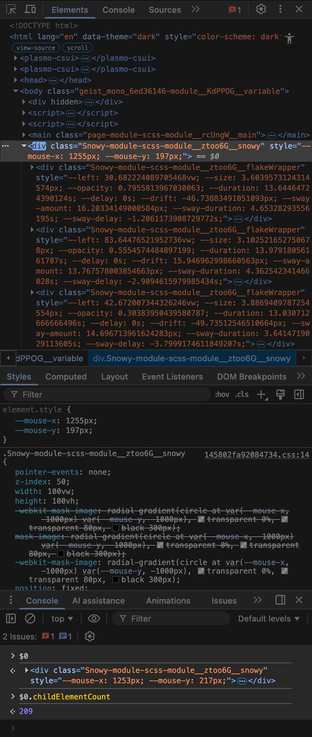
Another concern is that if you are making some particle effects for your website, do not simply render and refresh the particles in the DOM like me. Though this method performs well on Chrome, it will cause a low frame rate on Safari.

Instead, canvas works better. (In case you want to support Safari and its users.)

A screenshot of Chrome DevTools displaying HTML for numerous flake div elements, illustrating the use of the DOM to render particle effects. The console at the bottom shows that the parent container has a child element count of 209.
ALT text

A screenshot of Chrome DevTools displaying HTML for numerous flake div elements, illustrating the use of the DOM to render particle effects. The console at the bottom shows that the parent container has a child element count of 209.

@MrWillCom@vmst.io

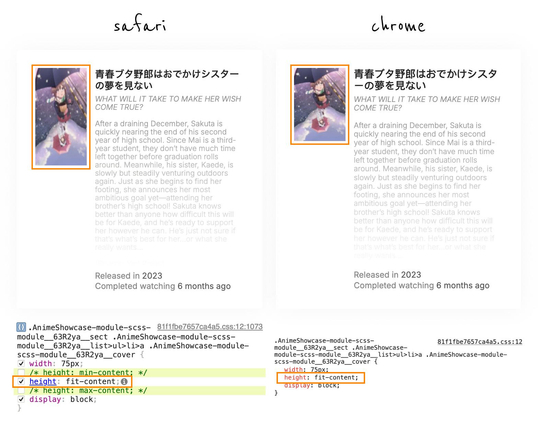
Safari, the stretched image "fits" you so much. 🤣

An image comparison shows a web element rendering differently in Safari and Chrome. In Safari, an anime poster is vertically stretched due to the "height: fit-content" CSS property, while it appears correctly proportioned in Chrome.
ALT text

An image comparison shows a web element rendering differently in Safari and Chrome. In Safari, an anime poster is vertically stretched due to the "height: fit-content" CSS property, while it appears correctly proportioned in Chrome.

@terminaltilt@climatejustice.social

Stop memorizing your passwords. Seriously.

Your brain is designed for patterns, not encryption. If you can remember your password, it is weak.

In the next video, we are fixing your digital hygiene. No closed source "just trust me, bro" apps. No browser saving. FOSS digital sovereignty.

Which side are you on right now?

  • Team Cloud (Bitwarden/Proton)74 (45%)
  • Team Local (KeePassXC)79 (48%)
  • I still use my Browser 😬8 (5%)
  • I use a sticky note... 🤦2 (1%)
@itgrrl@infosec.exchange

living with continues to reveal new / “features” 😡🤬

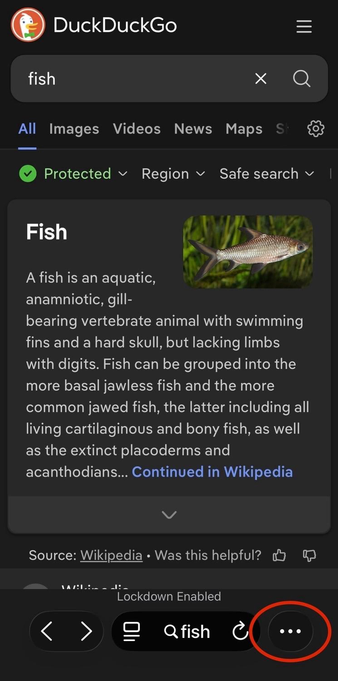
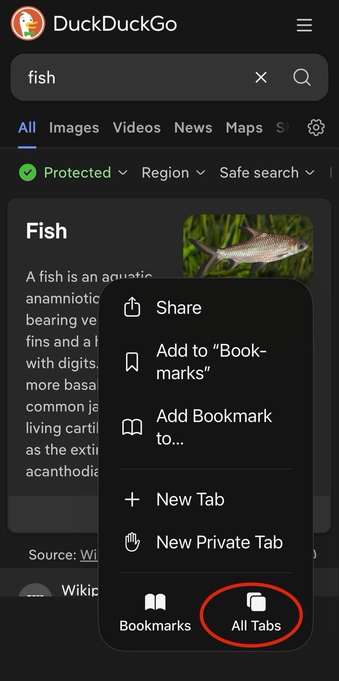
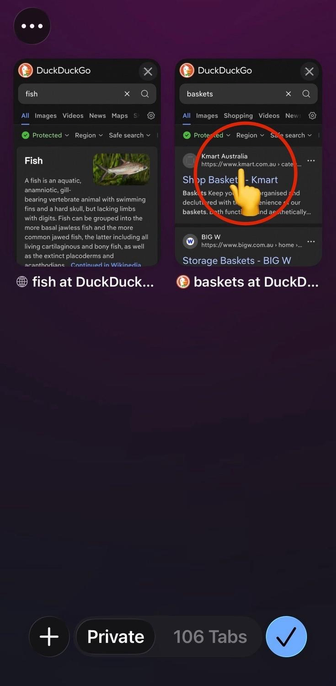
the toolbar now has enormous text & button elements^ that have presumably led to the decision to remove the tabs button / icon & relegating to a pop-up menu – so now viewing open tabs requires two taps instead of one, & switching to a different tab now requires three taps instead of two… 🤦‍♀️

these are the alleged “design geniuses” of at work, folks 🤦‍♀️🤦‍♀️🤦‍♀️


^ I have old eyes, so I tend to run most app text size at 120% – but I’ve checked the toolbar layout at other text sizes all the way down to 80% & it doesn’t change the elements presented, so the tabs button / icon doesn’t disappear ’coz I’m running larger text sizes, it’s just a crap design decision 💁‍♀️

a screenshot of the Safari mobile browser in iOS 26 showing a DuckDuckGo search result page for the word “fish” 
 
at bottom right, a red oval highlights the ellipses menu (…) that you now need to tap to bring up more options – this is where formerly a tabs button (icon) was displayed that would launch the tab picker screen with a single tap
ALT text

a screenshot of the Safari mobile browser in iOS 26 showing a DuckDuckGo search result page for the word “fish” at bottom right, a red oval highlights the ellipses menu (…) that you now need to tap to bring up more options – this is where formerly a tabs button (icon) was displayed that would launch the tab picker screen with a single tap

a screenshot of the Safari mobile browser in iOS 26 showing a DuckDuckGo search result page for the word “fish”, with a pop-up menu at bottom right
 
a red oval highlights the “All tabs” option (icon with text below it) that you now need to tap to launch the tab picker screen
ALT text

a screenshot of the Safari mobile browser in iOS 26 showing a DuckDuckGo search result page for the word “fish”, with a pop-up menu at bottom right a red oval highlights the “All tabs” option (icon with text below it) that you now need to tap to launch the tab picker screen

a screenshot of the Safari mobile browser in iOS 26 showing the tab picker screen – two tabs are visible, one is a DuckDuckGo search result page for the word “fish”, the other is a DuckDuckGo search result page for the word “baskets” 
 
a large red circle with an emoji of a hand with the index finger extended highlights the middle of the tab on the right (the search for “baskets”) where you tap to switch to the second tab
ALT text

a screenshot of the Safari mobile browser in iOS 26 showing the tab picker screen – two tabs are visible, one is a DuckDuckGo search result page for the word “fish”, the other is a DuckDuckGo search result page for the word “baskets” a large red circle with an emoji of a hand with the index finger extended highlights the middle of the tab on the right (the search for “baskets”) where you tap to switch to the second tab

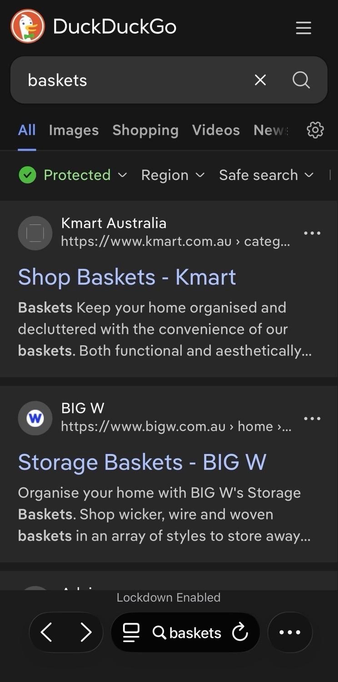
a screenshot of the Safari mobile browser in iOS 26 showing a DuckDuckGo search result page for the word “baskets” 
 
this completes the three-tap process to switch between tabs that used to be a two-tap process in earlier versions of iOS 🤦‍♀️
ALT text

a screenshot of the Safari mobile browser in iOS 26 showing a DuckDuckGo search result page for the word “baskets” this completes the three-tap process to switch between tabs that used to be a two-tap process in earlier versions of iOS 🤦‍♀️

@noim@noc.social

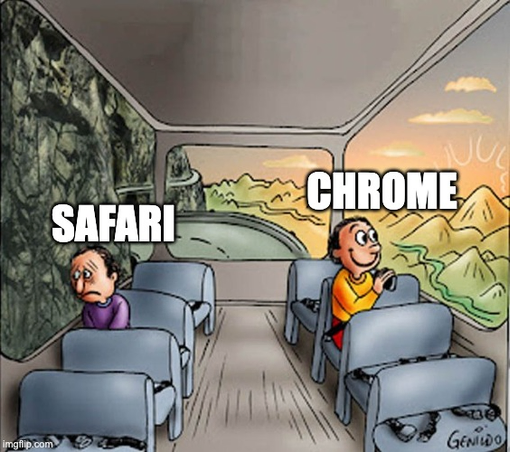
Mood today (shameless copied from coworker)

Two people sit on a bus; the "Safari" person looks unhappy on the dark side, while the "Chrome" person smiles on the bright side.
ALT text

Two people sit on a bus; the "Safari" person looks unhappy on the dark side, while the "Chrome" person smiles on the bright side.

@JForg@mastodos.com

【おしえてえらい人】
、今試したら で開いてるページにある 画像の title 要素の内容を role="img" 指定があれば(ラベルとして)読み上げてくれるようになってたんだけど、この仕様になったのいつからでしょう?(昔は読まれなかったですよね)🤔

ちなみに当方で試した OS バージョンは
- macOS が 15.7.2
- iOS が 18.6.2
です。

@mikaeru@mastodon.social

The "official" Unicode Regular Expressions (UTS #18) document, dated February 8, 2022, has never been updated since then, and the four new Unicode properties introduced in Unicode 15.1 are only listed in the Proposed Update *draft*, dated May 11, 2023...

This could explain why , , and the framework () trigger an "invalid property" error for the /\p{IDS_Unary_Operator}/u in JavaScript, while /\p{IDS_Binary_Operator}/u is ok...

@JForg@mastodos.com

【おしえてえらい人】
、今試したら で開いてるページにある 画像の title 要素の内容を role="img" 指定があれば(ラベルとして)読み上げてくれるようになってたんだけど、この仕様になったのいつからでしょう?(昔は読まれなかったですよね)🤔

ちなみに当方で試した OS バージョンは
- macOS が 15.7.2
- iOS が 18.6.2
です。

@nibushibu@vivaldi.net · Reply to GENKI

さては 、`writing-mode: vertidal-rl;` の実装微妙だな?
なんか縦書き折り返しとか発生している状態で `overflow: scroll` とかになってると余計なスクロールがうまれる…

@nibushibu@vivaldi.net · Reply to GENKI

そもそも が使いづらすぎという問題もある。スタイルとか上書きしてると結構バグっぽい感じになってリロードせざるを得ないみたいなのによくぶつかる。
選択してる要素と違う要素のスタイル一覧表示してきたり、スタイルパネルでスタイル上書きしても要素に適応されなかったり。

もうちょっとどうにかならないか… :tony_sigh:

@heybenji@social.coop

Any Tab Groups users out there? A recent update seems to now auto-expand groups when I click on them, making this feature pretty much useless to me. Is it just me? I can’t seem to find a setting to turn it off.

@jensimmons any ideas?

@nibushibu@vivaldi.net · Reply to GENKI

が、以前チャレンジした前衛的な UI(タブとアドレスバーを同一のモノとして見せたUI)をひっそりと引っ込めて、サイドバーとタブバーには重複する情報が表示されちゃってる最中に、
はカスタマイズの自由度がさらに上がって、たとえば横置きしたタブバーにアドレスバーとかナビゲーションをまとめた、いわゆる 的な UI をつくることも出来るようになったのはなんか象徴的だなと思って見てる。

:vivaldi_red: はとにかくユーザーの選択肢を極力増やして、減らさない。だから新しい UI のアイディアを取り込んでも、それが気に入らないユーザーはカスタマイズして元に戻せる。

一方、 🧭 には(すくなくとも :vivaldi_red: ほどの)カスタマイズの自由度はなくて、そんな中で野心的に挑戦した新しい UI は多数派のユーザーには受け入れられず、一旦「オプションとして選択可能」という形で残すもの今回のアップデートで削除(されたのかな?自分が設定をみつけられていないだけか?)されたという、この差。

vivaldi.com/ja/blog/news/vival

vivaldi.com

Vivaldi 7.6:すべてをカスタマイズして、タブを自在にコントロール | Vivaldi Browser

ブラウザは手に馴染み、自然に使える相棒であるべきです。ユーザーが努力して慣れるのではなく、ブラウザがあなたに合わせるのが理想です。今回のアップデートでは、カスタマイズ可能なタブバーとタブボタンを追加しました。タブ管理に便利なこの機能を使って、すいすい泳ぐように目的のタブにたどり着きましょう。

@nibushibu@vivaldi.net · Reply to GENKI

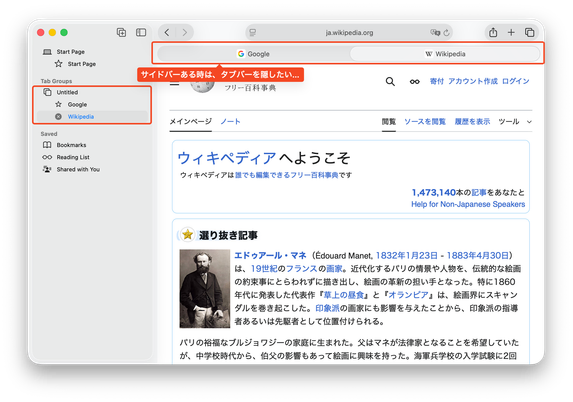
あと、サイドバーがあるのはいいんだけど、タブバーを隠せないんだろうか

Safari のウインドウのキャプチャー画像。
サイドバーとタブバーに同じ情報が重複していることを、吹き出しとハイライトで示しています。
ALT text

Safari のウインドウのキャプチャー画像。 サイドバーとタブバーに同じ情報が重複していることを、吹き出しとハイライトで示しています。

@nibushibu@vivaldi.net · Reply to GENKI

あれ、ほんとだ、 のタブとアドレスバーが同一みたいになる UI なくなったの?
自分もあれ、UI の筋としては悪くはないとおもってたんだけど :tony_neutral:

@dmarti@federate.social

Does anyone have an example (blog post?) of how to use to block search ad clicks?

developer.apple.com/documentat

(I'm able to block them using enterprise config files in Firefox and Chrome, but I don't have a link to do it in Safari blog.zgp.org/search-malvertisi )

blog.zgp.org

Search malvertising protection using enterprise policies

@TheEvilSkeleton@treehouse.systems · Reply to TheEvilSkeleton

To elaborate on my hostility against WebKit: WebKit does nothing but get in my way whenever I work on literally any website.

When I rewrote nouveau's website in late 2023, the website worked perfectly fine on Firefox (Gecko) and Chromium (Blink), but was broken on Epiphany/Safari (WebKit). The logo, which is an SVG, would not adapt to dark style, because, to this day, WebKit still does not support prefers-color-scheme in SVGs. So, as a workaround, instead of having one SVG file for both color schemes, we have one SVG file for light style, and one for dark style.

Another example: On my website, some elements are intentionally made to be unselectable using user-select: none;, such as the command-line decoration and the “Table of Contents” text, but on WebKit, these elements continue to be selectable because it does not properly support the user-select property. And no, using the vendor prefix is completely unacceptable, especially considering that it behaves differently.

Lastly, WebKit does not yet fully support the ::marker pseudo-element. This means, in my articles, numbered list items in the table of contents are completely wrong and don't represent the same numbers as headings.

Apple has consistently proved that they don't care about WebKit, because otherwise browsers like Safari and Epiphany would have worked as well as they do on Firefox and Chromium. There's absolutely no reason to force WebKit onto iOS and iPadOS if they're not even willing to invest in WebKit. Likewise, Apple employees working on WebKit should really stop calling themselves “WebKit evangelists” if their inferior engine regularly gets in developers’ way. So yes, WebKit sucks, and this is 100% on Apple. I don't care about being harsh. Apple is a multi-trillion dollar company, most of which came from exploiting people. The least they can do is invest in their projects.

For clarity, my hostility towards WebKit is purely targeted at Apple's lack of involvement with WebKit, not the browsers using it.

developer.mozilla.org

::marker - CSS | MDN

The ::marker CSS pseudo-element selects the marker box of a list item, which typically contains a bullet or number. It works on any element or pseudo-element set to display: list-item, such as the <li> and <summary> elements.

@TheEvilSkeleton@treehouse.systems · Reply to TheEvilSkeleton

To elaborate on my hostility against WebKit: WebKit does nothing but get in my way whenever I work on literally any website.

When I rewrote nouveau's website in late 2023, the website worked perfectly fine on Firefox (Gecko) and Chromium (Blink), but was broken on Epiphany/Safari (WebKit). The logo, which is an SVG, would not adapt to dark style, because, to this day, WebKit still does not support prefers-color-scheme in SVGs. So, as a workaround, instead of having one SVG file for both color schemes, we have one SVG file for light style, and one for dark style.

Another example: On my website, some elements are intentionally made to be unselectable using user-select: none;, such as the command-line decoration and the “Table of Contents” text, but on WebKit, these elements continue to be selectable because it does not properly support the user-select property. And no, using the vendor prefix is completely unacceptable, especially considering that it behaves differently.

Lastly, WebKit does not yet fully support the ::marker pseudo-element. This means, in my articles, numbered list items in the table of contents are completely wrong and don't represent the same numbers as headings.

Apple has consistently proved that they don't care about WebKit, because otherwise browsers like Safari and Epiphany would have worked as well as they do on Firefox and Chromium. There's absolutely no reason to force WebKit onto iOS and iPadOS if they're not even willing to invest in WebKit. Likewise, Apple employees working on WebKit should really stop calling themselves “WebKit evangelists” if their inferior engine regularly gets in developers’ way. So yes, WebKit sucks, and this is 100% on Apple. I don't care about being harsh. Apple is a multi-trillion dollar company, most of which came from exploiting people. The least they can do is invest in their projects.

For clarity, my hostility towards WebKit is purely targeted at Apple's lack of involvement with WebKit, not the browsers using it.

developer.mozilla.org

::marker - CSS | MDN

The ::marker CSS pseudo-element selects the marker box of a list item, which typically contains a bullet or number. It works on any element or pseudo-element set to display: list-item, such as the <li> and <summary> elements.

@eurozerozero@mastodon.social · Reply to eurozerozero

After using for more than a month, I can say it is absolutely worth the money. The results are miles better than Google or DuckDuckGo for the kinds of searches I regularly do.

The ability to block, raise, lower and pin sites in your search results is fantastic.

But really needs it added as a search engine option, because while the Kagi plugin is a good workaround to redirect searches, it shouldn’t be needed.

( FB18294218 – Recent Similar Reports: None)

@eurozerozero@mastodon.social · Reply to eurozerozero

After using for more than a month, I can say it is absolutely worth the money. The results are miles better than Google or DuckDuckGo for the kinds of searches I regularly do.

The ability to block, raise, lower and pin sites in your search results is fantastic.

But really needs it added as a search engine option, because while the Kagi plugin is a good workaround to redirect searches, it shouldn’t be needed.

( FB18294218 – Recent Similar Reports: None)

@aslakr@mastodon.social

Denne gjelder fortsatt; det hadde vært fint om de store browserene hadde innebygget oppdaging av feeds med en dedikert knapp eller meny.

Litt på samme måte som Firefox nå kan oppdate OpenGraph-headere for forhåndsvisning av lenker.

openrss.org/blog/browsers-shou

openrss.org

Browsers removed the RSS Button and they should bring it back

The one thing that made it so easy to discover new RSS feeds was stripped from browsers

@czottmann@norden.social
@eurozerozero@mastodon.social

Safari really should have Kagi as a search engine option.

Or, give us the ability to add search engines!

I’ve moved on from DuckDuckGo now. When you search for something and the top results are irrelevant *ads*, it’s the time to say goodbye.

@davidjohnson@hachyderm.io
@ueeu@vivaldi.net

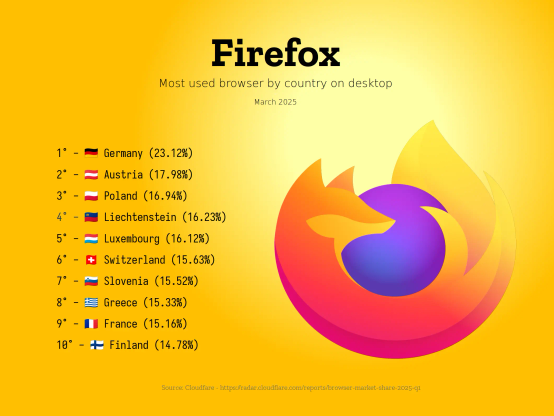
Browser Market Share Report for March 2025 by Cloudfare

Most used browsers by country on desktop:

radar.cloudflare.com/reports/b

Firefox
Most used browser by country on desktop
March 2025
1° - 🇩🇪 Germany (23.12%)
2° - 🇦🇹 Austria (17.98%)
3° - 🇵🇱 Poland (16.94%)
4° - 🇱🇮 Liechtenstein (16.23%)
5° - 🇱🇺 Luxembourg (16.12%)
6° - 🇨🇭 Switzerland (15.63%)
7° - 🇸🇮 Slovenia (15.52%)
8° - 🇬🇷 Greece (15.33%)
9° - 🇫🇷 France (15.16%)
10° - 🇫🇮 Finland (14.78%)
ALT text

Firefox Most used browser by country on desktop March 2025 1° - 🇩🇪 Germany (23.12%) 2° - 🇦🇹 Austria (17.98%) 3° - 🇵🇱 Poland (16.94%) 4° - 🇱🇮 Liechtenstein (16.23%) 5° - 🇱🇺 Luxembourg (16.12%) 6° - 🇨🇭 Switzerland (15.63%) 7° - 🇸🇮 Slovenia (15.52%) 8° - 🇬🇷 Greece (15.33%) 9° - 🇫🇷 France (15.16%) 10° - 🇫🇮 Finland (14.78%)

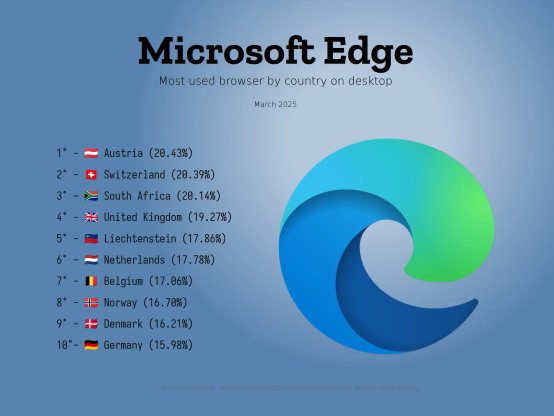
Microsoft Edge
Most used browser by country on desktop
March 2025
1° - 🇦🇹 Austria (20.43%)
2° - 🇨🇭 Switzerland (20.39%)
3° - 🇿🇦 South Africa (20.14%)
4° - 🇬🇧 United Kingdom (19.27%)
5° - 🇱🇮 Liechtenstein (17.86%)
6° - 🇳🇱 Netherlands (17.78%)
7° - 🇧🇪 Belgium (17.06%)
8° - 🇳🇴 Norway (16.70%)
9° - 🇩🇰 Denmark (16.21%)
10°- 🇩🇪 Germany (15.98%)
ALT text

Microsoft Edge Most used browser by country on desktop March 2025 1° - 🇦🇹 Austria (20.43%) 2° - 🇨🇭 Switzerland (20.39%) 3° - 🇿🇦 South Africa (20.14%) 4° - 🇬🇧 United Kingdom (19.27%) 5° - 🇱🇮 Liechtenstein (17.86%) 6° - 🇳🇱 Netherlands (17.78%) 7° - 🇧🇪 Belgium (17.06%) 8° - 🇳🇴 Norway (16.70%) 9° - 🇩🇰 Denmark (16.21%) 10°- 🇩🇪 Germany (15.98%)

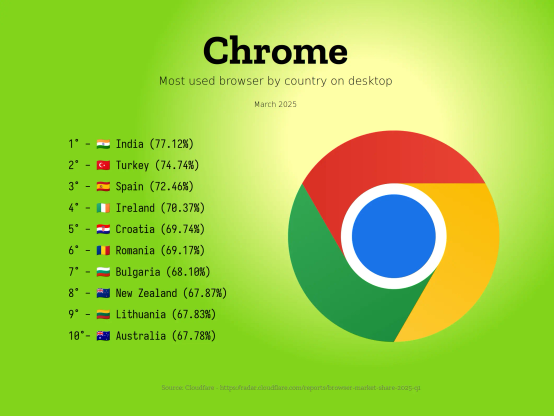
Chrome
Most used browser by country on desktop
March 2025
1° - 🇮🇳 India (77.12%)
2° - 🇹🇷 Turkey (74.74%)
3° - 🇪🇸 Spain (72.46%)
4° - 🇮🇪 Ireland (70.37%)
5° - 🇭🇷 Croatia (69.74%)
6° - 🇷🇴 Romania (69.17%)
7° - 🇧🇬 Bulgaria (68.10%)
8° - 🇳🇿 New Zealand (67.87%)
9° - 🇱🇹 Lithuania (67.83%)
10°- 🇦🇺 Australia (67.78%)
ALT text

Chrome Most used browser by country on desktop March 2025 1° - 🇮🇳 India (77.12%) 2° - 🇹🇷 Turkey (74.74%) 3° - 🇪🇸 Spain (72.46%) 4° - 🇮🇪 Ireland (70.37%) 5° - 🇭🇷 Croatia (69.74%) 6° - 🇷🇴 Romania (69.17%) 7° - 🇧🇬 Bulgaria (68.10%) 8° - 🇳🇿 New Zealand (67.87%) 9° - 🇱🇹 Lithuania (67.83%) 10°- 🇦🇺 Australia (67.78%)

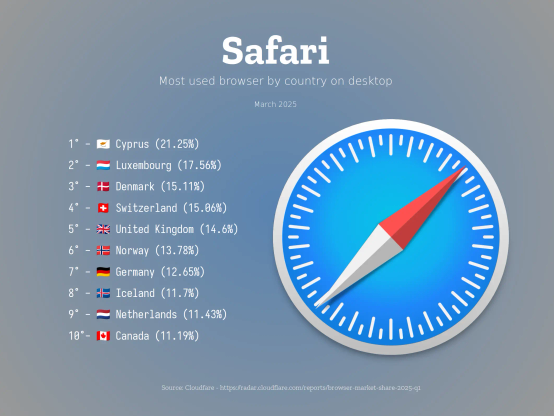
Safari
Most used browser by country on desktop
March 2025
1° - 🇨🇾 Cyprus (21.25%)
2° - 🇱🇺 Luxembourg (17.56%)
3° - 🇩🇰 Denmark (15.11%)
4° - 🇨🇭 Switzerland (15.06%)
5° - 🇬🇧 United Kingdom (14.6%)
6° - 🇳🇴 Norway (13.78%)
7° - 🇩🇪 Germany (12.65%)
8° - 🇮🇸 Iceland (11.7%)
9° - 🇳🇱 Netherlands (11.43%)
10°- 🇨🇦 Canada (11.19%)
ALT text

Safari Most used browser by country on desktop March 2025 1° - 🇨🇾 Cyprus (21.25%) 2° - 🇱🇺 Luxembourg (17.56%) 3° - 🇩🇰 Denmark (15.11%) 4° - 🇨🇭 Switzerland (15.06%) 5° - 🇬🇧 United Kingdom (14.6%) 6° - 🇳🇴 Norway (13.78%) 7° - 🇩🇪 Germany (12.65%) 8° - 🇮🇸 Iceland (11.7%) 9° - 🇳🇱 Netherlands (11.43%) 10°- 🇨🇦 Canada (11.19%)

@czottmann@norden.social

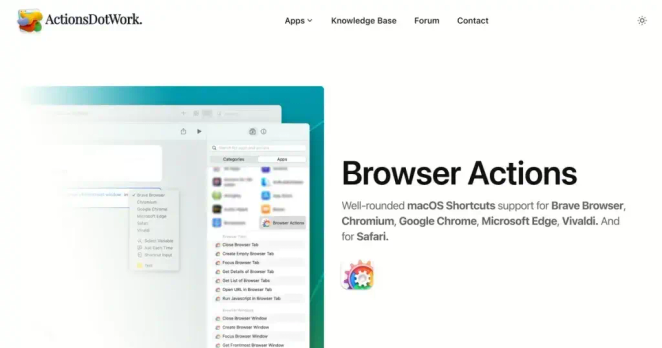
ICYMI, a while back I did release my app, Browser Actions.

BA lets you use to automate , , , , , and – with actions for navigating, working with forms, clicking page elements, handling windows & tabs, getting data out, and more!

actions.work/browser-actions?r
14d trial, perpetual licenses, no subs.

(I'd really appreciate some boosts ♻️ – it's hard to get new apps noticed, and I'm struggling quite a bit 😬)

@czottmann@norden.social

ICYMI, a while back I did release my app, Browser Actions.

BA lets you use to automate , , , , , and – with actions for navigating, working with forms, clicking page elements, handling windows & tabs, getting data out, and more!

actions.work/browser-actions?r
14d trial, perpetual licenses, no subs.

(I'd really appreciate some boosts ♻️ – it's hard to get new apps noticed, and I'm struggling quite a bit 😬)

@ueeu@vivaldi.net

Browser Market Share Report for March 2025 by Cloudfare

Most used browsers by country on desktop:

radar.cloudflare.com/reports/b

Firefox
Most used browser by country on desktop
March 2025
1° - 🇩🇪 Germany (23.12%)
2° - 🇦🇹 Austria (17.98%)
3° - 🇵🇱 Poland (16.94%)
4° - 🇱🇮 Liechtenstein (16.23%)
5° - 🇱🇺 Luxembourg (16.12%)
6° - 🇨🇭 Switzerland (15.63%)
7° - 🇸🇮 Slovenia (15.52%)
8° - 🇬🇷 Greece (15.33%)
9° - 🇫🇷 France (15.16%)
10° - 🇫🇮 Finland (14.78%)
ALT text

Firefox Most used browser by country on desktop March 2025 1° - 🇩🇪 Germany (23.12%) 2° - 🇦🇹 Austria (17.98%) 3° - 🇵🇱 Poland (16.94%) 4° - 🇱🇮 Liechtenstein (16.23%) 5° - 🇱🇺 Luxembourg (16.12%) 6° - 🇨🇭 Switzerland (15.63%) 7° - 🇸🇮 Slovenia (15.52%) 8° - 🇬🇷 Greece (15.33%) 9° - 🇫🇷 France (15.16%) 10° - 🇫🇮 Finland (14.78%)

Microsoft Edge
Most used browser by country on desktop
March 2025
1° - 🇦🇹 Austria (20.43%)
2° - 🇨🇭 Switzerland (20.39%)
3° - 🇿🇦 South Africa (20.14%)
4° - 🇬🇧 United Kingdom (19.27%)
5° - 🇱🇮 Liechtenstein (17.86%)
6° - 🇳🇱 Netherlands (17.78%)
7° - 🇧🇪 Belgium (17.06%)
8° - 🇳🇴 Norway (16.70%)
9° - 🇩🇰 Denmark (16.21%)
10°- 🇩🇪 Germany (15.98%)
ALT text

Microsoft Edge Most used browser by country on desktop March 2025 1° - 🇦🇹 Austria (20.43%) 2° - 🇨🇭 Switzerland (20.39%) 3° - 🇿🇦 South Africa (20.14%) 4° - 🇬🇧 United Kingdom (19.27%) 5° - 🇱🇮 Liechtenstein (17.86%) 6° - 🇳🇱 Netherlands (17.78%) 7° - 🇧🇪 Belgium (17.06%) 8° - 🇳🇴 Norway (16.70%) 9° - 🇩🇰 Denmark (16.21%) 10°- 🇩🇪 Germany (15.98%)

Chrome
Most used browser by country on desktop
March 2025
1° - 🇮🇳 India (77.12%)
2° - 🇹🇷 Turkey (74.74%)
3° - 🇪🇸 Spain (72.46%)
4° - 🇮🇪 Ireland (70.37%)
5° - 🇭🇷 Croatia (69.74%)
6° - 🇷🇴 Romania (69.17%)
7° - 🇧🇬 Bulgaria (68.10%)
8° - 🇳🇿 New Zealand (67.87%)
9° - 🇱🇹 Lithuania (67.83%)
10°- 🇦🇺 Australia (67.78%)
ALT text

Chrome Most used browser by country on desktop March 2025 1° - 🇮🇳 India (77.12%) 2° - 🇹🇷 Turkey (74.74%) 3° - 🇪🇸 Spain (72.46%) 4° - 🇮🇪 Ireland (70.37%) 5° - 🇭🇷 Croatia (69.74%) 6° - 🇷🇴 Romania (69.17%) 7° - 🇧🇬 Bulgaria (68.10%) 8° - 🇳🇿 New Zealand (67.87%) 9° - 🇱🇹 Lithuania (67.83%) 10°- 🇦🇺 Australia (67.78%)

Safari
Most used browser by country on desktop
March 2025
1° - 🇨🇾 Cyprus (21.25%)
2° - 🇱🇺 Luxembourg (17.56%)
3° - 🇩🇰 Denmark (15.11%)
4° - 🇨🇭 Switzerland (15.06%)
5° - 🇬🇧 United Kingdom (14.6%)
6° - 🇳🇴 Norway (13.78%)
7° - 🇩🇪 Germany (12.65%)
8° - 🇮🇸 Iceland (11.7%)
9° - 🇳🇱 Netherlands (11.43%)
10°- 🇨🇦 Canada (11.19%)
ALT text

Safari Most used browser by country on desktop March 2025 1° - 🇨🇾 Cyprus (21.25%) 2° - 🇱🇺 Luxembourg (17.56%) 3° - 🇩🇰 Denmark (15.11%) 4° - 🇨🇭 Switzerland (15.06%) 5° - 🇬🇧 United Kingdom (14.6%) 6° - 🇳🇴 Norway (13.78%) 7° - 🇩🇪 Germany (12.65%) 8° - 🇮🇸 Iceland (11.7%) 9° - 🇳🇱 Netherlands (11.43%) 10°- 🇨🇦 Canada (11.19%)

@ueeu@vivaldi.net

Browser Market Share Report for March 2025 by Cloudfare

Most used browsers by country on desktop:

radar.cloudflare.com/reports/b

Firefox
Most used browser by country on desktop
March 2025
1° - 🇩🇪 Germany (23.12%)
2° - 🇦🇹 Austria (17.98%)
3° - 🇵🇱 Poland (16.94%)
4° - 🇱🇮 Liechtenstein (16.23%)
5° - 🇱🇺 Luxembourg (16.12%)
6° - 🇨🇭 Switzerland (15.63%)
7° - 🇸🇮 Slovenia (15.52%)
8° - 🇬🇷 Greece (15.33%)
9° - 🇫🇷 France (15.16%)
10° - 🇫🇮 Finland (14.78%)
ALT text

Firefox Most used browser by country on desktop March 2025 1° - 🇩🇪 Germany (23.12%) 2° - 🇦🇹 Austria (17.98%) 3° - 🇵🇱 Poland (16.94%) 4° - 🇱🇮 Liechtenstein (16.23%) 5° - 🇱🇺 Luxembourg (16.12%) 6° - 🇨🇭 Switzerland (15.63%) 7° - 🇸🇮 Slovenia (15.52%) 8° - 🇬🇷 Greece (15.33%) 9° - 🇫🇷 France (15.16%) 10° - 🇫🇮 Finland (14.78%)

Microsoft Edge
Most used browser by country on desktop
March 2025
1° - 🇦🇹 Austria (20.43%)
2° - 🇨🇭 Switzerland (20.39%)
3° - 🇿🇦 South Africa (20.14%)
4° - 🇬🇧 United Kingdom (19.27%)
5° - 🇱🇮 Liechtenstein (17.86%)
6° - 🇳🇱 Netherlands (17.78%)
7° - 🇧🇪 Belgium (17.06%)
8° - 🇳🇴 Norway (16.70%)
9° - 🇩🇰 Denmark (16.21%)
10°- 🇩🇪 Germany (15.98%)
ALT text

Microsoft Edge Most used browser by country on desktop March 2025 1° - 🇦🇹 Austria (20.43%) 2° - 🇨🇭 Switzerland (20.39%) 3° - 🇿🇦 South Africa (20.14%) 4° - 🇬🇧 United Kingdom (19.27%) 5° - 🇱🇮 Liechtenstein (17.86%) 6° - 🇳🇱 Netherlands (17.78%) 7° - 🇧🇪 Belgium (17.06%) 8° - 🇳🇴 Norway (16.70%) 9° - 🇩🇰 Denmark (16.21%) 10°- 🇩🇪 Germany (15.98%)

Chrome
Most used browser by country on desktop
March 2025
1° - 🇮🇳 India (77.12%)
2° - 🇹🇷 Turkey (74.74%)
3° - 🇪🇸 Spain (72.46%)
4° - 🇮🇪 Ireland (70.37%)
5° - 🇭🇷 Croatia (69.74%)
6° - 🇷🇴 Romania (69.17%)
7° - 🇧🇬 Bulgaria (68.10%)
8° - 🇳🇿 New Zealand (67.87%)
9° - 🇱🇹 Lithuania (67.83%)
10°- 🇦🇺 Australia (67.78%)
ALT text

Chrome Most used browser by country on desktop March 2025 1° - 🇮🇳 India (77.12%) 2° - 🇹🇷 Turkey (74.74%) 3° - 🇪🇸 Spain (72.46%) 4° - 🇮🇪 Ireland (70.37%) 5° - 🇭🇷 Croatia (69.74%) 6° - 🇷🇴 Romania (69.17%) 7° - 🇧🇬 Bulgaria (68.10%) 8° - 🇳🇿 New Zealand (67.87%) 9° - 🇱🇹 Lithuania (67.83%) 10°- 🇦🇺 Australia (67.78%)

Safari
Most used browser by country on desktop
March 2025
1° - 🇨🇾 Cyprus (21.25%)
2° - 🇱🇺 Luxembourg (17.56%)
3° - 🇩🇰 Denmark (15.11%)
4° - 🇨🇭 Switzerland (15.06%)
5° - 🇬🇧 United Kingdom (14.6%)
6° - 🇳🇴 Norway (13.78%)
7° - 🇩🇪 Germany (12.65%)
8° - 🇮🇸 Iceland (11.7%)
9° - 🇳🇱 Netherlands (11.43%)
10°- 🇨🇦 Canada (11.19%)
ALT text

Safari Most used browser by country on desktop March 2025 1° - 🇨🇾 Cyprus (21.25%) 2° - 🇱🇺 Luxembourg (17.56%) 3° - 🇩🇰 Denmark (15.11%) 4° - 🇨🇭 Switzerland (15.06%) 5° - 🇬🇧 United Kingdom (14.6%) 6° - 🇳🇴 Norway (13.78%) 7° - 🇩🇪 Germany (12.65%) 8° - 🇮🇸 Iceland (11.7%) 9° - 🇳🇱 Netherlands (11.43%) 10°- 🇨🇦 Canada (11.19%)

@estelle@infosec.exchange · Reply to Estelle Platini

Which browsers do you use?
• Multiple choice to account for various usage and any device (pro & perso)
• You may boost to enlarge the sample

  • Safari501 (11%)
  • Firefox1,724 (38%)
  • Librewolf374 (8%)
  • other browser motorised by Gecko201 (4%)
  • Chrome472 (10%)
  • Vivaldi398 (9%)
  • Edge243 (5%)
  • ungoogled-chromium253 (6%)
  • other Chromium204 (5%)
  • other Blink-motor'd (inc. Brave)132 (3%)
@estelle@infosec.exchange · Reply to Estelle Platini

Which browsers do you use?
• Multiple choice to account for various usage and any device (pro & perso)
• You may boost to enlarge the sample

  • Safari501 (11%)
  • Firefox1,724 (38%)
  • Librewolf374 (8%)
  • other browser motorised by Gecko201 (4%)
  • Chrome472 (10%)
  • Vivaldi398 (9%)
  • Edge243 (5%)
  • ungoogled-chromium253 (6%)
  • other Chromium204 (5%)
  • other Blink-motor'd (inc. Brave)132 (3%)
@Vivaldi@vivaldi.net

Switching from Safari? We’ve made it almost too easy. One click and your browser data’s already home. Break free from that Big Tech browser with Vivaldi. 😌

A user switches from Safari to Vivaldi. First, they use Safari to navigate to vivaldi.com, download and install the latest version of Vivaldi for computers. After opening Vivaldi and logging in, they import all their Safari browser data with one click by selecting the Safari icon. The process is simple and smooth, with no drama, ready to browse instantly.
ALT text

A user switches from Safari to Vivaldi. First, they use Safari to navigate to vivaldi.com, download and install the latest version of Vivaldi for computers. After opening Vivaldi and logging in, they import all their Safari browser data with one click by selecting the Safari icon. The process is simple and smooth, with no drama, ready to browse instantly.

@Vivaldi@vivaldi.net

Switching from Safari? We’ve made it almost too easy. One click and your browser data’s already home. Break free from that Big Tech browser with Vivaldi. 😌

A user switches from Safari to Vivaldi. First, they use Safari to navigate to vivaldi.com, download and install the latest version of Vivaldi for computers. After opening Vivaldi and logging in, they import all their Safari browser data with one click by selecting the Safari icon. The process is simple and smooth, with no drama, ready to browse instantly.
ALT text

A user switches from Safari to Vivaldi. First, they use Safari to navigate to vivaldi.com, download and install the latest version of Vivaldi for computers. After opening Vivaldi and logging in, they import all their Safari browser data with one click by selecting the Safari icon. The process is simple and smooth, with no drama, ready to browse instantly.

@reallylazybear@mastodon.social
@obrhoff@chaos.social

I'm very happy with Orion as my browser, but I'm really curious why it's so snappy compared to Safari, when it looks more or less like a "tweaked" version of Safari.

Why is Safari so slow then?

The only thing I miss is more color variants to change the icon. @kagihq

morrick.me/archives/9500

morrick.me

This is my next main browser: a review of Orion

Orion is currently my favourite browser, and has replaced Safari entirely on one of my primary Macs. Here's why.

@lucidillusions@pixelfed.social
a suspicious spotted deer and an equally suspicious Rufous treepie, checking what the photographer is up to.

#twosday #twofertuesday #birds #photography #Wildlife #Nature #Mammals #Jungle #Safari 📸📸 🌿🖌️ 🦊 🪶
a bird sitting on the antler of a male indian spotted deer and helping with preening/keeping the antler clean. 

there is also a partial second male deer (out of focus) in the frame.

the bird has a black head, rusty/orange wing feathers, as well as white and black streaks. 

the deer is rich brown in color, and has white spots. the antler has a velvety feel to it.
ALT text

a bird sitting on the antler of a male indian spotted deer and helping with preening/keeping the antler clean. there is also a partial second male deer (out of focus) in the frame. the bird has a black head, rusty/orange wing feathers, as well as white and black streaks. the deer is rich brown in color, and has white spots. the antler has a velvety feel to it.

@lucidillusions@pixelfed.social
a suspicious spotted deer and an equally suspicious Rufous treepie, checking what the photographer is up to.

#twosday #twofertuesday #birds #photography #Wildlife #Nature #Mammals #Jungle #Safari 📸📸 🌿🖌️ 🦊 🪶
a bird sitting on the antler of a male indian spotted deer and helping with preening/keeping the antler clean. 

there is also a partial second male deer (out of focus) in the frame.

the bird has a black head, rusty/orange wing feathers, as well as white and black streaks. 

the deer is rich brown in color, and has white spots. the antler has a velvety feel to it.
ALT text

a bird sitting on the antler of a male indian spotted deer and helping with preening/keeping the antler clean. there is also a partial second male deer (out of focus) in the frame. the bird has a black head, rusty/orange wing feathers, as well as white and black streaks. the deer is rich brown in color, and has white spots. the antler has a velvety feel to it.

@nachtfunke@indieweb.social

Omg. I attempted to debug an issue in safari, where a position: fixed; element didn't correctly align to the viewports edge and I couldn't find out why, until I noticed that it is now relatively positioned to the next element with `container: inline-size;` on it.

Is this how it is supposed to be? This is only the case in safari

@jon@vivaldi.net

My survey showed that most users are not happy with the browser that comes with their computers. If you are using one of those browsers, how about trying something new?

Does your browser have workspaces? Tab stacks? Tab tiles? Windows panel? Page capture? Sync? Custom themes with custom buttons? Web panels? Mouse gestures? Editable keyboard shortcuts?

Want to try a browser that has all of the above and more?

vivaldi.com

@jon@vivaldi.net

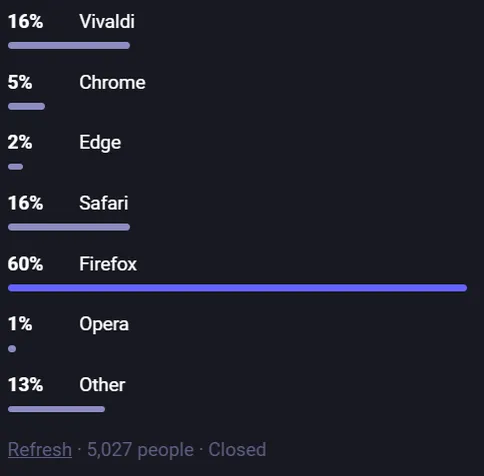
Here are the results of my "What is your favorite browser?" survey, here on Mastodon. These are some very interesting results.

It is clear that the incumbents are not getting a lot of love. Edge gets 2% and Chrome gets 5%. These browsers are widely used, but not very popular, based on this survey.

Safari does a lot better at 16%, the same as Vivaldi. The enthusiasm level from those that use Vivaldi is high and plenty of people also mention Vivaldi as a secondary option.

Opera gets just 1%.

Firefox gets 60%, so clearly a strong showing here in the Fediverse, although many say they use Firefox only because they do not want to use a Chromium based browser.

The cool part is then that 13% say they prefer another browser. Plenty of smaller browsers getting a mention, which is nice.

If you notice that the total is higher than 100%, then that is because I allowed people to select more than one browser, although most did not.

If you are still using Chrome or Edge, maybe it is time to try something new? You have a choice!

@lisamelton@mastodon.social

My name is Elizabeth but please call me Lisa.

I'm probably best known as the person who started the and projects at . You may think you know my deadname but... you don't.

I've drawn underground comics, pioneered using a Mac for newspaper graphics and developed software at Adobe and Netscape.

Now I write video scripts and sometimes podcast.

Follow me and I'll fill your timeline with boosts.

1/4

@czottmann@norden.social

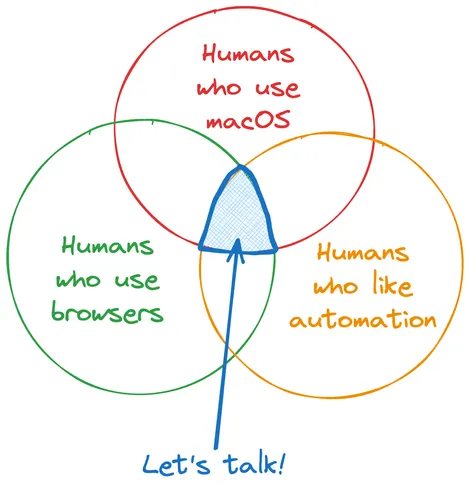
I’m working on a new app called Browser Actions: It's for 13.3+, and it brings solid Shortcuts support for , , , , . And for !

(See the diagram to decide if you should be excited.)

💡 actions.work/browser-actions

Public beta TestFlight is ongoing, link on the website!

Venn diagram with three overlapping circles:

- Humans who use macOS
- Humans who use browsers
- Humans who like automation

The overlapping area is marked with “Let’s talk”.
ALT text

Venn diagram with three overlapping circles: - Humans who use macOS - Humans who use browsers - Humans who like automation The overlapping area is marked with “Let’s talk”.

@technobaboo@ordinary.cafe

Given the Firefox stuff that's happening and the announcement of ladybird, I think it's a good idea to mention a browser project that's got no controversy I can see but could use time and money, @servo.

Servo is a browser engine made in Rust, it was made to be an experimental engine by Mozilla but the Linux Foundation is hosting it now. What I especially like is how modular it is, compared to other engines I feel I can make a better browser with it and its components help other projects too!

If you want to see a browser that can be maintained in pieces instead of monolithically it's worth checking out! they need serious CSS/flexbox help to get up to par with other browsers but the webGL and WASM is top notch.

@eric@social.coop · Reply to Estelle Platini
@estelle@infosec.exchange · Reply to Eric Maugendre

@eric Let's :

I propose an assessment of the situation before drops (deadline 6 March).
Which do you use across all your devices?

  • Safari12 (12%)
  • Firefox48 (49%)
  • Librewolf6 (6%)
  • other browser motorised by Gecko3 (3%)
  • Chrome6 (6%)
  • Vivaldi7 (7%)
  • Edge1 (1%)
  • ungoogled-chromium5 (5%)
  • other Chromium4 (4%)
  • other Blink-motor'd (inc. Brave)6 (6%)
@eric@social.coop · Reply to Eric Maugendre
@maugendre@hachyderm.io · Reply to Eric Maugendre

• unmigrated accounts on legacy browser—such as
• pro liaison on a browser approved by your organization
• consuming, online streaming, on the all-purpose browser: (then Settings > Privacy)
• social media on a speedy browser—such as (but you must update)
• online banking, health, sysadmin & sensitive stuff on a hardened browser—such as or 's browser

@maugendre@hachyderm.io · Reply to Eric Maugendre

Many mainly are data collection tools for advertising companies.
You can assume that everything you do through or is collected, saved to your data profile, and used for targeted advertising. Your data is shared between browsers only if you are "signed in" to the same account. So you should use different browsers for different online activities.
The practice is called .

For example: 👇🏾

@kn@hachyderm.io