Hashtag

#Ghostty

29 posts tagged with this hashtag.

@pnutzh4x0r@social.ndlug.org

After some reflection... I've decided to stick with for another two years and have upgraded all my machines (3 desktops, 4 servers) to 26.04 by doing:

$ sudo do-release-upgrade -d

On the desktop side, things went pretty smoothly and I only had to do the following after the update completed:

1. Resolve some configuration file conflicts, notably rsnapshot, nginx, and grub. For these, mostly used vimdiff afterwards to merge the maintainer's version into the local file.

2. Update apt sources in /etc/apt/sources.list.d. During upgraded, all third party repos are disabled and so afterwards, I had to go and re-enable or update them. Fortunately, I only had a few: google (chrome), steam, and weechat.

3. After updating, Ubuntu pro was not enabled for some reason (though I was enrolled and registered). To fix this, I did: "sudo pro enable livepatch" which also enabled the ESM repos.

That said, not everything was perfect:

1. On my laptop with a 1080p LCD, the default scaling was set to 125% instead of 100% due to it being a smaller screen (14in physically). I did not appreciate this... but I think once you set it to 100% it will be remembered.

2. The OSD for switching inputs is too small and so the text is truncated as shown in the video

3. Epiphany (aka web) was only version 49 and the font rendering was... blurry. Because of this, I switched back to (crazy I know) both on the desktop and mobile.

4. I am not a fan of the new default terminal ptyxis, so I installed and am using that instead. My issues with ptyxis is that the window decoration does not follow the default color scheme and that it tries to do a bit too much. I did make a custom palette for ptyxis but it still did not behave right (ie. dimming), so I'm just using (despite it having a bug with opening off centered with custom window width/height).

On the server side, the upgrades appeared to be fine... until I realized things were not working. In particular a few services stopped working due to

1. I had to write a custom apparmor profile for mbsync as shown below.

2. For wireguard and znc, I could not figure out how to write an appropriate apparmor profile, so I installed apparmor-utils and then did "sudo aa-complain" on the corresponding apparmor profiles to put them in complain mode (ie. audit but don't enforce)

I think this last part (the stricter apparmor profiles) will probably bite a lot of people... particularly if you tend to use custom file locations for data and configs, so be warned!

Despite these hiccups, things appear to be running smoothly for now... :}
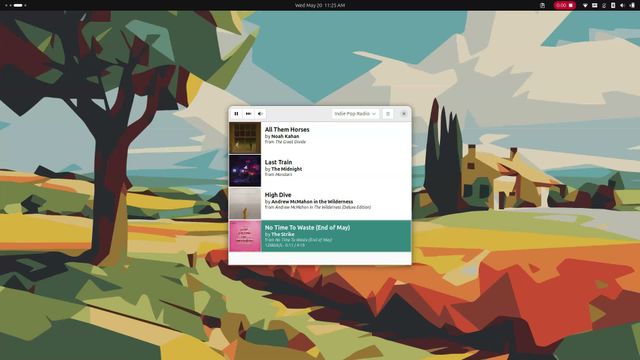
OSD for switching monitor inputs is truncated.
ALT text

OSD for switching monitor inputs is truncated.

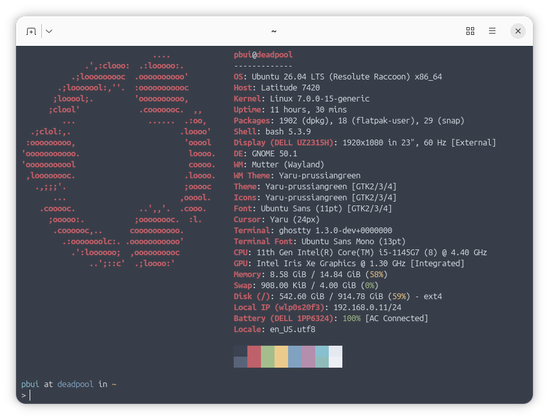
Fastfetch of my laptop running 26.04.
ALT text

Fastfetch of my laptop running 26.04.
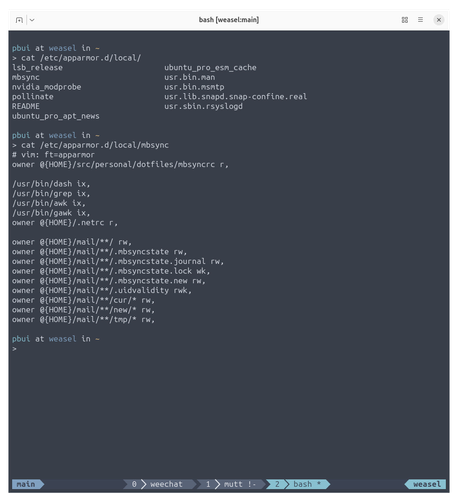
Custom apparmor profile for mbsync
ALT text

Custom apparmor profile for mbsync

@Lorker@sharkey.daddelwerk.net

Eine Frage an die nutzenden. Welches hübsche könnt ihr denn empfehlen?

Die KDE Konsole macht zwar ihren Job, aber wirklich hübsch ist sie nicht.
😅
Ich hadere zwischen
, und . Kitty kenne ich bereits, da ich es mit Hyprland auf dem Laptop nutze, aber vielleicht könnt ihr ja was empfehlen. 🙃

@dvshkn@treehouse.systems

RE: hachyderm.io/@mitchellh/116484

This seems like one that people might notice. The move sounds like it's driven by the decline in uptime and doesn't even touch on the fact that github had a bug where it was merging PRs incorrectly (!!!) for a period. Yeesh.

hachyderm.io

Mitchell Hashimoto (@mitchellh@hachyderm.io)

Ghostty is leaving GitHub. I'm GitHub user 1299, joined Feb 2008. I've visited GitHub almost every single day for over 18 years. It's never been a question for me where I'd put my projects: always GitHub. I'm super sad to say this, but its time to go. https://mitchellh.com/writing/ghostty-leaving-github

This quote was not authorized by the quoted post's author.

@zenn_trend_bot@silicon.moe · Reply to Zenn Trends

📰 Ghostty 1.3が来たぞ (👍 22)

🇬🇧 Ghostty 1.3 terminal emulator released with many new features; version 1.3.1 quickly followed to fix early issues
🇰🇷 Ghostty 1.3 터미널 에뮬레이터 출시, 많은 신규 기능 추가; 초기 이슈 수정한 1.3.1 버전 빠르게 후속 릴리스

🔗 zenn.dev/kawarimidoll/articles

zenn.dev

Ghostty 1.3が来たぞ

@UkiahSmith@mastodon.social · Reply to Mitchell Hashimoto

@mitchellh I see your point, but there are a few reasons why I still use

- Its the same everywhere, same look same config same keys
- It looks like how I want it to be layed out, bottom tabs.
- I have not been impacted by issues related to term in term

I use at $WORK and would consider using it for splits but I want bottom tabs that look minimal. I appreciate your work. Thank you.

@metawops@mastodon.social · Reply to tinfoil-hat

@tinfoil-hat So there we have it officially from @mitchellh: Currently it's not possible to programmatically open a new split view in . 🤷‍♂️ github.com/ghostty-org/ghostty
Okay, now plan B: open the video in the same split view, "on top“ of the running . That should be possible with a bind command in newsboat's config file …

github.com

Open new split from within newsboat? · ghostty-org/ghostty · Discussion #8431

Ghostty is awesome! 🌟🙏❤️ Here's a use case I like to implement in newsboat. I added feeds for some of my favorite YouTube channels. When a new video is posted I like to press a key on the selected ...

@omgubuntu@floss.social

The Ghostty terminal has undergone a GTK rewrite, embracing the GObject type system. The result: new features for Linux, better memory management, and improved stability. Version 1.2 with the changes drops in a few weeks, so keep your lights on! 👻

omgubuntu.co.uk/2025/08/ghostt

omgubuntu.co.uk

Ghostty Terminal Rewrites its GTK Build to Fix Linux Issues

Ghostty terminal has undergone a GTK rewrite, embracing the GObject type system. The result: new features, better memory management, and improved stability.

@omgubuntu@floss.social

The Ghostty terminal has undergone a GTK rewrite, embracing the GObject type system. The result: new features for Linux, better memory management, and improved stability. Version 1.2 with the changes drops in a few weeks, so keep your lights on! 👻

omgubuntu.co.uk/2025/08/ghostt

omgubuntu.co.uk

Ghostty Terminal Rewrites its GTK Build to Fix Linux Issues

Ghostty terminal has undergone a GTK rewrite, embracing the GObject type system. The result: new features, better memory management, and improved stability.

@bitboxer@mastodon.social · Reply to Bodo Tasche

(github.com/rvaiya/keyd) was basically one of the biggest missing pieces for me last time I tried Linux. With it, I can map all my keys and replace application shortcuts with better defaults. Like this:

[google-chrome]
meta.[ = C-S-tab
meta.] = macro(C-tab)

[firefox-esr]
meta.] = macro(C-tab)
meta.[ = C-S-tab

That shortcut is way nicer for my hands, and I unified it everywhere. Luckily, has a config for this.

github.com

GitHub - rvaiya/keyd: A key remapping daemon for linux.

A key remapping daemon for linux. Contribute to rvaiya/keyd development by creating an account on GitHub.

@kubanrob@discuss.systems

Maybe a particular problem, but ... if you're using in on MacOS with a German keyboard, it makes sense to map only the left option key to alt in Gostty. That way Helix shortcuts with alt work, and the "special" characters are still accessible through the other option key.

@abnv@fantastic.earth
@WindOfChange@mastodon.online

Test driving . It is good. But I don't think I'll be using it anytime soon. Same as other new terminals (kittu, alacritty) it has custom terminfo, which makes it hard to use when one daily connects to various short-lived instances over ssh.
I know I can override the TERM env variable in ssh config, but then why ghostty does not use generic xterm (or variants) from the get go?

@eisenhorn@hdev.im

1.0 is released. I am amazed by the dedication and passion of @mitchellh, and it is truly inspiring.

I switched from iTerm2 to Ghostty, let’s see how it goes. The most striking difference: it is FAST.

Other significant (for me) features:
+ configuration is just a plain text file that can be easily synchronized between multiple machines
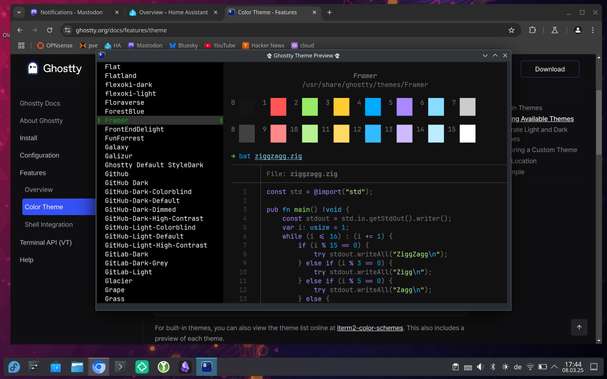
+ themes viewer is amazing
+ quick terminal (aka quake-style)
- cannot turn off mouse p̶r̶o̶t̶o̶c̶o̶l̶ reporting (but I’m learning to live with it)
- no “profiles” support (but I barely used it with iTerm either)