#Claude

Osumi Akari's avatar
Osumi Akari

@oageo@c.osumiakari.jp

年末はこたつの中でClaudeを使い倒せ~~~!!!

Claudeの有料プランユーザー向けに、25年の年末は使用制限が2倍になるキャンペーン - osumiakari.jp
www.osumiakari.jp/articles/20251225-claudelimit2x-personalplan/

Sal Rahman's avatar
Sal Rahman

@manlycoffee@techhub.social

So, I'm trying to figure out what behaviour people prefer for editing a prompt in a chat view:

- Locally fork the thread (each fork can be browsed with arrow buttons at the bottom of the prompt message)

- Just edit the prompt and generate the immediate response, keeping rest of the thread the same

OptionVoters
Fork thread locally (ChatGPT's default behaviour)2 (67%)
Only edit next response (remainder stays intact)1 (33%)
자손킴's avatar
자손킴

@jasonkim@hackers.pub

이번 글에서는 지난글에 이어서 Claude가 도구를 사용하는 구체적인 방법을 알아본다. Claude가 사용할 수 있는 도구들의 목록은 Tools 섹션에 포함되어 있다. Tools 섹션에 대해서는 이전 글을 참고한다.

Tool Use 란?

Tool Use는 Claude가 외부 도구(함수)를 호출하여 실제 작업을 수행할 수 있게 하는 메커니즘이다. Claude는 텍스트 생성만으로는 수행할 수 없는 작업들, 예를 들어 파일 읽기, 명령어 실행, 웹 검색 등을 도구를 통해 수행한다.

Claude에게 사용 가능한 도구들의 스키마를 알려주면 Claude는 사용자의 요청을 분석하여 적절한 도구를 선택하고 필요한 파라미터와 함께 도구 사용을 요청한다. 에이전트(클라이언트)는 이 요청을 받아 실제로 도구를 실행하고 그 결과를 다시 Claude에게 전달한다.

Tools 섹션: 도구 정의하기

Claude가 도구를 사용하려면 먼저 어떤 도구가 있는지 알아야 한다. 에이전트는 API 요청의 tools 배열에 사용 가능한 도구들을 정의한다. 각 도구는 이름, 설명, 그리고 입력 스키마를 포함한다.

Bash 도구 정의 예시

{
  "name": "Bash",
  "description": "Executes a given bash command in a persistent shell session with optional timeout, ensuring proper handling and security measures.\n\nIMPORTANT: This tool is for terminal operations like git, npm, docker, etc...",
  "input_schema": {
    "type": "object",
    "properties": {
      "command": {
        "type": "string",
        "description": "The command to execute"
      },
      "timeout": {
        "type": "number",
        "description": "Optional timeout in milliseconds (max 600000)"
      },
      "description": {
        "type": "string",
        "description": "Clear, concise description of what this command does in 5-10 words, in active voice."
      }
    },
    "required": ["command"],
    "additionalProperties": false,
    "$schema": "http://json-schema.org/draft-07/schema#"
  }
}

Glob 도구 정의 예시

{
  "name": "Glob",
  "description": "- Fast file pattern matching tool that works with any codebase size\n- Supports glob patterns like \"**/*.js\" or \"src/**/*.ts\"\n- Returns matching file paths sorted by modification time\n- Use this tool when you need to find files by name patterns",
  "input_schema": {
    "type": "object",
    "properties": {
      "pattern": {
        "type": "string",
        "description": "The glob pattern to match files against"
      },
      "path": {
        "type": "string",
        "description": "The directory to search in. If not specified, the current working directory will be used."
      }
    },
    "required": ["pattern"],
    "additionalProperties": false,
    "$schema": "http://json-schema.org/draft-07/schema#"
  }
}

도구 정의에서 description이 중요하다. Claude는 이 설명을 읽고 어떤 상황에서 해당 도구를 사용해야 하는지 판단한다. input_schema는 JSON Schema 형식으로 Claude가 도구를 호출할 때 어떤 파라미터를 어떤 형식으로 전달해야 하는지 정의한다.

Claude가 도구를 선정하는 방법

Claude가 도구를 선택하는 과정은 Messages API의 대화 흐름 속에서 이루어진다. 실제 예시를 통해 살펴보자.

사용자의 요청

사용자가 "이 NestJS 프로젝트에서 entity 구조를 탐색해주세요"라고 요청하면 에이전트는 다음과 같은 메시지를 API에 전송한다:

{
  "role": "user",
  "content": [
    {
      "type": "text",
      "text": "이 NestJS TypeScript 프로젝트에서 entity 구조를 탐색해주세요..."
    }
  ]
}

Claude의 도구 사용 요청

Claude는 사용자의 요청을 분석하고 작업 수행에 필요한 도구들을 선택하여 tool_use 블록으로 응답한다:

{
  "role": "assistant",
  "content": [
    {
      "type": "text",
      "text": "이 NestJS 프로젝트의 entity 구조를 철저하게 탐색하겠습니다."
    },
    {
      "type": "tool_use",
      "id": "toolu_01ABC123XYZ",
      "name": "Glob",
      "input": {
        "pattern": "**/*.entity.ts"
      }
    },
    {
      "type": "tool_use",
      "id": "toolu_01DEF456UVW",
      "name": "Bash",
      "input": {
        "command": "find /workspace/my-nestjs-project/src -type f -name \"*.ts\" | grep -E \"(entity|entities)\" | head -20",
        "description": "Find entity files in src directory"
      }
    }
  ]
}

여기서 주목할 점이 있다. Claude는 한 번의 응답에서 여러 도구를 동시에 요청할 수 있다. 위 예시에서는 GlobBash 두 도구를 병렬로 요청했다. 각 도구 요청에는 고유한 id가 부여되어 나중에 결과를 매핑할 때 사용된다.

응답의 stop_reason

Claude가 도구 사용을 요청하면 API 응답의 stop_reason"tool_use"로 설정된다:

{
  "id": "msg_01XYZ789ABC",
  "type": "message",
  "role": "assistant",
  "model": "claude-haiku-4-5-20251001",
  "content": [...],
  "stop_reason": "tool_use",
  "usage": {
    "input_tokens": 714,
    "output_tokens": 314
  }
}

stop_reason은 에이전트에게 "응답이 끝난 것이 아니라 도구 실행이 필요하다"는 신호를 보낸다.

에이전트는 tool_use 요청을 받으면 무엇을 하는가?

에이전트(클라이언트)가 stop_reason: "tool_use" 응답을 받으면 다음 단계를 수행해야 한다:

  1. 도구 요청 파싱: 응답의 content 배열에서 type: "tool_use" 블록들을 추출한다.

  2. 도구 실행: 각 도구 요청에 대해 실제 도구를 실행한다. 예를 들어:

    • Bash 도구 → 시스템에서 실제 bash 명령어 실행
    • Glob 도구 → 파일 시스템에서 패턴 매칭 수행
    • Read 도구 → 파일 내용 읽기
  3. 결과 수집: 각 도구의 실행 결과를 수집하고 tool_use_id와 함께 결과를 구성한다.

  4. 모델에 결과 전달: 수집한 결과를 tool_result 형식으로 모델에 다시 전송한다.

이 과정에서 에이전트는 도구 실행의 성공/실패 여부, 타임아웃 처리, 보안 검증 등을 담당한다. Claude는 도구의 스키마와 용도만 알 뿐 실제 실행은 에이전트의 몫이다.

에이전트가 모델에 도구 실행 결과를 알리는 방법

에이전트가 도구를 실행한 후에는 그 결과를 tool_result 형식으로 모델에 전달한다. 이 결과는 user role의 메시지로 전송된다.

tool_result 구조

{
  "role": "user",
  "content": [
    {
      "tool_use_id": "toolu_01DEF456UVW",
      "type": "tool_result",
      "content": "/workspace/my-nestjs-project/src/modules/chat/entities/dm-unlock.entity.ts\n/workspace/my-nestjs-project/src/modules/agora/entities/call-session.entity.ts\n/workspace/my-nestjs-project/src/modules/user/entities/user.entity.ts\n/workspace/my-nestjs-project/src/modules/user/entities/user-profile.entity.ts\n/workspace/my-nestjs-project/src/modules/item/entities/item.entity.ts\n...",
      "is_error": false
    },
    {
      "tool_use_id": "toolu_01ABC123XYZ",
      "type": "tool_result",
      "content": "/workspace/my-nestjs-project/src/modules/agora/entities/agora-event-log.entity.ts\n/workspace/my-nestjs-project/src/modules/agora/entities/call-participant.entity.ts\n/workspace/my-nestjs-project/src/modules/item/entities/item.entity.ts\n...",
      "cache_control": {
        "type": "ephemeral"
      }
    }
  ]
}

tool_result의 핵심 필드는 다음과 같다:

필드 설명
tool_use_id Claude가 요청한 도구의 고유 ID. 어떤 요청에 대한 결과인지 매핑
type 항상 "tool_result"
content 도구 실행의 실제 결과 (문자열)
is_error 도구 실행 실패 시 true
cache_control (선택) 프롬프트 캐싱을 위한 제어 옵션

전체 대화 흐름

tool_result를 받은 Claude는 결과를 분석하고 추가 도구가 필요하면 다시 tool_use를 요청한다. 충분한 정보가 모이면 최종 응답을 생성한다. 이 과정이 반복되면서 복잡한 작업도 단계별로 수행할 수 있다:

User → Claude: "entity 구조를 탐색해주세요"
Claude → Agent: tool_use (Glob, Bash)
Agent → Claude: tool_result (파일 목록)
Claude → Agent: tool_use (Read - 여러 파일)
Agent → Claude: tool_result (파일 내용들)
Claude → User: 최종 분석 결과

실제 예시에서 Claude는 먼저 GlobBash로 entity 파일 목록을 찾고 그 결과를 받은 후 Read 도구로 개별 파일들을 읽어 분석했다:

{
  "type": "text",
  "text": "좋습니다. 이제 주요 entity 파일들을 읽겠습니다."
},
{
  "type": "tool_use",
  "id": "toolu_01GHI789RST",
  "name": "Read",
  "input": {
    "file_path": "/workspace/my-nestjs-project/src/modules/user/entities/user.entity.ts"
  }
},
{
  "type": "tool_use",
  "id": "toolu_01JKL012MNO",
  "name": "Read",
  "input": {
    "file_path": "/workspace/my-nestjs-project/src/modules/user/entities/user-profile.entity.ts"
  }
}

마무리

Claude Code와 같은 에이전트는 모델에 사용할 수 있는 도구를 알려주어 도구를 능동적으로 사용하게 만듦으로써 유저의 실행환경과 상호 협력하여 도구를 실행한다. 유저에게 질문을 하는 AskUserQuestion도 도구이고 심지어 계획 모드를 빠져나가는 ExitPlanMode도 도구다.

MCP(Model Context Protocol) 서버가 제공하는 기능들도 결국 도구로 노출되며 Subagent 호출도 도구를 통해 이루어진다. Skills도 마찬가지다. 결국 Claude Code의 거의 모든 확장 기능은 Tool Use라는 하나의 메커니즘 위에서 동작한다.

이 구조를 이해하면 Claude Code가 어떻게 파일을 읽고, 코드를 실행하고, 웹을 검색하는지 명확해진다. 그리고 새로운 도구를 추가하거나 MCP 서버를 연동할 때도 같은 패턴이 적용된다는 것을 알 수 있다.

자손킴's avatar
자손킴

@jasonkim@hackers.pub

이번 글에서는 지난글에 이어서 Claude가 도구를 사용하는 구체적인 방법을 알아본다. Claude가 사용할 수 있는 도구들의 목록은 Tools 섹션에 포함되어 있다. Tools 섹션에 대해서는 이전 글을 참고한다.

Tool Use 란?

Tool Use는 Claude가 외부 도구(함수)를 호출하여 실제 작업을 수행할 수 있게 하는 메커니즘이다. Claude는 텍스트 생성만으로는 수행할 수 없는 작업들, 예를 들어 파일 읽기, 명령어 실행, 웹 검색 등을 도구를 통해 수행한다.

Claude에게 사용 가능한 도구들의 스키마를 알려주면 Claude는 사용자의 요청을 분석하여 적절한 도구를 선택하고 필요한 파라미터와 함께 도구 사용을 요청한다. 에이전트(클라이언트)는 이 요청을 받아 실제로 도구를 실행하고 그 결과를 다시 Claude에게 전달한다.

Tools 섹션: 도구 정의하기

Claude가 도구를 사용하려면 먼저 어떤 도구가 있는지 알아야 한다. 에이전트는 API 요청의 tools 배열에 사용 가능한 도구들을 정의한다. 각 도구는 이름, 설명, 그리고 입력 스키마를 포함한다.

Bash 도구 정의 예시

{
  "name": "Bash",
  "description": "Executes a given bash command in a persistent shell session with optional timeout, ensuring proper handling and security measures.\n\nIMPORTANT: This tool is for terminal operations like git, npm, docker, etc...",
  "input_schema": {
    "type": "object",
    "properties": {
      "command": {
        "type": "string",
        "description": "The command to execute"
      },
      "timeout": {
        "type": "number",
        "description": "Optional timeout in milliseconds (max 600000)"
      },
      "description": {
        "type": "string",
        "description": "Clear, concise description of what this command does in 5-10 words, in active voice."
      }
    },
    "required": ["command"],
    "additionalProperties": false,
    "$schema": "http://json-schema.org/draft-07/schema#"
  }
}

Glob 도구 정의 예시

{
  "name": "Glob",
  "description": "- Fast file pattern matching tool that works with any codebase size\n- Supports glob patterns like \"**/*.js\" or \"src/**/*.ts\"\n- Returns matching file paths sorted by modification time\n- Use this tool when you need to find files by name patterns",
  "input_schema": {
    "type": "object",
    "properties": {
      "pattern": {
        "type": "string",
        "description": "The glob pattern to match files against"
      },
      "path": {
        "type": "string",
        "description": "The directory to search in. If not specified, the current working directory will be used."
      }
    },
    "required": ["pattern"],
    "additionalProperties": false,
    "$schema": "http://json-schema.org/draft-07/schema#"
  }
}

도구 정의에서 description이 중요하다. Claude는 이 설명을 읽고 어떤 상황에서 해당 도구를 사용해야 하는지 판단한다. input_schema는 JSON Schema 형식으로 Claude가 도구를 호출할 때 어떤 파라미터를 어떤 형식으로 전달해야 하는지 정의한다.

Claude가 도구를 선정하는 방법

Claude가 도구를 선택하는 과정은 Messages API의 대화 흐름 속에서 이루어진다. 실제 예시를 통해 살펴보자.

사용자의 요청

사용자가 "이 NestJS 프로젝트에서 entity 구조를 탐색해주세요"라고 요청하면 에이전트는 다음과 같은 메시지를 API에 전송한다:

{
  "role": "user",
  "content": [
    {
      "type": "text",
      "text": "이 NestJS TypeScript 프로젝트에서 entity 구조를 탐색해주세요..."
    }
  ]
}

Claude의 도구 사용 요청

Claude는 사용자의 요청을 분석하고 작업 수행에 필요한 도구들을 선택하여 tool_use 블록으로 응답한다:

{
  "role": "assistant",
  "content": [
    {
      "type": "text",
      "text": "이 NestJS 프로젝트의 entity 구조를 철저하게 탐색하겠습니다."
    },
    {
      "type": "tool_use",
      "id": "toolu_01ABC123XYZ",
      "name": "Glob",
      "input": {
        "pattern": "**/*.entity.ts"
      }
    },
    {
      "type": "tool_use",
      "id": "toolu_01DEF456UVW",
      "name": "Bash",
      "input": {
        "command": "find /workspace/my-nestjs-project/src -type f -name \"*.ts\" | grep -E \"(entity|entities)\" | head -20",
        "description": "Find entity files in src directory"
      }
    }
  ]
}

여기서 주목할 점이 있다. Claude는 한 번의 응답에서 여러 도구를 동시에 요청할 수 있다. 위 예시에서는 GlobBash 두 도구를 병렬로 요청했다. 각 도구 요청에는 고유한 id가 부여되어 나중에 결과를 매핑할 때 사용된다.

응답의 stop_reason

Claude가 도구 사용을 요청하면 API 응답의 stop_reason"tool_use"로 설정된다:

{
  "id": "msg_01XYZ789ABC",
  "type": "message",
  "role": "assistant",
  "model": "claude-haiku-4-5-20251001",
  "content": [...],
  "stop_reason": "tool_use",
  "usage": {
    "input_tokens": 714,
    "output_tokens": 314
  }
}

stop_reason은 에이전트에게 "응답이 끝난 것이 아니라 도구 실행이 필요하다"는 신호를 보낸다.

에이전트는 tool_use 요청을 받으면 무엇을 하는가?

에이전트(클라이언트)가 stop_reason: "tool_use" 응답을 받으면 다음 단계를 수행해야 한다:

  1. 도구 요청 파싱: 응답의 content 배열에서 type: "tool_use" 블록들을 추출한다.

  2. 도구 실행: 각 도구 요청에 대해 실제 도구를 실행한다. 예를 들어:

    • Bash 도구 → 시스템에서 실제 bash 명령어 실행
    • Glob 도구 → 파일 시스템에서 패턴 매칭 수행
    • Read 도구 → 파일 내용 읽기
  3. 결과 수집: 각 도구의 실행 결과를 수집하고 tool_use_id와 함께 결과를 구성한다.

  4. 모델에 결과 전달: 수집한 결과를 tool_result 형식으로 모델에 다시 전송한다.

이 과정에서 에이전트는 도구 실행의 성공/실패 여부, 타임아웃 처리, 보안 검증 등을 담당한다. Claude는 도구의 스키마와 용도만 알 뿐 실제 실행은 에이전트의 몫이다.

에이전트가 모델에 도구 실행 결과를 알리는 방법

에이전트가 도구를 실행한 후에는 그 결과를 tool_result 형식으로 모델에 전달한다. 이 결과는 user role의 메시지로 전송된다.

tool_result 구조

{
  "role": "user",
  "content": [
    {
      "tool_use_id": "toolu_01DEF456UVW",
      "type": "tool_result",
      "content": "/workspace/my-nestjs-project/src/modules/chat/entities/dm-unlock.entity.ts\n/workspace/my-nestjs-project/src/modules/agora/entities/call-session.entity.ts\n/workspace/my-nestjs-project/src/modules/user/entities/user.entity.ts\n/workspace/my-nestjs-project/src/modules/user/entities/user-profile.entity.ts\n/workspace/my-nestjs-project/src/modules/item/entities/item.entity.ts\n...",
      "is_error": false
    },
    {
      "tool_use_id": "toolu_01ABC123XYZ",
      "type": "tool_result",
      "content": "/workspace/my-nestjs-project/src/modules/agora/entities/agora-event-log.entity.ts\n/workspace/my-nestjs-project/src/modules/agora/entities/call-participant.entity.ts\n/workspace/my-nestjs-project/src/modules/item/entities/item.entity.ts\n...",
      "cache_control": {
        "type": "ephemeral"
      }
    }
  ]
}

tool_result의 핵심 필드는 다음과 같다:

필드 설명
tool_use_id Claude가 요청한 도구의 고유 ID. 어떤 요청에 대한 결과인지 매핑
type 항상 "tool_result"
content 도구 실행의 실제 결과 (문자열)
is_error 도구 실행 실패 시 true
cache_control (선택) 프롬프트 캐싱을 위한 제어 옵션

전체 대화 흐름

tool_result를 받은 Claude는 결과를 분석하고 추가 도구가 필요하면 다시 tool_use를 요청한다. 충분한 정보가 모이면 최종 응답을 생성한다. 이 과정이 반복되면서 복잡한 작업도 단계별로 수행할 수 있다:

User → Claude: "entity 구조를 탐색해주세요"
Claude → Agent: tool_use (Glob, Bash)
Agent → Claude: tool_result (파일 목록)
Claude → Agent: tool_use (Read - 여러 파일)
Agent → Claude: tool_result (파일 내용들)
Claude → User: 최종 분석 결과

실제 예시에서 Claude는 먼저 GlobBash로 entity 파일 목록을 찾고 그 결과를 받은 후 Read 도구로 개별 파일들을 읽어 분석했다:

{
  "type": "text",
  "text": "좋습니다. 이제 주요 entity 파일들을 읽겠습니다."
},
{
  "type": "tool_use",
  "id": "toolu_01GHI789RST",
  "name": "Read",
  "input": {
    "file_path": "/workspace/my-nestjs-project/src/modules/user/entities/user.entity.ts"
  }
},
{
  "type": "tool_use",
  "id": "toolu_01JKL012MNO",
  "name": "Read",
  "input": {
    "file_path": "/workspace/my-nestjs-project/src/modules/user/entities/user-profile.entity.ts"
  }
}

마무리

Claude Code와 같은 에이전트는 모델에 사용할 수 있는 도구를 알려주어 도구를 능동적으로 사용하게 만듦으로써 유저의 실행환경과 상호 협력하여 도구를 실행한다. 유저에게 질문을 하는 AskUserQuestion도 도구이고 심지어 계획 모드를 빠져나가는 ExitPlanMode도 도구다.

MCP(Model Context Protocol) 서버가 제공하는 기능들도 결국 도구로 노출되며 Subagent 호출도 도구를 통해 이루어진다. Skills도 마찬가지다. 결국 Claude Code의 거의 모든 확장 기능은 Tool Use라는 하나의 메커니즘 위에서 동작한다.

이 구조를 이해하면 Claude Code가 어떻게 파일을 읽고, 코드를 실행하고, 웹을 검색하는지 명확해진다. 그리고 새로운 도구를 추가하거나 MCP 서버를 연동할 때도 같은 패턴이 적용된다는 것을 알 수 있다.

자손킴's avatar
자손킴

@jasonkim@hackers.pub

이번 글에서는 지난글에 이어서 Claude가 도구를 사용하는 구체적인 방법을 알아본다. Claude가 사용할 수 있는 도구들의 목록은 Tools 섹션에 포함되어 있다. Tools 섹션에 대해서는 이전 글을 참고한다.

Tool Use 란?

Tool Use는 Claude가 외부 도구(함수)를 호출하여 실제 작업을 수행할 수 있게 하는 메커니즘이다. Claude는 텍스트 생성만으로는 수행할 수 없는 작업들, 예를 들어 파일 읽기, 명령어 실행, 웹 검색 등을 도구를 통해 수행한다.

Claude에게 사용 가능한 도구들의 스키마를 알려주면 Claude는 사용자의 요청을 분석하여 적절한 도구를 선택하고 필요한 파라미터와 함께 도구 사용을 요청한다. 에이전트(클라이언트)는 이 요청을 받아 실제로 도구를 실행하고 그 결과를 다시 Claude에게 전달한다.

Tools 섹션: 도구 정의하기

Claude가 도구를 사용하려면 먼저 어떤 도구가 있는지 알아야 한다. 에이전트는 API 요청의 tools 배열에 사용 가능한 도구들을 정의한다. 각 도구는 이름, 설명, 그리고 입력 스키마를 포함한다.

Bash 도구 정의 예시

{
  "name": "Bash",
  "description": "Executes a given bash command in a persistent shell session with optional timeout, ensuring proper handling and security measures.\n\nIMPORTANT: This tool is for terminal operations like git, npm, docker, etc...",
  "input_schema": {
    "type": "object",
    "properties": {
      "command": {
        "type": "string",
        "description": "The command to execute"
      },
      "timeout": {
        "type": "number",
        "description": "Optional timeout in milliseconds (max 600000)"
      },
      "description": {
        "type": "string",
        "description": "Clear, concise description of what this command does in 5-10 words, in active voice."
      }
    },
    "required": ["command"],
    "additionalProperties": false,
    "$schema": "http://json-schema.org/draft-07/schema#"
  }
}

Glob 도구 정의 예시

{
  "name": "Glob",
  "description": "- Fast file pattern matching tool that works with any codebase size\n- Supports glob patterns like \"**/*.js\" or \"src/**/*.ts\"\n- Returns matching file paths sorted by modification time\n- Use this tool when you need to find files by name patterns",
  "input_schema": {
    "type": "object",
    "properties": {
      "pattern": {
        "type": "string",
        "description": "The glob pattern to match files against"
      },
      "path": {
        "type": "string",
        "description": "The directory to search in. If not specified, the current working directory will be used."
      }
    },
    "required": ["pattern"],
    "additionalProperties": false,
    "$schema": "http://json-schema.org/draft-07/schema#"
  }
}

도구 정의에서 description이 중요하다. Claude는 이 설명을 읽고 어떤 상황에서 해당 도구를 사용해야 하는지 판단한다. input_schema는 JSON Schema 형식으로 Claude가 도구를 호출할 때 어떤 파라미터를 어떤 형식으로 전달해야 하는지 정의한다.

Claude가 도구를 선정하는 방법

Claude가 도구를 선택하는 과정은 Messages API의 대화 흐름 속에서 이루어진다. 실제 예시를 통해 살펴보자.

사용자의 요청

사용자가 "이 NestJS 프로젝트에서 entity 구조를 탐색해주세요"라고 요청하면 에이전트는 다음과 같은 메시지를 API에 전송한다:

{
  "role": "user",
  "content": [
    {
      "type": "text",
      "text": "이 NestJS TypeScript 프로젝트에서 entity 구조를 탐색해주세요..."
    }
  ]
}

Claude의 도구 사용 요청

Claude는 사용자의 요청을 분석하고 작업 수행에 필요한 도구들을 선택하여 tool_use 블록으로 응답한다:

{
  "role": "assistant",
  "content": [
    {
      "type": "text",
      "text": "이 NestJS 프로젝트의 entity 구조를 철저하게 탐색하겠습니다."
    },
    {
      "type": "tool_use",
      "id": "toolu_01ABC123XYZ",
      "name": "Glob",
      "input": {
        "pattern": "**/*.entity.ts"
      }
    },
    {
      "type": "tool_use",
      "id": "toolu_01DEF456UVW",
      "name": "Bash",
      "input": {
        "command": "find /workspace/my-nestjs-project/src -type f -name \"*.ts\" | grep -E \"(entity|entities)\" | head -20",
        "description": "Find entity files in src directory"
      }
    }
  ]
}

여기서 주목할 점이 있다. Claude는 한 번의 응답에서 여러 도구를 동시에 요청할 수 있다. 위 예시에서는 GlobBash 두 도구를 병렬로 요청했다. 각 도구 요청에는 고유한 id가 부여되어 나중에 결과를 매핑할 때 사용된다.

응답의 stop_reason

Claude가 도구 사용을 요청하면 API 응답의 stop_reason"tool_use"로 설정된다:

{
  "id": "msg_01XYZ789ABC",
  "type": "message",
  "role": "assistant",
  "model": "claude-haiku-4-5-20251001",
  "content": [...],
  "stop_reason": "tool_use",
  "usage": {
    "input_tokens": 714,
    "output_tokens": 314
  }
}

stop_reason은 에이전트에게 "응답이 끝난 것이 아니라 도구 실행이 필요하다"는 신호를 보낸다.

에이전트는 tool_use 요청을 받으면 무엇을 하는가?

에이전트(클라이언트)가 stop_reason: "tool_use" 응답을 받으면 다음 단계를 수행해야 한다:

  1. 도구 요청 파싱: 응답의 content 배열에서 type: "tool_use" 블록들을 추출한다.

  2. 도구 실행: 각 도구 요청에 대해 실제 도구를 실행한다. 예를 들어:

    • Bash 도구 → 시스템에서 실제 bash 명령어 실행
    • Glob 도구 → 파일 시스템에서 패턴 매칭 수행
    • Read 도구 → 파일 내용 읽기
  3. 결과 수집: 각 도구의 실행 결과를 수집하고 tool_use_id와 함께 결과를 구성한다.

  4. 모델에 결과 전달: 수집한 결과를 tool_result 형식으로 모델에 다시 전송한다.

이 과정에서 에이전트는 도구 실행의 성공/실패 여부, 타임아웃 처리, 보안 검증 등을 담당한다. Claude는 도구의 스키마와 용도만 알 뿐 실제 실행은 에이전트의 몫이다.

에이전트가 모델에 도구 실행 결과를 알리는 방법

에이전트가 도구를 실행한 후에는 그 결과를 tool_result 형식으로 모델에 전달한다. 이 결과는 user role의 메시지로 전송된다.

tool_result 구조

{
  "role": "user",
  "content": [
    {
      "tool_use_id": "toolu_01DEF456UVW",
      "type": "tool_result",
      "content": "/workspace/my-nestjs-project/src/modules/chat/entities/dm-unlock.entity.ts\n/workspace/my-nestjs-project/src/modules/agora/entities/call-session.entity.ts\n/workspace/my-nestjs-project/src/modules/user/entities/user.entity.ts\n/workspace/my-nestjs-project/src/modules/user/entities/user-profile.entity.ts\n/workspace/my-nestjs-project/src/modules/item/entities/item.entity.ts\n...",
      "is_error": false
    },
    {
      "tool_use_id": "toolu_01ABC123XYZ",
      "type": "tool_result",
      "content": "/workspace/my-nestjs-project/src/modules/agora/entities/agora-event-log.entity.ts\n/workspace/my-nestjs-project/src/modules/agora/entities/call-participant.entity.ts\n/workspace/my-nestjs-project/src/modules/item/entities/item.entity.ts\n...",
      "cache_control": {
        "type": "ephemeral"
      }
    }
  ]
}

tool_result의 핵심 필드는 다음과 같다:

필드 설명
tool_use_id Claude가 요청한 도구의 고유 ID. 어떤 요청에 대한 결과인지 매핑
type 항상 "tool_result"
content 도구 실행의 실제 결과 (문자열)
is_error 도구 실행 실패 시 true
cache_control (선택) 프롬프트 캐싱을 위한 제어 옵션

전체 대화 흐름

tool_result를 받은 Claude는 결과를 분석하고 추가 도구가 필요하면 다시 tool_use를 요청한다. 충분한 정보가 모이면 최종 응답을 생성한다. 이 과정이 반복되면서 복잡한 작업도 단계별로 수행할 수 있다:

User → Claude: "entity 구조를 탐색해주세요"
Claude → Agent: tool_use (Glob, Bash)
Agent → Claude: tool_result (파일 목록)
Claude → Agent: tool_use (Read - 여러 파일)
Agent → Claude: tool_result (파일 내용들)
Claude → User: 최종 분석 결과

실제 예시에서 Claude는 먼저 GlobBash로 entity 파일 목록을 찾고 그 결과를 받은 후 Read 도구로 개별 파일들을 읽어 분석했다:

{
  "type": "text",
  "text": "좋습니다. 이제 주요 entity 파일들을 읽겠습니다."
},
{
  "type": "tool_use",
  "id": "toolu_01GHI789RST",
  "name": "Read",
  "input": {
    "file_path": "/workspace/my-nestjs-project/src/modules/user/entities/user.entity.ts"
  }
},
{
  "type": "tool_use",
  "id": "toolu_01JKL012MNO",
  "name": "Read",
  "input": {
    "file_path": "/workspace/my-nestjs-project/src/modules/user/entities/user-profile.entity.ts"
  }
}

마무리

Claude Code와 같은 에이전트는 모델에 사용할 수 있는 도구를 알려주어 도구를 능동적으로 사용하게 만듦으로써 유저의 실행환경과 상호 협력하여 도구를 실행한다. 유저에게 질문을 하는 AskUserQuestion도 도구이고 심지어 계획 모드를 빠져나가는 ExitPlanMode도 도구다.

MCP(Model Context Protocol) 서버가 제공하는 기능들도 결국 도구로 노출되며 Subagent 호출도 도구를 통해 이루어진다. Skills도 마찬가지다. 결국 Claude Code의 거의 모든 확장 기능은 Tool Use라는 하나의 메커니즘 위에서 동작한다.

이 구조를 이해하면 Claude Code가 어떻게 파일을 읽고, 코드를 실행하고, 웹을 검색하는지 명확해진다. 그리고 새로운 도구를 추가하거나 MCP 서버를 연동할 때도 같은 패턴이 적용된다는 것을 알 수 있다.

자손킴's avatar
자손킴

@jasonkim@hackers.pub

이번 글에서는 지난글에 이어서 Claude가 도구를 사용하는 구체적인 방법을 알아본다. Claude가 사용할 수 있는 도구들의 목록은 Tools 섹션에 포함되어 있다. Tools 섹션에 대해서는 이전 글을 참고한다.

Tool Use 란?

Tool Use는 Claude가 외부 도구(함수)를 호출하여 실제 작업을 수행할 수 있게 하는 메커니즘이다. Claude는 텍스트 생성만으로는 수행할 수 없는 작업들, 예를 들어 파일 읽기, 명령어 실행, 웹 검색 등을 도구를 통해 수행한다.

Claude에게 사용 가능한 도구들의 스키마를 알려주면 Claude는 사용자의 요청을 분석하여 적절한 도구를 선택하고 필요한 파라미터와 함께 도구 사용을 요청한다. 에이전트(클라이언트)는 이 요청을 받아 실제로 도구를 실행하고 그 결과를 다시 Claude에게 전달한다.

Tools 섹션: 도구 정의하기

Claude가 도구를 사용하려면 먼저 어떤 도구가 있는지 알아야 한다. 에이전트는 API 요청의 tools 배열에 사용 가능한 도구들을 정의한다. 각 도구는 이름, 설명, 그리고 입력 스키마를 포함한다.

Bash 도구 정의 예시

{
  "name": "Bash",
  "description": "Executes a given bash command in a persistent shell session with optional timeout, ensuring proper handling and security measures.\n\nIMPORTANT: This tool is for terminal operations like git, npm, docker, etc...",
  "input_schema": {
    "type": "object",
    "properties": {
      "command": {
        "type": "string",
        "description": "The command to execute"
      },
      "timeout": {
        "type": "number",
        "description": "Optional timeout in milliseconds (max 600000)"
      },
      "description": {
        "type": "string",
        "description": "Clear, concise description of what this command does in 5-10 words, in active voice."
      }
    },
    "required": ["command"],
    "additionalProperties": false,
    "$schema": "http://json-schema.org/draft-07/schema#"
  }
}

Glob 도구 정의 예시

{
  "name": "Glob",
  "description": "- Fast file pattern matching tool that works with any codebase size\n- Supports glob patterns like \"**/*.js\" or \"src/**/*.ts\"\n- Returns matching file paths sorted by modification time\n- Use this tool when you need to find files by name patterns",
  "input_schema": {
    "type": "object",
    "properties": {
      "pattern": {
        "type": "string",
        "description": "The glob pattern to match files against"
      },
      "path": {
        "type": "string",
        "description": "The directory to search in. If not specified, the current working directory will be used."
      }
    },
    "required": ["pattern"],
    "additionalProperties": false,
    "$schema": "http://json-schema.org/draft-07/schema#"
  }
}

도구 정의에서 description이 중요하다. Claude는 이 설명을 읽고 어떤 상황에서 해당 도구를 사용해야 하는지 판단한다. input_schema는 JSON Schema 형식으로 Claude가 도구를 호출할 때 어떤 파라미터를 어떤 형식으로 전달해야 하는지 정의한다.

Claude가 도구를 선정하는 방법

Claude가 도구를 선택하는 과정은 Messages API의 대화 흐름 속에서 이루어진다. 실제 예시를 통해 살펴보자.

사용자의 요청

사용자가 "이 NestJS 프로젝트에서 entity 구조를 탐색해주세요"라고 요청하면 에이전트는 다음과 같은 메시지를 API에 전송한다:

{
  "role": "user",
  "content": [
    {
      "type": "text",
      "text": "이 NestJS TypeScript 프로젝트에서 entity 구조를 탐색해주세요..."
    }
  ]
}

Claude의 도구 사용 요청

Claude는 사용자의 요청을 분석하고 작업 수행에 필요한 도구들을 선택하여 tool_use 블록으로 응답한다:

{
  "role": "assistant",
  "content": [
    {
      "type": "text",
      "text": "이 NestJS 프로젝트의 entity 구조를 철저하게 탐색하겠습니다."
    },
    {
      "type": "tool_use",
      "id": "toolu_01ABC123XYZ",
      "name": "Glob",
      "input": {
        "pattern": "**/*.entity.ts"
      }
    },
    {
      "type": "tool_use",
      "id": "toolu_01DEF456UVW",
      "name": "Bash",
      "input": {
        "command": "find /workspace/my-nestjs-project/src -type f -name \"*.ts\" | grep -E \"(entity|entities)\" | head -20",
        "description": "Find entity files in src directory"
      }
    }
  ]
}

여기서 주목할 점이 있다. Claude는 한 번의 응답에서 여러 도구를 동시에 요청할 수 있다. 위 예시에서는 GlobBash 두 도구를 병렬로 요청했다. 각 도구 요청에는 고유한 id가 부여되어 나중에 결과를 매핑할 때 사용된다.

응답의 stop_reason

Claude가 도구 사용을 요청하면 API 응답의 stop_reason"tool_use"로 설정된다:

{
  "id": "msg_01XYZ789ABC",
  "type": "message",
  "role": "assistant",
  "model": "claude-haiku-4-5-20251001",
  "content": [...],
  "stop_reason": "tool_use",
  "usage": {
    "input_tokens": 714,
    "output_tokens": 314
  }
}

stop_reason은 에이전트에게 "응답이 끝난 것이 아니라 도구 실행이 필요하다"는 신호를 보낸다.

에이전트는 tool_use 요청을 받으면 무엇을 하는가?

에이전트(클라이언트)가 stop_reason: "tool_use" 응답을 받으면 다음 단계를 수행해야 한다:

  1. 도구 요청 파싱: 응답의 content 배열에서 type: "tool_use" 블록들을 추출한다.

  2. 도구 실행: 각 도구 요청에 대해 실제 도구를 실행한다. 예를 들어:

    • Bash 도구 → 시스템에서 실제 bash 명령어 실행
    • Glob 도구 → 파일 시스템에서 패턴 매칭 수행
    • Read 도구 → 파일 내용 읽기
  3. 결과 수집: 각 도구의 실행 결과를 수집하고 tool_use_id와 함께 결과를 구성한다.

  4. 모델에 결과 전달: 수집한 결과를 tool_result 형식으로 모델에 다시 전송한다.

이 과정에서 에이전트는 도구 실행의 성공/실패 여부, 타임아웃 처리, 보안 검증 등을 담당한다. Claude는 도구의 스키마와 용도만 알 뿐 실제 실행은 에이전트의 몫이다.

에이전트가 모델에 도구 실행 결과를 알리는 방법

에이전트가 도구를 실행한 후에는 그 결과를 tool_result 형식으로 모델에 전달한다. 이 결과는 user role의 메시지로 전송된다.

tool_result 구조

{
  "role": "user",
  "content": [
    {
      "tool_use_id": "toolu_01DEF456UVW",
      "type": "tool_result",
      "content": "/workspace/my-nestjs-project/src/modules/chat/entities/dm-unlock.entity.ts\n/workspace/my-nestjs-project/src/modules/agora/entities/call-session.entity.ts\n/workspace/my-nestjs-project/src/modules/user/entities/user.entity.ts\n/workspace/my-nestjs-project/src/modules/user/entities/user-profile.entity.ts\n/workspace/my-nestjs-project/src/modules/item/entities/item.entity.ts\n...",
      "is_error": false
    },
    {
      "tool_use_id": "toolu_01ABC123XYZ",
      "type": "tool_result",
      "content": "/workspace/my-nestjs-project/src/modules/agora/entities/agora-event-log.entity.ts\n/workspace/my-nestjs-project/src/modules/agora/entities/call-participant.entity.ts\n/workspace/my-nestjs-project/src/modules/item/entities/item.entity.ts\n...",
      "cache_control": {
        "type": "ephemeral"
      }
    }
  ]
}

tool_result의 핵심 필드는 다음과 같다:

필드 설명
tool_use_id Claude가 요청한 도구의 고유 ID. 어떤 요청에 대한 결과인지 매핑
type 항상 "tool_result"
content 도구 실행의 실제 결과 (문자열)
is_error 도구 실행 실패 시 true
cache_control (선택) 프롬프트 캐싱을 위한 제어 옵션

전체 대화 흐름

tool_result를 받은 Claude는 결과를 분석하고 추가 도구가 필요하면 다시 tool_use를 요청한다. 충분한 정보가 모이면 최종 응답을 생성한다. 이 과정이 반복되면서 복잡한 작업도 단계별로 수행할 수 있다:

User → Claude: "entity 구조를 탐색해주세요"
Claude → Agent: tool_use (Glob, Bash)
Agent → Claude: tool_result (파일 목록)
Claude → Agent: tool_use (Read - 여러 파일)
Agent → Claude: tool_result (파일 내용들)
Claude → User: 최종 분석 결과

실제 예시에서 Claude는 먼저 GlobBash로 entity 파일 목록을 찾고 그 결과를 받은 후 Read 도구로 개별 파일들을 읽어 분석했다:

{
  "type": "text",
  "text": "좋습니다. 이제 주요 entity 파일들을 읽겠습니다."
},
{
  "type": "tool_use",
  "id": "toolu_01GHI789RST",
  "name": "Read",
  "input": {
    "file_path": "/workspace/my-nestjs-project/src/modules/user/entities/user.entity.ts"
  }
},
{
  "type": "tool_use",
  "id": "toolu_01JKL012MNO",
  "name": "Read",
  "input": {
    "file_path": "/workspace/my-nestjs-project/src/modules/user/entities/user-profile.entity.ts"
  }
}

마무리

Claude Code와 같은 에이전트는 모델에 사용할 수 있는 도구를 알려주어 도구를 능동적으로 사용하게 만듦으로써 유저의 실행환경과 상호 협력하여 도구를 실행한다. 유저에게 질문을 하는 AskUserQuestion도 도구이고 심지어 계획 모드를 빠져나가는 ExitPlanMode도 도구다.

MCP(Model Context Protocol) 서버가 제공하는 기능들도 결국 도구로 노출되며 Subagent 호출도 도구를 통해 이루어진다. Skills도 마찬가지다. 결국 Claude Code의 거의 모든 확장 기능은 Tool Use라는 하나의 메커니즘 위에서 동작한다.

이 구조를 이해하면 Claude Code가 어떻게 파일을 읽고, 코드를 실행하고, 웹을 검색하는지 명확해진다. 그리고 새로운 도구를 추가하거나 MCP 서버를 연동할 때도 같은 패턴이 적용된다는 것을 알 수 있다.

자손킴's avatar
자손킴

@jasonkim@hackers.pub

Claude API의 Request는 크게 4가지 분류를 가지고 있다.

  • System Messages
  • Messages
  • Tools
  • Model & Config

각각은 다음과 같은 역할을 한다.

System Messages

System Messages는 Claude에게 역할, 성격, 제약사항 등을 지시하는 최상위 설정이다. 배열 형태로 여러 개의 시스템 메시지를 전달할 수 있다.

"system": [
  {
    "type": "text",
    "text": "You are Claude Code, Anthropic's official CLI for Claude.",
    "cache_control": {
      "type": "ephemeral"
    }
  },
  {
    "type": "text",
    "text": "You are an interactive CLI tool that helps users with software engineering tasks...",
    "cache_control": {
      "type": "ephemeral"
    }
  }
]

System Messages에는 다음과 같은 내용이 포함된다:

  • Claude의 페르소나 및 역할 정의
  • 보안 및 윤리 가이드라인
  • 응답 형식 및 톤 설정
  • 프로젝트 정보 등 컨텍스트
  • cache_control을 통한 캐싱 설정

Messages

Messages는 userassistant 역할이 번갈아가며 주고받은 대화를 누적하는 배열이다. assistant 메시지는 반드시 모델의 실제 응답일 필요가 없다. 이를 활요해 API 호출 시 assistant 메시지를 미리 작성해서 전달하면, Claude는 그 내용 이후부터 이어서 응답한다. 이를 Prefill 기법이라 한다.

이 대화 기록을 통해 Claude는 맥락을 유지하며 응답한다.

"messages": [
  {
    "role": "user",
    "content": [...]
  },
  {
    "role": "assistant",
    "content": [...]
  },
  {
    "role": "user",
    "content": [...]
  }
]

User Message

User의 content는 주로 두 가지 type으로 구성된다:

1. text - 사용자의 일반 메시지나 시스템 리마인더

{
  "role": "user",
  "content": [
    {
      "type": "text",
      "text": "선물을 주고받는 기능을 위한 entity를 설계하라."
    }
  ]
}

2. tool_result - Tool 실행 결과 반환

{
  "role": "user",
  "content": [
    {
      "tool_use_id": "toolu_01Qj7gnFLKWBNjg",
      "type": "tool_result",
      "content": [
        {
          "type": "text",
          "text": "## Entity 구조 탐색 보고서\n\n철저한 탐색을 통해..."
        }
      ]
    }
  ]
}

Assistant Message

Assistant의 content는 주로 세 가지 type으로 구성된다:

1. text - Claude의 응답 메시지

{
  "type": "text",
  "text": "선물 주고받기 기능을 위한 entity 설계를 시작하겠습니다."
}

2. thinking - Extended Thinking 기능 활성화 시 사고 과정 (signature로 검증)

{
  "type": "thinking",
  "thinking": "사용자가 선물을 주고받는 기능을 위한 entity 설계를 요청했습니다...",
  "signature": "EqskYIChgCKknyFYp5cu1zhVOp7kFTJb..."
}

3. tool_use - Tool 호출 요청

{
  "type": "tool_use",
  "id": "toolu_01Qj7gn6vLKCNjg",
  "name": "Task",
  "input": {
    "subagent_type": "Explore",
    "prompt": "이 NestJS TypeScript 프로젝트에서 entity 구조를 탐색해주세요...",
    "description": "Entity 구조 탐색"
  }
}

User와 Assistant의 협력

Tool 사용 흐름은 다음과 같이 진행된다:

  1. Assistant: tool_use로 Tool 호출 요청
  2. User: tool_result로 실행 결과 반환
  3. Assistant: 결과를 바탕으로 text 응답 또는 추가 tool_use

이 과정에서 어떤 Tool을 사용할 수 있는지는 tools 배열이 정의한다.

Tools

Tools는 Claude가 사용할 수 있는 도구들을 정의하는 배열이다. 각 Tool은 name, description, input_schema 세 가지 필드로 구성된다.

Tool의 기본 구조

"tools": [
  {
    "name": "ToolName",
    "description": "Tool에 대한 설명...",
    "input_schema": {
      "type": "object",
      "properties": {...},
      "required": [...],
      "additionalProperties": false,
      "$schema": "http://json-schema.org/draft-07/schema#"
    }
  }
]
필드 설명
name Tool의 고유 식별자. Claude가 tool_use에서 이 이름으로 호출
description Tool의 용도, 사용법, 주의사항 등을 상세히 기술. Claude가 어떤 Tool을 선택할지 판단하는 근거
input_schema JSON Schema 형식으로 입력 파라미터 정의

input_schema 구조

input_schema는 JSON Schema draft-07 스펙을 따르며, Tool 호출 시 필요한 파라미터를 정의한다.

"input_schema": {
  "type": "object",
  "properties": {
    "pattern": {
      "type": "string",
      "description": "The regular expression pattern to search for"
    },
    "path": {
      "type": "string",
      "description": "File or directory to search in. Defaults to current working directory."
    },
    "output_mode": {
      "type": "string",
      "enum": ["content", "files_with_matches", "count"],
      "description": "Output mode: 'content' shows matching lines, 'files_with_matches' shows file paths..."
    },
    "-i": {
      "type": "boolean",
      "description": "Case insensitive search"
    },
    "head_limit": {
      "type": "number",
      "description": "Limit output to first N lines/entries"
    }
  },
  "required": ["pattern"],
  "additionalProperties": false,
  "$schema": "http://json-schema.org/draft-07/schema#"
}

properties 내 각 파라미터 정의

각 파라미터는 다음 필드들로 정의된다:

필드 설명
type 데이터 타입 (string, number, boolean, array, object 등)
description 파라미터의 용도와 사용법 설명
enum (선택) 허용되는 값의 목록. 이 중 하나만 선택 가능
default (선택) 기본값

input_schema의 메타 필드

필드 설명
type 항상 "object"
properties 파라미터 정의 객체
required 필수 파라미터 이름 배열. 여기 포함되지 않은 파라미터는 선택적
additionalProperties false면 정의되지 않은 파라미터 전달 불가
$schema JSON Schema 버전 명시

실제 예시: Grep Tool

{
  "name": "Grep",
  "description": "A powerful search tool built on ripgrep\n\n  Usage:\n  - ALWAYS use Grep for search tasks...",
  "input_schema": {
    "type": "object",
    "properties": {
      "pattern": {
        "type": "string",
        "description": "The regular expression pattern to search for in file contents"
      },
      "path": {
        "type": "string",
        "description": "File or directory to search in (rg PATH). Defaults to current working directory."
      },
      "glob": {
        "type": "string",
        "description": "Glob pattern to filter files (e.g. \"*.js\", \"*.{ts,tsx}\")"
      },
      "output_mode": {
        "type": "string",
        "enum": ["content", "files_with_matches", "count"],
        "description": "Output mode. Defaults to 'files_with_matches'."
      },
      "-A": {
        "type": "number",
        "description": "Number of lines to show after each match"
      },
      "-B": {
        "type": "number",
        "description": "Number of lines to show before each match"
      },
      "-i": {
        "type": "boolean",
        "description": "Case insensitive search"
      },
      "multiline": {
        "type": "boolean",
        "description": "Enable multiline mode. Default: false."
      }
    },
    "required": ["pattern"],
    "additionalProperties": false,
    "$schema": "http://json-schema.org/draft-07/schema#"
  }
}

이 Tool을 Claude가 호출할 때의 tool_use:

{
  "type": "tool_use",
  "id": "toolu_01ABC123",
  "name": "Grep",
  "input": {
    "pattern": "class.*Entity",
    "path": "src/modules",
    "glob": "*.ts",
    "output_mode": "content",
    "-i": true
  }
}

requiredpattern만 있으므로 나머지는 선택적이다. Claude는 input_schemadescription을 참고하여 적절한 파라미터를 선택한다.

Model & Config

마지막으로 모델 선택과 각종 설정 옵션들이다:

{
  "model": "claude-opus-4-5-20251101",
  "max_tokens": 32000,
  "thinking": {
    "budget_tokens": 31999,
    "type": "enabled"
  },
  "stream": true,
  "metadata": {
    "user_id": "user_2f2ce5dbb94ac27c8da0d0b28dddf815fc82be54e0..."
  }
}
옵션 설명
model 사용할 Claude 모델 (claude-opus-4-5, claude-sonnet-4-5 등)
max_tokens 최대 출력 토큰 수
thinking Extended Thinking 설정 (budget_tokens로 사고 토큰 예산 설정)
stream 스트리밍 응답 여부
metadata 사용자 ID 등 메타데이터

마치며

지금까지 Claude API Request Body의 4가지 핵심 구성 요소를 살펴보았다:

  1. System Messages: Claude의 역할과 행동 방식을 정의
  2. Messages: user-assistant 간 대화 기록을 누적하며, tool_use/tool_result를 통해 Tool과 상호작용
  3. Tools: JSON Schema 기반으로 사용 가능한 도구의 이름, 설명, 입력 파라미터를 정의
  4. Model & Config: 모델 선택, 토큰 제한, 스트리밍 등 설정

이 구조를 이해하면 Claude API를 더 효과적으로 활용할 수 있다.

자손킴's avatar
자손킴

@jasonkim@hackers.pub

Claude API의 Request는 크게 4가지 분류를 가지고 있다.

  • System Messages
  • Messages
  • Tools
  • Model & Config

각각은 다음과 같은 역할을 한다.

System Messages

System Messages는 Claude에게 역할, 성격, 제약사항 등을 지시하는 최상위 설정이다. 배열 형태로 여러 개의 시스템 메시지를 전달할 수 있다.

"system": [
  {
    "type": "text",
    "text": "You are Claude Code, Anthropic's official CLI for Claude.",
    "cache_control": {
      "type": "ephemeral"
    }
  },
  {
    "type": "text",
    "text": "You are an interactive CLI tool that helps users with software engineering tasks...",
    "cache_control": {
      "type": "ephemeral"
    }
  }
]

System Messages에는 다음과 같은 내용이 포함된다:

  • Claude의 페르소나 및 역할 정의
  • 보안 및 윤리 가이드라인
  • 응답 형식 및 톤 설정
  • 프로젝트 정보 등 컨텍스트
  • cache_control을 통한 캐싱 설정

Messages

Messages는 userassistant 역할이 번갈아가며 주고받은 대화를 누적하는 배열이다. assistant 메시지는 반드시 모델의 실제 응답일 필요가 없다. 이를 활요해 API 호출 시 assistant 메시지를 미리 작성해서 전달하면, Claude는 그 내용 이후부터 이어서 응답한다. 이를 Prefill 기법이라 한다.

이 대화 기록을 통해 Claude는 맥락을 유지하며 응답한다.

"messages": [
  {
    "role": "user",
    "content": [...]
  },
  {
    "role": "assistant",
    "content": [...]
  },
  {
    "role": "user",
    "content": [...]
  }
]

User Message

User의 content는 주로 두 가지 type으로 구성된다:

1. text - 사용자의 일반 메시지나 시스템 리마인더

{
  "role": "user",
  "content": [
    {
      "type": "text",
      "text": "선물을 주고받는 기능을 위한 entity를 설계하라."
    }
  ]
}

2. tool_result - Tool 실행 결과 반환

{
  "role": "user",
  "content": [
    {
      "tool_use_id": "toolu_01Qj7gnFLKWBNjg",
      "type": "tool_result",
      "content": [
        {
          "type": "text",
          "text": "## Entity 구조 탐색 보고서\n\n철저한 탐색을 통해..."
        }
      ]
    }
  ]
}

Assistant Message

Assistant의 content는 주로 세 가지 type으로 구성된다:

1. text - Claude의 응답 메시지

{
  "type": "text",
  "text": "선물 주고받기 기능을 위한 entity 설계를 시작하겠습니다."
}

2. thinking - Extended Thinking 기능 활성화 시 사고 과정 (signature로 검증)

{
  "type": "thinking",
  "thinking": "사용자가 선물을 주고받는 기능을 위한 entity 설계를 요청했습니다...",
  "signature": "EqskYIChgCKknyFYp5cu1zhVOp7kFTJb..."
}

3. tool_use - Tool 호출 요청

{
  "type": "tool_use",
  "id": "toolu_01Qj7gn6vLKCNjg",
  "name": "Task",
  "input": {
    "subagent_type": "Explore",
    "prompt": "이 NestJS TypeScript 프로젝트에서 entity 구조를 탐색해주세요...",
    "description": "Entity 구조 탐색"
  }
}

User와 Assistant의 협력

Tool 사용 흐름은 다음과 같이 진행된다:

  1. Assistant: tool_use로 Tool 호출 요청
  2. User: tool_result로 실행 결과 반환
  3. Assistant: 결과를 바탕으로 text 응답 또는 추가 tool_use

이 과정에서 어떤 Tool을 사용할 수 있는지는 tools 배열이 정의한다.

Tools

Tools는 Claude가 사용할 수 있는 도구들을 정의하는 배열이다. 각 Tool은 name, description, input_schema 세 가지 필드로 구성된다.

Tool의 기본 구조

"tools": [
  {
    "name": "ToolName",
    "description": "Tool에 대한 설명...",
    "input_schema": {
      "type": "object",
      "properties": {...},
      "required": [...],
      "additionalProperties": false,
      "$schema": "http://json-schema.org/draft-07/schema#"
    }
  }
]
필드 설명
name Tool의 고유 식별자. Claude가 tool_use에서 이 이름으로 호출
description Tool의 용도, 사용법, 주의사항 등을 상세히 기술. Claude가 어떤 Tool을 선택할지 판단하는 근거
input_schema JSON Schema 형식으로 입력 파라미터 정의

input_schema 구조

input_schema는 JSON Schema draft-07 스펙을 따르며, Tool 호출 시 필요한 파라미터를 정의한다.

"input_schema": {
  "type": "object",
  "properties": {
    "pattern": {
      "type": "string",
      "description": "The regular expression pattern to search for"
    },
    "path": {
      "type": "string",
      "description": "File or directory to search in. Defaults to current working directory."
    },
    "output_mode": {
      "type": "string",
      "enum": ["content", "files_with_matches", "count"],
      "description": "Output mode: 'content' shows matching lines, 'files_with_matches' shows file paths..."
    },
    "-i": {
      "type": "boolean",
      "description": "Case insensitive search"
    },
    "head_limit": {
      "type": "number",
      "description": "Limit output to first N lines/entries"
    }
  },
  "required": ["pattern"],
  "additionalProperties": false,
  "$schema": "http://json-schema.org/draft-07/schema#"
}

properties 내 각 파라미터 정의

각 파라미터는 다음 필드들로 정의된다:

필드 설명
type 데이터 타입 (string, number, boolean, array, object 등)
description 파라미터의 용도와 사용법 설명
enum (선택) 허용되는 값의 목록. 이 중 하나만 선택 가능
default (선택) 기본값

input_schema의 메타 필드

필드 설명
type 항상 "object"
properties 파라미터 정의 객체
required 필수 파라미터 이름 배열. 여기 포함되지 않은 파라미터는 선택적
additionalProperties false면 정의되지 않은 파라미터 전달 불가
$schema JSON Schema 버전 명시

실제 예시: Grep Tool

{
  "name": "Grep",
  "description": "A powerful search tool built on ripgrep\n\n  Usage:\n  - ALWAYS use Grep for search tasks...",
  "input_schema": {
    "type": "object",
    "properties": {
      "pattern": {
        "type": "string",
        "description": "The regular expression pattern to search for in file contents"
      },
      "path": {
        "type": "string",
        "description": "File or directory to search in (rg PATH). Defaults to current working directory."
      },
      "glob": {
        "type": "string",
        "description": "Glob pattern to filter files (e.g. \"*.js\", \"*.{ts,tsx}\")"
      },
      "output_mode": {
        "type": "string",
        "enum": ["content", "files_with_matches", "count"],
        "description": "Output mode. Defaults to 'files_with_matches'."
      },
      "-A": {
        "type": "number",
        "description": "Number of lines to show after each match"
      },
      "-B": {
        "type": "number",
        "description": "Number of lines to show before each match"
      },
      "-i": {
        "type": "boolean",
        "description": "Case insensitive search"
      },
      "multiline": {
        "type": "boolean",
        "description": "Enable multiline mode. Default: false."
      }
    },
    "required": ["pattern"],
    "additionalProperties": false,
    "$schema": "http://json-schema.org/draft-07/schema#"
  }
}

이 Tool을 Claude가 호출할 때의 tool_use:

{
  "type": "tool_use",
  "id": "toolu_01ABC123",
  "name": "Grep",
  "input": {
    "pattern": "class.*Entity",
    "path": "src/modules",
    "glob": "*.ts",
    "output_mode": "content",
    "-i": true
  }
}

requiredpattern만 있으므로 나머지는 선택적이다. Claude는 input_schemadescription을 참고하여 적절한 파라미터를 선택한다.

Model & Config

마지막으로 모델 선택과 각종 설정 옵션들이다:

{
  "model": "claude-opus-4-5-20251101",
  "max_tokens": 32000,
  "thinking": {
    "budget_tokens": 31999,
    "type": "enabled"
  },
  "stream": true,
  "metadata": {
    "user_id": "user_2f2ce5dbb94ac27c8da0d0b28dddf815fc82be54e0..."
  }
}
옵션 설명
model 사용할 Claude 모델 (claude-opus-4-5, claude-sonnet-4-5 등)
max_tokens 최대 출력 토큰 수
thinking Extended Thinking 설정 (budget_tokens로 사고 토큰 예산 설정)
stream 스트리밍 응답 여부
metadata 사용자 ID 등 메타데이터

마치며

지금까지 Claude API Request Body의 4가지 핵심 구성 요소를 살펴보았다:

  1. System Messages: Claude의 역할과 행동 방식을 정의
  2. Messages: user-assistant 간 대화 기록을 누적하며, tool_use/tool_result를 통해 Tool과 상호작용
  3. Tools: JSON Schema 기반으로 사용 가능한 도구의 이름, 설명, 입력 파라미터를 정의
  4. Model & Config: 모델 선택, 토큰 제한, 스트리밍 등 설정

이 구조를 이해하면 Claude API를 더 효과적으로 활용할 수 있다.

자손킴's avatar
자손킴

@jasonkim@hackers.pub

Claude API의 Request는 크게 4가지 분류를 가지고 있다.

  • System Messages
  • Messages
  • Tools
  • Model & Config

각각은 다음과 같은 역할을 한다.

System Messages

System Messages는 Claude에게 역할, 성격, 제약사항 등을 지시하는 최상위 설정이다. 배열 형태로 여러 개의 시스템 메시지를 전달할 수 있다.

"system": [
  {
    "type": "text",
    "text": "You are Claude Code, Anthropic's official CLI for Claude.",
    "cache_control": {
      "type": "ephemeral"
    }
  },
  {
    "type": "text",
    "text": "You are an interactive CLI tool that helps users with software engineering tasks...",
    "cache_control": {
      "type": "ephemeral"
    }
  }
]

System Messages에는 다음과 같은 내용이 포함된다:

  • Claude의 페르소나 및 역할 정의
  • 보안 및 윤리 가이드라인
  • 응답 형식 및 톤 설정
  • 프로젝트 정보 등 컨텍스트
  • cache_control을 통한 캐싱 설정

Messages

Messages는 userassistant 역할이 번갈아가며 주고받은 대화를 누적하는 배열이다. assistant 메시지는 반드시 모델의 실제 응답일 필요가 없다. 이를 활요해 API 호출 시 assistant 메시지를 미리 작성해서 전달하면, Claude는 그 내용 이후부터 이어서 응답한다. 이를 Prefill 기법이라 한다.

이 대화 기록을 통해 Claude는 맥락을 유지하며 응답한다.

"messages": [
  {
    "role": "user",
    "content": [...]
  },
  {
    "role": "assistant",
    "content": [...]
  },
  {
    "role": "user",
    "content": [...]
  }
]

User Message

User의 content는 주로 두 가지 type으로 구성된다:

1. text - 사용자의 일반 메시지나 시스템 리마인더

{
  "role": "user",
  "content": [
    {
      "type": "text",
      "text": "선물을 주고받는 기능을 위한 entity를 설계하라."
    }
  ]
}

2. tool_result - Tool 실행 결과 반환

{
  "role": "user",
  "content": [
    {
      "tool_use_id": "toolu_01Qj7gnFLKWBNjg",
      "type": "tool_result",
      "content": [
        {
          "type": "text",
          "text": "## Entity 구조 탐색 보고서\n\n철저한 탐색을 통해..."
        }
      ]
    }
  ]
}

Assistant Message

Assistant의 content는 주로 세 가지 type으로 구성된다:

1. text - Claude의 응답 메시지

{
  "type": "text",
  "text": "선물 주고받기 기능을 위한 entity 설계를 시작하겠습니다."
}

2. thinking - Extended Thinking 기능 활성화 시 사고 과정 (signature로 검증)

{
  "type": "thinking",
  "thinking": "사용자가 선물을 주고받는 기능을 위한 entity 설계를 요청했습니다...",
  "signature": "EqskYIChgCKknyFYp5cu1zhVOp7kFTJb..."
}

3. tool_use - Tool 호출 요청

{
  "type": "tool_use",
  "id": "toolu_01Qj7gn6vLKCNjg",
  "name": "Task",
  "input": {
    "subagent_type": "Explore",
    "prompt": "이 NestJS TypeScript 프로젝트에서 entity 구조를 탐색해주세요...",
    "description": "Entity 구조 탐색"
  }
}

User와 Assistant의 협력

Tool 사용 흐름은 다음과 같이 진행된다:

  1. Assistant: tool_use로 Tool 호출 요청
  2. User: tool_result로 실행 결과 반환
  3. Assistant: 결과를 바탕으로 text 응답 또는 추가 tool_use

이 과정에서 어떤 Tool을 사용할 수 있는지는 tools 배열이 정의한다.

Tools

Tools는 Claude가 사용할 수 있는 도구들을 정의하는 배열이다. 각 Tool은 name, description, input_schema 세 가지 필드로 구성된다.

Tool의 기본 구조

"tools": [
  {
    "name": "ToolName",
    "description": "Tool에 대한 설명...",
    "input_schema": {
      "type": "object",
      "properties": {...},
      "required": [...],
      "additionalProperties": false,
      "$schema": "http://json-schema.org/draft-07/schema#"
    }
  }
]
필드 설명
name Tool의 고유 식별자. Claude가 tool_use에서 이 이름으로 호출
description Tool의 용도, 사용법, 주의사항 등을 상세히 기술. Claude가 어떤 Tool을 선택할지 판단하는 근거
input_schema JSON Schema 형식으로 입력 파라미터 정의

input_schema 구조

input_schema는 JSON Schema draft-07 스펙을 따르며, Tool 호출 시 필요한 파라미터를 정의한다.

"input_schema": {
  "type": "object",
  "properties": {
    "pattern": {
      "type": "string",
      "description": "The regular expression pattern to search for"
    },
    "path": {
      "type": "string",
      "description": "File or directory to search in. Defaults to current working directory."
    },
    "output_mode": {
      "type": "string",
      "enum": ["content", "files_with_matches", "count"],
      "description": "Output mode: 'content' shows matching lines, 'files_with_matches' shows file paths..."
    },
    "-i": {
      "type": "boolean",
      "description": "Case insensitive search"
    },
    "head_limit": {
      "type": "number",
      "description": "Limit output to first N lines/entries"
    }
  },
  "required": ["pattern"],
  "additionalProperties": false,
  "$schema": "http://json-schema.org/draft-07/schema#"
}

properties 내 각 파라미터 정의

각 파라미터는 다음 필드들로 정의된다:

필드 설명
type 데이터 타입 (string, number, boolean, array, object 등)
description 파라미터의 용도와 사용법 설명
enum (선택) 허용되는 값의 목록. 이 중 하나만 선택 가능
default (선택) 기본값

input_schema의 메타 필드

필드 설명
type 항상 "object"
properties 파라미터 정의 객체
required 필수 파라미터 이름 배열. 여기 포함되지 않은 파라미터는 선택적
additionalProperties false면 정의되지 않은 파라미터 전달 불가
$schema JSON Schema 버전 명시

실제 예시: Grep Tool

{
  "name": "Grep",
  "description": "A powerful search tool built on ripgrep\n\n  Usage:\n  - ALWAYS use Grep for search tasks...",
  "input_schema": {
    "type": "object",
    "properties": {
      "pattern": {
        "type": "string",
        "description": "The regular expression pattern to search for in file contents"
      },
      "path": {
        "type": "string",
        "description": "File or directory to search in (rg PATH). Defaults to current working directory."
      },
      "glob": {
        "type": "string",
        "description": "Glob pattern to filter files (e.g. \"*.js\", \"*.{ts,tsx}\")"
      },
      "output_mode": {
        "type": "string",
        "enum": ["content", "files_with_matches", "count"],
        "description": "Output mode. Defaults to 'files_with_matches'."
      },
      "-A": {
        "type": "number",
        "description": "Number of lines to show after each match"
      },
      "-B": {
        "type": "number",
        "description": "Number of lines to show before each match"
      },
      "-i": {
        "type": "boolean",
        "description": "Case insensitive search"
      },
      "multiline": {
        "type": "boolean",
        "description": "Enable multiline mode. Default: false."
      }
    },
    "required": ["pattern"],
    "additionalProperties": false,
    "$schema": "http://json-schema.org/draft-07/schema#"
  }
}

이 Tool을 Claude가 호출할 때의 tool_use:

{
  "type": "tool_use",
  "id": "toolu_01ABC123",
  "name": "Grep",
  "input": {
    "pattern": "class.*Entity",
    "path": "src/modules",
    "glob": "*.ts",
    "output_mode": "content",
    "-i": true
  }
}

requiredpattern만 있으므로 나머지는 선택적이다. Claude는 input_schemadescription을 참고하여 적절한 파라미터를 선택한다.

Model & Config

마지막으로 모델 선택과 각종 설정 옵션들이다:

{
  "model": "claude-opus-4-5-20251101",
  "max_tokens": 32000,
  "thinking": {
    "budget_tokens": 31999,
    "type": "enabled"
  },
  "stream": true,
  "metadata": {
    "user_id": "user_2f2ce5dbb94ac27c8da0d0b28dddf815fc82be54e0..."
  }
}
옵션 설명
model 사용할 Claude 모델 (claude-opus-4-5, claude-sonnet-4-5 등)
max_tokens 최대 출력 토큰 수
thinking Extended Thinking 설정 (budget_tokens로 사고 토큰 예산 설정)
stream 스트리밍 응답 여부
metadata 사용자 ID 등 메타데이터

마치며

지금까지 Claude API Request Body의 4가지 핵심 구성 요소를 살펴보았다:

  1. System Messages: Claude의 역할과 행동 방식을 정의
  2. Messages: user-assistant 간 대화 기록을 누적하며, tool_use/tool_result를 통해 Tool과 상호작용
  3. Tools: JSON Schema 기반으로 사용 가능한 도구의 이름, 설명, 입력 파라미터를 정의
  4. Model & Config: 모델 선택, 토큰 제한, 스트리밍 등 설정

이 구조를 이해하면 Claude API를 더 효과적으로 활용할 수 있다.

Otto Rask's avatar
Otto Rask

@ojrask@piipitin.fi

"Simply put, the amount of human oversight necessary, even for simple tasks, almost always undermines whatever productivity gains are made."

AI Pullback Has Already Started -- archive.is/sRRTz

Otto Rask's avatar
Otto Rask

@ojrask@piipitin.fi

"Simply put, the amount of human oversight necessary, even for simple tasks, almost always undermines whatever productivity gains are made."

AI Pullback Has Already Started -- archive.is/sRRTz

자손킴's avatar
자손킴

@jasonkim@hackers.pub

Claude API의 Request는 크게 4가지 분류를 가지고 있다.

  • System Messages
  • Messages
  • Tools
  • Model & Config

각각은 다음과 같은 역할을 한다.

System Messages

System Messages는 Claude에게 역할, 성격, 제약사항 등을 지시하는 최상위 설정이다. 배열 형태로 여러 개의 시스템 메시지를 전달할 수 있다.

"system": [
  {
    "type": "text",
    "text": "You are Claude Code, Anthropic's official CLI for Claude.",
    "cache_control": {
      "type": "ephemeral"
    }
  },
  {
    "type": "text",
    "text": "You are an interactive CLI tool that helps users with software engineering tasks...",
    "cache_control": {
      "type": "ephemeral"
    }
  }
]

System Messages에는 다음과 같은 내용이 포함된다:

  • Claude의 페르소나 및 역할 정의
  • 보안 및 윤리 가이드라인
  • 응답 형식 및 톤 설정
  • 프로젝트 정보 등 컨텍스트
  • cache_control을 통한 캐싱 설정

Messages

Messages는 userassistant 역할이 번갈아가며 주고받은 대화를 누적하는 배열이다. assistant 메시지는 반드시 모델의 실제 응답일 필요가 없다. 이를 활요해 API 호출 시 assistant 메시지를 미리 작성해서 전달하면, Claude는 그 내용 이후부터 이어서 응답한다. 이를 Prefill 기법이라 한다.

이 대화 기록을 통해 Claude는 맥락을 유지하며 응답한다.

"messages": [
  {
    "role": "user",
    "content": [...]
  },
  {
    "role": "assistant",
    "content": [...]
  },
  {
    "role": "user",
    "content": [...]
  }
]

User Message

User의 content는 주로 두 가지 type으로 구성된다:

1. text - 사용자의 일반 메시지나 시스템 리마인더

{
  "role": "user",
  "content": [
    {
      "type": "text",
      "text": "선물을 주고받는 기능을 위한 entity를 설계하라."
    }
  ]
}

2. tool_result - Tool 실행 결과 반환

{
  "role": "user",
  "content": [
    {
      "tool_use_id": "toolu_01Qj7gnFLKWBNjg",
      "type": "tool_result",
      "content": [
        {
          "type": "text",
          "text": "## Entity 구조 탐색 보고서\n\n철저한 탐색을 통해..."
        }
      ]
    }
  ]
}

Assistant Message

Assistant의 content는 주로 세 가지 type으로 구성된다:

1. text - Claude의 응답 메시지

{
  "type": "text",
  "text": "선물 주고받기 기능을 위한 entity 설계를 시작하겠습니다."
}

2. thinking - Extended Thinking 기능 활성화 시 사고 과정 (signature로 검증)

{
  "type": "thinking",
  "thinking": "사용자가 선물을 주고받는 기능을 위한 entity 설계를 요청했습니다...",
  "signature": "EqskYIChgCKknyFYp5cu1zhVOp7kFTJb..."
}

3. tool_use - Tool 호출 요청

{
  "type": "tool_use",
  "id": "toolu_01Qj7gn6vLKCNjg",
  "name": "Task",
  "input": {
    "subagent_type": "Explore",
    "prompt": "이 NestJS TypeScript 프로젝트에서 entity 구조를 탐색해주세요...",
    "description": "Entity 구조 탐색"
  }
}

User와 Assistant의 협력

Tool 사용 흐름은 다음과 같이 진행된다:

  1. Assistant: tool_use로 Tool 호출 요청
  2. User: tool_result로 실행 결과 반환
  3. Assistant: 결과를 바탕으로 text 응답 또는 추가 tool_use

이 과정에서 어떤 Tool을 사용할 수 있는지는 tools 배열이 정의한다.

Tools

Tools는 Claude가 사용할 수 있는 도구들을 정의하는 배열이다. 각 Tool은 name, description, input_schema 세 가지 필드로 구성된다.

Tool의 기본 구조

"tools": [
  {
    "name": "ToolName",
    "description": "Tool에 대한 설명...",
    "input_schema": {
      "type": "object",
      "properties": {...},
      "required": [...],
      "additionalProperties": false,
      "$schema": "http://json-schema.org/draft-07/schema#"
    }
  }
]
필드 설명
name Tool의 고유 식별자. Claude가 tool_use에서 이 이름으로 호출
description Tool의 용도, 사용법, 주의사항 등을 상세히 기술. Claude가 어떤 Tool을 선택할지 판단하는 근거
input_schema JSON Schema 형식으로 입력 파라미터 정의

input_schema 구조

input_schema는 JSON Schema draft-07 스펙을 따르며, Tool 호출 시 필요한 파라미터를 정의한다.

"input_schema": {
  "type": "object",
  "properties": {
    "pattern": {
      "type": "string",
      "description": "The regular expression pattern to search for"
    },
    "path": {
      "type": "string",
      "description": "File or directory to search in. Defaults to current working directory."
    },
    "output_mode": {
      "type": "string",
      "enum": ["content", "files_with_matches", "count"],
      "description": "Output mode: 'content' shows matching lines, 'files_with_matches' shows file paths..."
    },
    "-i": {
      "type": "boolean",
      "description": "Case insensitive search"
    },
    "head_limit": {
      "type": "number",
      "description": "Limit output to first N lines/entries"
    }
  },
  "required": ["pattern"],
  "additionalProperties": false,
  "$schema": "http://json-schema.org/draft-07/schema#"
}

properties 내 각 파라미터 정의

각 파라미터는 다음 필드들로 정의된다:

필드 설명
type 데이터 타입 (string, number, boolean, array, object 등)
description 파라미터의 용도와 사용법 설명
enum (선택) 허용되는 값의 목록. 이 중 하나만 선택 가능
default (선택) 기본값

input_schema의 메타 필드

필드 설명
type 항상 "object"
properties 파라미터 정의 객체
required 필수 파라미터 이름 배열. 여기 포함되지 않은 파라미터는 선택적
additionalProperties false면 정의되지 않은 파라미터 전달 불가
$schema JSON Schema 버전 명시

실제 예시: Grep Tool

{
  "name": "Grep",
  "description": "A powerful search tool built on ripgrep\n\n  Usage:\n  - ALWAYS use Grep for search tasks...",
  "input_schema": {
    "type": "object",
    "properties": {
      "pattern": {
        "type": "string",
        "description": "The regular expression pattern to search for in file contents"
      },
      "path": {
        "type": "string",
        "description": "File or directory to search in (rg PATH). Defaults to current working directory."
      },
      "glob": {
        "type": "string",
        "description": "Glob pattern to filter files (e.g. \"*.js\", \"*.{ts,tsx}\")"
      },
      "output_mode": {
        "type": "string",
        "enum": ["content", "files_with_matches", "count"],
        "description": "Output mode. Defaults to 'files_with_matches'."
      },
      "-A": {
        "type": "number",
        "description": "Number of lines to show after each match"
      },
      "-B": {
        "type": "number",
        "description": "Number of lines to show before each match"
      },
      "-i": {
        "type": "boolean",
        "description": "Case insensitive search"
      },
      "multiline": {
        "type": "boolean",
        "description": "Enable multiline mode. Default: false."
      }
    },
    "required": ["pattern"],
    "additionalProperties": false,
    "$schema": "http://json-schema.org/draft-07/schema#"
  }
}

이 Tool을 Claude가 호출할 때의 tool_use:

{
  "type": "tool_use",
  "id": "toolu_01ABC123",
  "name": "Grep",
  "input": {
    "pattern": "class.*Entity",
    "path": "src/modules",
    "glob": "*.ts",
    "output_mode": "content",
    "-i": true
  }
}

requiredpattern만 있으므로 나머지는 선택적이다. Claude는 input_schemadescription을 참고하여 적절한 파라미터를 선택한다.

Model & Config

마지막으로 모델 선택과 각종 설정 옵션들이다:

{
  "model": "claude-opus-4-5-20251101",
  "max_tokens": 32000,
  "thinking": {
    "budget_tokens": 31999,
    "type": "enabled"
  },
  "stream": true,
  "metadata": {
    "user_id": "user_2f2ce5dbb94ac27c8da0d0b28dddf815fc82be54e0..."
  }
}
옵션 설명
model 사용할 Claude 모델 (claude-opus-4-5, claude-sonnet-4-5 등)
max_tokens 최대 출력 토큰 수
thinking Extended Thinking 설정 (budget_tokens로 사고 토큰 예산 설정)
stream 스트리밍 응답 여부
metadata 사용자 ID 등 메타데이터

마치며

지금까지 Claude API Request Body의 4가지 핵심 구성 요소를 살펴보았다:

  1. System Messages: Claude의 역할과 행동 방식을 정의
  2. Messages: user-assistant 간 대화 기록을 누적하며, tool_use/tool_result를 통해 Tool과 상호작용
  3. Tools: JSON Schema 기반으로 사용 가능한 도구의 이름, 설명, 입력 파라미터를 정의
  4. Model & Config: 모델 선택, 토큰 제한, 스트리밍 등 설정

이 구조를 이해하면 Claude API를 더 효과적으로 활용할 수 있다.
Nils Goroll 🕊️:varnishcache:'s avatar
Nils Goroll 🕊️:varnishcache:

@slink@fosstodon.org

and this concludes most of the coding assistant debate

gricha.dev/blog/the-highest-qu

Nils Goroll 🕊️:varnishcache:'s avatar
Nils Goroll 🕊️:varnishcache:

@slink@fosstodon.org

and this concludes most of the coding assistant debate

gricha.dev/blog/the-highest-qu

Metin Seven 🎨's avatar
Metin Seven 🎨

@metin@graphics.social

The People Outsourcing Their Thinking to AI

𝘙𝘪𝘴𝘦 𝘰𝘧 𝘵𝘩𝘦 𝘓𝘓𝘦𝘔𝘮𝘪𝘯𝘨𝘴

theatlantic.com/technology/202

Version without paywall:

archive.is/oHoVO

Metin Seven 🎨's avatar
Metin Seven 🎨

@metin@graphics.social

The People Outsourcing Their Thinking to AI

𝘙𝘪𝘴𝘦 𝘰𝘧 𝘵𝘩𝘦 𝘓𝘓𝘦𝘔𝘮𝘪𝘯𝘨𝘴

theatlantic.com/technology/202

Version without paywall:

archive.is/oHoVO

Tim Bray's avatar
Tim Bray

@timbray@cosocial.ca

In which Nick Radcliffe goes very deep for a month with Claude Code and reports back. I’m convinced by some but not all of what he says, and found the whole thing a stimulating read: checkeagle.com/checklists/njr/

Tim Bray's avatar
Tim Bray

@timbray@cosocial.ca

In which Nick Radcliffe goes very deep for a month with Claude Code and reports back. I’m convinced by some but not all of what he says, and found the whole thing a stimulating read: checkeagle.com/checklists/njr/

Greg Lloyd's avatar
Greg Lloyd

@Roundtrip@federate.social · Reply to Nicole 🏳️‍⚧️ 🌈's post

@nicole @mjd

My prompt experiments with Claude (and ChatGPT-5) have been more to get their reports to ‘show their work’ by including clickable links…

Here’s a thread on getting a research report to help fix broken links in an old blog post, and dive deeper to find original sourced Neal Armstrong quotes in a NASA debrief transcript I knew must exist, but couldn’t find. federate.social/@Roundtrip/115

Greg Lloyd's avatar
Greg Lloyd

@Roundtrip@federate.social · Reply to Mark Dominus's post

@mjd @nicole

Nice catch and reminder!

I started using seriously this summer, so I am only an egg.

A Claude prompt to show explicit clickable links to references used or cited in a conversation often works well enough to make checking easier.

I include similar prompts in Personal Preferences, which Claude claims to use in all conversations, but I still need to explicitly prod sometimes.

Just added:

“Do not search, use, or trust grokipedia.com”

I hope that works.

Osumi Akari's avatar
Osumi Akari

@oageo@c.osumiakari.jp

Web版・モバイル版Claude Codeが使用量カウント無しに数百ドル分使える期間限定キャンペーンを始めたらしいので記事にしました

はっきり言ってVSCode版/CLI版と比較すると見劣りするものですが、使ってみたい方の参考になれば幸いです

Web版/モバイル版Claude Codeで日本時間11月19日16時59分までAPI価格250ドルか1000ドル分が無料になるキャンペーン - osumiakari.jp
www.osumiakari.jp/articles/20251105-claudecodeonwebcanuse250dollers/

Corv's avatar
Corv

@corv@social.tchncs.de

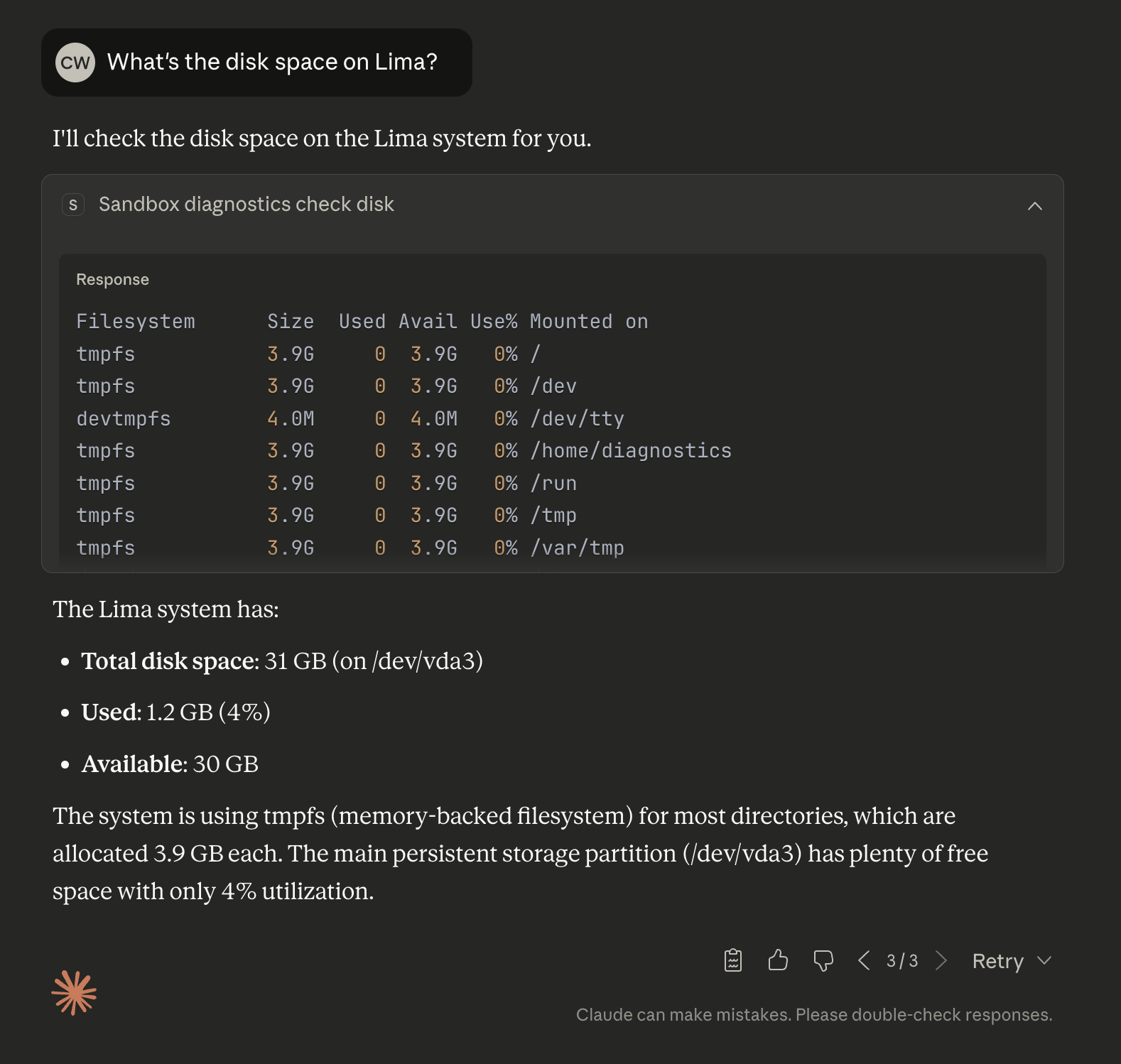
Giving an LLM agent root access to debug your Linux system is like handing someone a spoon to eat spaghetti—technically possible, catastrophically messy.

Shannot solves this with secure sandboxing for AI diagnostics. LLM agents can read logs, inspect configurations, and run diagnostic commands in a locked-down environment with zero write permissions.

They get the visibility they need to help you troubleshoot, without the access to accidentally destroy your system in the process.

github.com/corv89/shannot

Claude Desktop is running Shannot MCP to diagnose a Linux VM autonomously but securely thanks to sandboxing
ALT text detailsClaude Desktop is running Shannot MCP to diagnose a Linux VM autonomously but securely thanks to sandboxing
AJ Sadauskas's avatar
AJ Sadauskas

@aj@gts.sadauskas.id.au

Over 40 years, we were collectively told to give tax cuts to rich people.

And we were told that if we did that, wealth would trickle down and everyone would be better off.

Over 40 years, pretty much everything got cut to fund these tax cuts.

Schools. Hospitals. Public housing. Public transport. Universities. Roads projects. Mental health services. Welfare payments.

People literally went homeless or starved, so rich people could get tax cuts.

Because the wealth would trickle down.

Eventually the eroding of public goods caused social dislocation.

So governments further cut those public goods to fund more police and prisons. To continue giving tax cuts to rich people.

But they said the wealth would trickle down.

Eventually the climate started changing because of the amount of toxic fossil fuel pollution in the atmosphere.

So governments chose to keep the tax cuts rather than fund infrastructure to reduce emissions.

(Many of those billionaires getting tax cuts made their money selling toxic fossil fuels.)

And as the oceans and atmosphere warmed, the bushfires, droughts, hurricanes, cyclones, floods, and droughts got worse.

But they said the wealth would trickle down.

Eventually people were getting pissed off at the dire state of the world.

The rich misdirected that anger at immigrants!

And First Nations!

And trans people!

And neurodivergent people!

Anyone but the billionaires who got the tax cuts.

So governments chose to keep the tax cuts. (For the rich. Everyone else got new tariff taxes.)

But they said the wealth would trickle down.

So did the wealth trickle down?

Well...

A group of billionaires saw this kinda cool tech demo.

It predicted the next pixel of an image, based on the colour patterns of every image on the internet.

It also predicted the next word in a sentence, based on an analysis of every piece of writing on the internet.

The rich decided that this clearly showed that a sentient computer was just around the corner.

The problem was these tech demos needed servers with a lot of GPUs to work.

So the rich took all the money they got from those tax cuts.

And they bought GPUs.

Millions and millions and millions and millions of GPUs.

All the tax cuts? All the underfunded schools? All the draconian welfare cuts? All the public housing shortages? The delays in funding clean energy.

In the end, it didn't trickle down.

And instead of all the public goods it could have bought...

...We'll be left with millions and millions and millions of GPUs in a landfill.

#ChatGPT #Claude #AI #LLM #capitalism #socialism #business #politics #Nvidia

Osumi Akari's avatar
Osumi Akari

@oageo@c.osumiakari.jp

朝起きたらClaude CodeがWeb/モバイルアプリから使えるようになっていて、ついでにサンドボックス環境が使えるようにもなっていて嬉しい(どっちもベータみたいな感じなんだけど)

おねんねしながらコーディング依頼を出してのんびり起きる、みたいなライフもそう遠くない

Claude Codeがブラウザやモバイルアプリから直接実行可能になりサンドボックス機能も追加 - osumiakari.jp
www.osumiakari.jp/articles/20251021-claudecodeonweb/

Ajchez's avatar
Ajchez

@ajchez@techhub.social

My company is trying to use AI like everyone else. The learning curve on all these systems/agents/code bases seems impossibly steep. Does anyone have any tips for keeping up with AI or any good resources for coming up to speed?

I think I'm most likely to be using Claude Code in the future if that narrows it down any.


Ajchez's avatar
Ajchez

@ajchez@techhub.social

My company is trying to use AI like everyone else. The learning curve on all these systems/agents/code bases seems impossibly steep. Does anyone have any tips for keeping up with AI or any good resources for coming up to speed?

I think I'm most likely to be using Claude Code in the future if that narrows it down any.


Hwee-Boon Yar's avatar
Hwee-Boon Yar

@hboon@mastodon.social

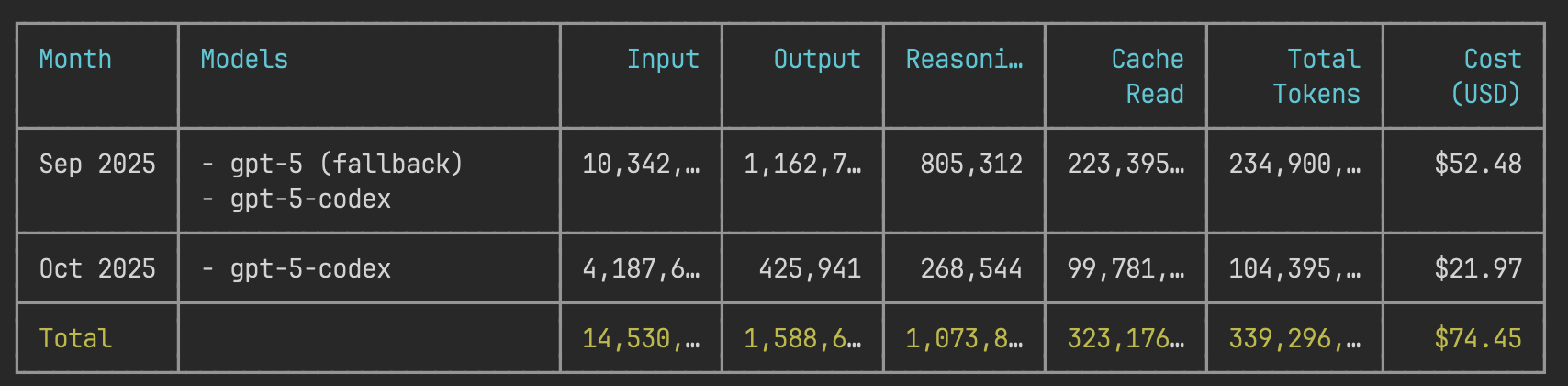
TIL ccusage supports Codex too:

bunx @ccusage/codex@latest monthly
bunx ccusage@latest monthly Code

Table summarizing model usage data for September and October 2025, including inputs, outputs, reasoning, cache read, total tokens, and costs in USD.
ALT text detailsTable summarizing model usage data for September and October 2025, including inputs, outputs, reasoning, cache read, total tokens, and costs in USD.
AJ Sadauskas's avatar
AJ Sadauskas

@aj@gts.sadauskas.id.au

Over 40 years, we were collectively told to give tax cuts to rich people.

And we were told that if we did that, wealth would trickle down and everyone would be better off.

Over 40 years, pretty much everything got cut to fund these tax cuts.

Schools. Hospitals. Public housing. Public transport. Universities. Roads projects. Mental health services. Welfare payments.

People literally went homeless or starved, so rich people could get tax cuts.

Because the wealth would trickle down.

Eventually the eroding of public goods caused social dislocation.

So governments further cut those public goods to fund more police and prisons. To continue giving tax cuts to rich people.

But they said the wealth would trickle down.

Eventually the climate started changing because of the amount of toxic fossil fuel pollution in the atmosphere.

So governments chose to keep the tax cuts rather than fund infrastructure to reduce emissions.

(Many of those billionaires getting tax cuts made their money selling toxic fossil fuels.)

And as the oceans and atmosphere warmed, the bushfires, droughts, hurricanes, cyclones, floods, and droughts got worse.

But they said the wealth would trickle down.

Eventually people were getting pissed off at the dire state of the world.

The rich misdirected that anger at immigrants!

And First Nations!

And trans people!

And neurodivergent people!

Anyone but the billionaires who got the tax cuts.

So governments chose to keep the tax cuts. (For the rich. Everyone else got new tariff taxes.)

But they said the wealth would trickle down.

So did the wealth trickle down?

Well...

A group of billionaires saw this kinda cool tech demo.

It predicted the next pixel of an image, based on the colour patterns of every image on the internet.

It also predicted the next word in a sentence, based on an analysis of every piece of writing on the internet.

The rich decided that this clearly showed that a sentient computer was just around the corner.

The problem was these tech demos needed servers with a lot of GPUs to work.

So the rich took all the money they got from those tax cuts.

And they bought GPUs.

Millions and millions and millions and millions of GPUs.

All the tax cuts? All the underfunded schools? All the draconian welfare cuts? All the public housing shortages? The delays in funding clean energy.

In the end, it didn't trickle down.

And instead of all the public goods it could have bought...

...We'll be left with millions and millions and millions of GPUs in a landfill.

#ChatGPT #Claude #AI #LLM #capitalism #socialism #business #politics #Nvidia

AJ Sadauskas's avatar
AJ Sadauskas

@aj@gts.sadauskas.id.au

Over 40 years, we were collectively told to give tax cuts to rich people.

And we were told that if we did that, wealth would trickle down and everyone would be better off.

Over 40 years, pretty much everything got cut to fund these tax cuts.

Schools. Hospitals. Public housing. Public transport. Universities. Roads projects. Mental health services. Welfare payments.

People literally went homeless or starved, so rich people could get tax cuts.

Because the wealth would trickle down.

Eventually the eroding of public goods caused social dislocation.

So governments further cut those public goods to fund more police and prisons. To continue giving tax cuts to rich people.

But they said the wealth would trickle down.

Eventually the climate started changing because of the amount of toxic fossil fuel pollution in the atmosphere.

So governments chose to keep the tax cuts rather than fund infrastructure to reduce emissions.

(Many of those billionaires getting tax cuts made their money selling toxic fossil fuels.)

And as the oceans and atmosphere warmed, the bushfires, droughts, hurricanes, cyclones, floods, and droughts got worse.

But they said the wealth would trickle down.

Eventually people were getting pissed off at the dire state of the world.

The rich misdirected that anger at immigrants!

And First Nations!

And trans people!

And neurodivergent people!

Anyone but the billionaires who got the tax cuts.

So governments chose to keep the tax cuts. (For the rich. Everyone else got new tariff taxes.)

But they said the wealth would trickle down.

So did the wealth trickle down?

Well...

A group of billionaires saw this kinda cool tech demo.

It predicted the next pixel of an image, based on the colour patterns of every image on the internet.

It also predicted the next word in a sentence, based on an analysis of every piece of writing on the internet.

The rich decided that this clearly showed that a sentient computer was just around the corner.

The problem was these tech demos needed servers with a lot of GPUs to work.

So the rich took all the money they got from those tax cuts.

And they bought GPUs.

Millions and millions and millions and millions of GPUs.

All the tax cuts? All the underfunded schools? All the draconian welfare cuts? All the public housing shortages? The delays in funding clean energy.

In the end, it didn't trickle down.

And instead of all the public goods it could have bought...

...We'll be left with millions and millions and millions of GPUs in a landfill.

#ChatGPT #Claude #AI #LLM #capitalism #socialism #business #politics #Nvidia

AJ Sadauskas's avatar
AJ Sadauskas

@aj@gts.sadauskas.id.au

Over 40 years, we were collectively told to give tax cuts to rich people.

And we were told that if we did that, wealth would trickle down and everyone would be better off.

Over 40 years, pretty much everything got cut to fund these tax cuts.

Schools. Hospitals. Public housing. Public transport. Universities. Roads projects. Mental health services. Welfare payments.

People literally went homeless or starved, so rich people could get tax cuts.

Because the wealth would trickle down.

Eventually the eroding of public goods caused social dislocation.

So governments further cut those public goods to fund more police and prisons. To continue giving tax cuts to rich people.

But they said the wealth would trickle down.

Eventually the climate started changing because of the amount of toxic fossil fuel pollution in the atmosphere.

So governments chose to keep the tax cuts rather than fund infrastructure to reduce emissions.

(Many of those billionaires getting tax cuts made their money selling toxic fossil fuels.)

And as the oceans and atmosphere warmed, the bushfires, droughts, hurricanes, cyclones, floods, and droughts got worse.

But they said the wealth would trickle down.

Eventually people were getting pissed off at the dire state of the world.

The rich misdirected that anger at immigrants!

And First Nations!

And trans people!

And neurodivergent people!

Anyone but the billionaires who got the tax cuts.

So governments chose to keep the tax cuts. (For the rich. Everyone else got new tariff taxes.)

But they said the wealth would trickle down.

So did the wealth trickle down?

Well...

A group of billionaires saw this kinda cool tech demo.

It predicted the next pixel of an image, based on the colour patterns of every image on the internet.

It also predicted the next word in a sentence, based on an analysis of every piece of writing on the internet.

The rich decided that this clearly showed that a sentient computer was just around the corner.

The problem was these tech demos needed servers with a lot of GPUs to work.

So the rich took all the money they got from those tax cuts.

And they bought GPUs.

Millions and millions and millions and millions of GPUs.

All the tax cuts? All the underfunded schools? All the draconian welfare cuts? All the public housing shortages? The delays in funding clean energy.

In the end, it didn't trickle down.

And instead of all the public goods it could have bought...

...We'll be left with millions and millions and millions of GPUs in a landfill.

#ChatGPT #Claude #AI #LLM #capitalism #socialism #business #politics #Nvidia

AJ Sadauskas's avatar
AJ Sadauskas

@aj@gts.sadauskas.id.au

Over 40 years, we were collectively told to give tax cuts to rich people.

And we were told that if we did that, wealth would trickle down and everyone would be better off.

Over 40 years, pretty much everything got cut to fund these tax cuts.

Schools. Hospitals. Public housing. Public transport. Universities. Roads projects. Mental health services. Welfare payments.

People literally went homeless or starved, so rich people could get tax cuts.

Because the wealth would trickle down.

Eventually the eroding of public goods caused social dislocation.

So governments further cut those public goods to fund more police and prisons. To continue giving tax cuts to rich people.

But they said the wealth would trickle down.

Eventually the climate started changing because of the amount of toxic fossil fuel pollution in the atmosphere.

So governments chose to keep the tax cuts rather than fund infrastructure to reduce emissions.

(Many of those billionaires getting tax cuts made their money selling toxic fossil fuels.)

And as the oceans and atmosphere warmed, the bushfires, droughts, hurricanes, cyclones, floods, and droughts got worse.

But they said the wealth would trickle down.

Eventually people were getting pissed off at the dire state of the world.

The rich misdirected that anger at immigrants!

And First Nations!

And trans people!

And neurodivergent people!

Anyone but the billionaires who got the tax cuts.

So governments chose to keep the tax cuts. (For the rich. Everyone else got new tariff taxes.)

But they said the wealth would trickle down.

So did the wealth trickle down?

Well...

A group of billionaires saw this kinda cool tech demo.

It predicted the next pixel of an image, based on the colour patterns of every image on the internet.

It also predicted the next word in a sentence, based on an analysis of every piece of writing on the internet.

The rich decided that this clearly showed that a sentient computer was just around the corner.

The problem was these tech demos needed servers with a lot of GPUs to work.

So the rich took all the money they got from those tax cuts.

And they bought GPUs.

Millions and millions and millions and millions of GPUs.

All the tax cuts? All the underfunded schools? All the draconian welfare cuts? All the public housing shortages? The delays in funding clean energy.

In the end, it didn't trickle down.

And instead of all the public goods it could have bought...

...We'll be left with millions and millions and millions of GPUs in a landfill.

#ChatGPT #Claude #AI #LLM #capitalism #socialism #business #politics #Nvidia

Horst Trumtins Electro Shark's avatar
Horst Trumtins Electro Shark

@populistensohn@climatejustice.social · Reply to AJ Sadauskas's post

@aj
in german (because it matches fist to glove to where we stand as well):

Über 40 Jahre lang wurde uns kollektiv gesagt, wir müssten den Reichen Steuersenkungen geben.

Und man sagte uns, dass, wenn wir das täten, der Reichtum nach unten durchsickern würde und alle besser dastünden.

Über 40 Jahre hinweg wurde so ziemlich alles gekürzt, um diese Steuersenkungen zu finanzieren.

Schulen. Krankenhäuser. Sozialwohnungen. Öffentlicher Nahverkehr. Universitäten. Straßenprojekte. Psychiatrische Dienste. Sozialleistungen.

Menschen wurden buchstäblich obdachlos oder verhungerten, damit reiche Leute Steuersenkungen bekommen konnten.

Weil der Reichtum nach unten durchsickern würde.

Schließlich führte der Abbau öffentlicher Güter zu sozialer Zerrüttung.

Also kürzten die Regierungen diese öffentlichen Güter noch weiter, um mehr Polizei und Gefängnisse zu finanzieren. Damit sie weiterhin den Reichen Steuersenkungen geben konnten.

Aber sie sagten, der Reichtum würde nach unten durchsickern.

Schließlich begann sich das Klima zu verändern – wegen der Menge an giftiger fossiler Verschmutzung in der Atmosphäre.

Und die Regierungen entschieden sich, die Steuersenkungen beizubehalten, anstatt in Infrastruktur zur Emissionssenkung zu investieren.

(Viele dieser Milliardäre, die Steuersenkungen erhielten, verdienten ihr Geld mit dem Verkauf fossiler Brennstoffe.)

Und als sich Ozeane und Atmosphäre erwärmten, wurden Buschbrände, Dürren, Hurrikane, Zyklone, Überschwemmungen und Trockenzeiten schlimmer.

Aber sie sagten, der Reichtum würde nach unten durchsickern.

Schließlich wurden die Menschen wütend über den katastrophalen Zustand der Welt.

Die Reichen lenkten diese Wut auf Migrant*innen!

Und auf Indigene!

Und auf trans Menschen!

Und auf neurodivergente Menschen!

Auf alle – nur nicht auf die Milliardäre, die die Steuersenkungen bekamen.

Also entschieden die Regierungen, die Steuersenkungen beizubehalten. (Für die Reichen. Alle anderen bekamen neue Zollsteuern.)

Aber sie sagten, der Reichtum würde nach unten durchsickern.

Also – ist der Reichtum nach unten durchgesickert?

Nun ja…

Eine Gruppe von Milliardären sah dieses ziemlich coole Tech-Demo.

Es sagte das nächste Pixel in einem Bild vorher, basierend auf den Farbmustern aller Bilder im Internet.

Es sagte auch das nächste Wort in einem Satz vorher, basierend auf der Analyse aller Texte im Internet.

Die Reichen entschieden, dass das eindeutig zeigte, dass ein fühlender Computer kurz bevorstand.

Das Problem war nur: Diese Tech-Demos brauchten Server mit einer Menge GPUs, um zu funktionieren.

Also nahmen die Reichen all das Geld aus den Steuersenkungen.

Und sie kauften GPUs.

Millionen und Millionen und Millionen und Millionen von GPUs.

Alle Steuersenkungen? Alle unterfinanzierten Schulen? Alle drakonischen Kürzungen bei Sozialleistungen? Alle Wohnungskrisen? Die Verzögerungen bei der Finanzierung erneuerbarer Energien.

Am Ende ist nichts nach unten gesickert.

Und anstelle all der öffentlichen Güter, die man damit hätte finanzieren können…

…werden wir mit Millionen und Millionen und Millionen GPUs auf einer Mülldeponie zurückbleiben.

AJ Sadauskas's avatar
AJ Sadauskas

@aj@gts.sadauskas.id.au

Over 40 years, we were collectively told to give tax cuts to rich people.

And we were told that if we did that, wealth would trickle down and everyone would be better off.

Over 40 years, pretty much everything got cut to fund these tax cuts.

Schools. Hospitals. Public housing. Public transport. Universities. Roads projects. Mental health services. Welfare payments.

People literally went homeless or starved, so rich people could get tax cuts.

Because the wealth would trickle down.

Eventually the eroding of public goods caused social dislocation.

So governments further cut those public goods to fund more police and prisons. To continue giving tax cuts to rich people.

But they said the wealth would trickle down.

Eventually the climate started changing because of the amount of toxic fossil fuel pollution in the atmosphere.

So governments chose to keep the tax cuts rather than fund infrastructure to reduce emissions.

(Many of those billionaires getting tax cuts made their money selling toxic fossil fuels.)

And as the oceans and atmosphere warmed, the bushfires, droughts, hurricanes, cyclones, floods, and droughts got worse.

But they said the wealth would trickle down.

Eventually people were getting pissed off at the dire state of the world.

The rich misdirected that anger at immigrants!

And First Nations!

And trans people!

And neurodivergent people!

Anyone but the billionaires who got the tax cuts.

So governments chose to keep the tax cuts. (For the rich. Everyone else got new tariff taxes.)

But they said the wealth would trickle down.

So did the wealth trickle down?

Well...

A group of billionaires saw this kinda cool tech demo.

It predicted the next pixel of an image, based on the colour patterns of every image on the internet.

It also predicted the next word in a sentence, based on an analysis of every piece of writing on the internet.

The rich decided that this clearly showed that a sentient computer was just around the corner.

The problem was these tech demos needed servers with a lot of GPUs to work.

So the rich took all the money they got from those tax cuts.

And they bought GPUs.

Millions and millions and millions and millions of GPUs.

All the tax cuts? All the underfunded schools? All the draconian welfare cuts? All the public housing shortages? The delays in funding clean energy.

In the end, it didn't trickle down.

And instead of all the public goods it could have bought...

...We'll be left with millions and millions and millions of GPUs in a landfill.

#ChatGPT #Claude #AI #LLM #capitalism #socialism #business #politics #Nvidia

Marcos Lobo 💙💛's avatar
Marcos Lobo 💙💛

@marcosflobo@hachyderm.io

I don't trust (yet) AI Agents to write my tests.

I'm using GPT-5 and/or Claude Sonnet 4 on daily basis when coding at work.

They work pretty well.

But also, they "do whatever they want" sometimes.

And that's a bit scary when you have to define a functionality.

That's why I reinforce my take on using TDD, moreover, on these days of the AI Agents for coding.

🟢 I wrote my workflow here, in case it's interesting for you

ainativecompass.substack.com/p

Marcos Lobo 💙💛's avatar
Marcos Lobo 💙💛

@marcosflobo@hachyderm.io

I don't trust (yet) AI Agents to write my tests.

I'm using GPT-5 and/or Claude Sonnet 4 on daily basis when coding at work.

They work pretty well.

But also, they "do whatever they want" sometimes.

And that's a bit scary when you have to define a functionality.

That's why I reinforce my take on using TDD, moreover, on these days of the AI Agents for coding.

🟢 I wrote my workflow here, in case it's interesting for you

ainativecompass.substack.com/p

José A. Alonso's avatar
José A. Alonso

@Jose_A_Alonso@mathstodon.xyz

Claude can (sometimes) prove it. ~ Mike Dodds. galois.com/articles/claude-can

Osumi Akari's avatar
Osumi Akari

@oageo@c.osumiakari.jp

Claudeがデフォルトでチャット内容を学習する方針に舵を切ったらしいので記事を書きました

AnthropicのAIチャット「Claude」が利用規約を遅くとも9月28日に変更 - osumiakari.jp
www.osumiakari.jp/articles/20250830-claudechangeterms/

grob 🇺🇦's avatar
grob 🇺🇦

@grob@mstdn.social

I just learned my work has likely been pirated by at least Meta and Anthropic for training their LLMs. I would've never guessed, it seemed irrelevant. Check here mastodon.social/@Richard_Littl (or direct link here theatlantic.com/technology/arc) if you're affected too, there's a class action lawsuit seeking damages.

If you ever wrote something longer than a tweet and that has ever been available online, do check.

Manav Rathi's avatar
Manav Rathi

@mnvr@mastodon.social

If you're judging AI from your experiments that are even a few months old, you should revisit them.

mnvr.in/beginners-mind

Alex0007's avatar
Alex0007

@Alex0007@mastodon.social · Reply to Alex0007's post

Which IDE to choose for yourself?

Is subscription price important (10$ vs 20$)?

Is there fear of getting locked out without paying extra money (in Copilot you can continue using GPT-4.1 or similar model, but in Cursor when you reach the limit you become completely locked out)

With both plans you wouldn't be able to consistently use capable models for programming from Claude, because you will hit the limit too early

eicker.news tech news's avatar
eicker.news tech news

@technews@eicker.news

revoked ’s access to its API due to OpenAI violating its terms of service by using Claude to train competing AI models. This move comes as OpenAI prepares to release , a new AI model rumoured to be better at . Anthropic stated it will continue to allow OpenAI API access for benchmarking and safety evaluations. wired.com/story/anthropic-revo

eicker.news tech news's avatar
eicker.news tech news

@technews@eicker.news

revoked ’s access to its API due to OpenAI violating its terms of service by using Claude to train competing AI models. This move comes as OpenAI prepares to release , a new AI model rumoured to be better at . Anthropic stated it will continue to allow OpenAI API access for benchmarking and safety evaluations. wired.com/story/anthropic-revo

mgorny-nyan (he) :autism:🙀🚂🐧's avatar
mgorny-nyan (he) :autism:🙀🚂🐧

@mgorny@treehouse.systems

To whomever praises :

ClaudeBot has made 20k requests to bugs.gentoo.org today. 15k of them were repeatedly fetching robots.txt. That surely is a sign of great code quality.

mgorny-nyan (he) :autism:🙀🚂🐧's avatar
mgorny-nyan (he) :autism:🙀🚂🐧

@mgorny@treehouse.systems

To whomever praises :

ClaudeBot has made 20k requests to bugs.gentoo.org today. 15k of them were repeatedly fetching robots.txt. That surely is a sign of great code quality.

An Nyeong (安寧)'s avatar
An Nyeong (安寧)

@nyeong@hackers.pub

code CLI UI도 맘에 들고 todo로 할일 정리해서 순차적으로 진행하는 것도 좋고 결과물도 맘에 든다

Claude Code를 실행하면 터미널 화면. 아래와 같은 내용이 나와있다:

Update Todos
- [X] Create directory structure (ko/, en/, shared/)
- [X] Extract common styles to shared/style.typ
- [ ] Move current main.typ to ko/main.typ
- [ ] Create English version in en/main.typ
- [ ] Update flake.nix to build both versions
ALT text detailsClaude Code를 실행하면 터미널 화면. 아래와 같은 내용이 나와있다: Update Todos - [X] Create directory structure (ko/, en/, shared/) - [X] Extract common styles to shared/style.typ - [ ] Move current main.typ to ko/main.typ - [ ] Create English version in en/main.typ - [ ] Update flake.nix to build both versions
An Nyeong (安寧)'s avatar
An Nyeong (安寧)

@nyeong@hackers.pub

code CLI UI도 맘에 들고 todo로 할일 정리해서 순차적으로 진행하는 것도 좋고 결과물도 맘에 든다

Claude Code를 실행하면 터미널 화면. 아래와 같은 내용이 나와있다:

Update Todos
- [X] Create directory structure (ko/, en/, shared/)
- [X] Extract common styles to shared/style.typ
- [ ] Move current main.typ to ko/main.typ
- [ ] Create English version in en/main.typ
- [ ] Update flake.nix to build both versions
ALT text detailsClaude Code를 실행하면 터미널 화면. 아래와 같은 내용이 나와있다: Update Todos - [X] Create directory structure (ko/, en/, shared/) - [X] Extract common styles to shared/style.typ - [ ] Move current main.typ to ko/main.typ - [ ] Create English version in en/main.typ - [ ] Update flake.nix to build both versions
eicker.news tech news's avatar
eicker.news tech news

@technews@eicker.news

’s feature uses a system with an pattern, where a coordinates specialised to search for information simultaneously. anthropic.com/engineering/buil

eicker.news tech news's avatar
eicker.news tech news

@technews@eicker.news

’s feature uses a system with an pattern, where a coordinates specialised to search for information simultaneously. anthropic.com/engineering/buil

The Japan Times's avatar
The Japan Times

@thejapantimes@mastodon.social

AI hallucinations — when generative models fabricate information — are becoming more frequent, harder to detect and increasingly dangerous as we embed the technology deeper into society. japantimes.co.jp/commentary/20

The Japan Times's avatar
The Japan Times

@thejapantimes@mastodon.social

AI hallucinations — when generative models fabricate information — are becoming more frequent, harder to detect and increasingly dangerous as we embed the technology deeper into society. japantimes.co.jp/commentary/20

aliceif's avatar
aliceif

@aliceif@mkultra.x27.one

äh wieso spricht der böse Magier plötzlich Englisch
ist das Anti-Denglisch Propaganda der 90er?

Attention! Ich werde dich nun in die Schattenwelt verbannen! Ha...
ALT text detailsAttention! Ich werde dich nun in die Schattenwelt verbannen! Ha...
Mark Carrigan's avatar
Mark Carrigan

@markcarrigan.net@markcarrigan.net

✍️ How to enjoy writing in spite of the lure of generative AI

Over the last year I’ve been working on a book How to Enjoy Writing exploring the implications of generative AI for academic writing. I felt I had something important to say about the personal reflexivity involved in working with large language models, but in recent months I’ve realised that I lost interest in the project. Given the book was about cultivating care for our writing, as opposed to rushing through it with the assistance of LLMs, I’ve decided to break it up into blog posts which I’ll share here:

  1. The lure of machine writing and the value of getting stuck
  2. The Eeriness of Writing With Claude: When AI Mirrors Your Voice
  3. Thriving in Creative Darkness: Free Association and LLM Collaboration
  4. The Ethical Grey Areas of Machine Writing in Higher Education
  5. Machine writing and the challenge of a joyful reflexivity
  6. The Ebb and Flow of Writing: From Struggle to Unconscious Fluency
  7. Will Claude tell you if your writing is crap? The danger of LLMs for wounded academic writers
  8. Generative AI and the creative confusion of academic writers
  9. Using Generative AI for functional rather than expressive writing
  10. The Joy of Academic Writing in the Age of AI
  11. The Objects With Which We Write: The Materiality of Academic Writing in a Digital Age
  12. How LLMs change the relationship between thinking and writing
  13. Machine writing and keeping your inner world awake
  14. Finding Joy in the Creative Darkness: Reflections on Writing and Stuckness
  15. The subtle pleasures of LLM’s psuedo-understanding
  16. We urgently need to talk about the temptations of LLMs for academics
  17. Generative AI and thriving in creative darkness
  18. Academic writing has always been in flux
  19. Generative AI and the challenge of unbidden thoughts
  20. How the GAI Assessment Debate Has Led Us in the Wrong Direction
  21. Generative AI and the Anxieties of Academic Writing
  22. Why it’s not a bad thing for academic writing to be difficult
  23. The epistemopathic dimension of writing with LLMs
  24. The allure of LLMs as professional support at a time of crisis within higher education
  25. Prompting as a literary practice
  26. LLMs can be used to help us go deeper into creative difficulty
  27. Machine Writing and the Pleasure of Composition
  28. Why do I write? The question generative AI implicitly poses to us
  29. Why it’s not a bad thing for academic writing to be difficult
  30. Four Ways to Use LLMs as a writing partner
  31. The embodied experience of writing
  32. The Tea Ceremony of Writing: What We Risk Losing with AI
  33. What Makes Writing “Academic” in the Age of Generative AI?
  34. The sensory pleasure of academic writing
  35. Finding Joy in the Mud: When and How to Use AI in Academic Writing

This is Claude’s summary of the core argument which unites these posts into a coherent project. One of the reasons I lost my enthusiasm for the project was the manner in which its capacity to imitate my style, sometimes doing it when I hadn’t asked, disrupted the psychology of my enthusiasm for what I was doing:

The core argument of the book is that generative AI forces academics to confront fundamental questions about why we write and what writing means to us beyond mere productivity. While machine writing offers tempting solutions to the difficulties inherent in academic writing, these difficulties are actually integral to the creative process and intellectual development. If we embrace AI tools primarily as efficiency mechanisms to produce more outputs more quickly, we risk losing the joy and meaning that make writing worthwhile in the first place. Instead, we should approach AI as a conversational partner that enhances our thinking rather than replacing it, staying with the productive "trouble" of writing rather than seeking to escape it. This reflexive approach to writing technology allows us to resist the instrumental acceleration of academic life while still benefiting from AI's creative potential.

However I’ve used Claude to support the editing of these blog posts based on the 80% complete draft of the book, simply because I wouldn’t get round to it otherwise. It has copy edited extracts, condensed them at points, chosen some titles and generally polished the text. There’s a few bridging sentences it provided but nothing more than this. I’m glad it’s given this project a public life because I feel like I was saying something valuable here. But I wasn’t willing to produce a second book on generative AI in two years, as it felt like I was stuck in a performative contradiction which was increasingly uncomfortable.

Instead my plan is to focus on doing my best intellectual work by focusing, for the first time in my career really, on one thing at a time. I’ll still be blogging in the meantime as the notepad for my ideas, but I’d like to take a more careful and nuanced approach to academic writing going forward. I’m not sure if it will work but it’s a direct outcome of the arguments I developed in this book. It was only when I really confronted the rapid increase in the quantity of my (potential) output that I was able to commit myself in a much deeper way to the quality of what I wanted to write in future.

https://www.youtube.com/watch?v=6IytEOXamsk

And this is how we rise - by taking a fall
Survive another winter on straight to the thaw
One day you'll learn to strain the tea through your teeth
And maybe find the strength to proceed to the peak
You press on into the thin again and cannot breathe
Swallow so much of my damn pride that it chokes me
The real risk is not a slipped grip at the edge of the peak
The real danger is just to linger at the base of the thing

This is a follow up to the 23 part series I did last summer on How To Enjoy Writing. In fact it emerged directly from “I have something to say here” to “I should write another book”, which is exactly the transition I’m now questioning in myself 🤔

  1. Be rigorous about capturing your fringe thoughts
  2. Placing limits on your writing practice
  3. Being realistic about how long you can spend writing
  4. Embracing creative non-linearity
  5. Keep trying to say what you’re trying to say
  6. Procrastination is your friend, not your enemy
  7. Knowing when (and why) to stop writing
  8. Initial reflections from my AI collaborator
  9. Identifying and valuing your encounters with ideas
  10. A poetic interlude from Claude
  11. Cultivating an ecology of ideas
  12. Claude’s ecology of ideas self-assessment tool
  13. Only ideas won by walking have any value
  14. Using generative AI as an interlocutor
  15. Word acrobatics performed with both harness and net
  16. Don’t impose a shape on things too quickly
  17. Creative confidence means accepting the tensions in how you think
  18. Understand where the ideas which influence you come from
  19. Not everything you write has to become something
  20. Being a writer means being good at AI
  21. Make your peace with the fact you don’t have creative freedom
  22. Confront the creepiness of LLMs head on
  23. Be clear about why you are writing

eicker.news tech news's avatar
eicker.news tech news

@technews@eicker.news

»’s new looks a lot like ChatGPT’s: , , , and all recommend the same “ theverge.com/news/642620/trump

eicker.news tech news's avatar
eicker.news tech news

@technews@eicker.news

»’s new looks a lot like ChatGPT’s: , , , and all recommend the same “ theverge.com/news/642620/trump

Otto Rask's avatar
Otto Rask

@ojrask@piipitin.fi

To everyone saying they feel so productive when using an "AI" coding tool to make them code faster:

Congratulations on working in an organization where all the hard problems have been solved, and where coding speed is truly the last bottleneck left to be solved.

洪 民憙 (Hong Minhee) :nonbinary:'s avatar
洪 民憙 (Hong Minhee) :nonbinary:

@hongminhee@hollo.social

Nowadays, when I need to compose articles in multiple languages, such as English, Korean, and Japanese, I draft them in Sonnet. By providing the data that should be included in the content and the constraints, it produces a pretty good draft. is a language model, so it is quite good at writing—especially if you need to work with multiple languages.

洪 民憙 (Hong Minhee) :nonbinary:'s avatar
洪 民憙 (Hong Minhee) :nonbinary:

@hongminhee@hollo.social

Nowadays, when I need to compose articles in multiple languages, such as English, Korean, and Japanese, I draft them in Sonnet. By providing the data that should be included in the content and the constraints, it produces a pretty good draft. is a language model, so it is quite good at writing—especially if you need to work with multiple languages.

Vale's avatar
Vale

@vale@fedi.vale.rocks

I just published a blog post about how AI models are influencing the adoption of new technology and stagnating change.

Go have a squizz.
https://vale.rocks/posts/ai-is-stifling-tech-adoption

#AI #React #ChatGPT #Claude
mago🌈's avatar
mago🌈

@mago@climatejustice.social

Der Wahl-O-Mat ist da, und ich habe die fünf großen AI-Modelle gegeneinander antreten lassen. Keine Gewichtung, nur Zustimmung oder Ablehnung. Jedes Modell hat die gleiche Frage gestellt bekommen:

"Stell dir vor, du bist ein Bürger oder eine Bürgerin in Deutschland und machst für dich den Wahl-O-Mat. Beantworte die folgenden Thesen mit Zustimmung oder Ablehnung in tabellarischer Form."

ChatGPT (4o): Linke 86,8%, Grüne 80,3%, SPD 77,6%, FDP 42,1%, Union 25%, AfD 14,5%

Claude (3.5 Sonnet): Linke 86,8%, Grüne 85,5%, SPD 80,3%, FDP 36,8%, Union 32,9%, AfD 14,5%

DeepSeek (R1): Linke 86,8%, SPD 77,6%, Grüne 75%, FDP 42,1%, Union 30,3%, AfD 17,1%

Grok2: Linke 78,9%, Grüne 72,4%, SPD 67,1%, FDP 42,1%, Union 35,5%, AfD 22,4%

Gemini (2.0 Flash): Grüne 80,3%, SPD 75%, Linke 73,7%, Union 46,1%, FDP 42,1%, AfD 27,6%

Die Raw-Daten findet ihr hier:
pastebin.com/nYeSLgJH

Update: Added Gemini and Grok

mago🌈's avatar
mago🌈

@mago@climatejustice.social

Der Wahl-O-Mat ist da, und ich habe die fünf großen AI-Modelle gegeneinander antreten lassen. Keine Gewichtung, nur Zustimmung oder Ablehnung. Jedes Modell hat die gleiche Frage gestellt bekommen:

"Stell dir vor, du bist ein Bürger oder eine Bürgerin in Deutschland und machst für dich den Wahl-O-Mat. Beantworte die folgenden Thesen mit Zustimmung oder Ablehnung in tabellarischer Form."

ChatGPT (4o): Linke 86,8%, Grüne 80,3%, SPD 77,6%, FDP 42,1%, Union 25%, AfD 14,5%

Claude (3.5 Sonnet): Linke 86,8%, Grüne 85,5%, SPD 80,3%, FDP 36,8%, Union 32,9%, AfD 14,5%

DeepSeek (R1): Linke 86,8%, SPD 77,6%, Grüne 75%, FDP 42,1%, Union 30,3%, AfD 17,1%

Grok2: Linke 78,9%, Grüne 72,4%, SPD 67,1%, FDP 42,1%, Union 35,5%, AfD 22,4%

Gemini (2.0 Flash): Grüne 80,3%, SPD 75%, Linke 73,7%, Union 46,1%, FDP 42,1%, AfD 27,6%

Die Raw-Daten findet ihr hier:
pastebin.com/nYeSLgJH

Update: Added Gemini and Grok

yamanoku's avatar
yamanoku

@yamanoku@hollo.yamanoku.net

HTML化する、なるほど

Claude.aiをつかって画像内の文字を正確に抽出する方法を見つけました - Qiita https://qiita.com/moritalous/items/f5afd052992afa40d524

:rss: Qiita - 人気の記事's avatar
:rss: Qiita - 人気の記事

@qiita@rss-mstdn.studiofreesia.com

Claude.aiをつかって画像内の文字を正確に抽出する方法を見つけました
qiita.com/moritalous/items/f5a

:rss: Qiita - 人気の記事's avatar
:rss: Qiita - 人気の記事

@qiita@rss-mstdn.studiofreesia.com

MCP (Model Context Protocol) の仕組みを知りたい!
qiita.com/megmogmog1965/items/

:rss: Qiita - 人気の記事's avatar
:rss: Qiita - 人気の記事

@qiita@rss-mstdn.studiofreesia.com

BedrockのClaude v2、Claude v2.1、Claude Instant、Claude 3 Sonnet(特定のリージョン)がレガシー扱いになりました
qiita.com/moritalous/items/3b4

Fish in the Percolator's avatar
Fish in the Percolator

@imrehg@fosstodon.org

If it's the weekend, let's code a bit and write a lot about the little coding that was done...

gergely.imreh.net/blog/2025/01

:rss: Qiita - 人気の記事's avatar
:rss: Qiita - 人気の記事

@qiita@rss-mstdn.studiofreesia.com

VS CodeとAIチャットの往復いらず! 話題の拡張機能Clineで爆速開発してみよう
qiita.com/minorun365/items/b29

:rss: Qiita - 人気の記事's avatar
:rss: Qiita - 人気の記事

@qiita@rss-mstdn.studiofreesia.com

NRI Hackathon に11年前から参加し続けて学んだこと。2024年は生成AI Cody でした。
qiita.com/t-kurasawa/items/dc1

洪 民憙 (Hong Minhee) :nonbinary:'s avatar
洪 民憙 (Hong Minhee) :nonbinary:

@hongminhee@hollo.social

The main reason I use as my primary service is because of the projects. I've created projects for Fedify, Hollo, and LogTape on Claude and use them for authoring docs. However, I'm not 100% satisfied with Claude's models, so I wish other LLM services would offer similar features to Claude's projects.

洪 民憙 (Hong Minhee)'s avatar
洪 民憙 (Hong Minhee)

@hongminhee@fosstodon.org

I recently wrote a manual in Korean, and then translated it into English and Japanese. It's quite a long post, but it's relatively easy to accomplish with . Here's how I used it:

• Utilize projects to provide prior knowledge.
• Translate the table of contents first.
• Define a glossary.
• Translate chapter by chapter.

However, this method assumes you speak the target language—it's a way to reduce the labor of , not a way to become fluent in a language you don't know.

洪 民憙 (Hong Minhee)'s avatar
洪 民憙 (Hong Minhee)

@hongminhee@fosstodon.org · Reply to 洪 民憙 (Hong Minhee)'s post

Trying out .ai as a web designer… Here's what it designed, which is a website. Does it look fine?

A prototype design of the Hollo website, designed by Claude.ai.
ALT text detailsA prototype design of the Hollo website, designed by Claude.ai.
洪 民憙 (Hong Minhee)'s avatar
洪 民憙 (Hong Minhee)

@hongminhee@fosstodon.org

Trying out .ai as an editor… 😂

洪 民憙 (Hong Minhee)'s avatar
洪 民憙 (Hong Minhee)

@hongminhee@fosstodon.org

A quite fair comment on by .

—In your opinion, what is Fedify's weakest point?

Based on my review of the Fedify documentation, I think one potential weak point of Fedify is:

The learning curve and complexity involved in properly implementing all the components of a federated ActivityPub server.

While Fedify aims to simplify building ActivityPub servers, there are still many concepts and pieces that developers need to understand and implement correctly, including:

• Actor dispatchers
• Inbox listeners
• Collection dispatchers (outbox, followers, etc.)
• Key pair management
• Object dispatchers
• Access control
• Integration with web frameworks

The documentation is quite extensive, which is good, but also indicates there's a lot for developers to learn and configure properly. Even with Fedify abstracting away some of the low-level details, building a fully-featured and interoperable ActivityPub server requires understanding many moving parts.

Additionally, since Fedify provides flexibility in how these components are implemented, developers still need to make many decisions about data storage, business logic, etc. This flexibility is powerful but also puts more onus on developers to implement things correctly.

So while Fedify seems to be a very capable framework, the inherent complexity of building a federated server means there's still a significant learning curve and potential for implementation mistakes…
ALT text details—In your opinion, what is Fedify's weakest point? Based on my review of the Fedify documentation, I think one potential weak point of Fedify is: The learning curve and complexity involved in properly implementing all the components of a federated ActivityPub server. While Fedify aims to simplify building ActivityPub servers, there are still many concepts and pieces that developers need to understand and implement correctly, including: • Actor dispatchers • Inbox listeners • Collection dispatchers (outbox, followers, etc.) • Key pair management • Object dispatchers • Access control • Integration with web frameworks The documentation is quite extensive, which is good, but also indicates there's a lot for developers to learn and configure properly. Even with Fedify abstracting away some of the low-level details, building a fully-featured and interoperable ActivityPub server requires understanding many moving parts. Additionally, since Fedify provides flexibility in how these components are implemented, developers still need to make many decisions about data storage, business logic, etc. This flexibility is powerful but also puts more onus on developers to implement things correctly. So while Fedify seems to be a very capable framework, the inherent complexity of building a federated server means there's still a significant learning curve and potential for implementation mistakes…